What Is Ambient Occlusion in Games and How It Works
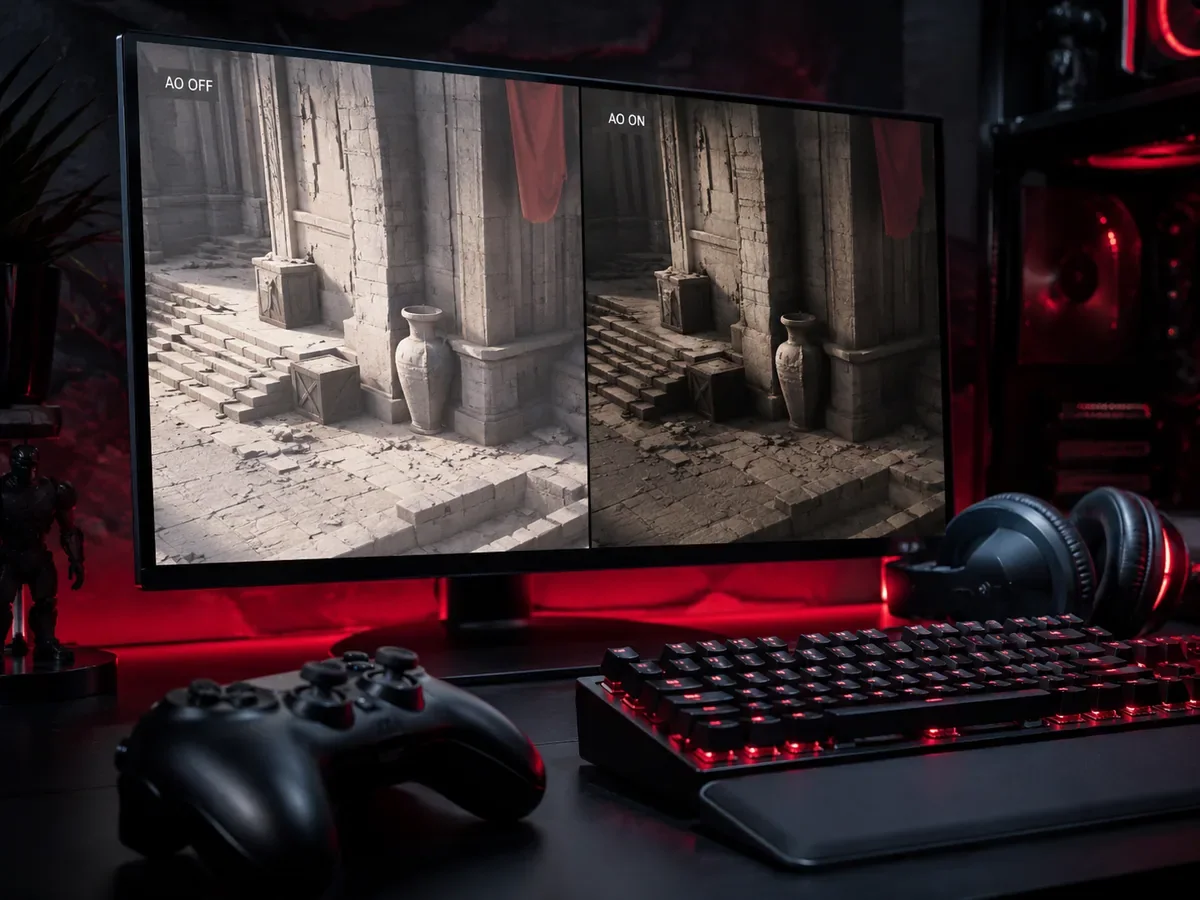
Ambient occlusion in games is a lighting effect that adds soft, subtle shadows wherever surfaces meet, touch, or crowd together, giving a scene a stronger sense of depth and weight. Think of the gentle darkening in a corner where two walls join, the shaded gap beneath a sofa cushion, or the small shadow nestled between a character's fingers. In the real world these shaded zones happen naturally because ambient light, the soft scattered light bouncing around a room, struggles to reach tight crevices and contact points. Ambient occlusion is the technique that recreates that effect in a game engine, and when it is done well you barely notice it as a separate feature. You simply feel that the world looks grounded, solid, and believable.
What Ambient Occlusion Actually Does
To understand ambient occlusion, it helps to separate it from the other shadows in a game. Direct shadows are the dark shapes cast by a clear light source, like the long shadow a tree throws on a sunny day. Ambient occlusion is different. It deals with the indirect, ambient light that fills a scene from every direction at once, the kind of soft glow you get on an overcast day or inside a room lit by many small sources.
That ambient light reaches open, exposed surfaces easily, but it has a hard time squeezing into corners, seams, cracks, and the narrow gaps where two objects nearly touch. Those tucked away spots receive less light, so they should look slightly darker. Ambient occlusion calculates exactly how exposed or hidden each point on a surface is, then darkens the hidden parts accordingly. The result is a network of soft contact shadows that glue objects to the floor, define the edges where things meet, and stop a scene from looking flat and floating.
Why Games Need It in the First Place
Without ambient occlusion, indirect lighting tends to be applied too evenly across a scene. Every surface gets roughly the same amount of fill light, so corners glow as brightly as open walls and objects appear to hover slightly above the ground rather than rest on it. The scene looks washed out, papery, and oddly weightless, even if the textures and models themselves are highly detailed.
Calculating true indirect light bouncing perfectly around a complex scene is extremely expensive, far too heavy to do fully in real time for most games. Ambient occlusion is a clever shortcut. Instead of simulating every bounce of light, it approximates one important part of the result, the darkening that happens in occluded areas, at a fraction of the cost. That is why it became one of the most common graphics settings in modern games. It delivers a large, immediately visible boost to realism and depth for a comparatively modest performance hit.
How Ambient Occlusion Is Calculated
The most common family of techniques in games is screen space ambient occlusion. The phrase screen space is the key. These methods work only with information already visible on screen, mainly the depth of each pixel, meaning how far it sits from the camera. By comparing the depth of nearby pixels, the engine estimates whether a given point is sitting in an exposed open area or tucked into a recess surrounded by closer geometry. Points that appear surrounded and hemmed in get darkened.
This screen space approach is fast and works with almost any scene because it does not need to understand the full three dimensional layout of the world. It only studies what the camera can currently see. The trade off is that it can be imperfect. Because it relies on screen information, it can sometimes miss occlusion from objects just off screen, and it can produce faint dark halos or edge artifacts around moving objects if the technique is basic. Higher quality methods spend extra effort sampling more points and smoothing the result to reduce these flaws.
SSAO, HBAO, and Other Variations
You will often see ambient occlusion presented in a graphics menu as a choice between several named options, and the differences mostly come down to quality and cost. Plain SSAO, or screen space ambient occlusion, is the original and lightest of the bunch. It samples points in a simple pattern around each pixel to estimate how occluded it is. It is cheap to run and gives a solid baseline, but it can look slightly rough and may show mild banding or noise.
HBAO, which stands for horizon based ambient occlusion, is a more refined approach. Instead of simply counting nearby samples, it traces the horizon angle around each point to judge how much of the surrounding hemisphere is blocked. This produces shadows that are more accurate and natural looking, with cleaner gradients in corners and crevices. It costs more performance than basic SSAO but generally looks better. Enhanced versions push the quality further with extra sampling and smoothing, trading even more performance for the cleanest result.
Some engines and graphics platforms also offer their own branded methods that aim for higher fidelity, and the newest frontier is ray traced ambient occlusion. By tracing actual light rays into the scene, ray traced occlusion can capture shadowing that screen space methods miss entirely, including contact shadows from objects outside the camera view. It looks the most convincing but demands powerful hardware, so it sits at the top of the quality and cost ladder.
The Visual Impact You Can See
The easiest way to appreciate ambient occlusion is to toggle it on and off in a game that offers the setting. With it off, the scene often looks bright and flat, with objects seeming to drift just above surfaces. Turn it on and the world snaps into place. Furniture sits firmly on the floor, foliage gains depth as leaves shade one another, faces look more sculpted as soft shadows define the nose, eyes, and cheekbones, and interior corners gain a natural, lived in darkness.
The effect is strongest in scenes with lots of overlapping geometry and ambient lighting, such as dense forests, cluttered rooms, rocky caves, and detailed character models. In wide open, brightly sunlit spaces with few nearby objects, the difference can be much harder to notice because there are fewer crevices for the effect to shade. This is useful to keep in mind when you are deciding whether the setting is worth its cost on your particular hardware and in the kinds of games you play.
The Performance Cost and How to Tune It
Ambient occlusion is a per pixel effect, which means its cost scales with your resolution and the quality level you choose. The good news is that the lighter methods are usually quite affordable on modern hardware, often costing only a small slice of your frame rate. The heavier, more accurate methods, and especially ray traced occlusion, can be considerably more demanding, which is why graphics menus typically offer several tiers rather than a simple on or off switch.
If you are tuning your settings for the best balance of looks and smoothness, ambient occlusion is one of the more forgiving options to adjust. Dropping from a high quality mode to a basic one often keeps most of the visual benefit while recovering noticeable performance. The table below gives a rough sense of how the common tiers compare.
| Method | Visual quality | Performance cost |
|---|---|---|
| SSAO (basic) | Good baseline depth | Low |
| HBAO | Cleaner, more natural shadows | Medium |
| Enhanced or high quality AO | Very clean, fewer artifacts | Medium to high |
| Ray traced AO | Most accurate, off screen contact shadows | High |
A sensible starting point for most players is to enable a mid level option such as HBAO if your hardware can handle it, then step down to plain SSAO only if you need to claw back frames. Reserve ray traced ambient occlusion for systems with capable graphics cards and games where you want the absolute best image quality and are willing to pay for it in performance.
Common Misconceptions and Artifacts
A frequent misunderstanding is that ambient occlusion adds the main shadows in a game. It does not. The big, sharp shadows cast by the sun or a lamp come from a separate shadow system. Ambient occlusion only adds the subtle contact darkening in occluded areas, working alongside those direct shadows rather than replacing them. When both systems are tuned well, they combine to make a scene look complete.
It is also worth knowing the typical artifacts so you can recognize them. Basic screen space methods can produce faint dark outlines, sometimes called halos, around the edges of objects, or shimmering and noise during camera movement. These are side effects of approximating occlusion from limited screen data. Higher quality settings and more advanced techniques reduce these issues, and ray traced occlusion largely avoids the screen space limitations altogether. If you ever spot odd dark fringes hugging characters or props, the ambient occlusion setting is a likely culprit, and switching to a cleaner method usually fixes it.
Should You Turn Ambient Occlusion On
For the vast majority of players, the answer is yes. Ambient occlusion is one of the most worthwhile graphics settings because it delivers a large, immediately visible improvement to depth and realism for a generally reasonable cost. Even the lightest mode meaningfully grounds objects and sharpens the sense of space, so unless you are squeezing out every last frame in a fast competitive shooter, leaving it on at a comfortable quality level is usually the right call.
If performance is tight, treat ambient occlusion as a dial rather than a switch. Start with a moderate quality method, watch your frame rate, and only lower or disable it as a last resort once you have trimmed other, heavier settings first. Tuned thoughtfully, ambient occlusion is one of those quiet features that you do not consciously see, yet it makes every game world look more solid, more dimensional, and more real.
FAQ
What does ambient occlusion do in a game?
It adds soft, subtle shadows where surfaces meet, touch, or crowd together, such as corners, seams, and gaps beneath objects. This darkening in occluded areas gives the scene depth and makes objects look grounded rather than flat and floating.
Is ambient occlusion the same as regular shadows?
No. Regular shadows are the large, defined shapes cast by a direct light source like the sun or a lamp. Ambient occlusion only handles the subtle contact darkening in crevices and tight spaces, working alongside direct shadows rather than replacing them.
What is the difference between SSAO and HBAO?
SSAO is the basic, lightest screen space method that samples points in a simple pattern and runs cheaply. HBAO traces the horizon angle around each point for more accurate, natural looking shadows with cleaner gradients, at a higher performance cost.
Does ambient occlusion hurt frame rate a lot?
It depends on the method. Basic SSAO usually costs only a small slice of frame rate on modern hardware, while higher quality and ray traced options are more demanding. That is why graphics menus often offer several tiers so you can balance looks and smoothness.
Should I turn ambient occlusion on or off?
For most players it is worth keeping on because it improves depth and realism for a reasonable cost. If you need maximum frame rate in a fast competitive game, you can lower or disable it, but reduce other heavier settings first.
Why do I see dark outlines around objects?
Faint dark halos and shimmering during movement are common artifacts of basic screen space ambient occlusion, which approximates shadowing from limited on screen data. Switching to a higher quality method, or to ray traced occlusion, usually removes these fringes.
Digidang Team
Gaming enthusiast and marketplace expert sharing tips, guides, and the best gaming deals.