Minecraft Gift Card: Types, Official Prices, and How to Redeem
A Minecraft gift card is a prepaid card or digital code with a 25 character key that you redeem on the official minecraft.net redeem page to unlock Minecraft, Minecoins, Realms, or DLC. You must sign in with a Microsoft account, each code works only once, and the content attaches to that account.
We built this guide from official pages we opened ourselves on 11 November 2026: the Minecraft redeem page, the official Minecraft store, Microsoft Support, and the Microsoft gift card terms. It covers the card types in circulation, official PC edition prices in Indonesian rupiah, step by step redemption, how a Minecraft card differs from an Xbox card, why codes fail, and how to buy a card safely as a gift.
What Is a Minecraft Gift Card?
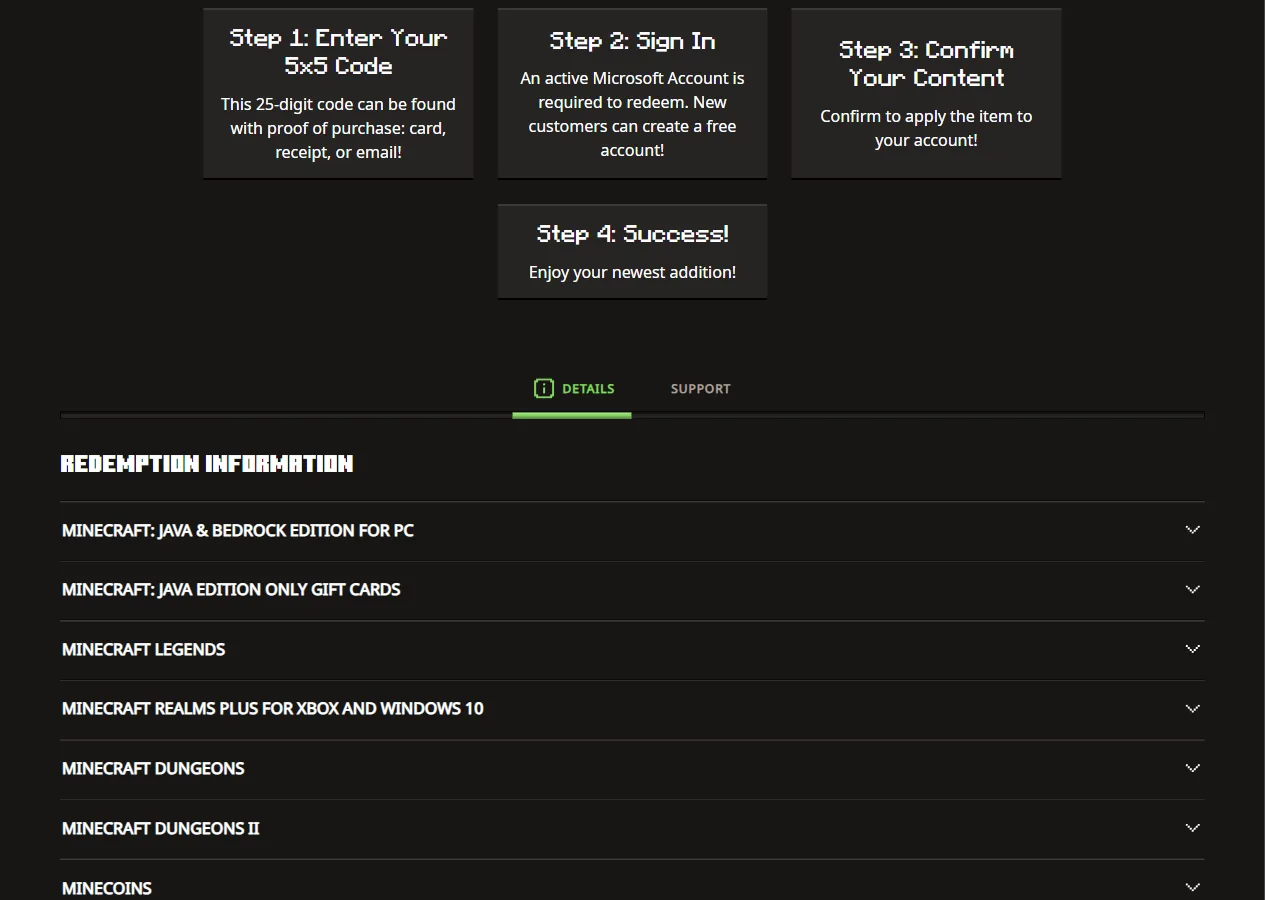
A Minecraft gift card is a physical prepaid card or digital code that holds one specific Minecraft product, such as the PC game or Minecoins. According to the Minecraft redeem page, the code uses a 5x5 format of 25 characters and is redeemed to a Microsoft account, so the product then belongs to that account.
Unlike a regular wallet balance, a Minecraft card usually does not hold a free cash amount. It holds the right to one product. The Minecraft: Java & Bedrock Edition for PC card holds a computer game licence, a Minecoins card holds Marketplace currency, and a Realms card holds a private server subscription. Before you buy, make sure the product on the card matches the device your recipient actually plays on.
One detail people often miss: almost every Minecraft product is now tied to a Microsoft account rather than an old Mojang account. That means the recipient needs a Microsoft account. If they do not have one yet, they can create it for free during redemption, as the second step on the redeem page explains.
Types of Minecraft Cards and Codes
The official redeem page lists the products that can be redeemed through the same code box. The table below summarises the types most relevant to players in Indonesia, with notes taken from the Redemption Information section of that page.
| Card or code type | Contents | Where to redeem | Official note |
|---|---|---|---|
| Minecraft: Java & Bedrock Edition for PC | PC game licence, Java and Bedrock together | minecraft.net/redeem | Code is on the back of the card or the store receipt |
| Java Edition only card (bought before 1 December 2020) | Legacy Java Edition licence | Through Minecraft Player Care | Not self redeemed, contact support |
| Minecoins | Marketplace currency | minecraft.net/redeem (25 character code) | 10 character codes go to xbox.codetocontent.com |
| Minecraft Realms Plus | Private server subscription | minecraft.net/redeem | Realm is activated in Bedrock on Xbox or Windows |
| Minecraft Dungeons, Dungeons II, Legends | Spin-off games | minecraft.net/redeem | Code on the card or in the gift email |
Besides these five types, the same page also lists partner promo codes, such as Character Creator items that come with partner products. Those codes have their own redemption deadlines printed on the redeem page, so do not keep them in a drawer for too long.
Official Minecraft PC Prices in Rupiah
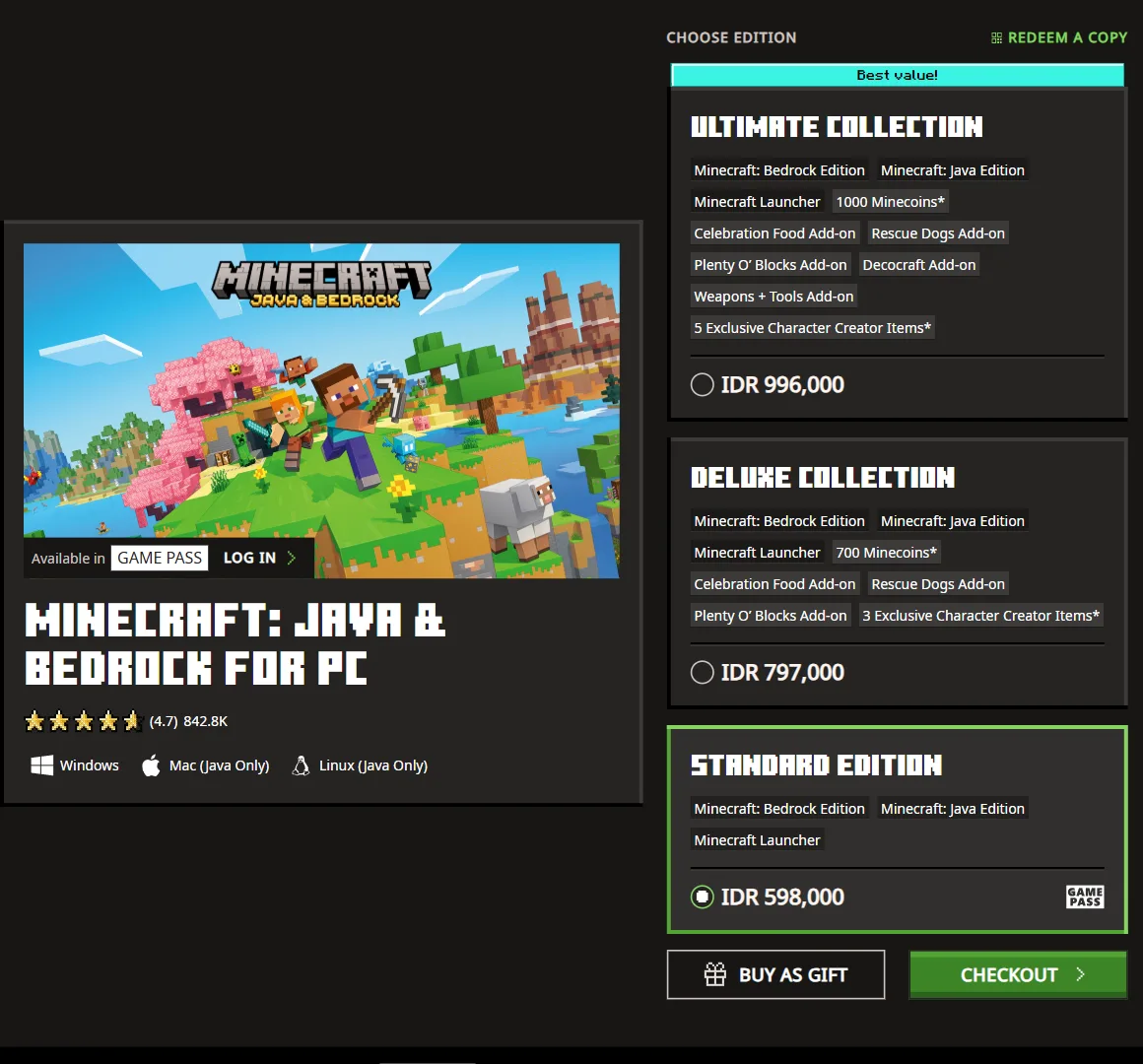
If you want to give Minecraft for PC, the most honest price reference is the official store. When we opened the Minecraft: Java & Bedrock Edition for PC store page, it showed rupiah prices for three editions. All three include Java Edition, Bedrock Edition, and the Minecraft Launcher, and the pricier editions add Minecoins and add-ons.
| Edition | Price | Extras besides the game |
|---|---|---|
| Standard Edition | IDR 598,000 | None, only Java, Bedrock, and the Launcher |
| Deluxe Collection | IDR 797,000 | 700 Minecoins, 3 add-ons, 3 exclusive Character Creator items |
| Ultimate Collection | IDR 996,000 | 1000 Minecoins, 5 add-ons, 5 exclusive Character Creator items |
The same page has a Buy as Gift button. This is the safest way to gift Minecraft, because you buy directly from the game owner with no middleman. The store also marks the Standard Edition as part of the Game Pass catalogue, so a PC Game Pass subscriber does not need a card at all.
An important note from the same store: Mac and Linux are compatible with Java Edition only. So a PC edition card still works for someone on a MacBook, but only Java will run on that computer. Consoles and phones sell Minecraft separately through their own platform stores, not through the PC edition card.
How to Redeem a Minecraft Gift Card Step by Step
You redeem a Minecraft code in a browser, not inside the game. The order below follows the four steps written on the official redeem page, plus the small details that trip people up most often.
- Get the code ready. For a physical card, gently scratch the silver panel on the back. For a digital purchase, open the confirmation email or the order history of the store you bought from.
- Open minecraft.net/redeem in a browser, ideally on a computer so typing is easier.
- Type the code into the Redemption Code box, then press Redeem. You do not need to type the dashes yourself.
- Sign in with a Microsoft account. Make sure it is the account that will be used to play, because the product attaches to it permanently.
- Check the product that appears, then confirm. This step tells you whether the code really holds what you expected.
- Done. Download the Minecraft Launcher, sign in with the same account, and the game or Minecoins are ready to use.
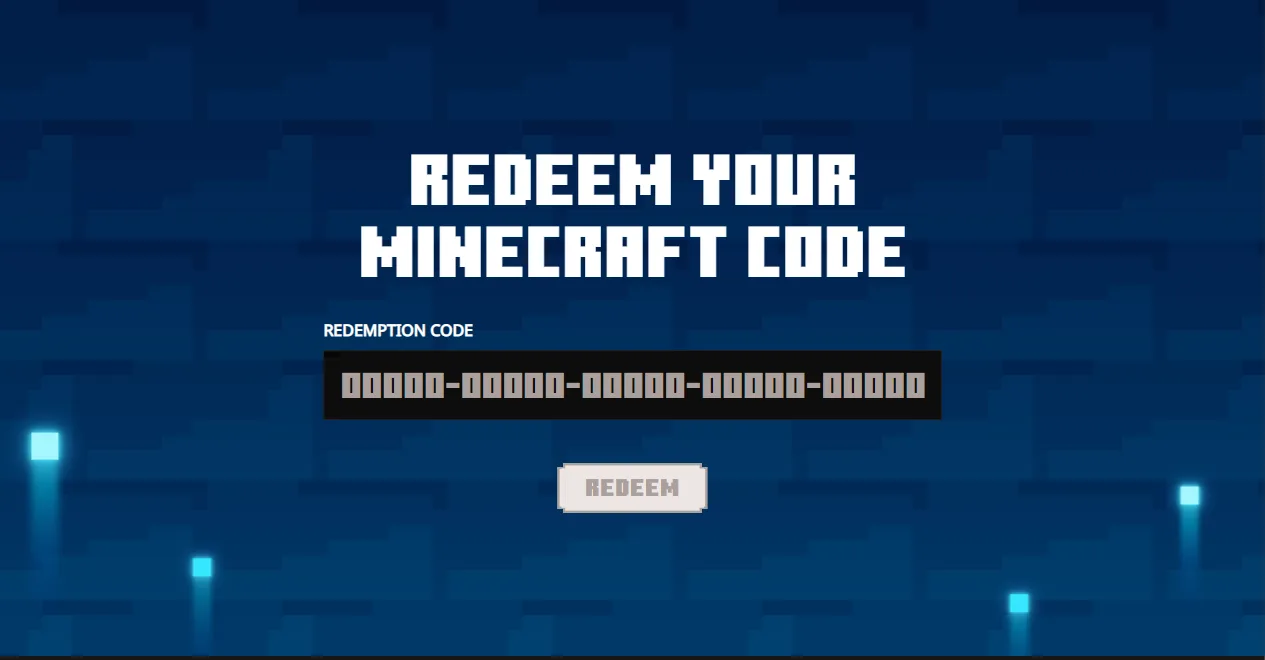
If your card is a Minecoins card with a 10 character code, the route is different. The redeem page says that type of code is redeemed at xbox.codetocontent.com, while 25 character codes still go through minecraft.net. Once redeemed, Minecoins appear in the in-game Bedrock Marketplace and buy skin packs, texture packs, worlds, and mash-up packs.
Realms Plus codes are redeemed on the same page. The difference is that the Realm only becomes active after you sign in to Minecraft Bedrock on Xbox or Windows with the same account. So do not panic if no server appears right after redeeming. Open the game first, then set up the Realm.
Minecraft Gift Card or Xbox Gift Card, Which Should You Buy?
This is the most common question, because Xbox and Microsoft cards are easier to find than Minecraft specific cards. Both are redeemed to a Microsoft account, but they hold different things. A Minecraft card holds one product. An Xbox or Microsoft card holds a free balance which, according to Microsoft Support, can be spent at Microsoft Store online, on Windows, or on Xbox.
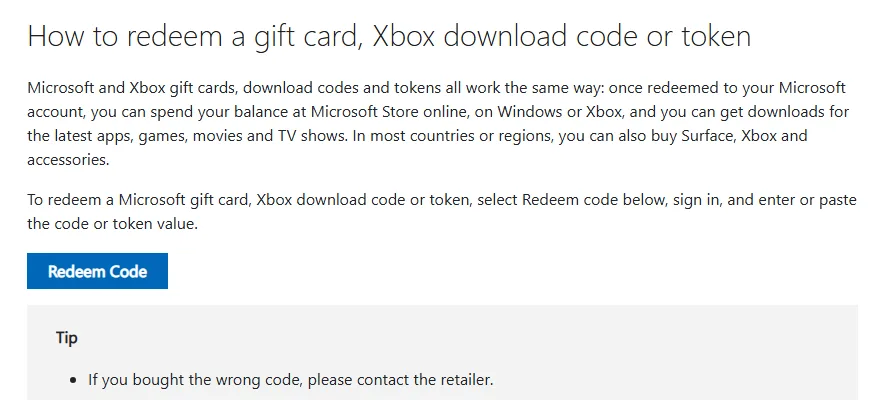
| Aspect | Minecraft gift card | Xbox or Microsoft gift card |
|---|---|---|
| Contents | One specific product (game, Minecoins, Realms) | Money balance in a Microsoft account |
| Where to redeem | minecraft.net/redeem | Redeem Code page of the Microsoft account |
| Can be used for | Only the product on the card | Games, apps, and content on Microsoft Store, Windows, and Xbox |
| Flexibility | Low, but always on target | High, the recipient chooses |
| Region limits | Follow the note on the card | Card currency must match the account region |
An Xbox card suits someone who plays on Xbox or Windows and has not decided what to buy. A Minecraft card suits a gift that must end up as Minecraft and nothing else. For players on Android or iPhone, Minecraft is bought through Google Play or the App Store, so the right gift is a card for that store. We cover both in our Google Play gift card guide and Apple gift card guide.
Balance Rules and Region Limits You Should Know
This section is often skipped, yet it decides whether your gift can be used at all. Every rule below comes from the Microsoft gift card terms and conditions, which govern Xbox cards and Microsoft account balance.
- No cash out. Except where the law requires it, gift cards cannot be exchanged for cash and are not reloadable.
- Regular balance does not expire. Only promotional balance can expire, under the terms of that promotion.
- Tied to the account region. A card in a given currency can only be added to an account registered in a jurisdiction that uses that currency, and the balance cannot be converted.
- Not transferable. Microsoft account balance cannot be moved to another person or another account.
- Lost cards are not covered. Microsoft is not responsible for a card that is lost, stolen, or used without your permission.
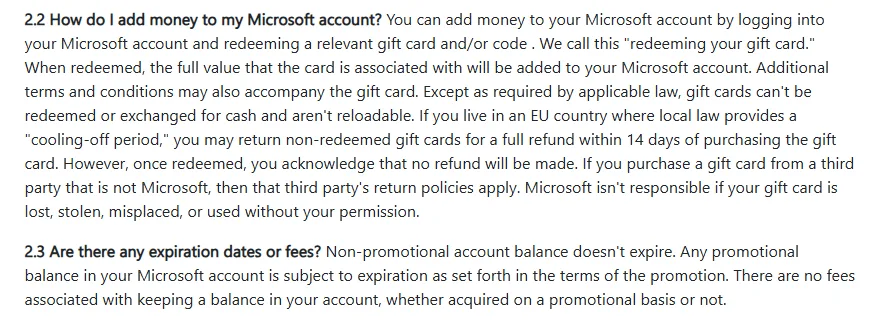
The region rule is the one that costs buyers the most. A card in US dollars cannot be added to an account registered in Indonesia, and the reverse is also true. Before you buy a card from abroad or from a seller who does not state its region, read our full explainer on digital gift card regions.
Why Does a Minecraft Code Fail to Redeem?
The FAQ on the Minecraft redeem page gives a clear checking order. We have ranked it from the most to the least common cause:
- Letters that look like numbers. The letter O swapped with zero, or the letter I swapped with one. Type it again slowly.
- The code was already used. Every code can be redeemed only once. If the card was second hand or opened by someone else, the code is probably gone.
- Signed in to the wrong Microsoft account. Many people have more than one account. The product may already sit on another one.
- Older or region specific codes. Legacy Java Edition codes and region locked codes have their own limits.
- Still failing. Contact Minecraft Support with proof of purchase, such as a receipt or confirmation email.
If you bought the card from a third party, keep the proof of purchase until the code is redeemed successfully. Microsoft's terms say the third party's return policy applies to cards bought outside Microsoft, so the seller is the first place to go. General steps for handling a failed digital transaction are in our guide on fixing a failed game top up.
Tips for Buying a Minecraft Gift Card Safely
Gift cards are a favourite target for scammers because anyone who sees the code can use it. The principle is simple: treat a code like cash. These habits protect both you and the person receiving the gift:
- Prefer official channels. Use the Buy as Gift button on the Minecraft store or a card from a store with a clear reputation.
- Inspect physical packaging. A scratched panel or packaging that has been reopened is a red flag.
- Never share a code in a group chat or a comment section. Whoever redeems it first owns it.
- Be wary of prices that look too cheap. Cheap codes from anonymous sellers are often bought with stolen payment details and can be revoked later.
- Match region and device. Make sure the card fits the account region and the recipient's device.
- Send the code privately. Write it inside a greeting card or send it directly to the recipient, not through a shared account.
For a child who is just starting out, consider whether the gift should be the full game or Minecoins. The full game is needed if the child does not own Minecraft yet. Minecoins make sense if the child already has Bedrock Edition and wants skins or worlds from the Marketplace. Our general rules for choosing a safe purchase channel are in how to top up games online safely.
Java, Bedrock, and the Right Card for Each Device
The most expensive mistake when buying a Minecraft card is picking the wrong device. The official store page explains that Java Edition runs on Windows, macOS, and Linux, is best for mods, but only plays with other Java players. Bedrock Edition runs on consoles, phones, Chromebooks, and PC, has the Marketplace, and supports cross-play between Bedrock devices.
The good news is that the PC edition card now includes both Java and Bedrock, so PC players do not have to choose. For other devices, use this quick guide:
- Windows PC: the Minecraft: Java & Bedrock Edition for PC card, or a Game Pass subscription.
- Mac or Linux: the PC edition card still works, but only Java Edition will run.
- Xbox: an Xbox gift card is more flexible because the game is bought through Microsoft Store on the console. See our Xbox gift card guide.
- Android and iPhone: a Google Play or Apple card, because the game is bought in the app store.
- Already owns Bedrock: a Minecoins card for Marketplace shopping.
If you are unsure, simply ask the recipient which device they play on. That one question prevents a card that cannot be used, because a redeemed code cannot be moved to another account or platform.
Frequently Asked Questions
Where do I redeem a Minecraft gift card?
Open minecraft.net/redeem, type the code into the Redemption Code box, press Redeem, sign in with a Microsoft account, and confirm the product. This order is written on the official redeem page. Redemption happens in a browser, not inside the game.
How much does Minecraft for PC cost in rupiah?
On the official Minecraft store on 11 November 2026, the Standard Edition cost IDR 598,000, the Deluxe Collection IDR 797,000, and the Ultimate Collection IDR 996,000. Prices can change, so check again before paying.
Can a Minecraft gift card be used on a phone?
The PC edition card is for computers only. On Android and iPhone, Minecraft is bought through Google Play or the App Store, so the right gift is a card for that store. A Minecoins card does work in Bedrock Edition, including the phone version, because it goes to the same Microsoft account.
Does Microsoft gift card balance expire?
Regular balance does not expire. According to the Microsoft gift card terms, only promotional balance can expire under its promotion terms, and there are no fees for keeping a balance in the account.
Why is my Minecraft code not working?
The most common causes are mixing up the letter O and zero, a code that was already used, or signing in to the wrong Microsoft account. If you have checked everything and it still fails, contact Minecraft Support with proof of purchase such as a receipt or confirmation email.
Can an Xbox gift card buy Minecraft?
Yes, for versions sold on Microsoft Store. Microsoft Support says Xbox card balance can be spent at Microsoft Store online, on Windows, or on Xbox. Make sure the card currency matches the recipient's account region.
Can a Minecraft gift card be cashed out or moved to another account?
No. Microsoft's terms say gift cards cannot be exchanged for cash unless the law requires it, and account balance cannot be transferred to another person. Redeemed products also stay permanently on the account used at redemption.
What are Minecoins?
Minecoins are the currency of the Minecraft Marketplace, used for skin packs, texture packs, worlds, and mash-up packs. They are used in Bedrock Edition and can be redeemed from a Minecoins card or code through the same redeem page.
Conclusion
A Minecraft gift card is safest when bought through the Buy as Gift button on the official store or from a store with a clear reputation, then redeemed at minecraft.net/redeem with the recipient's Microsoft account. Before buying, match three things: the recipient's device, the account region, and the product on the card. If the recipient plays on Xbox or wants to choose freely, an Xbox gift card is often more practical. If they play on a phone, pick a Google Play or Apple card to match the device.
Digidang Team
Gaming enthusiast and marketplace expert sharing tips, guides, and the best gaming deals.