How to Top Up an Indosat Data Package: myIM3, *888#, and Credit

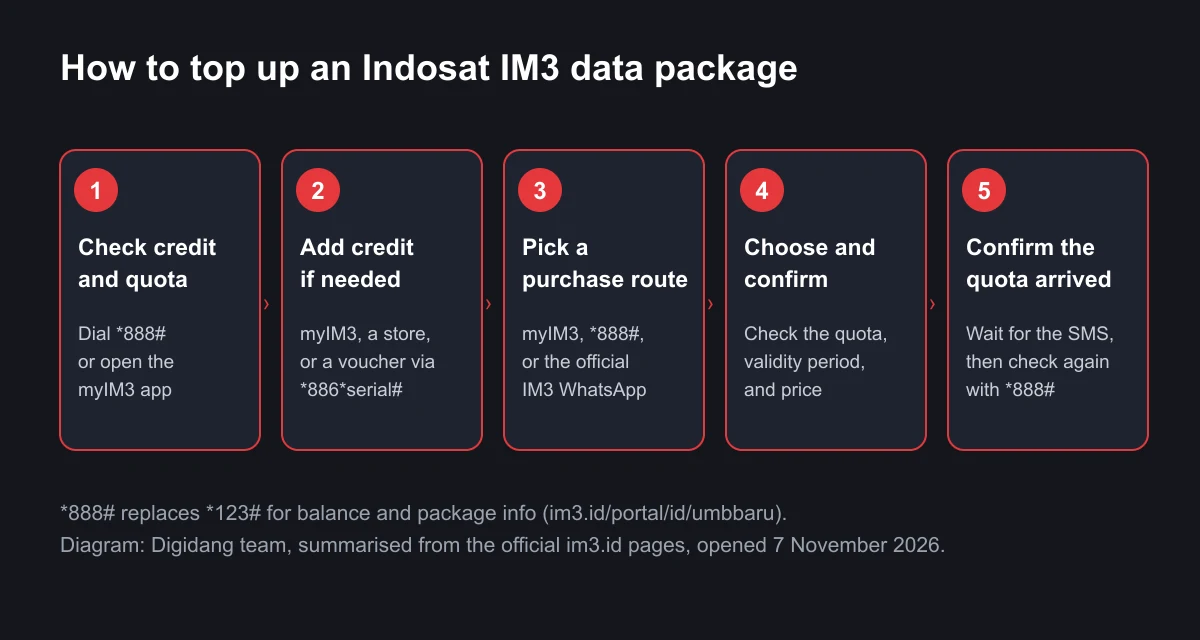
There are three official ways to top up an Indosat data package: the myIM3 app, the dial code *888#, and the official IM3 WhatsApp channel. Indosat names all three on its Freedom Internet page. Before you buy, make sure you have enough credit, because packages are paid from your prepaid balance or from a payment method inside the app.
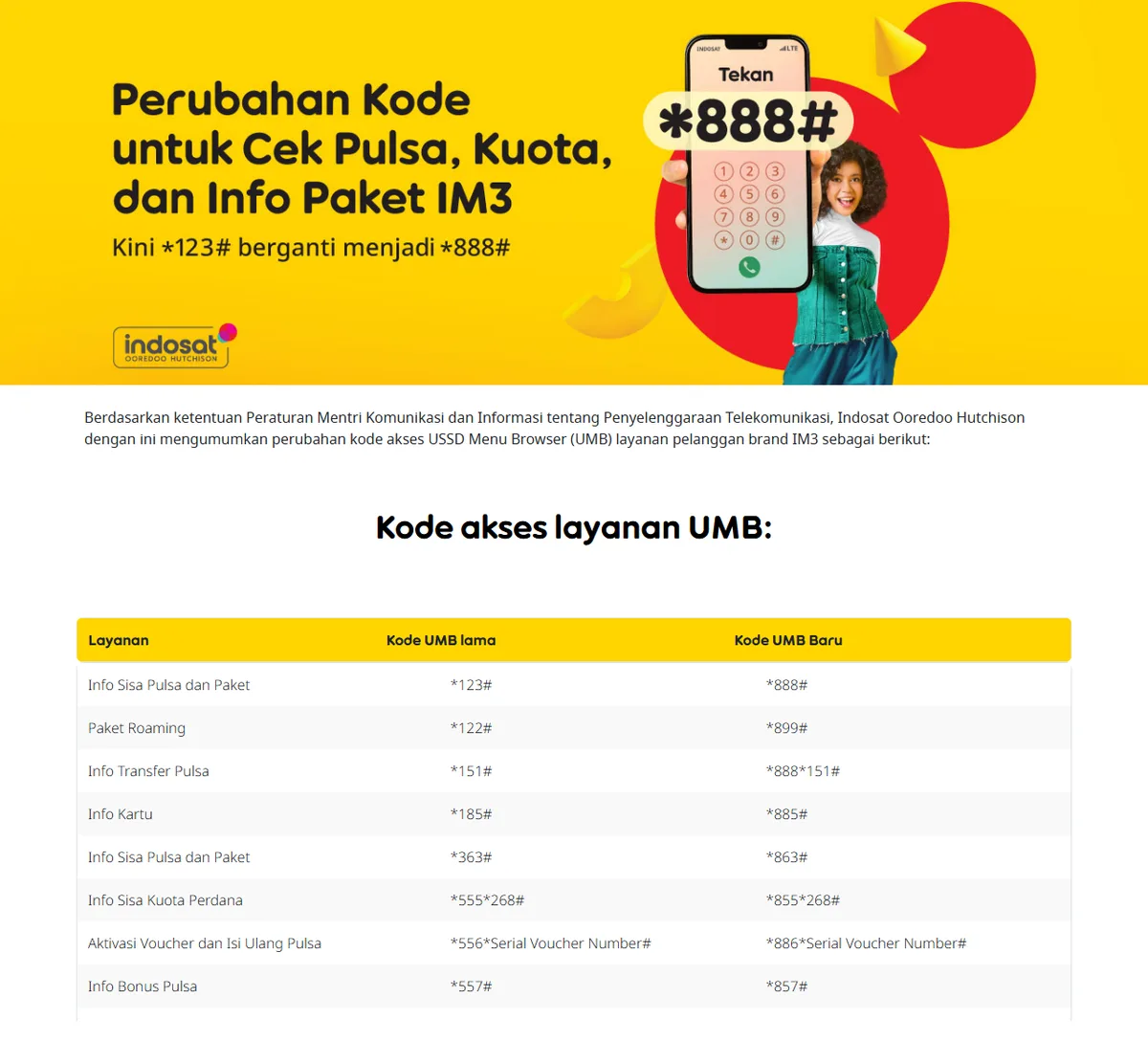
One detail makes many older guides misleading: the code *123#, which used to show your remaining credit and packages, has been replaced by *888#. Indosat announced the change on its new IM3 UMB access code page. We wrote this guide from the official im3.id pages we opened ourselves on 7 November 2026, including the table of old and new codes, the prices Indosat actually publishes, and the steps to confirm that your quota really arrived.
Which Official Routes Can You Use to Top Up an Indosat Package?
Indosat Ooredoo Hutchison sells data packages to IM3 prepaid customers through several doors. The Freedom Internet page lists *888#, the myIM3 app, and the official IM3 WhatsApp. To buy a package without an app, use the dial code. To compare every option side by side, use myIM3.
There is also an indirect route: buy credit or a voucher at a store, a minimarket, or a digital shop, then use that credit to buy the package. This is perfectly fine as long as the seller is legitimate and you choose the package yourself on your own number. What you should avoid is any seller who asks for your OTP code or myIM3 password, because that is the same as handing over access to your number.
The difference between the three official routes is mostly about convenience, not price. The banner on the Freedom Internet page literally says "Belinya di myIM3", meaning "buy it in myIM3", which shows that Indosat is pushing purchases through the app. Still, the same package can be activated with the dial code when you have no data connection, for example after your quota has run out completely.
How to Top Up an Indosat Package in the myIM3 App
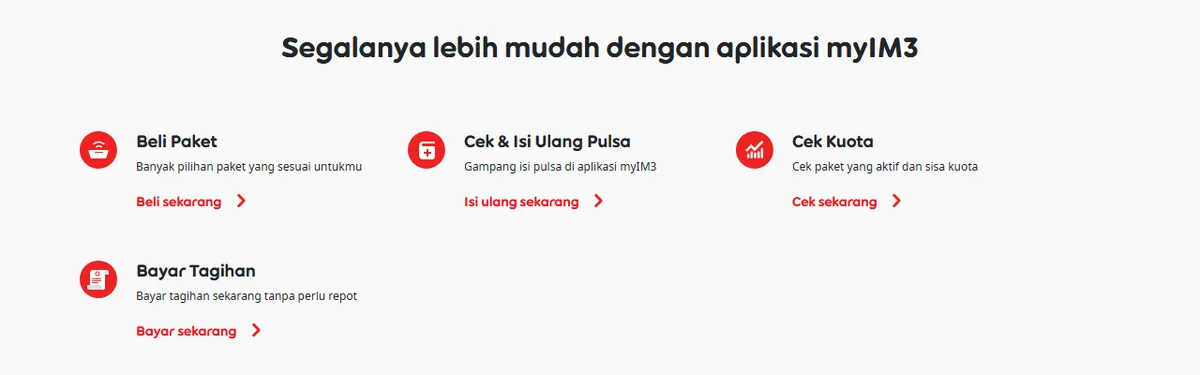
The myIM3 app is the most complete route. On the myIM3 page, Indosat shows four main menus: Buy Package (Beli Paket), Check and Top Up Credit (Cek dan Isi Ulang Pulsa), Check Quota (Cek Kuota), and Pay Bill (Bayar Tagihan). Everything you need, from adding credit to confirming that the quota arrived, sits in one app.
The general steps are:
- Install the myIM3 app from the official app store on your phone.
- Sign in with your IM3 number and enter the verification code sent to that number.
- Open Beli Paket and choose a package type, for example a daily or 30-day Freedom Internet package.
- Check the main quota, extra quota, validity period, and price before you tap buy.
- Choose a payment method and confirm the purchase.
- Open Cek Kuota to make sure the package is active.
Menu names can differ slightly between app versions, because Indosat updates myIM3 regularly. The safe reference is the four menus listed on the official page above. If you cannot find a menu with exactly the same name, look for the words Beli or Paket on the app's home screen.
The myIM3 page also lists perks that only exist in the app, such as the Panjat Kuota game for extra quota, a refer-a-friend programme with bonus quota of up to 3.75GB, and IMPoin point redemption. These are bonuses, not requirements. You can still buy a package without joining any programme.
How to Top Up Without the App Using *888#
If you cannot install the app, or your quota has run out so the app will not load, the dial code is the fallback. A dial code, also called UMB (USSD Menu Browser), works over the ordinary cellular network, so it does not need internet quota.
The steps:
- Open the phone dialer on your handset.
- Type *888# and press call.
- Wait for the menu, then choose the internet package option by the number shown on screen.
- Pick the package you want, read its details, and confirm.
- Wait for the SMS telling you the package is active.
The option numbers in the UMB menu can change with promotions and location, so we do not list specific numbers here. Read the menu text on your own screen. Your credit must cover the package price, because UMB purchases are deducted from your main balance.
Note that some older pages on the IM3 site still mention the old code. The Freedom U page, for example, still said to activate via *123# when we opened it on 7 November 2026. Indosat states that during the transition period the old UMB codes remain accessible. So if you are used to *123#, it will probably still work, but the officially announced code is now *888#.
Old and New IM3 UMB Codes
Indosat announced this change under the ministerial regulation on telecommunications services. The table below is copied from the official IM3 new UMB page, so you do not have to guess which code applies.
| Service | Old UMB code | New UMB code |
|---|---|---|
| Remaining credit and package info | *123# | *888# |
| Roaming packages | *122# | *899# |
| Credit transfer info | *151# | *888*151# |
| Card info | *185# | *885# |
| Remaining credit and package info | *363# | *863# |
| Starter pack quota info | *555*268# | *855*268# |
| Voucher activation and credit top up | *556*voucher serial number# | *886*voucher serial number# |
| Bonus credit info | *557# | *857# |
| Postpaid limit info | *707# | *807# |
| Bundled packages | *990# | *890# |
| IMPoin info | *999# | *898# |
The two rows that matter most for topping up are the first row and the voucher activation row. The first row is what you use to check your credit before buying and to confirm the package afterwards. The voucher row is for physical or digital vouchers that carry a serial number.
Add Credit First If Your Balance Is Low
Packages bought through *888# are paid from your credit. So the first step before topping up a package is to make sure your balance is enough. Check it with *888#, or through the Cek dan Isi Ulang Pulsa menu in myIM3.
If your credit is short, you can add more in several ways:
- Top up directly in the myIM3 app through the Isi Ulang Pulsa menu.
- Buy credit at a store, a minimarket, or a digital payment app, then wait for it to arrive.
- If you bought a voucher with a serial number, activate it by typing *886*voucher serial number# and pressing call, using the new code from the table above.
If you often buy credit for other digital needs, such as game top ups or app subscriptions, it is worth comparing the payment method you use as well. We cover the options in our guide to e-wallets for game top ups. The Digidang catalogue itself lists Indosat credit and Indosat data vouchers, where you enter the destination number yourself when you order.
Indosat Package Prices Published Officially
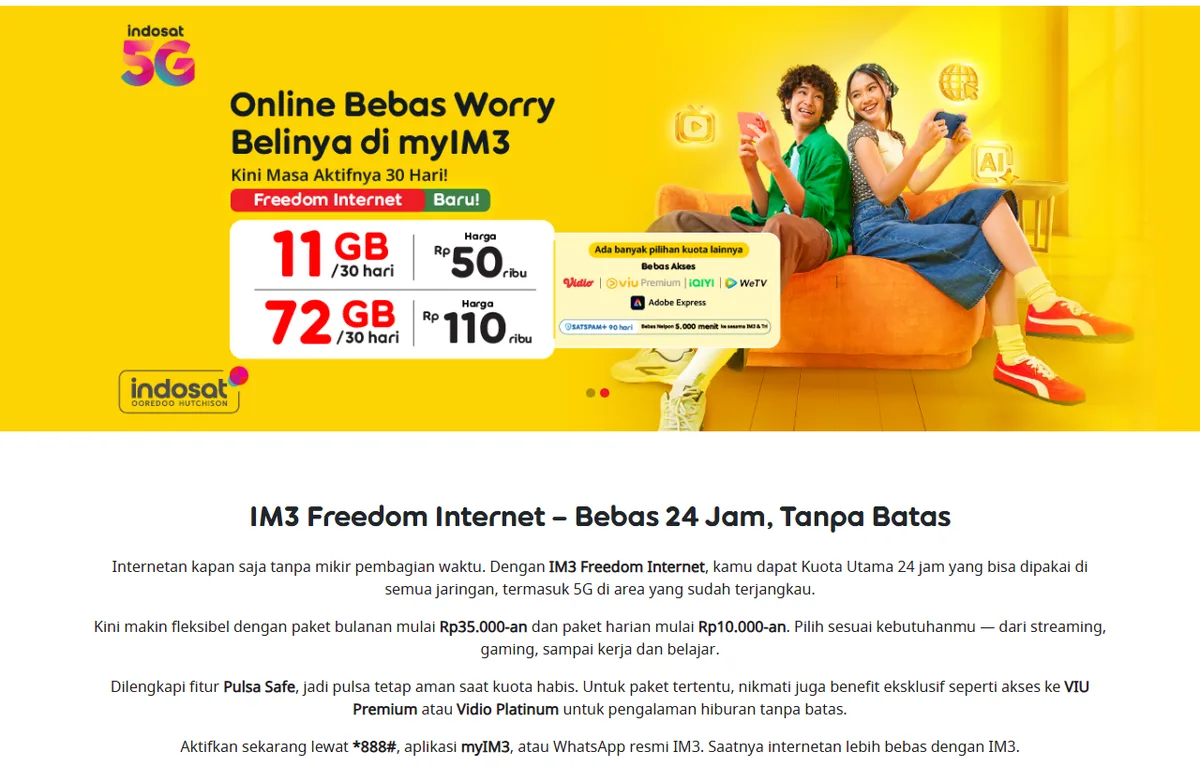
Indosat does not show a single fixed price list for every customer. The Freedom Internet page has a "choose a package based on your location" field, which means the quota and price on offer can differ by city. When we opened the page on 7 November 2026 with the default location of South Jakarta, the package list section displayed "Segera Datang" (coming soon), so we could not copy the full list.
What we can confirm are the numbers actually printed on the official pages:
| Package according to im3.id | Quota | Validity | Price | Cost per GB |
|---|---|---|---|---|
| Freedom Internet (banner) | 11GB | 30 days | Rp50,000 | about Rp4,545 |
| Freedom Internet (banner) | 72GB | 30 days | Rp110,000 | about Rp1,528 |
| IM3 starter SIM | 3GB | 30 days | Rp35,000 | about Rp11,667 |
| Freedom Internet monthly | not stated | monthly | from around Rp35,000 | cannot be calculated |
| Freedom Internet daily | not stated | daily | from around Rp10,000 | cannot be calculated |
The banner figures come from the Freedom Internet page, and the starter SIM price from the IM3 starter SIM page. Cost per GB is our own calculation: price divided by quota. The table shows the same pattern as other operators: bigger packages are almost always cheaper per GB. The 72GB package costs less than a third per GB compared with the 11GB package.
A lower cost per GB only helps if you actually use the quota, though. If you use around 10GB a month, buying 72GB means paying for quota that will probably expire. Track your average use in Cek Kuota for a month first, then pick the package size.
Main Quota, Extra Quota, and Pulsa Safe
When you top up an Indosat package you will see several quota types in the package details. Knowing the difference keeps you from buying a package whose quota cannot be used where you live.
Main quota (Kuota Utama). According to the Freedom Internet page, main quota works 24 hours a day on all networks, including 5G in covered areas. This is the number you should use to compare prices.
Extra quota (Kuota Ekstra). Indosat explains in the FAQ on the same page that extra quota such as 5G Quota and Zone Quota can only be earned and used in certain areas. To check your zone quota benefit, Indosat suggests sending an SMS with the text ZONE to 363. For 5G coverage, there is a page at im3.id/5g. So do not count extra quota as quota you are sure to use.
Pulsa Safe. The Freedom Internet page describes this feature as a way to keep your credit safe when your quota runs out. Without such protection, internet use after the quota is gone can eat into your credit at the base rate.
For the Freedom Combo package, the official page mentions a Data Rollover feature that can carry over up to 5GB of unused main quota. If your usage goes up and down from month to month, a feature like this reduces the quota you lose.
If You Bought a Package but the Quota Has Not Arrived
The most common problem after topping up is quota that does not appear. Before you panic, check these three things in order.
- Make sure your credit was actually deducted or that the in-app payment shows as successful. If your credit is untouched, the purchase most likely did not happen.
- Look for an SMS from Indosat. There is usually a notice that the package is active.
- Check your quota again with *888# or the Cek Kuota menu in myIM3. Close and reopen the app if the display has not changed.
If the quota still does not show up, contact customer service. On the new UMB page, Indosat names two help channels: the official IM3 WhatsApp with a virtual assistant, and call centre 185, dialled from your IM3 number. Have your number, the purchase time, and the package name ready so the process is quick.
If the problem is not a data package but an in-game purchase paid with credit, the checks are slightly different. We cover them in our guide to fixing failed game top ups.
Tips to Make Indosat Top Ups Cheaper
- Compare per GB, not the total price. As the price table shows, the 72GB package is far cheaper per GB than the 11GB package, but it only saves money if you use the quota.
- Check zone and 5G quota first. Leave extra quota out of your calculation if you rarely spend time in the areas where it works.
- Use the app to see every option. The Freedom Internet banner says to buy it in myIM3, and some bonus programmes only exist in the app.
- Save the new codes. Keep *888# for credit and package checks, and *886*serial number# for vouchers.
- Never share your OTP. A legitimate credit seller does not need your myIM3 verification code.
If you are comparing Indosat with other operators, read our guide on buying a cheap Telkomsel package and our overview of cheap internet packages. For gamers who often buy items with credit, our guide to safe online game top ups is also relevant.
Frequently Asked Questions
How do I top up an Indosat package without the app?
Dial *888# and press call, choose the internet package menu shown on screen, pick the package, and confirm. Payment comes from your main credit, so make sure your balance is enough before buying.
Does *123# still work for Indosat packages?
Indosat announced that *123# for credit and package info has been replaced by *888#. During the transition the old UMB codes remain accessible until further notice, but the officially announced code is now *888#.
What is the code to load an Indosat credit voucher?
According to the new UMB code table on im3.id, voucher activation and credit top up now use *886*voucher serial number#. The old code was *556*voucher serial number#.
How much does an Indosat Freedom Internet package cost?
The Freedom Internet page says monthly packages start from around Rp35,000 and daily packages from around Rp10,000. On 7 November 2026 its banner showed 11GB for 30 days at Rp50 thousand and 72GB for 30 days at Rp110 thousand. Prices and quota can vary by location.
Why can I not use my zone quota?
Indosat explains that extra quota such as 5G Quota and Zone Quota only works in certain areas. Check your zone quota benefit by sending ZONE to 363 by SMS, and check 5G coverage at im3.id/5g.
What should I do if my quota has not arrived after buying a package?
Make sure your credit was deducted, look for the confirmation SMS, then check your quota with *888# or myIM3. If it still has not arrived, contact the official IM3 WhatsApp or call centre 185 from your IM3 number.
Is it better to buy packages in myIM3?
The myIM3 page offers bonuses that only exist in the app, such as Panjat Kuota, a refer-a-friend bonus of up to 3.75GB, and IMPoin redemption. The package price itself should still be compared per GB with other options.
What is Pulsa Safe on Indosat packages?
Pulsa Safe is a feature mentioned on the Freedom Internet page that keeps your credit safe when your quota runs out, so internet use does not quietly drain your main balance.
Digidang Team
Gaming enthusiast and marketplace expert sharing tips, guides, and the best gaming deals.