Microsoft 365 Guide: Official Prices, Plans, and Activation

Microsoft 365 is Microsoft's official subscription that bundles Word, Excel, PowerPoint, Outlook, OneNote, and OneDrive cloud storage. This guide covers the official prices in Indonesia, how the Personal, Family, and Premium plans differ, the one time Office Home option, how to activate a code, and what to check before you pay.
What Is Microsoft 365?
Microsoft 365 is a Microsoft subscription service that gives you the latest Office apps, OneDrive storage, and Copilot features. According to Wikipedia, the consumer Office 365 plans were renamed Microsoft 365 in April 2020, so both names point to the same home service today.
The difference from older Office versions is the way you pay. People used to buy Office once and use it for years. With a subscription you pay monthly or yearly, and the apps keep getting new features while the plan is active. If the subscription ends, premium access ends too, although the documents you created remain yours. The Microsoft FAQ states that the documents you create belong to you completely, and you can keep them on OneDrive or on your own computer.
Every home plan uses a Microsoft account as the key. It is the same account used for Xbox, Outlook.com, and OneDrive, so if you already play on Xbox or PC with a Microsoft account, you can use that one. We explain the account itself in our Microsoft account guide, including how to recover access without creating a second account.
Official Microsoft 365 Prices in Indonesia
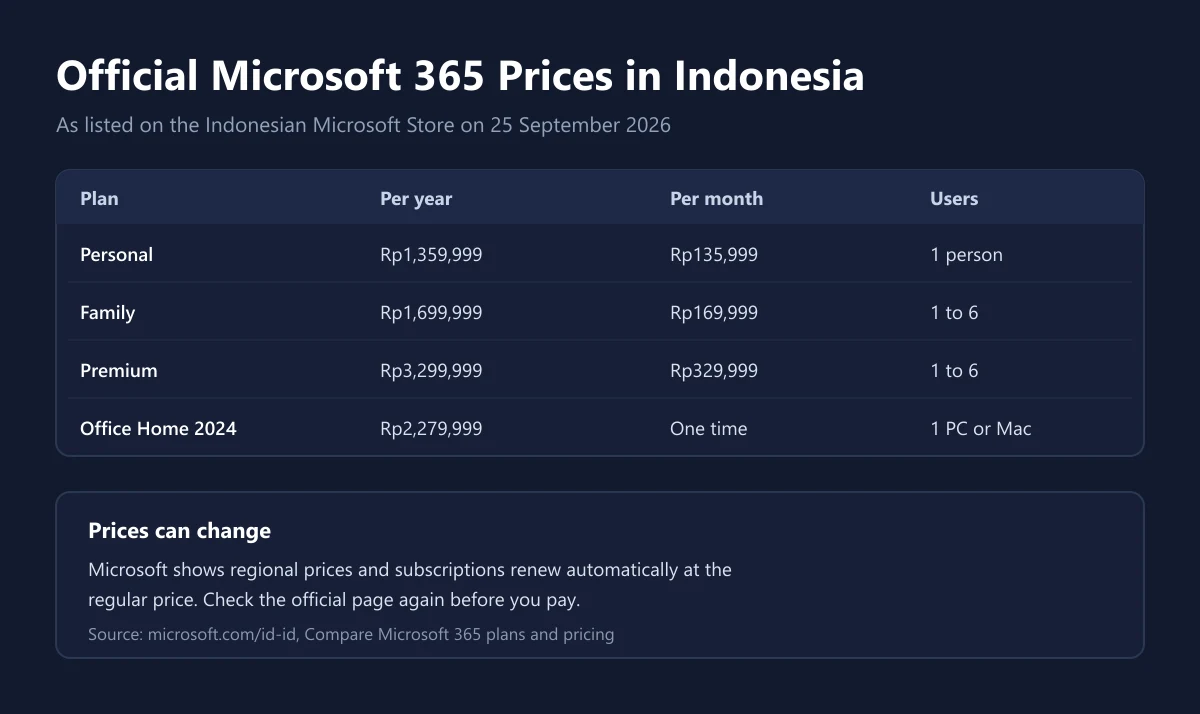
The prices below come from the Indonesian Microsoft Store comparison page as we checked it on 25 September 2026. Microsoft shows regional prices, so these figures apply to purchases from Indonesia and can change at any time.
| Plan | Paid yearly | Paid monthly | Users | Cloud storage |
|---|---|---|---|---|
| Microsoft 365 Personal | Rp1,359,999 per year | Rp135,999 per month | 1 person | 1 TB |
| Microsoft 365 Family | Rp1,699,999 per year | Rp169,999 per month | 1 to 6 people | Up to 6 TB (1 TB each) |
| Microsoft 365 Premium | Rp3,299,999 per year | Rp329,999 per month | 1 to 6 people | Up to 6 TB (1 TB each) |
| Office Home 2024 | Rp2,279,999 one time | 1 PC or Mac | No 1 TB included | |
Two things stand out. First, paying yearly is cheaper than twelve monthly payments. For Personal, twelve months add up to Rp1,631,988, while the yearly plan is Rp1,359,999, based on the same official prices. Second, Family costs only Rp340,000 a year more than Personal, yet it covers up to six people. If even one other person in your household needs Office, Family almost always makes more sense.
The official prices above are already in rupiah. If you buy a code from another seller priced in dollars, tax and the exchange rate shape the final price. We explain how to work that out in our guide to VAT on digital products, and how to pick a convenient payment method in our e-wallet guide.
Personal, Family, or Premium: Which One Fits
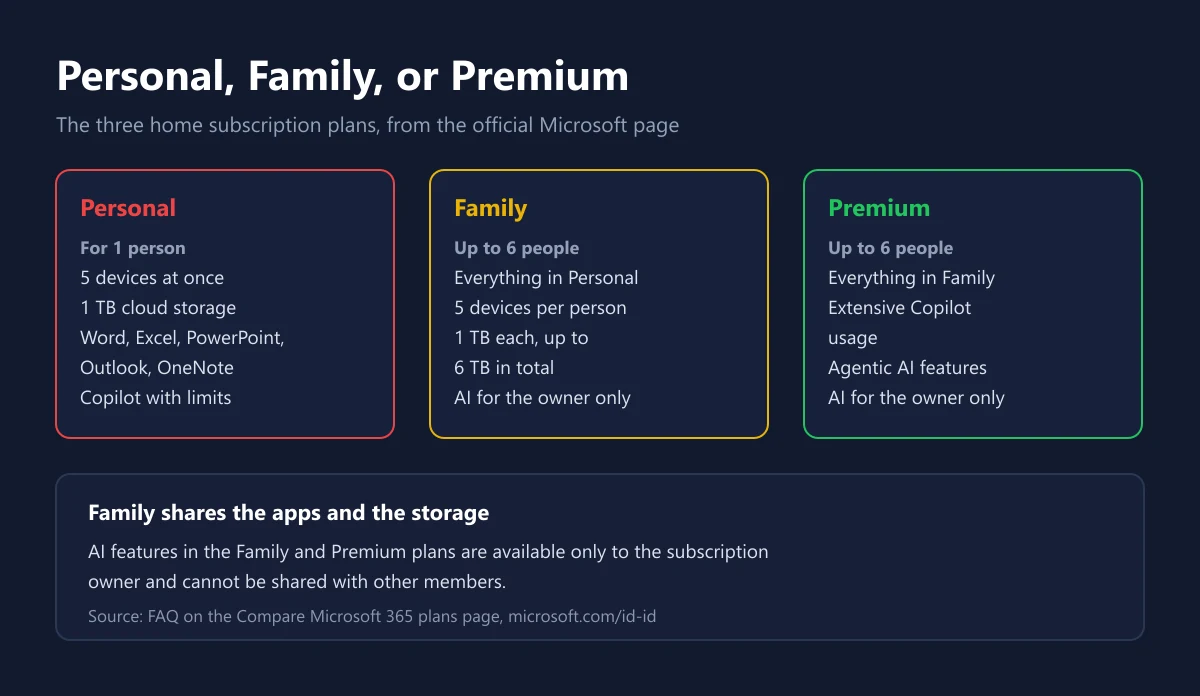
Personal suits one person who uses Office on several devices. Microsoft lists that Personal lets you sign in on 5 devices at once, runs on PC, Mac, phones, and tablets, and includes 1 TB of cloud storage. Students, freelancers, and streamers who write scripts or track sponsor data in Excel are usually well served by Personal.
Family includes everything in Personal plus the right to share with five other people. Each person gets their own 1 TB and can use up to 5 devices at the same time, according to the official plans page. One important caveat: AI features in Family are for the subscription owner only. Other members still get the apps and storage, but they do not share the owner's Copilot allowance.
Premium is aimed at people who lean on Copilot heavily. It includes everything in Family, plus higher advanced Copilot usage, agentic AI features for research and analysis, and a larger allowance for AI image creation. It costs almost twice as much as Family, so it only pays off if AI is part of your daily work. For writing assignments, building presentations, and storing files, Personal or Family is more than enough.
A quick way to decide: count how many people really need Office, then ask whether the account owner needs heavy AI use. One person without heavy AI needs should pick Personal. Two or more people should pick Family. Only an owner whose work depends on Copilot should consider Premium.
Microsoft 365 or Office Home 2024
If you dislike subscriptions, Microsoft still sells a one time version. Office Home 2024 costs Rp2,279,999, includes the classic 2024 desktop versions of Word, Excel, PowerPoint, and OneNote, and installs on 1 PC or Mac. Its product page also says it is meant for non commercial use at home or school.
| Aspect | Microsoft 365 Personal | Office Home 2024 |
|---|---|---|
| Payment | Monthly or yearly | One time |
| Devices | Sign in on 5 devices at once | 1 PC or Mac |
| Outlook | Included | Not included |
| OneDrive 1 TB | Included | Not included |
| New features | Keep arriving while subscribed | Stays on the 2024 version |
| Copilot in the apps | Included, with usage limits | Not included |
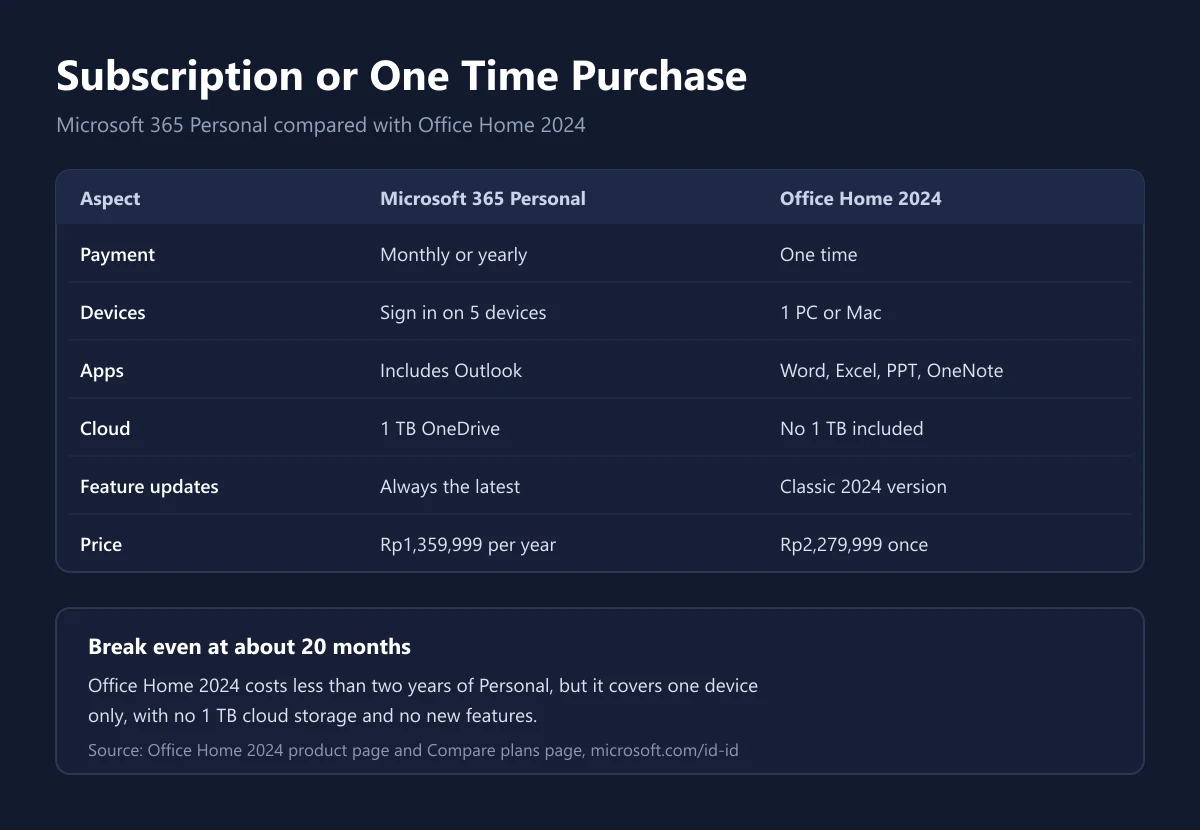
The math is simple. Office Home 2024 equals roughly 20 months of Microsoft 365 Personal at the yearly price on the official page. If you have a single laptop, do not need Outlook, and plan to use the same Office for years, buying once can save money. If you switch between a PC, a laptop, and a phone, or you want somewhere to back up files, the subscription is more practical.
Be Careful with Cheap Office Professional Plus
Code marketplaces often list Office Professional Plus far below the official price. It helps to know where this product comes from. According to Microsoft Learn, Office LTSC Professional Plus 2024 is available to organizations through volume licensing agreements and receives no feature updates after launch. That is a different channel from the retail versions sold for home use.
So before buying a Professional Plus key, ask the seller which channel the key comes from, how activation works, and what happens if activation fails. A line like "tested and activated" is not proof that the license is valid for you. We apply the same thinking in our Windows license guide and our guide on checking whether a digital code is genuine. For home use, the options with the clearest status are the official subscription or Office Home sold by Microsoft itself.
If you still buy from a marketplace, keep the receipt, a screenshot of the product page, and the seller's email. Those three things decide whether a complaint can be handled. The general checklist is in our safe digital shopping tips.
How to Share Microsoft 365 Family
Family sharing happens from the owner's Microsoft account, not by handing out a password. According to the official Microsoft FAQ, the owner opens their Microsoft account, chooses to add a user, and the invited person receives an email with the steps to follow. Once accepted, each member can install the apps on all of their own devices and sign in on five devices at the same time.
The owner can also stop sharing with someone or remove devices a member uses, from the same account page. That is why you should never share your Microsoft account password. The same account holds your Xbox purchases, Game Pass subscription, and other data worth far more than one Office plan. Turn on two step verification as we describe in our guide to securing accounts with 2FA.
One limit is often misunderstood. Microsoft states that AI features in Family and Premium are available only to the subscription owner and cannot be shared. If your child is the one who uses Copilot most for schoolwork, think about who should own the subscription from the start.
How to Activate a Microsoft 365 Code
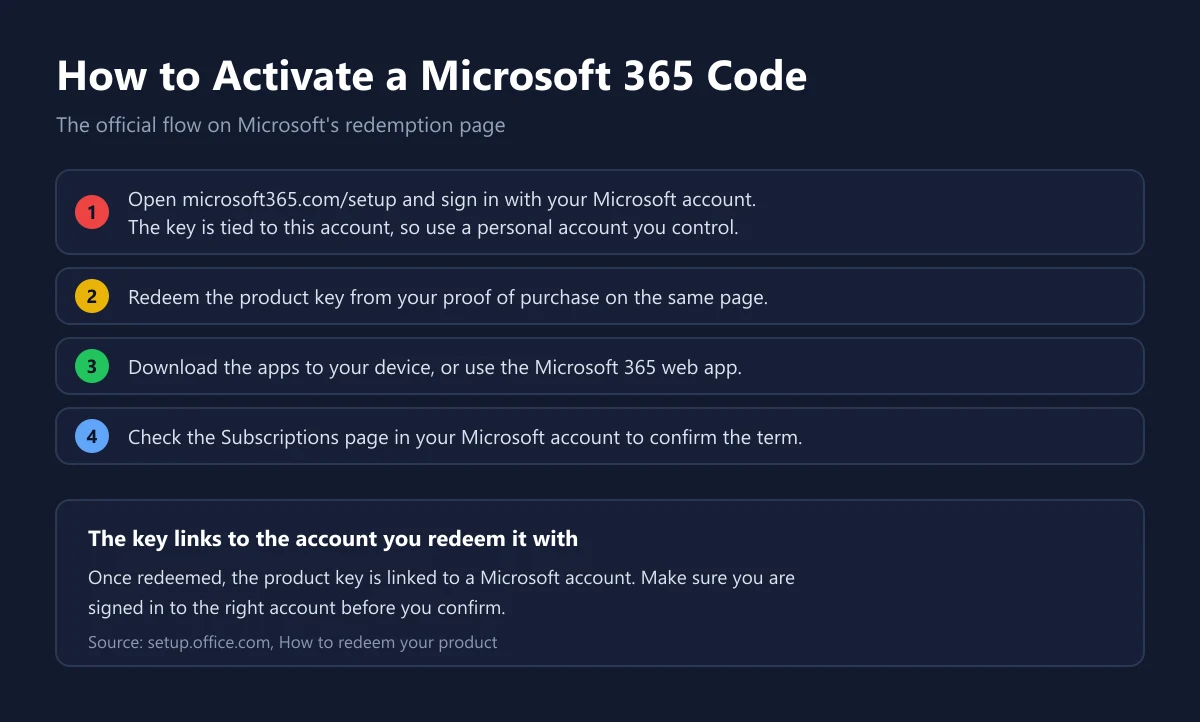
If you bought a code, you redeem it at microsoft365.com/setup, which leads to Microsoft's official redemption page. That page lists three steps: sign in with your Microsoft account, redeem the product key, then download your apps. The product key is linked to the Microsoft account you are using.
- Open the setup page and sign in with a personal Microsoft account that you fully control.
- Enter the product key from your proof of purchase and follow the confirmation on screen.
- Download the apps to your computer, or use the web version.
- Open the subscriptions page in your Microsoft account and confirm the term has been extended.
The first step matters most. If you are signed in with a work account, a school account, or somebody else's account, the subscription lands there. Check the email address in the corner of the page before you confirm. If the code is rejected, do not keep retrying with different accounts. Contact the seller with your proof of purchase, as we outline in our guide on where to activate codes by platform and our explainer on how digital keys work.
Auto Renewal, Internet, and Cancellation
Subscriptions bought directly from Microsoft renew automatically. The official plans page says the subscription renews automatically at the regular price and chosen term unless you cancel it through your Microsoft account. If you only want one year, switch off auto renewal right after buying.
On internet access, the Microsoft FAQ explains that the apps are fully installed on your computer, so Word and Excel work offline. However, you must connect at least every 31 days. After that, the apps enter reduced functionality mode: documents can still be opened and printed, but not edited until the device reconnects.
Refunds depend on where you bought. Direct purchases from Microsoft follow the Microsoft Store terms of sale, while codes bought from another shop follow that shop's policy. We cover the general pattern in our guide on refunding digital purchases, and for purchases in our store the rules are on the refund policy page.
Tips for Buying Microsoft 365 Safely
Before you pay, check five things. One, the plan type is clearly stated, Personal or Family, along with the duration. Two, what you receive is a product key you redeem yourself, not an invitation into the seller's own account. Three, the code's region, since some codes only redeem in certain countries, as we explain in our guide to digital code regions. Four, the seller's policy when a code fails. Five, the seller's track record.
An invite into a stranger's Family group looks cheap, but the group owner can remove you at any time and your files are exposed along with it. A yearly code redeemed to your own account is far safer. Our catalog lists Microsoft 365 Personal 12 months and Microsoft 365 Family 12 months, and you can compare the price on each product page with Microsoft's official prices before deciding.
If you also manage entertainment and gaming subscriptions, the same math applies as in our Xbox Game Pass guide and YouTube Premium guide. If you already use Microsoft account balance for games, we explain how that balance works in our Xbox Gift Card guide.
Frequently Asked Questions
Is Microsoft 365 the same as Office 365?
For home plans, yes. Wikipedia notes that the consumer Office 365 plans were renamed Microsoft 365 in April 2020.
What is the official price of Microsoft 365 Personal in Indonesia?
According to the Indonesian Microsoft Store, Rp1,359,999 per year or Rp135,999 per month when we checked on 25 September 2026.
How many people can use Microsoft 365 Family?
The owner can share with five other people, six users in total, and each person gets 1 TB, according to the official Microsoft FAQ.
Do Family members get Copilot too?
No. Microsoft states that AI features in Family and Premium are available only to the subscription owner and cannot be shared with other members.
Can Microsoft 365 be used without internet?
The installed apps work offline, but the device must connect at least every 31 days. After that the apps enter reduced functionality mode, according to the Microsoft FAQ.
Is Microsoft 365 or Office Home 2024 cheaper?
Office Home 2024 equals about 20 months of Personal, but it covers one device only, with no Outlook, no 1 TB OneDrive, and no new features.
Where do I redeem a Microsoft 365 code?
At microsoft365.com/setup. Sign in with your Microsoft account, enter the product key, then download the apps.
Does a Microsoft 365 subscription renew automatically?
Yes for direct Microsoft purchases. The subscription renews at the regular price unless you cancel it through your Microsoft account.
Is cheap Office Professional Plus official?
Not necessarily. Microsoft Learn says Office LTSC Professional Plus 2024 is provided to organizations through volume licensing, so ask the seller where the key comes from.
Do I lose my documents if the subscription ends?
No. Microsoft states that the documents you create remain yours. Still, keep a copy on your computer before you stop, because the 1 TB of OneDrive storage is a subscription benefit.
Digidang Team
Gaming enthusiast and marketplace expert sharing tips, guides, and the best gaming deals.