Xbox Game Pass Guide: Plans and How to Buy

Xbox Game Pass is no longer a single plan. The official Xbox page now shows four options with different game counts, cloud allowances and partner benefits. This guide details what each plan includes, how to redeem a code, and the recurring billing and refund rules buyers most often miss.
What Xbox Game Pass Is and What It Is Not
Game Pass is subscription access to a library of games, not ownership of them. While the subscription lives, you can download and play whatever sits in the library. When the subscription stops, or when a title leaves the library, that access ends. The official page says so directly, and that is what separates it from digital game keys that stay yours.
Comparing subscription cost against buying keys therefore cannot be done on a monthly price alone. The sharper question is how many titles you genuinely finish in a year, and whether those titles are in the library at all. We work through that framework at length in how to save money on game keys.
One more thing worth straightening out: game titles, numbers, features and availability vary over time, by region, by plan and by platform. The official Xbox page carries that warning itself. So the list you see today is not a permanent promise, and a library screenshot from another region is not evidence of what your account will get.
What Separates Essential, Premium, Ultimate and the PC Plan?
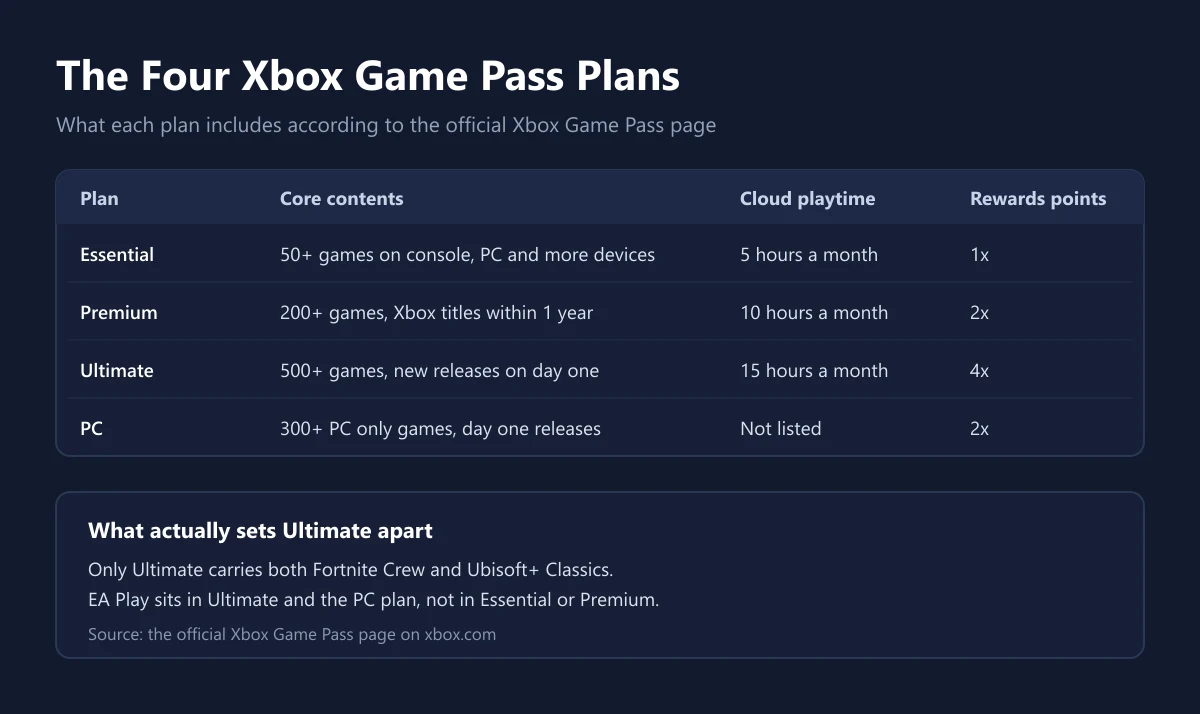
The separation rests on three things: library size, access to day one releases, and partner benefits. Essential offers the smallest library with no day one releases. Premium widens the library and adds Xbox published titles within a year of launch. Ultimate offers the largest library plus new releases from day one.
According to the official Xbox Game Pass page, Essential carries more than fifty titles, Premium more than two hundred, Ultimate more than five hundred, and the PC only plan more than three hundred titles that run on PC. The PC plan also grants day one releases, so it is not simply a cheaper Essential.
| Plan | Library size | Day one releases | Cloud playtime | Rewards points |
|---|---|---|---|---|
| Essential | More than fifty titles | No | Five hours a month | Standard |
| Premium | More than two hundred titles | Xbox titles within one year | Ten hours a month | Double |
| Ultimate | More than five hundred titles | Yes | Fifteen hours a month | Quadruple |
| PC | More than three hundred PC titles | Yes | Not listed | Double |
On price, the official Xbox page renders figures per market, so the numbers only appear once the page recognises your region. That is why we quote no single figure here. What the page does state is an introductory offer: a first month of Essential and a first fourteen days of Premium at a trial rate before the standard rate begins. We compare the annual arithmetic against Sony's service in Game Pass versus PS Plus.
How Long You Can Play Through the Cloud
Cloud play now carries a monthly allowance that differs by plan rather than being unlimited. The official page lists five hours a month for Essential, ten hours for Premium and fifteen hours for Ultimate. The PC only plan does not list a cloud allowance on its plan card, because it is built for playing on a PC.
That limit matters for players without a console who rely on a phone or a smart TV. Five hours a month disappears across two or three weekend sessions, so Essential fits poorly if cloud is your main way of playing. For regular use, a plan with a larger allowance makes more sense even at a higher cost.
Remember too that cloud play needs a stable connection, not merely a fast one. Latency spikes hurt more than download speed. If your home network keeps changing route, playing locally from a download is still the smoother experience, and we cover tuning a machine for that in how to optimise a PC for gaming.
Partner Benefits Tied to Specific Plans
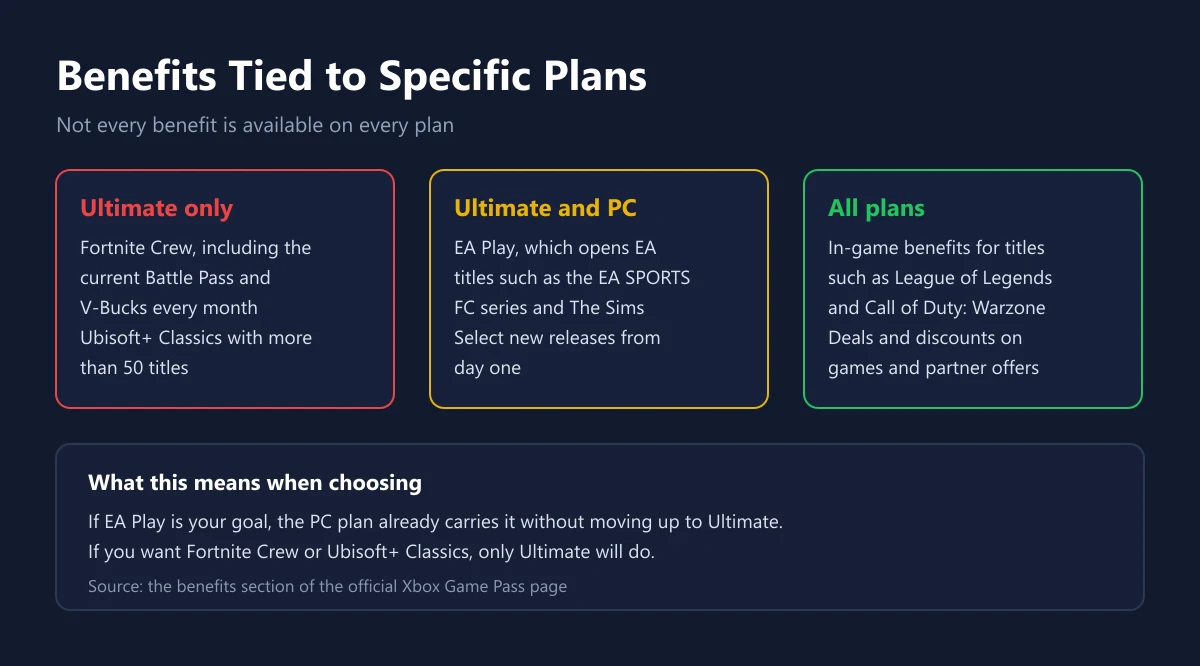
This is the part that decides value for money. The official page marks Fortnite Crew as an Ultimate benefit, complete with the current Battle Pass and monthly V-Bucks. Ubisoft+ Classics is likewise marked as an Ultimate benefit. EA Play, meanwhile, is marked for Ultimate and the PC plan together.
So if your only goal is opening the EA catalog, the PC plan already carries it without stepping up to Ultimate. Conversely, if you are after Fortnite Crew or Ubisoft+ Classics, nothing but Ultimate will do. What EA Play itself contains is detailed in our EA Play guide, including what disappears when that membership lapses.
| Benefit | Plans that carry it |
|---|---|
| Fortnite Crew | Ultimate |
| Ubisoft+ Classics | Ultimate |
| EA Play | Ultimate and the PC plan |
| Cloud play | Ultimate, Premium, Essential |
| In-game benefits | All plans |
| Online console multiplayer | Essential, Premium, Ultimate |
How to Redeem a Code or Gift Card
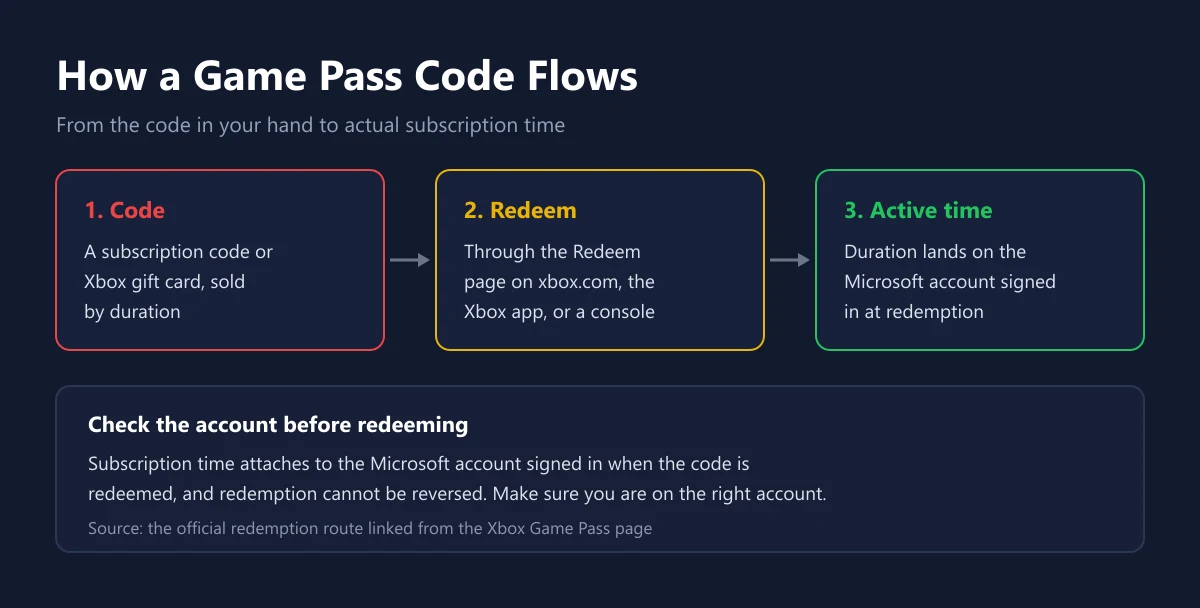
Subscription codes and Xbox gift cards are redeemed through the Redeem page on the official Xbox site, through the Xbox app, or straight from a console. What you must confirm before pressing redeem is which Microsoft account is signed in, because subscription time attaches to that account and redemption cannot be undone.
The difference between a gift card and a subscription code is often assumed away. A gift card adds store balance you can spend on anything, including extending a subscription, while a subscription code adds duration directly. We explain the distinction in our Xbox gift card guide, and the activation steps per platform in where to activate your game code by platform.
The most common failure point is region. A code issued for one market is often rejected by an account registered in another. If redemption fails, do not keep retrying; check the account region and the code region first. We collect these failure patterns in failed game top up and how to fix it and in our guide to digital gift card regions.
Recurring Billing and Refund Rules
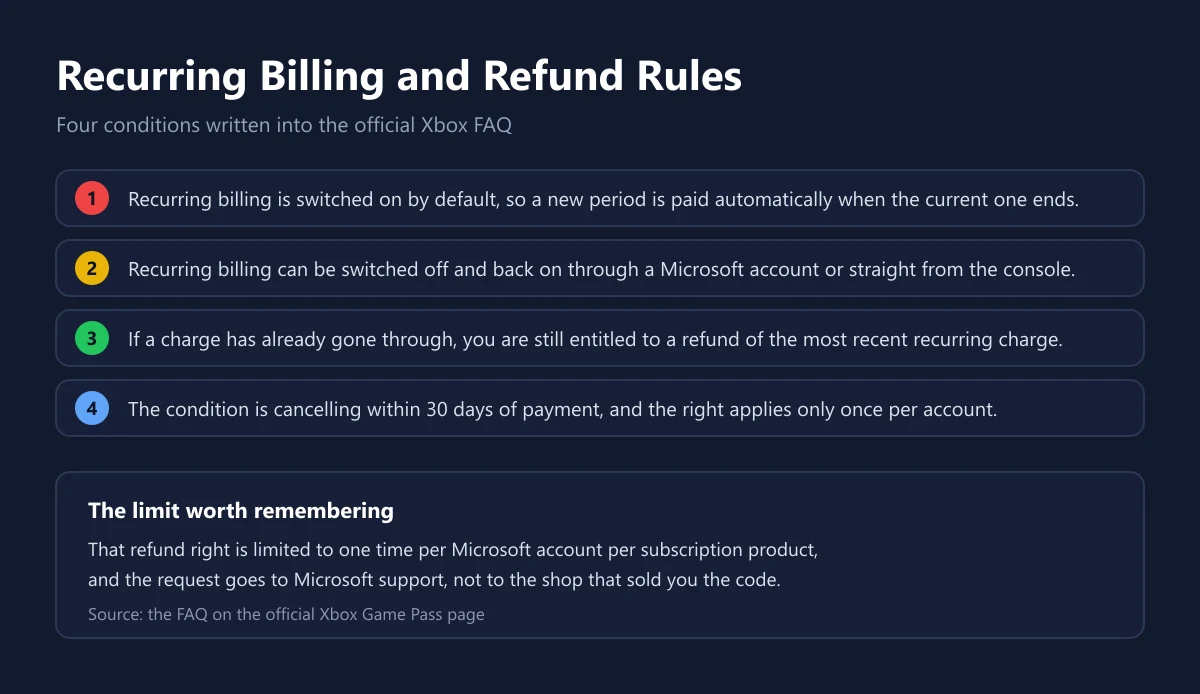
The official Xbox FAQ states that recurring billing is switched on by default, so a new period is paid automatically when the current one ends. The feature can be switched off and back on through a Microsoft account or straight from a console, and switching it off is the safest way to prevent an unwanted charge.
If a charge has already gone through when you did not want it, the official document says you are still entitled to a refund of your most recent recurring billing charge, provided you cancel within thirty days of that payment. The right is limited to one time per Microsoft account per subscription product, and the request goes to Microsoft support.
Note that this route covers subscriptions bought directly with a recurring payment method. A prepaid code that has already been redeemed is not a recurring charge, so it falls outside that scheme. For purchases from our shop the terms sit on our refund policy page, and how we check stock sourcing is described on how we verify.
When Subscribing Beats Buying a Key
Subscribing wins when you play many different titles in a short span, particularly Xbox published games that enter the library on day one. Buying keys wins when you play only one or two titles but play them for years, or when your favourite title is not in the library at all.
| Your situation | Usually the cheaper choice |
|---|---|
| Trying many new titles every month | Subscribing |
| Playing a single title for years | Buying a key |
| Wanting Xbox published releases on day one | Subscribing to Ultimate or the PC plan |
| Favourite title absent from the library | Buying a key |
| Playing mostly through cloud on a phone | Subscribing to a plan with a bigger cloud allowance |
If you do decide to subscribe, longer durations usually cost less per month. Our options are Game Pass Ultimate one month, three months and twelve months. Before buying from any seller, make a habit of checking code authenticity as described in how to check a genuine digital game code.
The Mistakes That Happen Most Often
The first mistake is paying for a more expensive plan to get a benefit that a cheaper plan already carries. The classic case: buying Ultimate when the actual goal was EA Play, which the PC plan also includes. The second is ignoring the cloud allowance and then being surprised when play stops mid month.
The third mistake is redeeming a code on the wrong account, typically a second account used to test another region. Because redemption cannot be reversed, that mistake has no easy way back. Get into the habit of checking which account is signed in, switch on two step verification as in our two step verification guide for game accounts, and buy only from sellers you can trace, as set out in safe digital product shopping tips.
Frequently Asked Questions
Do Game Pass games become mine?
No. Access lasts while the subscription is active and while the title remains in the library. When either condition fails, access ends.
Which plans include new releases on day one?
Ultimate and the PC only plan. Premium adds Xbox published titles within a year of launch, while Essential does not cover day one releases.
How much cloud playtime does each plan get?
The official Xbox page lists five hours a month for Essential, ten hours for Premium and fifteen hours for Ultimate. The PC only plan card does not list a cloud allowance.
Is EA Play already included?
EA Play is marked as a benefit of the Ultimate plan and the PC plan. The details, including member discount limits and trial rules, are in our EA Play guide.
What does Fortnite Crew include?
The official page says Fortnite Crew grants access to the current Battle Pass along with several other passes, plus V-Bucks each month. The benefit is marked for Ultimate.
What does Xbox Game Pass cost in Indonesia?
Microsoft renders the figures per market, so they appear only once the page recognises your region. The most reliable official number is the one shown on the official Xbox Game Pass page when you open it.
How do I switch off automatic renewal?
Through Microsoft account settings or straight from a console. Recurring billing is on by default, so switching it off is something you must do yourself before the renewal date.
Can a charge that already went through be refunded?
The official FAQ says you are entitled to a refund of the most recent recurring charge if you cancel within thirty days of payment. The right applies once per account per subscription product.
Can a code from another region be used?
Often not. Codes are usually bound to the market that issued them, and redemption is refused when the account region does not match. Check before buying, as explained in our guide to digital gift card regions.
Can the subscription be used on more than one device?
The subscription attaches to a Microsoft account rather than a device, so you can sign in on console and on PC. What limits you is the plan itself, since the PC plan only covers playing on a PC.
What should I check before redeeming a subscription code?
Make sure the signed in Microsoft account is the intended one, make sure the code region matches, and keep the proof of purchase. Redemption is final and cannot be reversed.
Digidang Team
Gaming enthusiast and marketplace expert sharing tips, guides, and the best gaming deals.