Xbox Gift Card Digital Code: Format, Region, Redemption

An Xbox gift card digital code is a 25-character prepaid code that adds money to a Microsoft account once you redeem it. You receive it by email or in an order page instead of on plastic, enter it on a console, PC, phone, or the official Xbox redeem flow, then spend the balance in the Microsoft Store.
This guide focuses on the code itself: what it looks like, how it reaches you, which account region it needs, and how to keep it safe from the moment you pay until the money shows up in your balance. If you want the broader picture of Xbox prepaid cards, such as physical versus digital cards and how sales events work, read our complete Xbox gift card guide first. Digidang does not sell or store codes itself. We compare offers and every Buy Now button opens the matching G2A listing, so the order, delivery, and any refund follow that marketplace's terms, as explained on Is Digidang safe?
What is an Xbox gift card digital code?
An Xbox gift card digital code is a prepaid value code delivered electronically. Redeeming the code adds its full face value to the Microsoft account you are signed in to, according to Microsoft's gift card terms. That balance then pays for games, add-ons, apps, and Xbox subscriptions.
The important word is balance. A gift card code does not unlock one specific game the way a game key does. It behaves like store credit, so you decide later what to buy with it. That makes it a flexible gift and a handy way to control spending, because the account can only spend what was loaded unless someone adds another payment method.
A digital code and a physical card carry the same kind of value. The difference is purely in delivery. With a physical card you scratch a strip on the back to reveal the code. With a digital code, the characters arrive in an email, an order history page, or a digital library at the marketplace where you paid. Everything after that point, from redemption to spending, works exactly the same, which is why the rest of this article applies to both once you are holding the code.
If you are new to prepaid codes in general, our explainer on how digital game keys work covers the difference between value codes and content keys in more depth.
Anatomy of the 25-character code
Xbox Support describes Xbox codes as strings of letters and numbers written in five blocks of five characters, in the pattern XXXXX-XXXXX-XXXXX-XXXXX-XXXXX, on its redeem codes page. Knowing this shape helps you spot a typo or a fake before you even try to redeem.
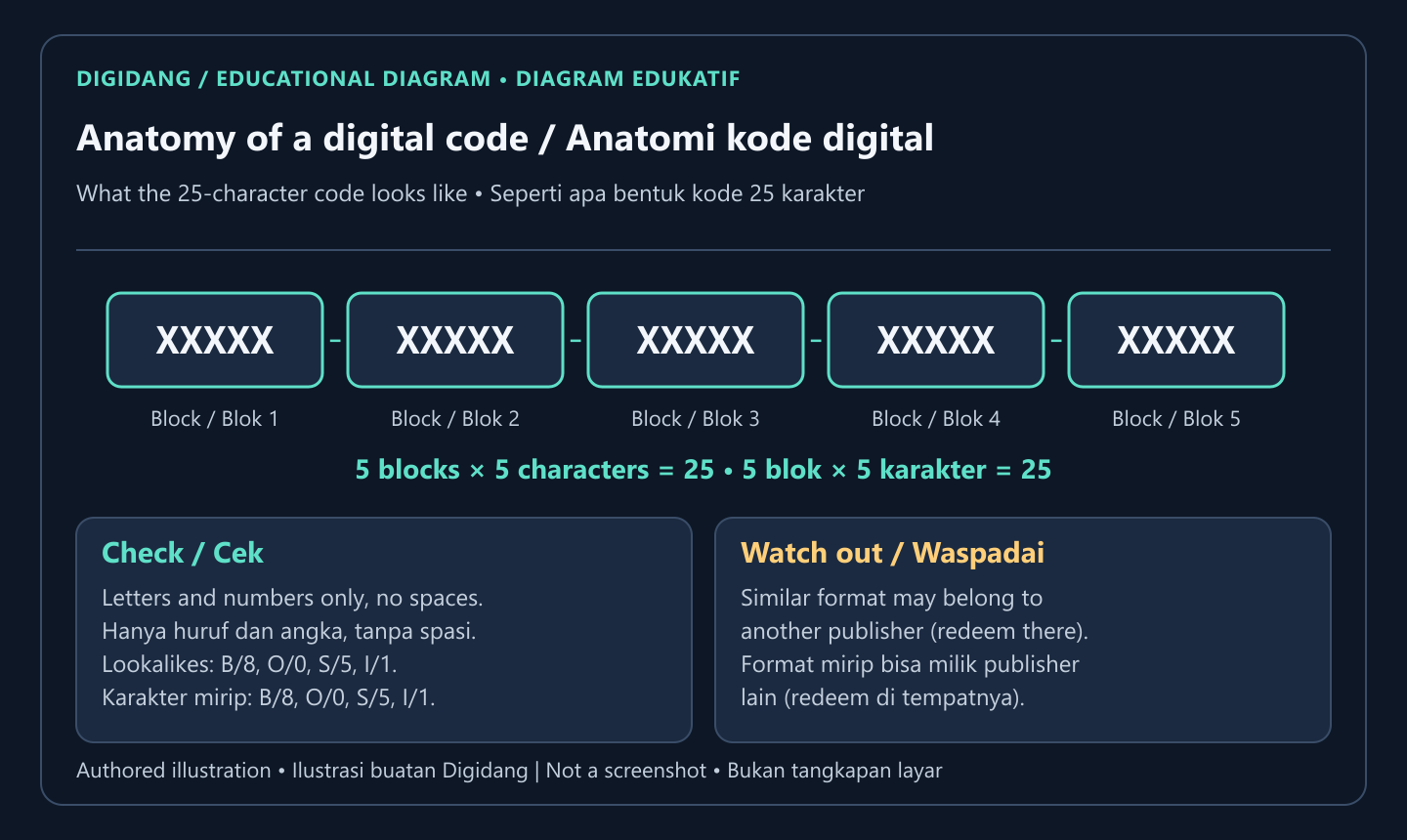
When you copy a code by hand, the most common mistakes come from characters that look alike in certain fonts, such as the letter O and the digit zero, or the letter B and the digit eight. Copy and paste whenever the code arrives as text. If you must type it, read it back block by block before you press Next.
Xbox Support also warns that codes from some other publishers can look similar to Xbox codes, with Fortnite V-Bucks cards as its example, and those are redeemed in the game or on the publisher's site instead (source). So the format alone does not prove the code belongs to Xbox. Check the product title and the instructions that came with it. A listing for an Xbox gift card should say Xbox or Microsoft balance, a face value, and a region.
Finally, treat the code like cash. Anyone who sees all the characters can redeem it to their own account, and Microsoft's terms say it is not responsible if a gift card is lost, stolen, or used without your permission. Do not post screenshots of an unredeemed code in chats or social media.
How a digital code is delivered after you pay
Digital delivery is the main reason people choose a code over a plastic card. There is no shipping and no store visit. The code appears shortly after payment in the place the marketplace uses for deliveries, which is usually an order page, a digital library, an email, or all three.
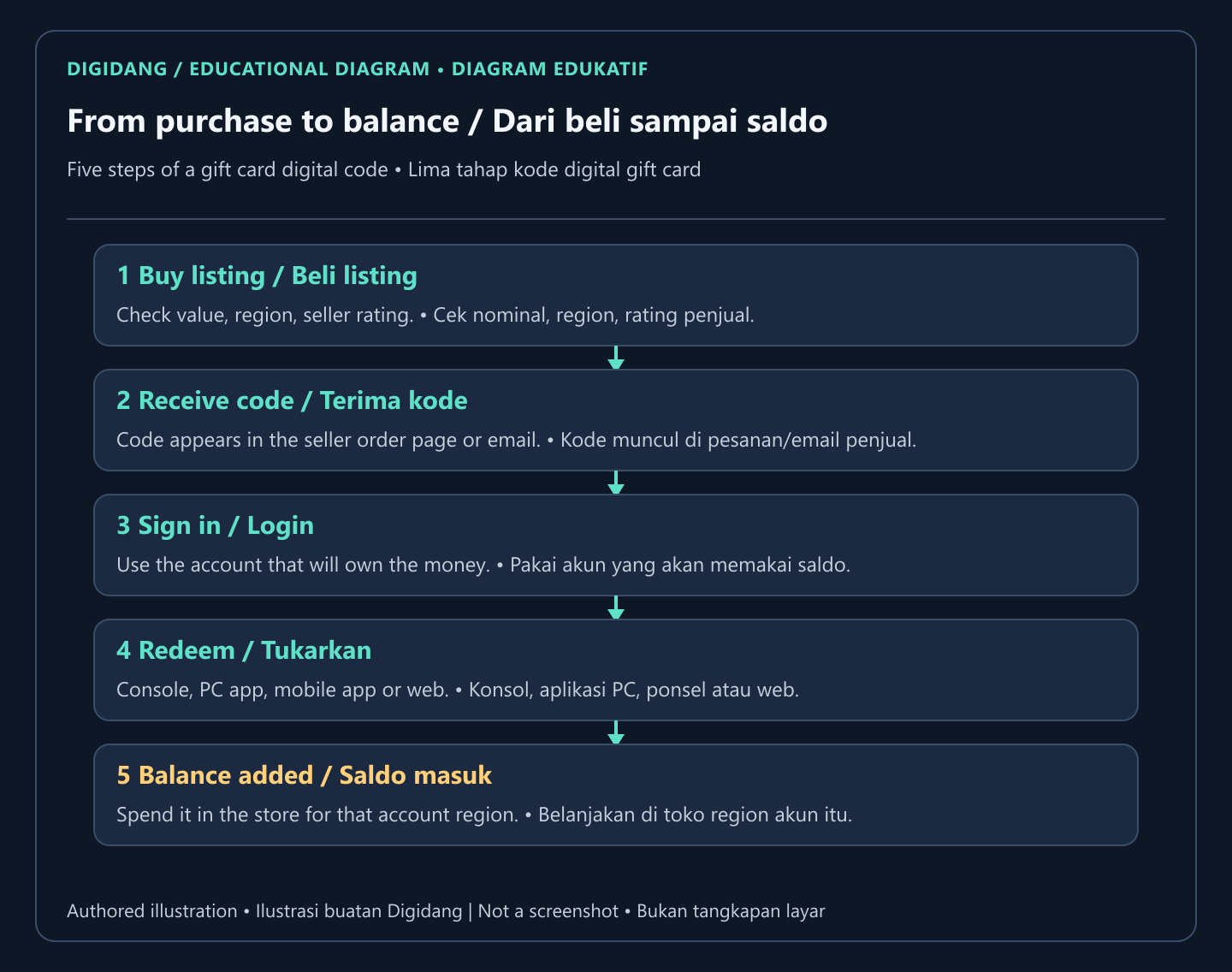
On Digidang, the product page shows the current offer and the Buy Now button sends you to the matching G2A listing. G2A handles the payment and shows the delivered code according to its own process. That means the order history at G2A is your proof of purchase, so keep the confirmation email and do not delete the order. If a code ever fails, the seller and the marketplace will ask for that record.
A few habits make delivery smooth. Use an email address you can open right away, because many marketplaces send the order confirmation there. Pay with a method you can trace later. Once the code appears, copy it into a private note or password manager before redeeming, so you still have it if the browser tab closes. Then redeem promptly. A code sitting unused in an inbox for months is simply one more thing that can be lost, forwarded by mistake, or exposed if the email account is compromised.
Protecting that email account matters more than most buyers think. Turning on two-step verification, as described in our guide to securing gaming accounts with two-step verification, keeps delivered codes and the Microsoft account itself out of other people's hands.
Region rules: the check that prevents most failed codes
Region is the single biggest reason a valid code refuses to redeem. Microsoft's terms state that account balance cannot be converted to another currency and can only be used in stores available in the jurisdiction where the account is registered (Microsoft gift card terms). In practice, the card's currency and region need to match your account's country or region.
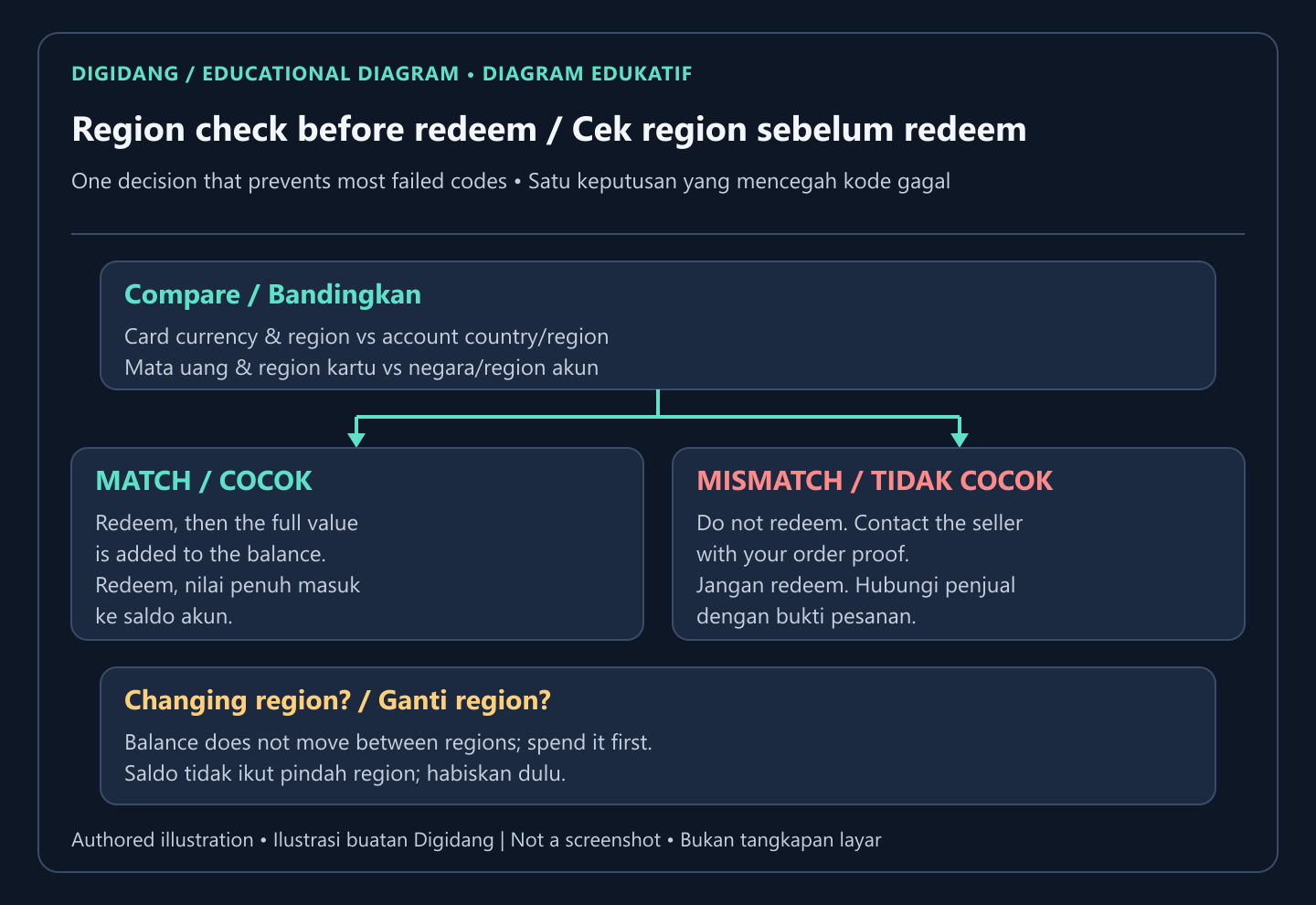
The Xbox gift card listings on Digidang carry a US region label and a value in US dollars, so they suit a Microsoft account whose country or region is set to the United States. Before buying, open your Microsoft account profile and confirm the country or region shown there. If it says something else, a USD card is not the right product for that account.
Changing the account region to fit a card is not a casual fix. Microsoft recommends changing your Store region only if you are moving to a new country or region for a long time, and warns that the funds in your account will not move with you and cannot be transferred between regions (Microsoft Support). Subscriptions, apps, and games bought in one region may also behave differently in another. Our deeper explainer on how gift card regions work compares how different platforms handle this, and the Microsoft account guide shows where the region setting lives.
Where to redeem: console, PC, phone, or web
You can redeem the same code from several places, and the result is identical: the value lands in the Microsoft account that is signed in at that moment. Pick whichever device is in front of you, but double check the account first, especially on a shared family console.
- Xbox console: open the Store, open its side menu, choose Redeem, and enter the code.
- Windows PC: open the Xbox app, go to your profile settings, and choose the redeem option.
- Phone: in the Xbox mobile app, open your profile, then settings, then Redeem code.
- Any browser: visit the Microsoft redeem page and sign in with the same account you use on your console or PC.
These routes come from Xbox Support, and Microsoft's own redeem help page links straight to the web form. We keep a full step by step walkthrough with every menu name in our article on how to redeem an Xbox code, so this section stays short on purpose.
The web route is often the easiest choice for gift card codes. You can paste the code from your notes without typing on a controller, and you see the confirmation screen clearly before you finish. Whichever route you use, the confirmation screen shows the value being added. Read it before you confirm. If the value or currency looks wrong, stop and contact the seller rather than continuing. For other platforms, our activation guide hub covers Steam, PlayStation, Nintendo, and more.
What the balance can and cannot buy
Once redeemed, Microsoft says the balance can be spent in Microsoft Store online, on Windows, and on Xbox, for apps, games, movies, and TV shows, and in most countries or regions also on Surface, Xbox hardware, and accessories (Microsoft Support). Add-ons and in-game currency sold through the Xbox store count as content too.
There are limits worth knowing before you buy. Microsoft's page on spending account money notes that the balance cannot be used at Microsoft Store retail locations or to get cash, gift certificates, or similar payment products, and that only Xbox subscriptions can be bought with a gift card (Microsoft Support). If you were hoping to pay for a non-Xbox subscription with gift card money, check the product page first.
Xbox subscriptions are therefore one of the most common uses. If you plan to pay for Game Pass from your balance, our Xbox Game Pass guide explains the plans, and you can compare offers for a prepaid Game Pass Ultimate membership as an alternative to topping up.
When a purchase costs more than your balance, Microsoft uses the balance first and asks for another payment method to cover the rest, according to its guide on spending all of your gift card money. That is useful for using up a small leftover amount without wasting it.
Checking your balance and keeping records
After redeeming, confirm that the money actually arrived. Xbox Support explains that you can check your Microsoft account balance online or directly on a console (Xbox Support). Online, sign in to your Microsoft account and open the payment and billing section, which lists the current balance and any promotional balance with its expiry.
Microsoft's terms say non-promotional balance does not expire, while promotional balance follows the terms of the promotion that granted it (source). The same terms state that account balance cannot be transferred to another person or another Microsoft account. So redeem a gift code to the account of the person who will actually use it. If the code is a present, give the code itself rather than redeeming it to your own account first.
Keep a simple record for every code you buy: the order reference, the purchase date, the face value, the region on the listing, and the date you redeemed it. A screenshot of the confirmation screen is enough. If something goes wrong weeks later, this record answers every question a support agent will ask, and it saves you from searching through old emails.
Parents can also use these records to keep spending predictable. Loading a set amount onto a child's account through a gift code, instead of attaching a credit card, means the account can never spend more than what was redeemed.
How to avoid gift card scams
Gift codes are popular with scammers precisely because they behave like cash and are hard to reverse once redeemed. Microsoft states plainly that it will never ask you to pay for support with gift cards or cryptocurrency (Microsoft Support). Anyone on the phone, in a pop-up, or in a chat who demands payment in Xbox codes is not Microsoft.
The same caution applies to offers that sound too generous. Websites promising free Xbox codes in exchange for surveys, app downloads, or your account password are a classic trap. Microsoft only confirms a code when you enter it in its own redeem screen, so no outside generator or checker can tell you a code is valid. Never type your Microsoft password anywhere except the real sign in page.
When buying, choose listings with a clear title, value, and region, plus a seller with a visible track record. Prices far below everyone else deserve suspicion, not excitement. Our checklist on shopping safely for digital products and the guide to checking whether a digital code is genuine walk through these signals in detail.
Finally, keep the code private until it is redeemed. Do not let a stranger redeem it for you, do not read it aloud on a voice call, and do not share a photo of it to ask whether it is real. If someone already has the characters, they can use the money before you do.
What to do when a code does not work
Start with the simple causes. Re-enter the code carefully, comparing lookalike characters, and confirm you are signed in to the right account. Then compare the card region with your account region, because a mismatch produces an error even when the code is perfectly valid.
Xbox Support keeps a dedicated troubleshooter for digital codes and gift cards that do not work. It covers wrong region, invalid or mistyped codes, codes that were already redeemed, codes that are not yet active, and suspended accounts, and it tells buyers to contact the retailer when the code does not match their account region (Xbox Support). Work through it before assuming the code is fake.
If the troubleshooter does not solve it, go back to where you bought the code. Microsoft's terms note that when you buy a gift card from a third party, that third party's return policies apply (source). For purchases made through a Digidang link, that means opening a ticket with the seller on G2A. Attach the order reference, a screenshot of the exact error message, and the time you tried. Do not post the full code publicly while waiting for an answer.
Act quickly. Sellers handle disputes more easily when the problem is reported soon after delivery, and a fresh screenshot is much stronger evidence than a description written weeks later. Our guide to digital game refunds explains what to expect from that process.
Choosing the right face value
Digidang lists four Xbox gift card values, all labeled for the US region. The table below summarizes what each listing is for. Prices change with offers, so the current price is always shown on each product page rather than here.
| Listing | Face value | Region label | Good fit for |
|---|---|---|---|
| Xbox Gift Card $5 | USD 5 | United States | Small add-ons, topping up a leftover balance |
| Xbox Gift Card $25 | USD 25 | United States | A discounted game or several add-ons |
| Xbox Gift Card $50 | USD 50 | United States | A larger game purchase or a gift |
| Xbox Gift Card $100 | USD 100 | United States | Planned purchases over several months |
A practical approach is to look up the exact item you want in the Microsoft Store first, note its price in your account's currency, then pick the code or combination of codes that covers it. Several smaller codes can be redeemed to the same account and the values add up, which helps when no single value matches. Since non-promotional balance does not expire, a slightly larger value is not wasted; it simply waits for your next purchase. You can browse every prepaid option, including other platforms, in our gift cards category.
Before you buy any of them, run the quick checklist one more time: the account region matches the card, the account belongs to the person who will use the money, and you know where the code will be delivered. Those three checks prevent nearly every problem described in this guide.
FAQ: Xbox gift card digital codes
What does an Xbox gift card digital code look like?
It is a string of letters and numbers split into five blocks of five characters, separated by hyphens. Xbox Support shows the pattern as XXXXX-XXXXX-XXXXX-XXXXX-XXXXX on its redeem page.
Is a digital code different from a physical Xbox gift card?
Only in delivery. A physical card hides the code under a scratch strip, while a digital code arrives by email or in an order page. After redemption, both add the same kind of balance to the Microsoft account.
Can I redeem a US Xbox gift card on an account from another country?
Not unless the account region uses the same currency. Microsoft's terms say balance cannot be converted to another currency, so a USD card belongs on an account set to the United States (terms).
Does the balance from an Xbox gift card expire?
Microsoft says non-promotional account balance does not expire, while promotional balance follows the terms of its promotion (source).
Can I move my balance to a friend's account?
No. Microsoft account balance is non-transferable to another person or account. If you want to give the value as a present, send the unredeemed code instead of redeeming it yourself.
Can I buy Game Pass with gift card balance?
Yes. Microsoft notes that only Xbox subscriptions can be bought with a gift card, and Game Pass is an Xbox subscription (Microsoft Support). Check the plan price against your balance before you subscribe.
What should I do if my code says it was already redeemed?
Check whether another account on your device redeemed it, then follow the digital code troubleshooter from Xbox Support. If it still fails, contact the seller with the order reference and a screenshot of the error.
Is it safe to pay someone with Xbox gift card codes?
Only for a genuine gift to someone you know. Microsoft never asks for payment in gift cards, so any caller or website demanding codes as payment, fees, or fines should be treated as a scam.
Digidang Team
Gaming enthusiast and marketplace expert sharing tips, guides, and the best gaming deals.