Buy Hogwarts Legacy Key: Editions, Region and Activation
To buy a Hogwarts Legacy key safely, choose a Steam key from a store that clearly lists the platform, edition, and key region, then confirm the region matches your Steam account before paying. After checkout, redeem the code in Steam with Activate a Product, and the game appears in your library ready to download.
That short answer covers most of what goes wrong with game keys. People rarely lose money because a key is fake; they lose it because they bought the wrong edition, a key locked to another territory, or a game their PC cannot run well. This guide walks through each decision in the order you should make it, using the official Steam store page and Steam Support as the reference points, and shows how the Hogwarts Legacy listings on Digidang map to those choices.
Where can you buy a Hogwarts Legacy key safely?
You can buy a Hogwarts Legacy key safely from the Steam store itself or from a key retailer that shows the platform, edition, region, delivery method, and refund policy before you pay. On Digidang, the Hogwarts Legacy Steam Key (Global) page lists those details, and the key is redeemed on your own Steam account.
The safe options share a few traits. The seller delivers a code, not an account login, so the game ends up on the Steam account you already control. The checkout runs on the store's own payment page rather than through a chat app or a direct bank transfer to a private person. The listing names the region in plain words, and there is a written policy for what happens if the code fails. If you want a deeper explanation of how these codes move from publisher to buyer, read how digital game keys work, and for general shopping hygiene see our safe digital shopping tips. Digidang also documents how we verify and source products, which is worth reading before your first order with any key store, not only ours.
What exactly is a Hogwarts Legacy Steam key?
A Hogwarts Legacy Steam key is a one time activation code that adds the PC version of the game to a Steam account. According to the official Steam store page, the game is developed by Avalanche Software, published by Warner Bros. Games, and was released on Steam on February 10, 2023.
Once the code is redeemed, the copy is tied to that Steam account permanently. You download it through the Steam client like any other purchase, it updates automatically, and your saves can sync through Steam Cloud. The same store page lists a few technical notes that matter for key buyers: the game uses Denuvo Anti-Tampering as third party DRM and asks you to accept a third party EULA when you first launch it. Neither is unusual for a large release, but it means the game checks its license through Steam, so a key cannot be used without a Steam account.
The game itself is an open world action RPG set in the wizarding world of the late 1800s, where you play a student at Hogwarts. If you enjoy that style of game, our list of the best open world games gives useful context on similar titles. The important point for buying is simpler: a Steam key is only for the PC version on Steam. It will not work on PlayStation, Xbox, Nintendo Switch, or the Epic Games Store, even though the game is sold on all of those platforms too.
Which edition should you buy: Standard or Digital Deluxe?
Steam currently sells two main editions. The Digital Deluxe Edition listing on Steam includes three items: the base game, the Dark Arts Garrison Hat, and the Dark Arts Pack. The base game is identical in both editions, so the difference is cosmetic and side content rather than extra story.
| What you get | Standard Edition | Digital Deluxe Edition |
|---|---|---|
| Full base game | Yes | Yes |
| Dark Arts Pack (Thestral mount, Dark Arts cosmetic set, Dark Arts Battle Arena) | No, sold separately as DLC | Yes |
| Dark Arts Garrison Hat | No | Yes |
| Story length and main quests | Same | Same |
| Can upgrade later | Yes, by buying the Dark Arts Pack on Steam | Not needed |
The contents of the pack come from the official Steam listing for the Dark Arts Pack, which names the Thestral mount, the cosmetic set, and the battle arena. For most players the Standard Edition is the sensible pick, because the extras do not change the story or the ending. Pick Deluxe if you specifically want the arena and the mount from the first hour.
Always read the product title and description before you pay. A listing that does not mention Digital Deluxe should be treated as the Standard Edition. Be careful with sellers advertising a Definitive Edition: we could not find any such edition on the official Steam page, so treat that label as unverified.
How do key regions work for Hogwarts Legacy?
A key region is a territory limit that the publisher can attach to a key. Steam Support explains on its Region Restrictions on Steam page that restrictions on retail keys vary by publisher, and that a key locked to another territory shows an error saying the product is not available in your territory.
That error is the whole reason region matters. Steam Support states on the same page that it cannot change or remove a region restriction, and using a VPN or proxy to get around one breaks the Steam Subscriber Agreement and can put the account at risk. So once you buy a key that does not match your account, Steam will not fix it for you; only the seller can help, and only if their policy allows it.
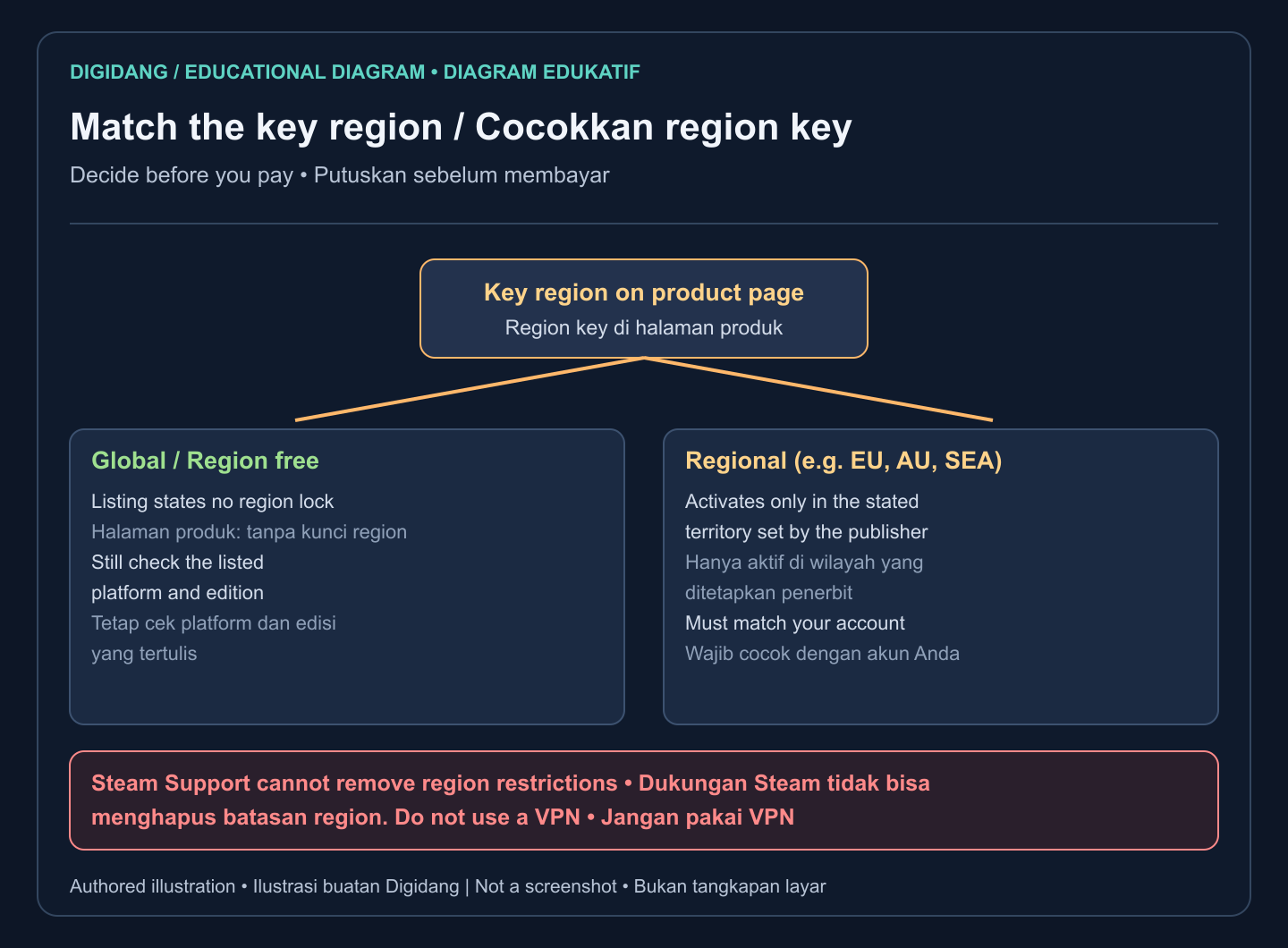
Your Steam store country is shown on the account details page of your Steam account, so check it there rather than guessing. If you are not sure how to set up or check an account, our guide on creating a Steam account covers it. The same matching logic applies to gift cards and wallet codes, which we explain in understanding digital gift card regions.
Which Digidang listing fits your Steam account?
Digidang lists Hogwarts Legacy as a Steam key in four region variants. Each one is a separate product page, and the region shown in the product name is the one to compare with your account. The simplest rule is to choose the Global key unless you have a clear reason to pick a regional one.
- Hogwarts Legacy Steam Key (Global): listed as region free, the safest default for most buyers.
- Hogwarts Legacy Steam Key (EU Region): for Steam accounts set to a European store region.
- Hogwarts Legacy Steam Key (AU Region): for Steam accounts set to the Australian store region.
- Hogwarts Legacy Steam Key (SEA Region): for Steam accounts set to a Southeast Asian store region.
Prices change with stock and promotions, so we do not quote them here; the current price is always shown on each product page. If two variants both fit your account, compare them on the page and pick the one you are most confident about. When in doubt, go Global.
A regional key is not a lower quality key. It is simply priced and licensed for a specific territory by the publisher. The risk is only in mismatching it. Before you pay, open Steam, check your store country, and compare it with the variant you are about to buy. If you travel often or recently moved, double check, because the account region can differ from where you are physically sitting. You can browse every other Steam title we stock in the game keys category, where the same region labels are used.
Can your PC run Hogwarts Legacy?
Check the hardware before buying, because a key cannot be returned just because the game runs poorly. The official Steam system requirements list a 64 bit Windows 10 system, DirectX 12, 16 GB of RAM, and 85 GB of storage for both tiers. The minimum tier targets 720p at 30 fps on low settings.
| Component | Minimum (Steam) | Recommended (Steam) |
|---|---|---|
| Operating system | 64-bit Windows 10 | 64-bit Windows 10 |
| Processor | Intel Core i5-6600 (3.3 GHz) or AMD Ryzen 5 1400 (3.2 GHz) | Intel Core i7-8700 (3.2 GHz) or AMD Ryzen 5 3600 (3.6 GHz) |
| Memory | 16 GB RAM | 16 GB RAM |
| Graphics | NVIDIA GeForce GTX 960 4GB or AMD Radeon RX 470 4GB | NVIDIA GeForce 1080 Ti, AMD Radeon RX 5700 XT, or Intel Arc A770 |
| DirectX | Version 12 | Version 12 |
| Storage | 85 GB, SSD preferred, HDD supported | 85 GB, SSD |
| Target stated by Steam | 720p, 30 fps, low settings | 1080p, 60 fps, high settings |
The recommended tier on the same Steam page targets 1080p at 60 fps on high settings with an SSD. Meeting a tier is a good sign, not a guarantee, because drivers, background apps, and storage speed also play a part.
Compare your exact processor and graphics card models with the table rather than relying on general labels like gaming laptop. If your machine sits between the two tiers, plan to start on medium settings. Our guide to optimizing your PC for gaming covers driver updates and background apps that help. Steam Deck owners can look at the store page too, which shows the game won the 2023 Steam Award for Best Game on Steam Deck; our Steam Deck tips help with handheld settings.
How to buy the key on Digidang step by step
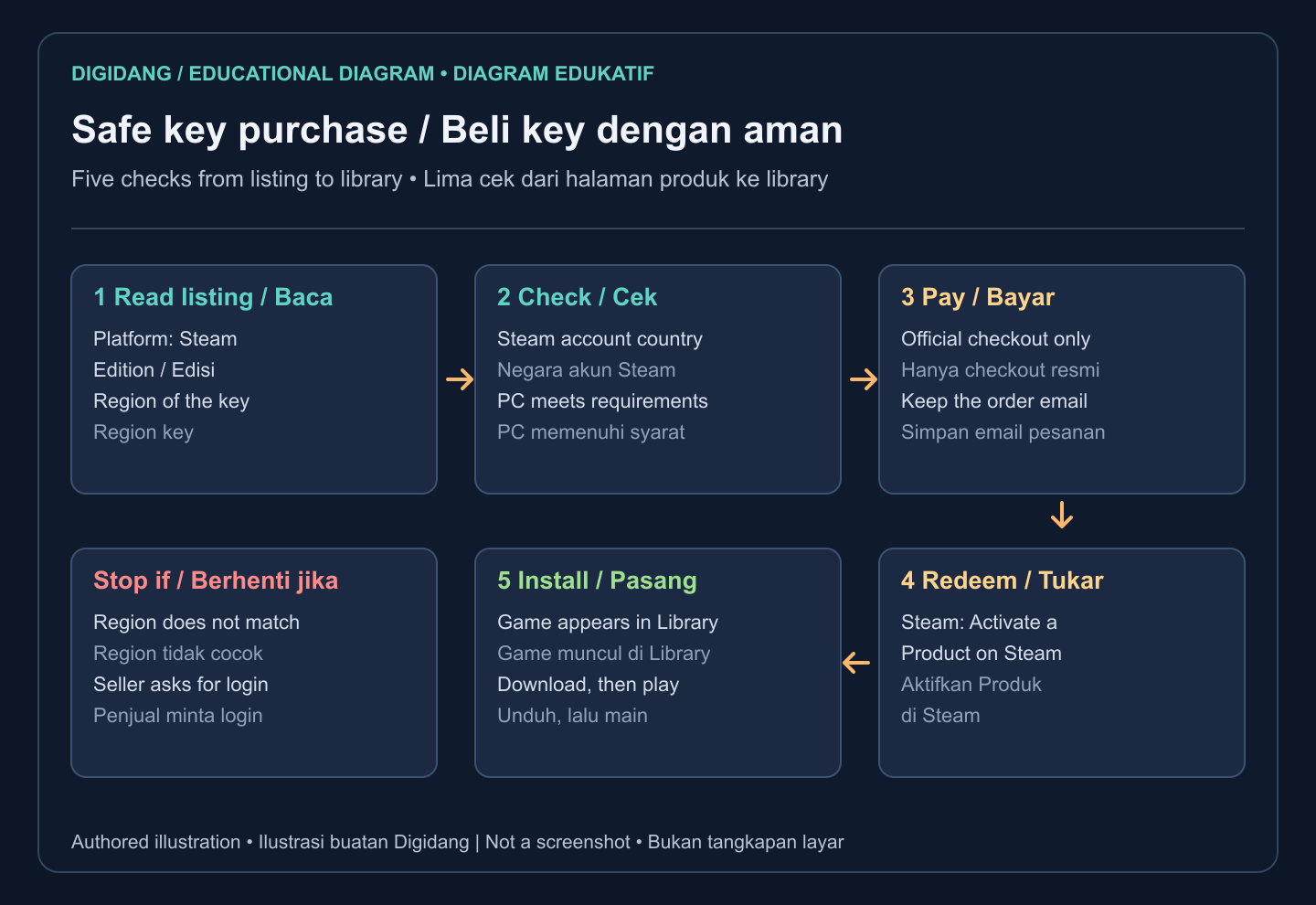
The buying flow is short, but the order matters. Every check that can stop a bad purchase happens before payment, and nothing after payment should ask for your Steam password. Follow these steps:
- Open the product page for the variant that matches your account, starting with the Global key.
- Read the title and description: platform should say Steam, and the edition and region should be the ones you want.
- Confirm your Steam account country and compare your PC with the requirements table above.
- Add the key to the cart and pay through the official checkout on the site.
- Keep the order confirmation and the email that carries your key, then redeem it on Steam.
Delivery information is listed on each product page, so you know where the code will appear before you buy. If you want to double check a code after it arrives and before redeeming, our game key verification page explains what you can and cannot confirm on your own. Treat the code like cash until it is redeemed: do not post it in screenshots, stream it, or send it to anyone. For broader saving habits, such as waiting for seasonal promotions, see how to save money on game keys.
How to activate a Hogwarts Legacy key on Steam
Activation takes a minute in the desktop client. Steam Support describes the process on its Activating a Product on Steam page: open the Games menu, choose Activate a Product on Steam, and follow the prompts to enter your code.
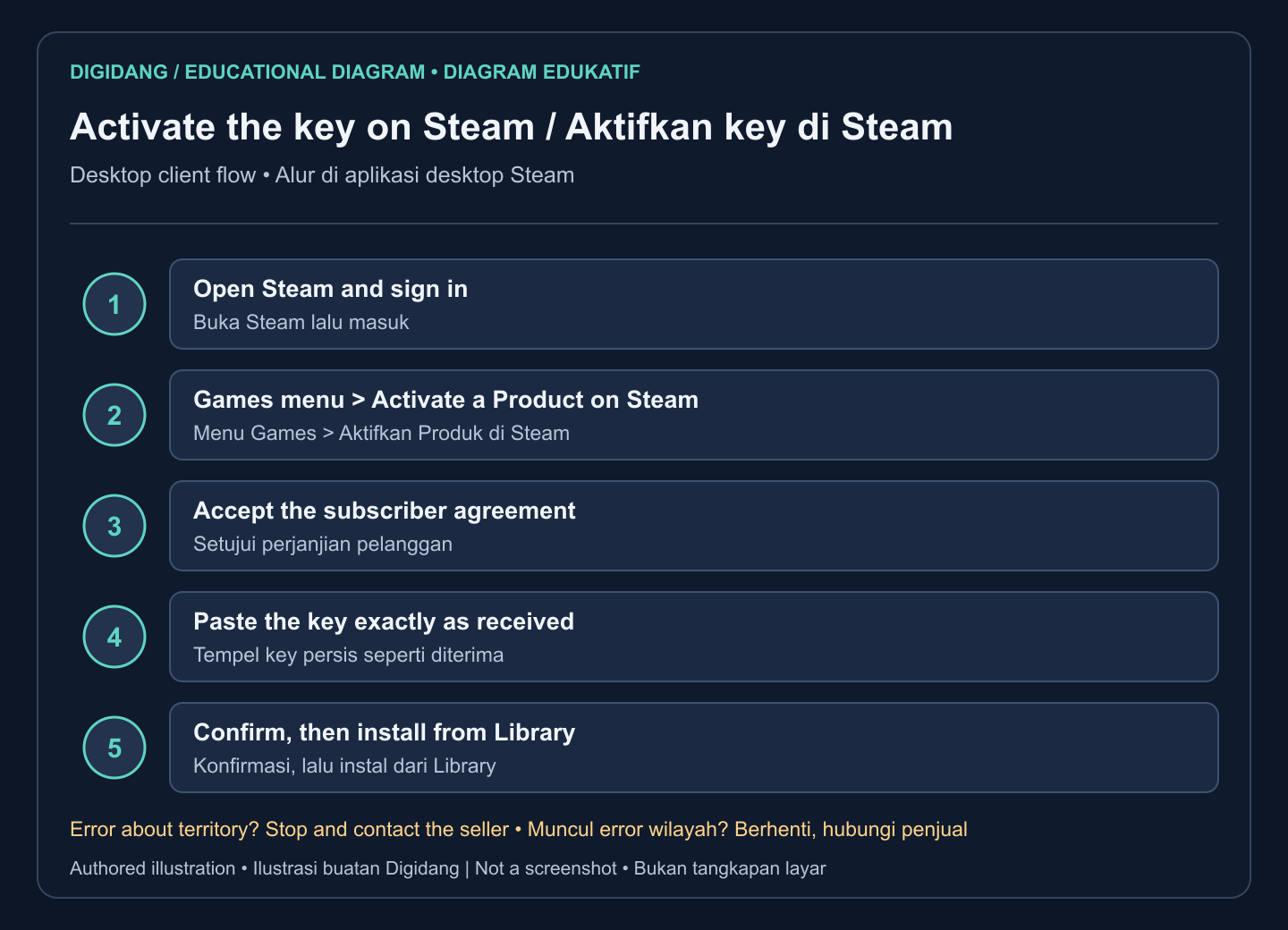
In practice the steps look like this. Sign in to the Steam account that should own the game. Open the Games menu at the top left and select Activate a Product on Steam. Accept the subscriber agreement, paste the key exactly as you received it, and confirm. Steam then shows the product name, which should read Hogwarts Legacy and, if you bought it, the Deluxe content. The game appears in your library, where you can start the download.
Copy and paste the key rather than typing it, since similar looking characters cause most input errors. If you see a message that the key was already activated, that the product is not available in your territory, or that the code is invalid, do not keep retrying. Steam may temporarily limit activation attempts after repeated failures. Instead, take a screenshot of the error and contact the seller. Our full walkthrough on redeeming a game code on Steam includes the browser method as well, and the Digidang key activation guide covers every platform we sell.
Which red flags mean you should not buy?
Some offers look attractive but carry risks that no discount can justify. Walk away if you see any of the following, whether on a marketplace, a social media post, or a chat message:
- The seller asks for your Steam username and password, or offers to log in and add the game for you.
- The seller sends a shared account login instead of a key; that account is not yours and can be taken back at any time.
- The listing does not state the region, or says something vague such as works everywhere without naming the platform.
- Payment must go through a personal bank transfer or a chat app instead of the store checkout.
- The offer promises a Definitive Edition or bonus content that the official Steam page does not list.
- There is no written refund or replacement policy.
Account sharing deserves a special warning. Steam ties the license to the account, so a game on someone else's account can disappear the moment the owner changes the password, and Steam does not help buyers of shared accounts. Protect your own account too: turning on Steam Guard and using strong, unique passwords blocks most takeovers. Our guide on securing game accounts with two factor authentication explains the setup.
What should you do if the key does not work?
If a Hogwarts Legacy key does not work, first read the exact Steam error, because it tells you what went wrong. A territory error means a region mismatch, already activated means the code was used, and invalid means a typing mistake or a bad code. Then contact the seller with your order number and a screenshot.
Refunds for keys follow the seller's policy, not Steam's. The Steam refund policy covers purchases made in the Steam store, and Steam Support's region article says it cannot refund third party keys. That is why a written store policy matters. Digidang's refund policy explains how failed keys are handled, and our article on refunding digital games compares the rules across stores.
Before you contact support, gather the details that speed things up: the order number, the email the key came in, the exact error text, and the region of your Steam account. If the issue is a region mismatch you caused by choosing the wrong variant, say so honestly; it helps the support team decide quickly. Never post the key publicly while you wait, because an unused code can still be claimed by someone else. If the key activated fine but the game will not launch, that is a technical problem rather than a key problem, so update your graphics drivers and verify the game files in Steam before anything else.
Is buying Hogwarts Legacy as a key a good choice?
For PC players on Steam, a key is a practical way to buy Hogwarts Legacy, especially when a store runs a promotion or when you prefer local payment methods. You end up with the same Steam license as a direct purchase: automatic updates, cloud saves, and the game permanently in your library.
The trade off is responsibility. With a key, you are the one checking edition, region, and hardware, and refunds depend on the seller rather than Steam's standard policy. If you follow the checks in this guide, those trade offs are small. Choose Standard unless you want the Dark Arts extras, pick the Global variant unless your account region clearly matches a regional one, and compare your PC with the official requirements before you pay.
If you are still deciding whether this is the right game for you, our roundup of top RPG games to buy puts it next to other story driven RPGs. When you are ready, start from the Hogwarts Legacy Steam Key (Global) page, check the details one last time, and keep the key private until it sits safely in your Steam library.
Frequently Asked Questions
Is a Hogwarts Legacy Steam key the same as buying on Steam?
Yes, once redeemed. The key adds the same license to your Steam account as a direct store purchase, with the same updates, achievements, and cloud saves. The difference is who handles refunds: the seller of the key, not Steam.
Which region should I choose for Hogwarts Legacy?
Choose the region that matches your Steam account store country. If you are unsure, a Global key listed as region free is the safest option. A regional key only works on accounts in the territory the publisher set.
Can I activate a Hogwarts Legacy Steam key on PlayStation or Xbox?
No. A Steam key only works on Steam for PC, including Steam Deck. Console versions need a code issued for that specific console store, and the game save does not transfer automatically between platforms.
Does the Digital Deluxe Edition add more story?
No. The Deluxe Edition adds the Dark Arts Pack and the Dark Arts Garrison Hat. The pack contains a Thestral mount, a cosmetic set, and the Dark Arts Battle Arena. The main story and quests are the same in both editions.
Can I upgrade from Standard to Deluxe later?
Yes. Steam sells the Dark Arts Pack separately, so a Standard owner can add the main Deluxe extras later from the Steam store page without buying the game again.
Do I need a VPN to activate a regional key?
No, and you should not use one. Steam Support says using a VPN to bypass region restrictions breaks the Steam Subscriber Agreement and can lead to account restrictions. Buy a key that matches your account instead.
How long does it take to receive the key?
Delivery details are shown on each Digidang product page before you pay. Once you have the key, activation on Steam takes about a minute, and the download time depends on your internet connection.
What happens if Steam says the product is not available in my territory?
That message means the key region does not match your account. Do not retry or use a VPN. Contact the seller with your order number and a screenshot of the error, and check their refund or replacement policy.
Digidang Team
Gaming enthusiast and marketplace expert sharing tips, guides, and the best gaming deals.