Buy Palworld Key: Safe Purchase, Region and Activation

To buy a Palworld key safely, pick a Steam key whose activation region matches your Steam store country, buy it from a seller that shows clear seller details and a refund policy, then redeem it in Steam under Activate a Product. Check the official Steam requirements first, because the key only unlocks the Windows PC version.
Palworld is the open world survival and creature collecting game from Pocketpair, and buying it as a digital key is one of the most common ways players add it to a Steam library. This guide walks through what a key actually is, which region variant fits your account, how to pay without getting burned, how to activate it, what your PC needs, and how to start a world with friends. Every factual detail about the game is linked to an official source, so you can double check anything before you spend money.
What do you get when you buy a Palworld key?
When you buy a Palworld key, you get a one time Steam activation code that adds the full game to your Steam account permanently. The key is not a separate copy or a rental. After redemption, Palworld behaves like any game bought directly from the Steam store: it sits in your library, updates automatically, and syncs with Steam Cloud.
A key is simply a license token. The publisher or an authorized distributor generates it, a store sells it, and Steam converts it into ownership the moment you enter it. Because the code is consumed on first use, a key that has already been redeemed cannot be used again, which is why buying from a trustworthy seller matters more than shaving a little off the price. If you want the full background on how keys move from publisher to player, our explainer on how digital game keys work covers the chain step by step.
It is also important to know what a Steam key does not cover. It does not unlock the Xbox, PlayStation, or Microsoft Store versions of the game, and it does not transfer between accounts once redeemed. If you mostly play on console, a Steam key is the wrong product. If you play on a Windows PC or a Steam Deck, it is exactly what you need, and the rest of this guide is written for you.
Is Palworld still in Early Access?
No. Palworld spent a long stretch in Early Access after its January 2024 launch, but Pocketpair took it out of Early Access with the full release, called version 1.0. The official Palworld 1.0 release changelog on Steam announced on July 10, 2026 that the game had exited Early Access, matching the date in Pocketpair's launch trailer announcement.
For buyers, the full release changes a few practical things. First, the game is no longer sold as an unfinished product, so the store page no longer carries the Early Access warning that explained the development plan. Second, the update cadence continues after launch: Pocketpair has kept shipping patches with bug fixes and balance changes, which Steam downloads for you automatically. Third, older guides and videos written during Early Access may describe systems that have since changed, so treat anything from before the full release with some caution.
What does not change is the product you buy. A Palworld key bought today activates the current version of the game on Steam, and you receive future updates the same way as everyone else. There is no separate full release key and no upgrade fee for people who already owned the Early Access version. The Wikipedia article on Palworld keeps a readable history of the major updates if you want context on how the game evolved.
Which Palworld key region should you choose?
The single most important choice when you buy a Palworld key is the region. Many Steam keys are restricted to a group of countries, and Steam checks that restriction against the store country of your account when you redeem the code. A mismatch usually ends with an error message instead of a game in your library, so it pays to check before checkout.
Start by confirming your own Steam store country, which you can see in your account details. Then read the region line on the product page. At Digidang, the Palworld listings come in several variants, and each page states the intended activation region near the price. Compare those two pieces of information and buy the variant that matches. The broader logic is the same one we explain for gift cards in understanding digital gift card regions.
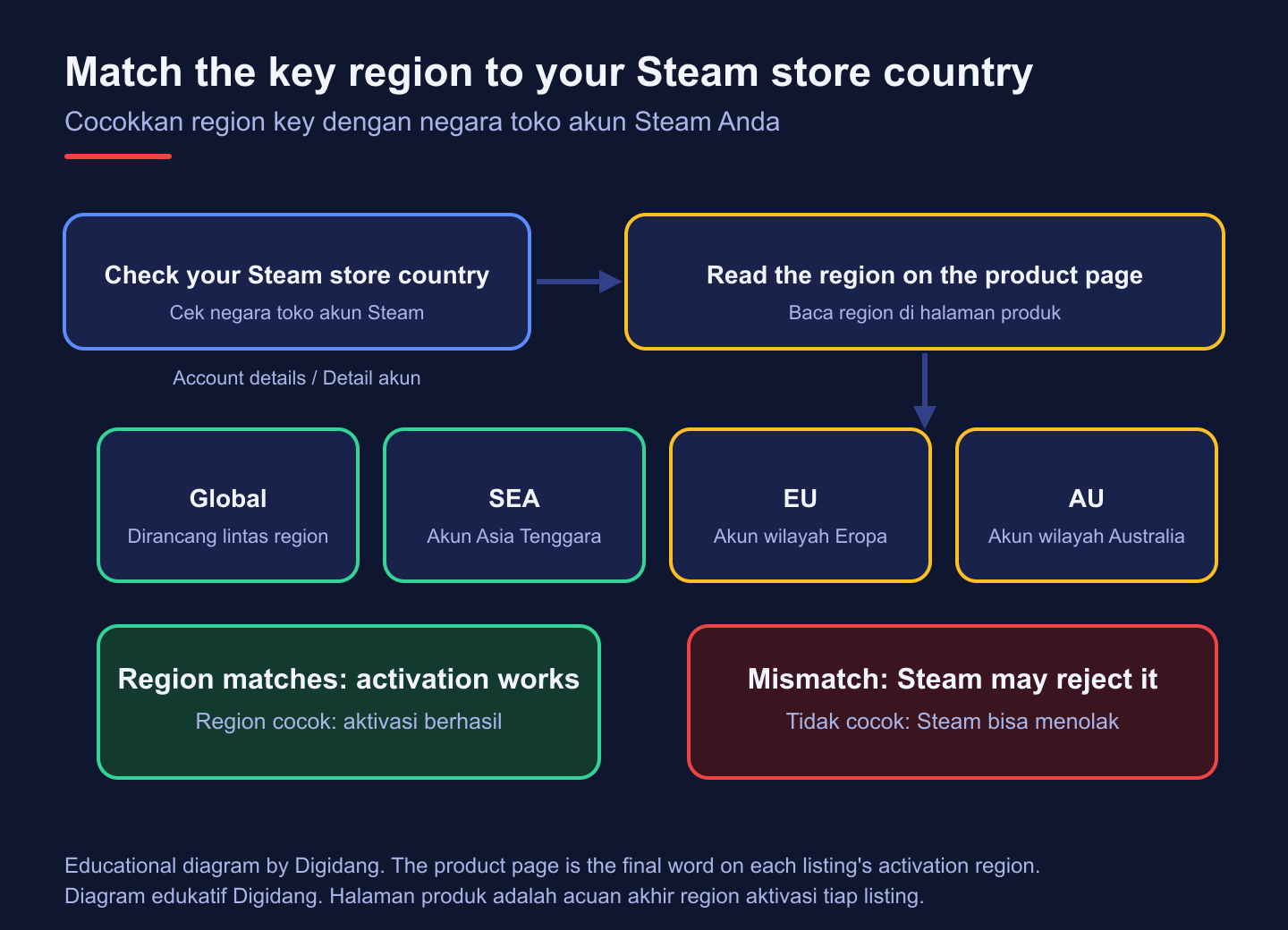
| Listing on Digidang | Intended activation | Best suited for | What to confirm |
|---|---|---|---|
| Palworld Steam Key (Global) | Listed as global, designed to work across regions | Most buyers, including those unsure about regional rules | The region line and seller notes on the product page |
| Palworld Steam Key (SEA Region) | Southeast Asia Steam accounts | Players whose Steam store country is in Southeast Asia, such as Indonesia | That your account country sits inside the SEA region |
| Palworld Steam Key (EU Region) | European Steam accounts | Players with a store country in Europe | The exact country list given by the seller |
| Palworld Steam Key (AU Region) | Australian region Steam accounts | Players with an Australian region store country | Whether nearby countries are included |
Prices for each variant change over time and are always shown on the individual product page, so we do not list them here. If you are comparing sellers rather than regions, our page on where to buy game keys in Indonesia lays out the trade offs.
How to buy a Palworld key safely
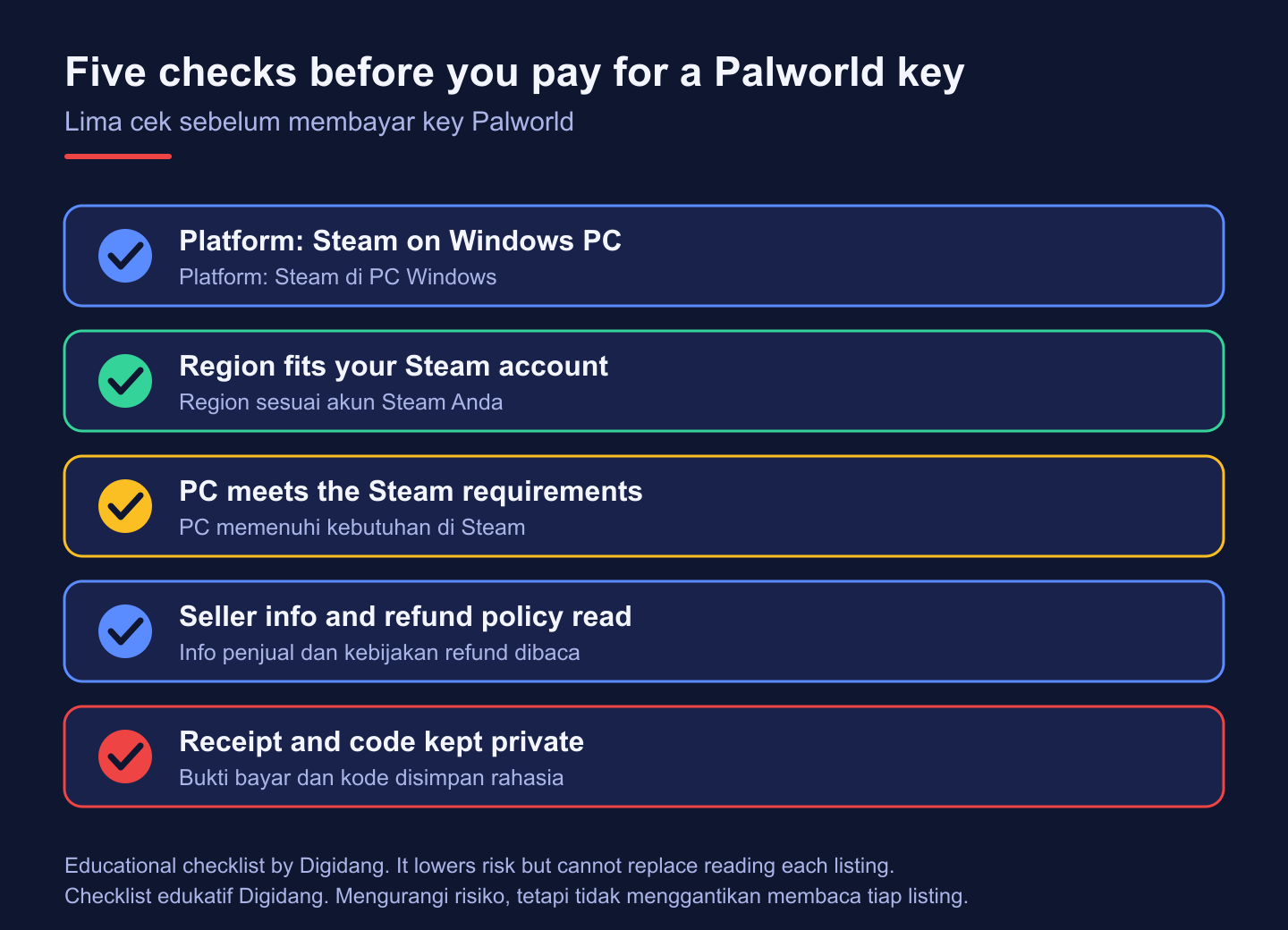
A safe purchase comes down to checking a handful of things in the right order. Most problems with keys, such as codes that were already used or codes for the wrong region, can be avoided before you pay. Run through these steps every time, even if you have bought from the same store before.
- Confirm the platform. Make sure the listing says Steam and that you plan to play on a Windows PC or Steam Deck.
- Match the region. Compare the region on the product page with your Steam store country.
- Check your PC. Compare your hardware with the official requirements covered later in this guide.
- Read the seller details. Some listings route the final purchase to a partner seller, so read the seller information on the page and that seller's terms before paying.
- Read the refund rules. Know what happens if a key fails, using the store's refund policy and buyer protection policy.
- Keep your proof. Save the receipt and the delivery email, and never share the code publicly.
Price is the trap that catches most people. A deal far below what other sellers charge is a reason to slow down, not speed up. Our guides on safe digital product shopping and checking whether a digital game code is genuine go deeper on red flags. You can read how Digidang sources and checks listings on the how we verify products page.
How to activate a Palworld key on Steam
Activating the key takes only a minute once you have a Steam account. If you do not have one yet, follow our walkthrough on how to create a Steam account first, and turn on Steam Guard so your library stays protected.
- Open the Steam client on your PC and sign in.
- Open the Games menu and choose Activate a Product on Steam, or use Add a Game at the bottom of your Library.
- Accept the Steam Subscriber Agreement when prompted.
- Paste the key exactly as delivered, including the dashes, and confirm.
- Palworld appears in your Library. Click Install, choose a drive, and wait for the download to finish.
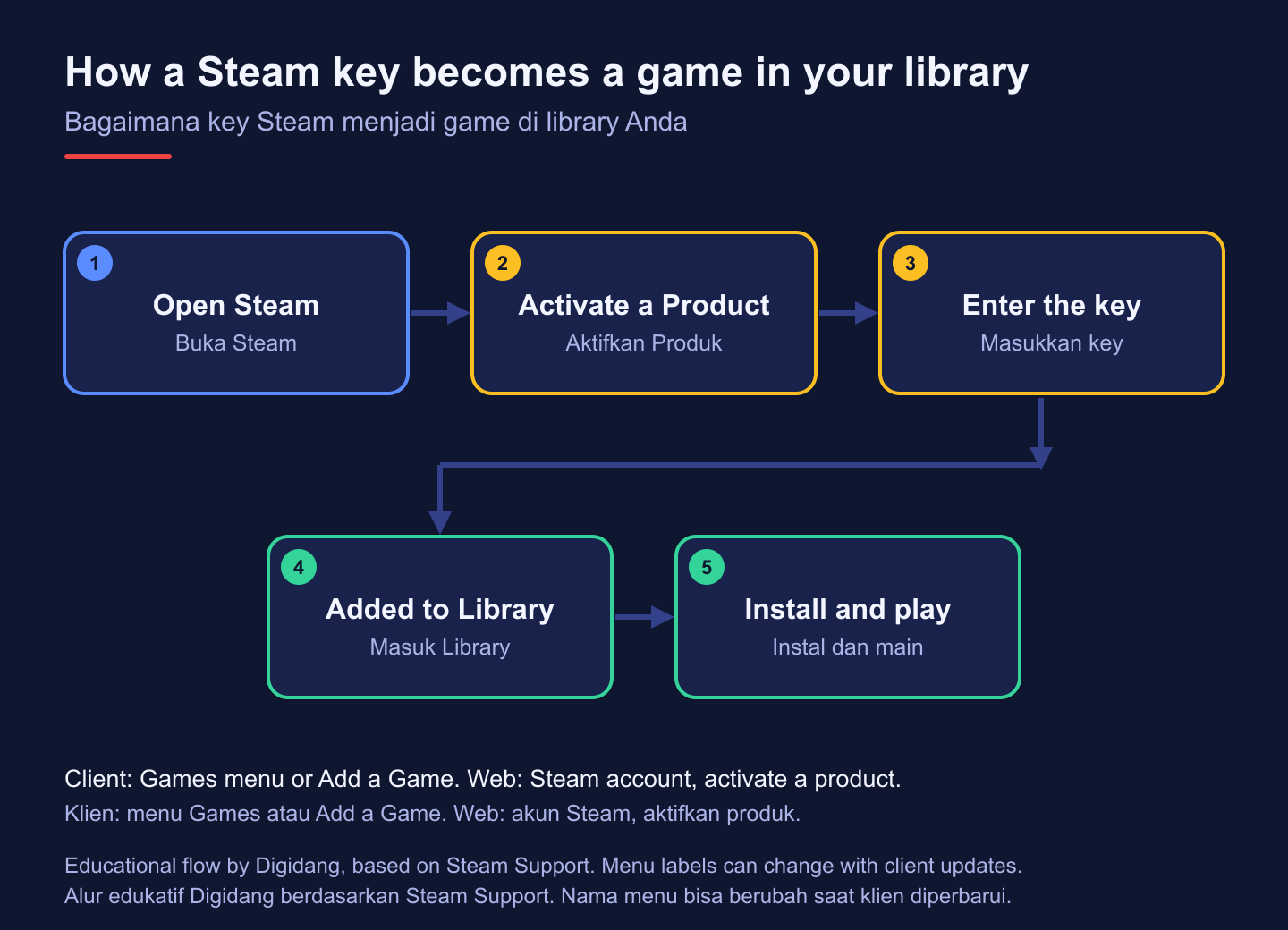
You can also redeem from a browser through your Steam account page, which is handy when you are away from your gaming PC: the game will be waiting in your library the next time you sign in. Valve documents the process on the Activating a Product on Steam support page. For screenshots of each screen, see our guide on how to redeem a game code on Steam, and for other storefronts check the activation guide for every platform.
Palworld system requirements on Steam
Before buying, compare your PC with the official requirements. The figures below come straight from the Palworld page on the Steam store, which also notes that an SSD is required and that performance may vary depending on how many Pals are active in your world. Requirements can be revised after updates, so recheck the store page on the day you buy.
| Component | Minimum | Recommended |
|---|---|---|
| Operating system | Windows 10, 64-bit | Windows 11, 64-bit |
| Processor | Intel Core i5-9400F | Intel Core i5-12400 or AMD Ryzen 5 5600X |
| Memory | 16 GB RAM | 32 GB RAM |
| Graphics | GeForce GTX 1660 | GeForce RTX 3060 Ti or Radeon RX 6700 XT |
| DirectX | Version 11 | Version 11 |
| Storage | 40 GB available, SSD required | 40 GB available, SSD required |
| Network | Broadband internet connection | Broadband internet connection |
Memory is the line people most often overlook. Palworld asks for more system memory than many games in its genre, so check the installed amount in Windows before checkout rather than assuming. If your machine sits close to the minimum, our tips on optimizing a PC for gaming help you squeeze out smoother frame rates. Steam lists the game as Steam Deck Verified on its store page, and our Steam Deck tips cover settings for handheld play.
Playing Palworld with friends
Multiplayer is a big part of why people buy Palworld. According to the official Steam store description, online co-op supports up to 4 players in one world, while a dedicated server can host up to 32 players together. Each player needs their own copy of the game, so a group of friends needs one key per person.
For a small group, the simplest option is for one person to host a co-op world and share an invite code. For a larger or always online group, a dedicated server is the better fit, because the world stays available even when the host is offline. Pocketpair publishes setup instructions in the official Palworld server guide, which is the right place to start if you plan to rent or run a server yourself.
Cross platform play is possible too. The Palworld history on Wikipedia records that update 0.5.0 in March 2025 added crossplay across platforms, so a Steam player can meet friends on other versions. Make sure everyone is on the same game version after a patch, since mismatched versions are the most common reason a friend cannot join. For more ideas on group games, browse our list of co-op games to play with friends.
Steam key or buying on the Steam store?
Both routes give you the same game, the same updates, and the same multiplayer access. The difference is in how you pay and what protections apply. Buying directly on Steam means Valve handles payment, and the Steam refund policy applies to that purchase. Buying a key from a store means the store's own refund and replacement terms apply instead, because Valve states it cannot refund purchases made outside of Steam, such as keys bought from third parties.
A key makes sense when you want a payment method Steam does not offer you, when a store has a competitive price, or when you want to gift the game to someone without logging into their account. The direct store route makes sense when you value Valve's refund window above everything else. Neither choice is wrong, as long as you understand which policy protects you. Our guide on how to refund a digital game explains how the rules differ between platforms and stores.
If you plan to add more games later, it is worth learning a few habits that keep costs down without raising risk, such as waiting for seasonal sales and comparing regions properly. Our roundup on saving money on game keys collects those habits in one place, and the game keys category lets you compare other Steam titles side by side.
Common problems after buying a Palworld key
Most activation problems fall into a few patterns, and almost all of them can be solved quickly if you know what the error means. Keep your receipt and delivery email open while you troubleshoot so you can contact support straight away if needed.
- Region error. Steam says the product is not available in your country. The key region does not match your store country. Contact the seller with your receipt instead of trying a VPN, which goes against Steam's terms.
- Key already used. Steam says the code has already been activated. Check your own library first, because you may have redeemed it already. If not, report it to the seller right away.
- Invalid code. Usually a typing error. Copy and paste the code rather than typing it, and check for confused characters such as the letter O and the digit zero.
- Too many attempts. Steam temporarily blocks activation after repeated failures. Wait before trying again rather than retrying many times in a row.
Account security matters too, because a Steam account with a valuable library is a target. Turn on Steam Guard and read our guide on securing your game account with two factor authentication. Never paste your Steam password into a site that claims to activate keys for you; activation only ever happens inside Steam itself, as Valve explains in the Steam Subscriber Agreement and its support pages.
Frequently Asked Questions
Is it safe to buy a Palworld key instead of buying on Steam?
Yes, as long as the seller is trustworthy, the region matches your account, and you understand the store's refund terms. The key redeems the same game you would get from the Steam store, with the same updates and multiplayer access.
Does a Palworld Steam key work on Xbox or PlayStation?
No. A Steam key only unlocks the Steam version for Windows PC and Steam Deck. Console versions are sold through their own stores and need their own purchases.
Which Palworld key region should I buy in Indonesia?
If your Steam store country is Indonesia, a global key or a key marked for the Southeast Asia region is the usual fit. Always confirm the region line on the product page before paying.
Is Palworld still an Early Access game?
No. Pocketpair released the full version and the game left Early Access, as stated in the official release changelog on Steam. A key bought now activates the current full game.
How many friends can play Palworld together?
The Steam store page states that online co-op supports up to 4 players and a dedicated server supports up to 32 players. Every player needs their own copy.
What should I do if my Palworld key says it was already used?
First check your own Steam library in case you redeemed it earlier. If the game is not there, contact the seller with your receipt and the exact error message, and do not post the code publicly.
Can I gift a Palworld key to a friend?
Yes. Send the unused code privately to your friend, and make sure the key region matches their Steam store country, not yours. Once they redeem it, the game belongs to their account.
Do I need a VPN to activate a region key?
No, and you should avoid it. Buy a key whose region matches your Steam store country instead. The Steam Subscriber Agreement forbids disguising your location to get around geographical restrictions, which can put your account at risk.
Ready to buy a Palworld key?
Buying Palworld as a Steam key is straightforward once you know what to check: the platform, the region, your PC, the seller, and the refund rules. Get those right and activation takes a minute, after which the full game is yours to play solo or with friends. Pick the variant that matches your account from the Palworld Steam key product page, and keep your receipt until the game is safely in your library. New to keys in general? Start with our beginner's guide to buying digital game keys, or read more about the genre in our overview of survival games.
Digidang Team
Gaming enthusiast and marketplace expert sharing tips, guides, and the best gaming deals.