NordVPN Guide: Official Prices, Plans, and Tips for Gamers

NordVPN is a paid VPN service with three plans: Basic, Complete, and Complete Max. This guide sums up the official price of each plan, the gap between intro and renewal prices, the 30-day money-back guarantee, store region rules for games, and when a VPN actually helps gamers.
What Is NordVPN?
NordVPN is a virtual private network service that encrypts your internet traffic and routes it through NordVPN servers before it reaches its destination. According to Wikipedia, NordVPN is a Lithuanian service incorporated in Panama, founded in 2012, and developed by the Dutch company Nord Security.
The idea is simple. Without a VPN, your internet provider can see which sites and servers you connect to, and the site on the other end sees your home IP address. With a VPN switched on, your provider only sees that you are connected to a VPN server, while the destination sees the IP address of that server. Everything between your device and the VPN server is encrypted.
One thing to get straight early: a VPN is not an invisibility cloak. The moment you sign in to Steam, Google, or Discord, that service still knows who you are. A VPN protects the connection, not the identity behind your account. Basic habits such as two-step verification on game accounts still matter, with or without a VPN.
Official NordVPN Prices Right Now
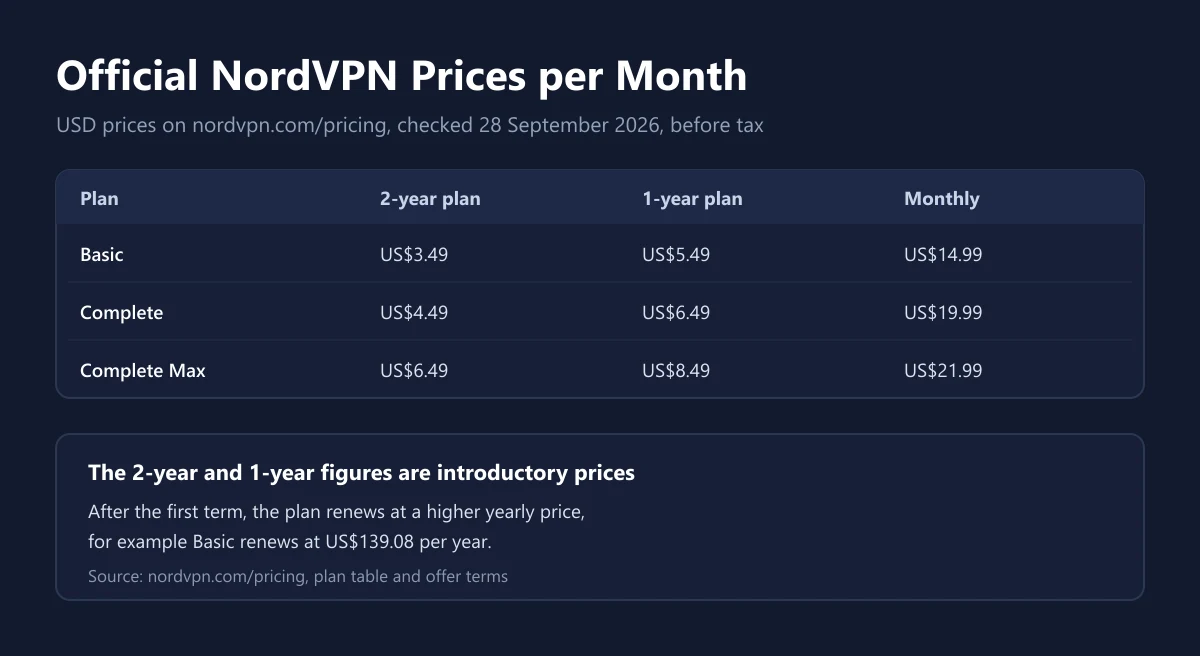
The prices below come from the NordVPN pricing page as checked on 28 September 2026. From our connection the page showed US dollar prices, with a note that VAT may apply. The currency and payment options on the checkout page can differ depending on your country.
| Plan | 2-year plan | 1-year plan | Paid monthly |
|---|---|---|---|
| Basic | US$3.49 a month (US$94.23 for the first 27 months) | US$5.49 a month (US$65.88 for the first 12 months) | US$14.99 a month |
| Complete | US$4.49 a month (US$121.23 for the first 27 months) | US$6.49 a month (US$77.88 for the first 12 months) | US$19.99 a month |
| Complete Max | US$6.49 a month (US$175.23 for the first 27 months) | US$8.49 a month (US$101.88 for the first 12 months) | US$21.99 a month |
When we checked, the 2-year plan came with 3 extra months, so the first term runs for 27 months. The monthly figures above are the upfront bill divided by the months, not a monthly charge. You still pay the whole first term at once, for example US$94.23 for Basic on the 2-year plan, according to the NordVPN price breakdown.
Tax is the other piece. The pricing page says VAT may apply, so the final figure at checkout can be a little higher than the table. We explain how tax works on digital subscriptions bought from abroad in our guide to VAT on digital products. If you compare the official price with a code from a store, compare the total you actually pay, not the monthly figure.
Basic vs Complete vs Complete Max
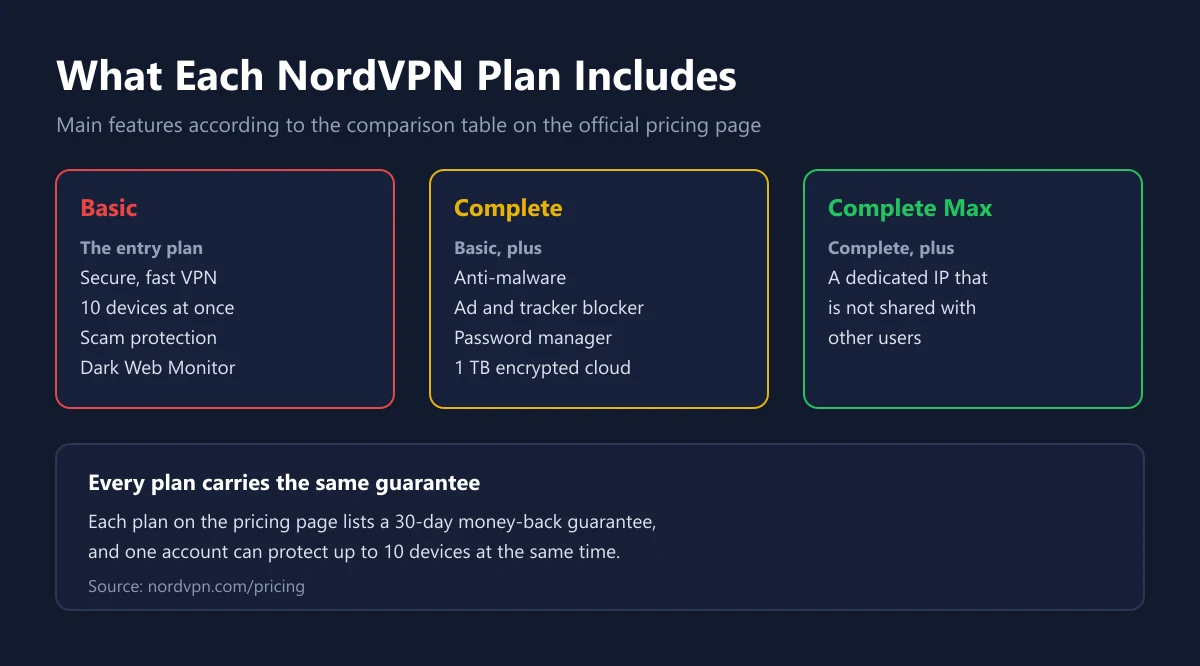
All three plans use the same VPN service. The difference is in the extras. According to the official comparison table, every plan includes a secure VPN for 10 devices at once, scam and phishing protection, and Dark Web Monitor, which watches up to 5 email addresses for data leaks.
| Feature | Basic | Complete | Complete Max |
|---|---|---|---|
| Secure VPN for 10 devices | Yes | Yes | Yes |
| Scam and phishing protection | Yes | Yes | Yes |
| Anti-malware and browsing protection | No | Yes | Yes |
| Ad and tracker blocker | No | Yes | Yes |
| Email, call, and message protection | No | Yes | Yes |
| Cross-platform password manager | No | Yes | Yes |
| 1 TB of encrypted cloud storage | No | Yes | Yes |
| Dark Web Monitor Pro | No | Yes | Yes |
| Dedicated IP | No | No | Yes |
If all you need is a protected connection while gaming or on public Wi-Fi, Basic is enough. Complete makes sense when you genuinely want a password manager and encrypted cloud storage on the same bill. If you already use a dedicated password manager, like the one in our 1Password guide, those extras overlap and Basic is the cheaper choice.
Complete Max adds a dedicated IP, an IP address that only your account uses. According to the NordVPN pricing page, this feature is only in Complete Max. It helps when a service is wary of VPN addresses shared by many people. For most gamers it is not essential.
Intro Prices and Renewal Prices
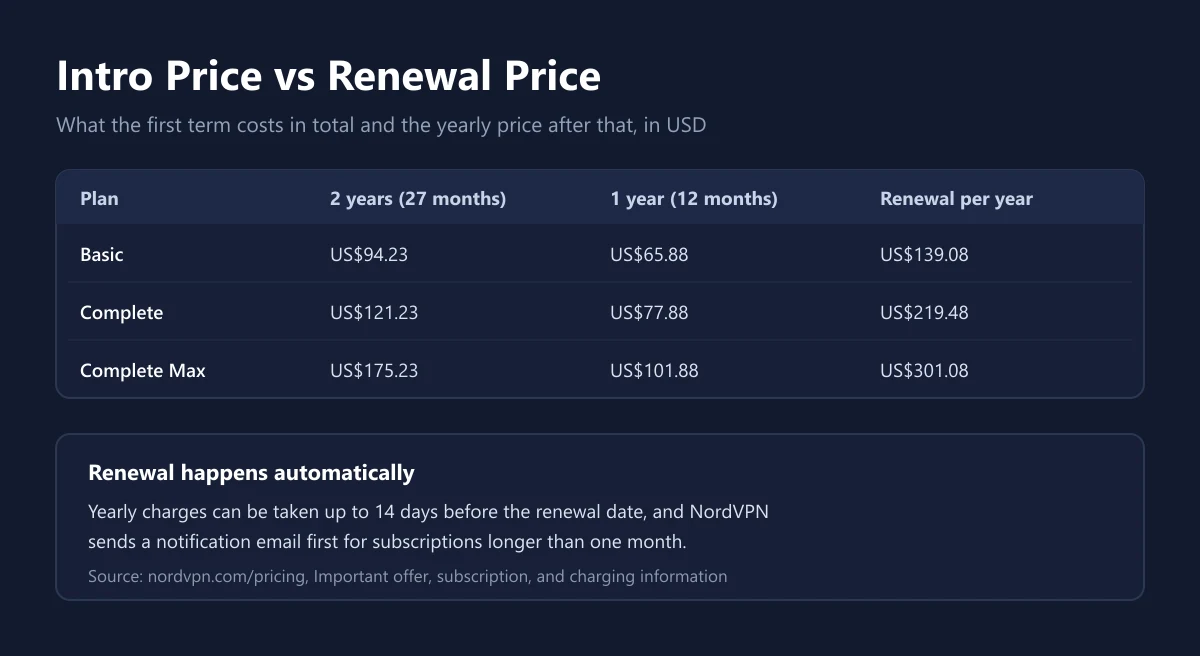
This is the part that deserves the most attention before you pay. The NordVPN offer terms say the introductory price only covers the first term. After that, the plan renews automatically at the renewal price, which was US$139.08 a year for Basic, US$219.48 for Complete, and US$301.08 for Complete Max when we checked.
On timing, NordVPN writes that yearly charges can be taken up to 14 days before the renewal date, and that for subscriptions longer than one month it always sends a notification email before the charge. Renewal prices can also change, so read that email instead of deleting it.
One more detail. If you upgrade, say from Basic to Complete through Nord Account, the pricing page FAQ says the change takes effect when your current subscription ends. Pick the right plan from the start so you do not wait a full term for the extra features.
A sensible approach: if you only want to try it, pay monthly first or lean on the money-back guarantee. Once you are sure, the 2-year plan gives the lowest monthly price. Set a calendar reminder a few weeks before the first term ends, then decide whether to continue at the renewal price or stop.
NordVPN for Gamers: When It Helps and When It Does Not
Many people buy a VPN hoping their ping will drop. In reality, a VPN adds a stop on the data path. Your packets travel to the VPN server first and only then to the game server. Because the path gets longer, ping usually stays the same or rises. It can only fall when your provider's route to the game server is poor and the VPN server happens to have a better one.
| Situation | Does a VPN help? | Notes |
|---|---|---|
| Playing on public Wi-Fi, in a cafe, or at a tournament venue | Yes | Your traffic is encrypted on a network you do not control |
| Hiding your home IP in voice chat or player-to-player games | Often | Other people see the VPN server's IP, not your home IP |
| High ping caused by a bad provider route | Sometimes | Test with and without the VPN, then compare |
| High ping caused by a weak signal or low data | No | Fix the connection first |
| The game server is having an outage | No | A VPN cannot bring a server back |
| Buying games at another region's price | Do not | It breaks store terms and can get the account closed |
The honest test is a direct comparison. Play one session without the VPN and note the ping shown in the game menu, then repeat with the VPN server closest to the game server. If the result is not better, turn the VPN off while playing and switch it on only when you need the security. Ping problems that start with your home connection are usually solved faster by picking the right data plan, which we cover in our guide to data plans for gamers.
The clearest benefit for gamers is network security. When you play in a cafe, a dorm, or at a tournament venue, you do not know who else is on the same network. VPN encryption stops other people on that network from simply reading your traffic.
VPNs and Game Store Region Rules
The biggest temptation for VPN users is buying games in a cheaper region. For Steam the answer is clear. The Steam Subscriber Agreement forbids IP proxying or other methods of disguising where you live, whether to get around regional restrictions on game content or to buy at pricing that does not apply to your region. Valve may terminate access to an account that does this.
The risk is bigger than a cancelled order. A Steam library built over years can disappear because of one cheap purchase. Use the VPN to protect your connection, not to switch store regions. If you want lower prices, the safe route is waiting for official sales or topping up with codes that match your account region, as explained in our Steam Wallet Code guide, our Steam voucher price comparison, and our explainer on gift card regions.
The same principle applies to other stores. Almost every platform ties prices and content to the account region, and forcing a region change often ends with a balance you cannot spend. We collect ways to save on digital games without breaking the rules in how to buy digital games cheaply.
The 30-Day Guarantee, Renewal, and Cancellation
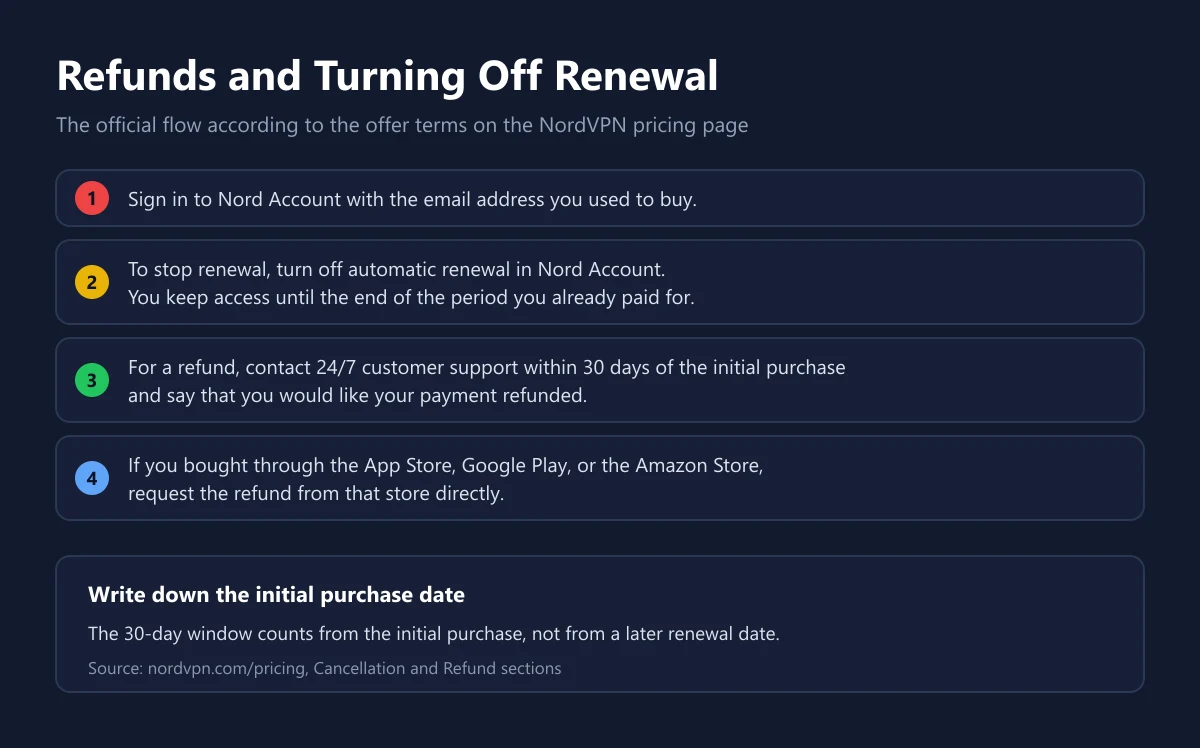
Every NordVPN plan lists a 30-day money-back guarantee. The refund terms explain that you must ask within 30 days of the initial purchase by contacting 24/7 customer support and saying that you want your payment refunded. Purchases made through the Amazon Store, the App Store, or Google Play must be refunded by those stores directly.
Turning off renewal is a different thing. You can stop automatic renewal at any time in Nord Account, and the service stays active until the end of the period you paid for, according to the Cancellation section of the pricing page. Turning off renewal does not refund anything by itself. If you want both, do the two steps separately.
The guarantee covers purchases made directly from NordVPN. If you buy a code or a prepaid card from another store, returns follow that store's rules. We explain the usual pattern for refunds on digital products, including the mistakes that get requests rejected, in how to refund digital games.
How to Buy NordVPN Safely
Buying directly on the official site is the simplest route. According to the NordVPN payment FAQ, the options include major credit and debit cards, PayPal, digital wallets such as Google Pay, Apple Pay, UnionPay, and GrabPay, a range of cryptocurrencies, and in-app purchases through app stores. The options shown at checkout depend on your country and currency.
If you buy an activation code from a store, check a few things. First, the duration and the plan name, because Basic and Complete differ a lot. If the plan name in the store does not match the name on the official page, ask which features are included before you pay. Second, whether the code is for a new account or can be added to an existing one. Third, the replacement policy if the code fails. Our catalogue has NordVPN 1 year and NordVPN 2 years, with ExpressVPN 1 year as an alternative.
Avoid shared VPN accounts sold cheaply on social media. Those accounts are used by many people at once, can be shut down at any time, and their owner can see the connected devices. We explain how to judge a seller before paying in how to choose a top-up platform, safe shopping tips for digital products, and how to check that a digital code is genuine. Once you are set up, secure the email linked to your Nord Account too, since that email is the key to managing the subscription and refunds.
Frequently Asked Questions
How much does NordVPN cost per month?
When we checked on 28 September 2026, Basic cost US$3.49 a month on the 2-year plan, US$5.49 on the 1-year plan, and US$14.99 when paid monthly, according to the NordVPN pricing page. VAT may apply.
Does NordVPN have a free plan?
The official pricing page only shows the paid Basic, Complete, and Complete Max plans. Instead, NordVPN gives a 30-day money-back guarantee on every plan.
How many devices can use one NordVPN account?
One account can protect up to 10 devices at the same time, according to the NordVPN pricing page. The limit is the same on all three plans.
Does NordVPN lower my ping in games?
Usually not. A VPN adds a stop on the data path, so ping tends to stay the same or rise. It can only drop when your provider's route to the game server is poor, so always test with and without the VPN.
Can I use a VPN to buy Steam games at another region's price?
No. The Steam Subscriber Agreement forbids disguising where you live to buy at pricing that does not apply to your region, and Valve may terminate access to accounts that break the rule.
What is the difference between NordVPN Basic and Complete?
Complete adds anti-malware, an ad and tracker blocker, a password manager, and 1 TB of encrypted cloud storage on top of Basic, according to the NordVPN comparison table.
Does a NordVPN subscription renew automatically?
Yes. After the first term, the plan renews at the renewal price, which is usually higher. You can turn off automatic renewal at any time in Nord Account and keep using the service until the current period ends.
How do I ask for a NordVPN refund?
Contact 24/7 customer support within 30 days of the initial purchase and ask for your payment back, as set out in the NordVPN refund terms. Purchases through the App Store, Google Play, or the Amazon Store are refunded by those stores.
Which payment methods does NordVPN accept?
Major credit and debit cards, PayPal, digital wallets such as Google Pay, Apple Pay, and GrabPay, cryptocurrencies, and purchases through app stores. The options you see depend on your country and currency at checkout.
Digidang Team
Gaming enthusiast and marketplace expert sharing tips, guides, and the best gaming deals.