1Password Guide: Prices, Features, and Game Account Safety
1Password is a paid password manager with Individual and Families plans. This guide covers the official prices, the 14-day free trial, how the Secret Key works, Watchtower and two-step verification codes, and practical steps for securing your game accounts one at a time.
What Is 1Password?
1Password is a password manager app that stores logins, cards, and secure notes in an encrypted vault, then fills them in automatically in your browser and apps. According to Wikipedia, 1Password is developed by the Canadian software company AgileBits and runs on iOS, Android, Windows, Linux, and macOS.
The problem 1Password solves is very close to a gamer's daily life. One person can have Steam, Epic Games, Riot, PlayStation, Xbox, Nintendo, and Discord accounts plus a main email address. Remembering a unique password for all of them is close to impossible, so plenty of people reuse one password across many accounts. Once that password leaks from one service, the other accounts are at risk too.
A password manager breaks that chain. You only remember one 1Password account password, and the app creates a different random password for every service. When you sign in, the app or browser extension fills it in for you. We covered the same idea for Roblox players in our Roblox password manager article, and this guide goes deeper into one product.
Official 1Password Prices Right Now
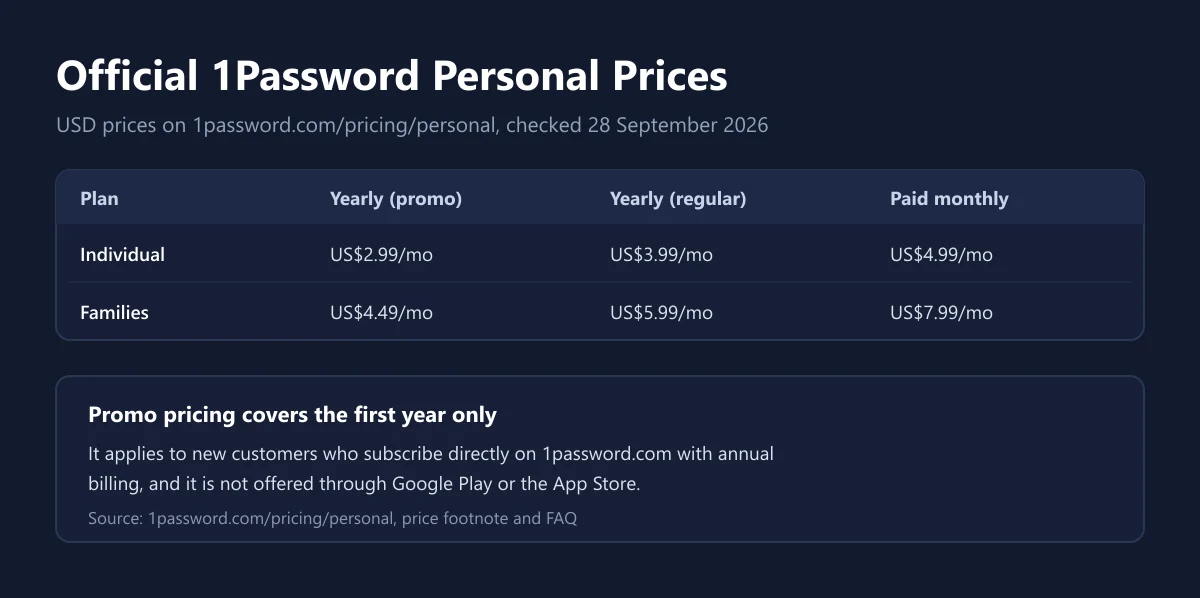
The prices below come from the 1Password personal pricing page as checked on 28 September 2026. From our connection the page showed US dollar prices. Yearly prices are written as a monthly figure but are billed for the whole year at once.
| Plan | Yearly, first-year promo | Yearly, regular price | Paid monthly | Seats in the base plan |
|---|---|---|---|---|
| Individual | US$2.99 a month | US$3.99 a month | US$4.99 a month | 1 |
| Families | US$4.49 a month | US$5.99 a month | US$7.99 a month | 5 |
The promo price comes with conditions. According to the pricing page footnote, it is only for new customers subscribing directly through 1Password.com, only for the first year, and only with annual billing. It is not available through Google Play, the Apple App Store, or other third-party app stores. From the second year, the price goes back to the regular rate.
You can try before you pay. The 1Password FAQ says both Individual and Families can be tried free for 14 days. For payment, 1Password accepts credit cards, ACH direct debit for eligible US bank accounts, and 1Password gift cards if your account is activated on 1Password.com. Tax can add to the final total, as we explain in our guide to VAT on digital products.
Individual or Families
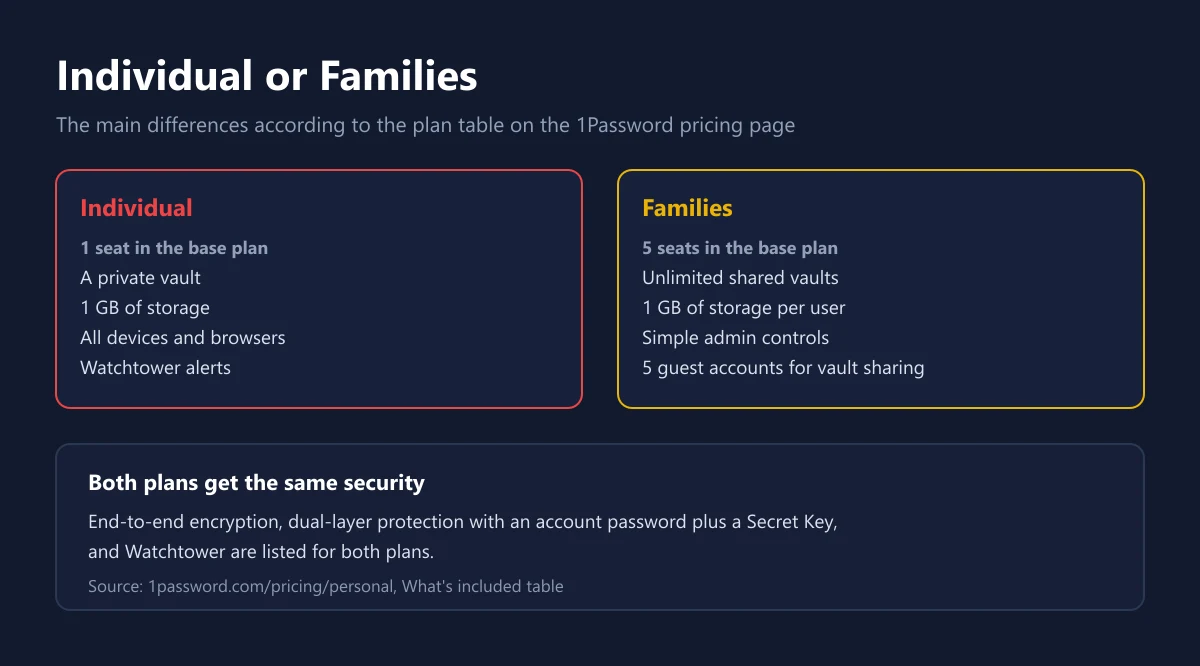
Individual is designed for one person. Families includes everything in Individual, plus the ability to invite family members, share unlimited vaults, and manage access with simple admin controls. The official plan table lists 5 seats in the Families base plan, 1 GB of storage per user, 5 guest accounts for vault sharing, and the ability to add, remove, or recover members. The last three are not part of Individual.
For a gaming household, Families has real uses. Parents can keep shared console logins, digital store accounts, or the Wi-Fi password in a shared vault, while each member still has a private vault the others cannot see. If your family also shares other subscriptions, like the ones in our Nintendo Switch Online guide, a shared vault keeps the plan owner's account details tidy.
If you live alone or only manage your own accounts, Individual is enough. Note that both plans get the same security. End-to-end encryption, dual-layer protection with an account password and a Secret Key, and Watchtower alerts are listed for both. You do not get stronger security by paying for Families, you get extra seats and sharing features.
How 1Password Security Works
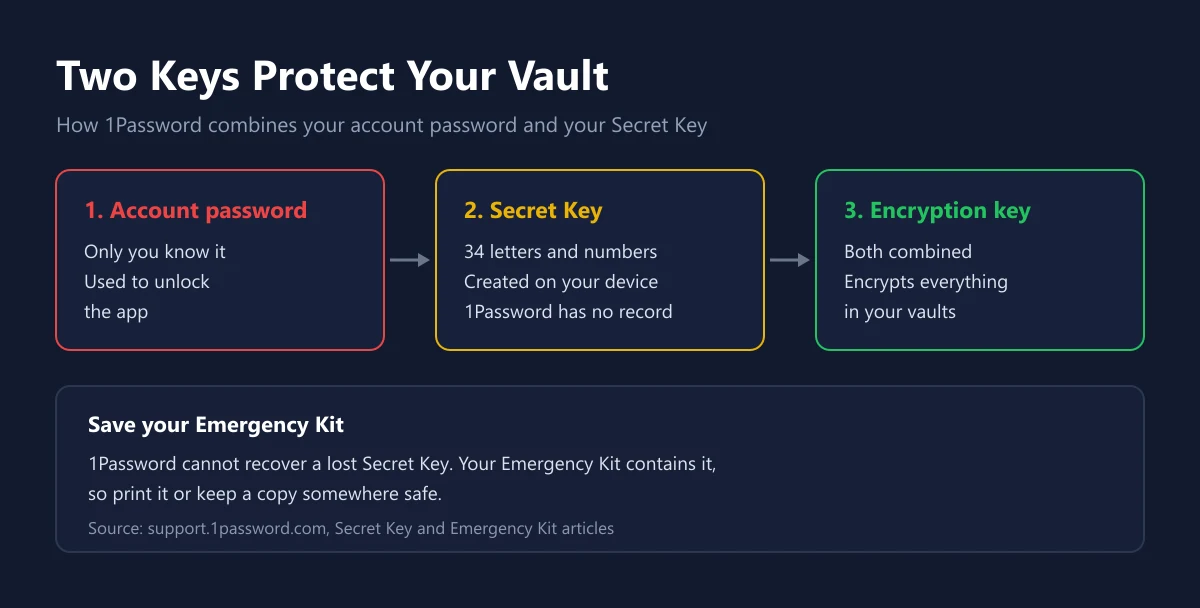
The strength of 1Password lies in two keys. The first is the account password that only you know. The second is the Secret Key. According to 1Password support, the Secret Key is 34 letters and numbers separated by dashes, created on your own device, and never recorded by 1Password. The two are combined into the encryption key for everything in your vaults.
That has two sides. The good side is that someone who steals your account password still cannot open your vault from a new device without the Secret Key. The side to watch is that 1Password cannot recover a lost Secret Key. The same page also stresses that the Secret Key is not a backup code, so it will not help if you forget your account password.
That is why you should keep your Emergency Kit. The Emergency Kit is a PDF with your account details and Secret Key, plus a space to write your account password. 1Password suggests printing it and storing it somewhere safe. If you turn on two-step verification for your 1Password account, also write down the 16-character secret next to the QR code, so you can still sign in if you lose your authenticator app.
The Features That Matter Most for Game Accounts
Out of all the features, these are the ones gamers will notice most. Every feature in the table is available on both Individual and Families.
| Feature | What it does | Gaming example |
|---|---|---|
| Password generator | Creates strong random passwords | A different password for Steam, Epic, and Riot |
| Autofill | Fills logins in browsers and apps | Sign in to game stores without retyping |
| Watchtower | Flags weak, reused, or breached passwords | Know which account to fix first |
| One-time passwords | Stores two-step verification codes | Login codes for accounts that support authenticator apps |
| Passkeys | Password-free sign-in on supported sites | Faster logins that resist phishing |
| Travel Mode | Hides vaults while you travel | Only travel-safe vaults show on your devices during a trip |
Watchtower delivers results fastest. According to 1Password support, Watchtower tells you about breaches, weak passwords, duplicate items, and sites that support two-step verification, and it keeps updating as new breaches are reported. After moving all your logins into 1Password, open Watchtower and you instantly have a to-do list.
For passkeys, the 1Password passkey guide explains that passkeys saved in 1Password work like any other item, so you can view, move, and even share them. A passkey cannot be guessed and cannot be typed into a fake site, which makes it a good fit for accounts that attract phishing.
Securing Game Accounts with 1Password, Step by Step
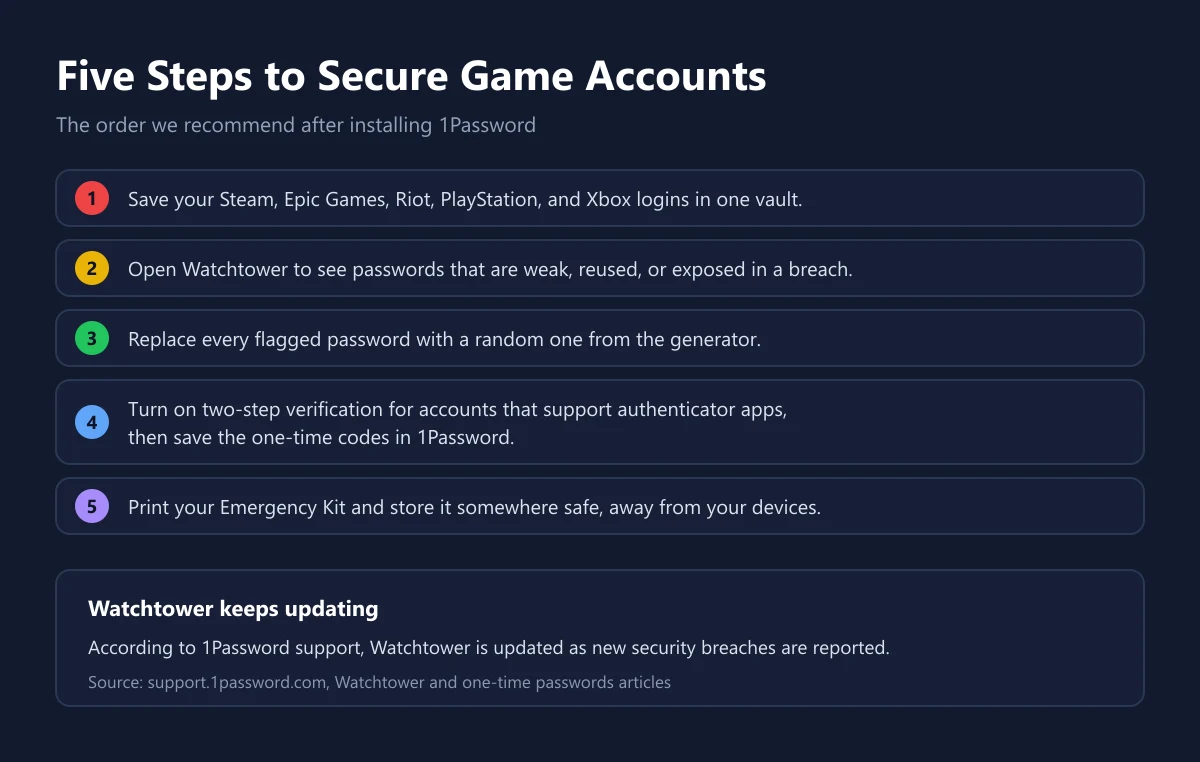
Start by gathering every login into one vault. The 1Password app offers to save a login each time you sign in to a site, so the easiest method is signing in to Steam, Epic Games, Riot, PlayStation, Xbox, and Discord one by one. Do not forget your main email, because email is the recovery door for almost every game account.
Next, open Watchtower and work through the list, starting with your most valuable account. Replace weak or reused passwords with random ones from the generator. Accounts that hold a balance or a big library, like the one covered in our Steam Wallet Code guide, should come first.
Then set up two-step verification. 1Password can act as an authenticator for sites that show a QR code or a string of characters when you turn on two-step verification. The code then appears in the same login item and can be filled in automatically. We explain how to turn on two-step verification across gaming platforms in our 2FA guide for game accounts.
There is one trade-off. Keeping passwords and verification codes in the same app is very convenient, but both then depend on one vault. A middle path worth considering: keep codes for everyday game accounts in 1Password, and keep the codes for your main email and for 1Password itself in a separate authenticator app. Finally, print your Emergency Kit and store it somewhere safe.
If Your 1Password Subscription Stops
A fair question is whether your data disappears if you forget to renew. According to 1Password support, an account whose subscription lapses is frozen, not deleted. You can still view and copy what is in your vaults, but some functions stop until you reactivate.
| While the account is frozen | Status |
|---|---|
| View all items | Still possible |
| Copy passwords | Still possible |
| Copy items to vaults outside the account | Still possible |
| Add new items | Not possible |
| Edit items | Not possible |
| Fill items in the browser | Not possible |
| Invite family members | Not possible |
You can reactivate at any time to unlock every function. If you belong to a family account, the family organizer is the one who needs to reactivate. So a gap in your subscription does not lock you out of your game accounts, it only makes everyday sign-ins more tedious until the subscription is active again.
How to Buy 1Password Safely
The safest route is subscribing directly on the official site, especially if you want the first-year promo price. If you buy a code or gift card from a store, check the plan (Individual or Families), the duration, and whether the code can be used on an existing account. Our catalogue has 1Password Individual for 1 year, and you can compare its price with the official 1Password prices.
Never buy access to someone else's password manager account. Shared accounts are risky enough for streaming services. For a password manager the consequences are far worse, because the account owner can see every password you save. We explain how to judge a seller in how to choose a top-up platform, safe shopping tips for digital products, and how to check that a digital code is genuine.
Finally, avoid paying twice for the same thing. NordVPN's Complete plan, for example, already includes a password manager, as we explain in our NordVPN guide. If you already use a Microsoft account for console and PC, review its security settings with our Microsoft account article, then save that login in 1Password alongside your other game accounts.
Frequently Asked Questions
How much does 1Password cost per month?
When we checked on 28 September 2026, Individual cost US$2.99 a month billed yearly (first-year promo), US$3.99 at the regular price, or US$4.99 when paid monthly, according to the 1Password pricing page.
Can I try 1Password for free?
Yes. 1Password offers a 14-day free trial of both Individual and Families before you choose a plan.
How many people can use 1Password Families?
The Families base plan includes 5 seats, plus 5 guest accounts for vault sharing, according to the 1Password plan table.
What is the Secret Key in 1Password?
The Secret Key is a secret created on your device and combined with your account password to encrypt your data. 1Password does not store it and cannot recover it, so keep your Emergency Kit safe.
Can 1Password store two-step verification codes?
Yes. 1Password can act as an authenticator for sites that show a QR code or a string of characters when you turn on two-step verification, and then fill in the one-time code automatically.
Do I lose my data if my 1Password subscription ends?
No. The account is frozen. You can still view and copy items, but you cannot add, edit, or autofill until you reactivate the subscription.
Does the 1Password promo price apply through the App Store or Google Play?
No. The promo is only for new customers who subscribe directly on 1Password.com with annual billing, and it is not offered through Google Play, the App Store, or other third-party app stores.
Does 1Password work on all my devices?
Yes. According to the official pricing page, 1Password has apps for macOS, iOS, watchOS, Windows, Android, and Linux, plus extensions for Chrome, Safari, Edge, Firefox, and Brave.
Which payment methods does 1Password accept?
Credit cards, ACH direct debit for eligible US bank accounts, and 1Password gift cards if your account is activated on 1Password.com.
Digidang Team
Gaming enthusiast and marketplace expert sharing tips, guides, and the best gaming deals.