Buy Cyberpunk 2077 Key: Editions, Region and Activation

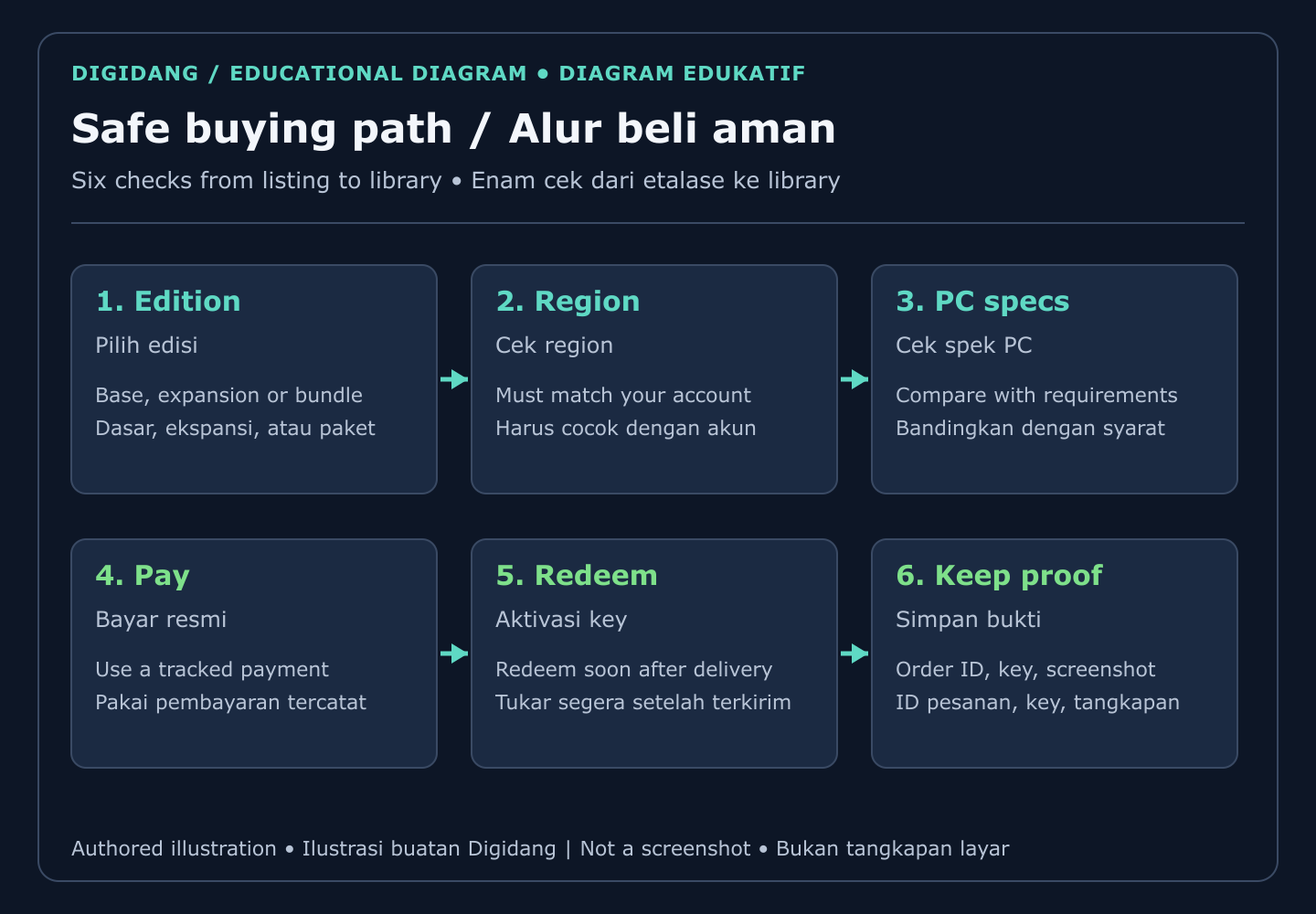
To buy a Cyberpunk 2077 key safely, pick the edition you need, confirm the key region matches your Steam account, check your PC against the official requirements on the Steam store page, pay through a tracked checkout, and redeem the code in Steam right after delivery.
This guide walks through each of those steps in order. It explains what the key actually unlocks, how the base game, the Phantom Liberty expansion and the Ultimate bundle relate to each other, why region labels matter, and what to do when a code refuses to activate. If digital keys are new to you, the beginner's guide to digital game keys covers the basics first.
What does a Cyberpunk 2077 Steam key actually give you?
A Cyberpunk 2077 Steam key is a one-time product code that adds the game license to your Steam account. Once redeemed, the game appears in your library permanently, downloads from Steam servers, and receives the same official patches as a copy bought directly from the Steam store.
In other words, the key is not a separate version of the game. There is no special "key edition" with missing features. You get the same files, the same achievements, the same cloud saves and the same update path as anyone else on Steam. The only things that differ are where you paid and which rules applied to that sale. That is why the buying process matters more than the game files themselves.
The game is an open world action role-playing game set in Night City. According to Wikipedia, it was developed by CD Projekt Red, published by CD Projekt, and first released on 10 December 2020 for Windows, PlayStation 4, Xbox One and Stadia. The Steam listing names CD PROJEKT RED as both developer and publisher.
A key is also tied to one platform. A Steam key only works on Steam. It will not activate on GOG, the Epic Games Store, PlayStation or Xbox. If you are still deciding which platform suits you, our comparison of PC and console gaming can help before you spend anything.
Which edition should you buy: base game, Phantom Liberty or Ultimate?
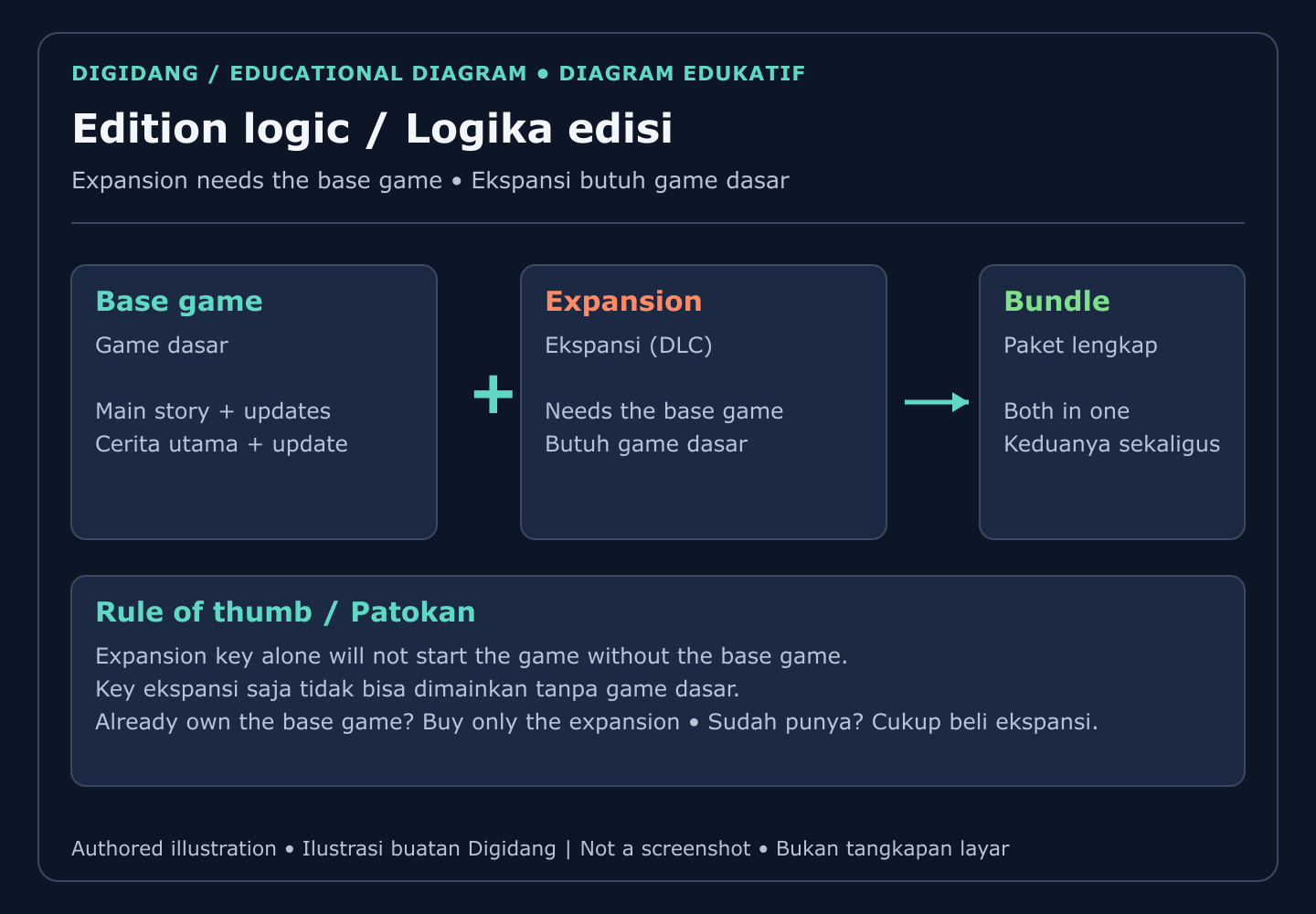
Most buyers choose between three products. The base game contains the main story and every free update. Phantom Liberty is a paid story expansion. The Ultimate Edition bundles both.
Phantom Liberty is downloadable content, not a standalone game. Its Steam page states that it requires the base game on Steam in order to play, and lists a release date of 25 September 2023. CD PROJEKT RED describes it on the official Phantom Liberty page as a spy thriller adventure set in the district of Dogtown. Wikipedia notes that the expansion launched only for Windows, PlayStation 5 and Xbox Series X/S, so it never came to the older consoles.
The Ultimate Edition arrived later. Wikipedia's Phantom Liberty article records that CD Projekt Red released it in December 2023 as a package that bundles the expansion together with the base game. If you have neither, the bundle is the simplest path. If you already own the base game on Steam, buying the full bundle again would mostly duplicate what you have, so the expansion alone is the logical purchase.
| Product | What it contains | Needs the base game? | Best for |
|---|---|---|---|
| Base game | Main story, free updates and free extra content | No, it is the base game | First-time players who want to try the world before committing further |
| Phantom Liberty | Paid story expansion set in Dogtown | Yes, on the same Steam account | Players who already own the base game on Steam |
| Ultimate Edition | Base game plus Phantom Liberty in one purchase | No, both are included | New players who want the complete story in one go |
How do key regions affect your purchase?
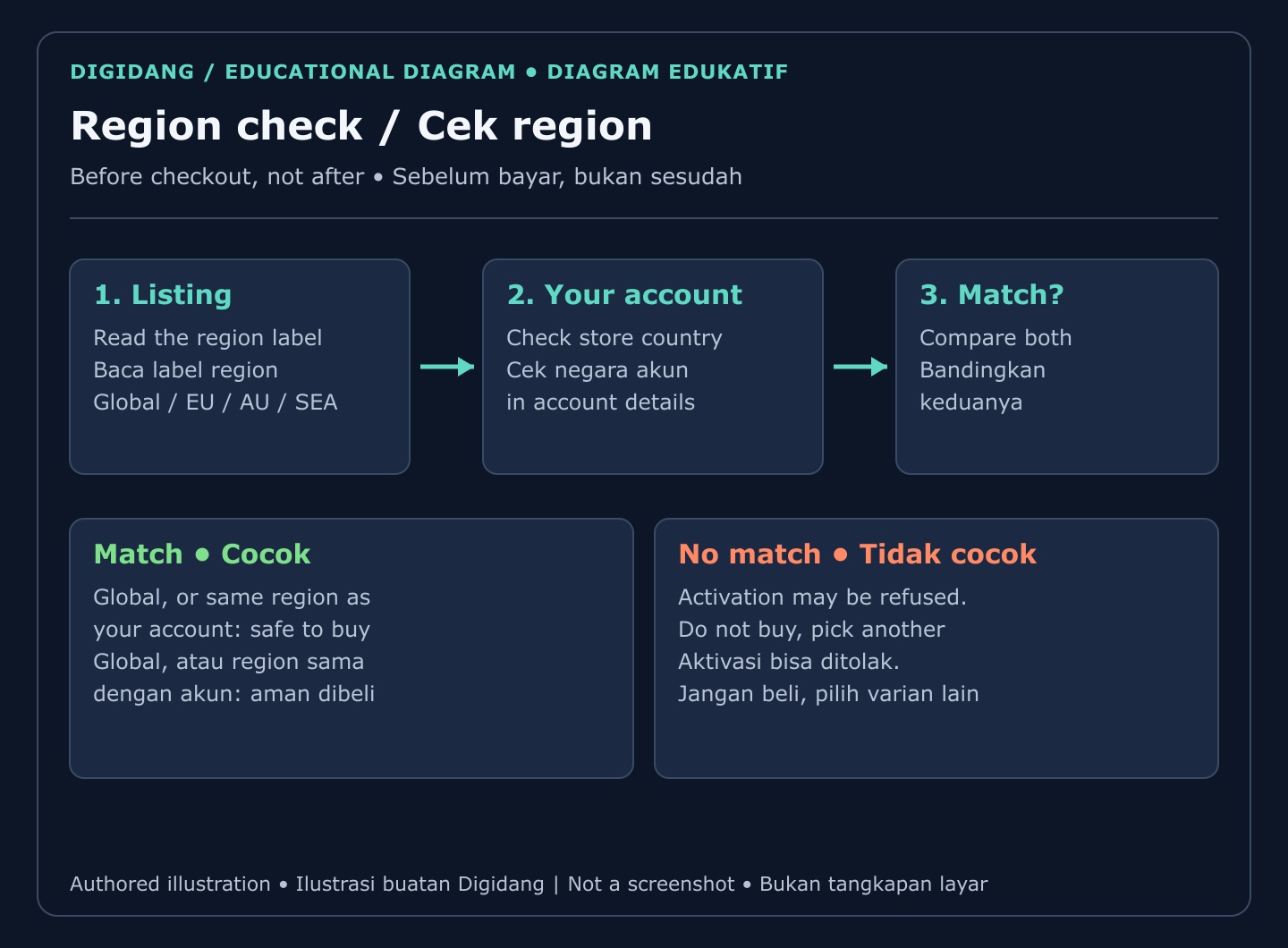
Region is the detail that causes the most failed activations. Publishers can restrict a key so that it only activates on accounts registered in a particular region. A Global key is meant to activate anywhere, while a regional key, such as one labelled EU, AU or SEA, is intended for accounts in that territory.
On Digidang you will find several listings for the same game. The Global Steam key listing is the broadest option. There are also regional variants: the EU Region key, the AU Region key and the SEA Region key. Each product page states the region it is meant for, and that label is the one to trust, not the listing photo or the search snippet.
Before you choose, open your Steam account details and look at the store country. Then compare it with the region on the product page. If you live in Indonesia, Malaysia, Thailand, the Philippines or another Southeast Asian country, a SEA or Global key is usually the relevant match. A buyer in Europe would look at EU or Global instead.
Region rules also explain why the same game can show different prices in different places. Regional pricing exists, and that is exactly why restrictions are attached to some keys. Prices on Digidang change with stock and promotions, so check the current amount on each product page rather than relying on a number you saw elsewhere. For a broader look at how regions work for digital codes, read our guide to understanding gift card regions.
Can your PC run it? Official Steam system requirements
Check your hardware before you pay, because a redeemed key is very hard to undo. The figures below come from the official Steam store page as read on 10 October 2026. Requirements can change after major updates, so always confirm the live page before buying.
| Component | Minimum | Recommended |
|---|---|---|
| Operating system | 64-bit Windows 10 | 64-bit Windows 10 |
| Processor | Core i7-6700 or Ryzen 5 1600 | Core i7-12700 or Ryzen 7 7800X3D |
| Memory | 12 GB RAM | 16 GB RAM |
| Graphics | GeForce GTX 1060 6GB, Radeon RX 580 8GB or Arc A380 | GeForce RTX 2060 SUPER, Radeon RX 5700 XT or Arc A770 |
| DirectX | Version 12 | Version 12 |
| Storage | 70 GB available space, SSD required | 70 GB available space, SSD required |
Two lines deserve special attention. First, the game needs a solid state drive; the Steam listing marks it as required, not optional. Second, the store page asks for 70 GB of free space for the base game, and the Phantom Liberty page lists another 35 GB on an SSD for the expansion. Plan your drive space for both if you buy the bundle.
Not sure what is inside your computer? The guide to optimizing your PC for gaming explains how to read your specs and which settings to adjust when you sit near the minimum line.
How to buy the key safely, step by step
A safe purchase is mostly about doing small checks in the right order. The sequence below is the same one we recommend for any Steam game, and it keeps the expensive mistakes, such as the wrong region or the wrong edition, from happening at all.
- Choose the edition. Decide between the base game, the expansion or the full bundle using the table above.
- Match the region. Compare the product page region with your Steam store country.
- Check your PC. Compare your processor, graphics card, memory and free SSD space with the official list.
- Read the product page. Look at the platform label, delivery method, seller information and the support or refund terms.
- Pay through a tracked method. Use a checkout that produces an order record and a receipt, never a private chat transfer.
- Redeem promptly. Activate the key soon after it arrives, so any problem is reported while the order is fresh.
Steps four and five matter more than people expect. A clear product page tells you who is selling the key and how support works. A tracked payment gives you proof that the order existed. Our checklist on safe shopping for digital products goes deeper into payment hygiene, and the Is Digidang safe? page explains how this store handles orders.
Finally, protect the account the key goes into. A game library is only as safe as its login, so turn on Steam Guard and read our guide to securing game accounts with two-factor authentication.
How to activate the key on Steam
Activation takes a few minutes and works the same way for the base game, the expansion and the bundle. Valve describes the process in its support article on activating a product on Steam. In short:
- Open the Steam client and sign in to the account that should own the game.
- Click the Games menu and choose Activate a Product on Steam. On newer clients, you can also use the Add a Game button at the bottom of the library.
- Accept the subscriber agreement prompt, then paste the key exactly as delivered.
- Confirm, and the game appears in your library, ready to download.
Copy and paste instead of typing whenever possible. The letter O and the number zero, or a capital I and the number one, are easy to confuse. If you are redeeming the expansion, make sure the base game is already on the same account; otherwise the content has nothing to attach to. For screenshots of every menu, see our walkthrough on how to redeem a game code on Steam, and if you still need an account, start with how to create a Steam account. Digidang also keeps a short activation guide for every platform.
After activation, let the download finish before you judge performance. The first launch often compiles shaders, which can make early minutes feel slower than normal play.
Warning signs of a risky Cyberpunk key listing
Most bad purchases share the same symptoms, and you can spot them before paying. Treat the following as reasons to stop and look elsewhere.
- No region stated. A listing that hides the activation region is asking you to gamble.
- Wrong platform hints. The title says Steam but the description mentions another launcher or a console.
- Account sales disguised as keys. You receive a username and password instead of a code. That is a shared account, not a license for your own library.
- Private payment requests. The seller asks you to pay outside the checkout through a personal transfer.
- No support path. There is no stated way to report an invalid or used code.
- A price that makes no sense. When an offer is far below every other store, ask why before you pay.
Our guide on how to check whether a digital game code is genuine explains these red flags in more detail, and the key verification page shows what Digidang checks on its side. Understanding the wider market also helps; how digital game keys work explains where keys come from and why sellers differ.
What happens if the key does not work?
First, read the exact error message. An "already activated" message means the code was used before. An "invalid" message often means a typing mistake, so paste the code again. A region error means the key and your account region do not match. Each message points to a different fix, and the seller needs that wording to help you.
Next, contact the seller, not Valve. Steam's refund policy states that Valve cannot provide refunds for purchases made outside of Steam, and it gives CD keys bought from third parties as an example. That means the store where you bought the key is the party that can replace or refund it, according to its own terms.
Prepare your evidence before you write in: the order ID, the key as delivered, the time you tried to redeem it, and a screenshot of the error. Report quickly; most stores set a window for claims. Digidang's refund policy describes how claims are handled here, and our broader guide on refunds for digital games compares how different stores treat this situation.
Is Cyberpunk worth buying today, and what else fits the same taste?
The game today is a very different product from the one that launched. CD Projekt Red has shipped large free updates over the years, and Wikipedia's coverage of the game's history describes the major overhaul that arrived with update 2.0 alongside Phantom Liberty. If you skipped it at launch, the current version is the one your key will install.
It suits players who enjoy dense cities, branching quests and build experimentation. If you like long role-playing games with strong writing, it sits comfortably next to The Witcher 3: Wild Hunt Complete Edition from the same studio (CD Projekt Red, as Wikipedia confirms), Baldur's Gate 3 for tactical party play, or Elden Ring for open world combat. Our lists of the best open world games and top RPGs to buy offer more ideas.
If you prefer to wait for a lower price, read our tips on saving money on game keys, or browse every Steam title in the game keys category. Whatever you choose, the safe buying steps above stay exactly the same.
Frequently Asked Questions
Is a Cyberpunk Steam key the same as buying on Steam directly?
Yes, once redeemed the license is identical. The game sits in your Steam library, downloads from Steam and receives the same official updates. The difference is only the shop you paid and whose refund terms apply.
Does the Phantom Liberty key work without the base game?
No. Phantom Liberty is an expansion and its Steam page states that it requires the base game on Steam. Redeem it on the same account that owns the base game, or buy the bundle that includes both.
Which region key should I buy if I live in Indonesia?
Check your Steam store country first. For an account registered in Indonesia, a Global key or a key labelled for Southeast Asia is normally the relevant choice. Always follow the region written on the product page.
Can I activate the key on GOG, Epic or a console?
No. A Steam key activates only on Steam. Other stores and consoles use their own codes, so buy the version that matches the platform where you want to play.
Can I get a refund from Steam for a key bought elsewhere?
No. Steam's refund policy says Valve cannot refund purchases made outside Steam, including keys bought from third parties. Contact the store where you bought the key and follow its claim process.
Does the game support Indonesian language?
The Steam language list does not include Indonesian. English and several other languages are available, so check the language section on the Steam page if subtitles in a specific language matter to you.
How fast is the key delivered after payment?
Delivery depends on the listing. Each Digidang product page shows its delivery method, so read it before checkout and check your email or order page after the payment is confirmed.
What should I do if the key says it was already used?
Stop trying to redeem it, take a screenshot of the error, and contact the seller with your order ID right away. Do not share the code publicly, because that makes the claim harder to verify.
Digidang Team
Gaming enthusiast and marketplace expert sharing tips, guides, and the best gaming deals.