Buy Red Dead Redemption 2 Key: Editions and Activation

To buy a Red Dead Redemption 2 key safely, pick a Steam listing from a seller with a clear refund rule, confirm the edition and the key region match your account, and check your PC against the requirements on the official Steam store page. Then redeem the key in Steam and sign in to Rockstar.
That short answer hides a few details that trip people up. RDR2 on PC runs through two pieces of software, the Steam client and the Rockstar Games Launcher, and the key region printed on a listing matters more than most buyers expect. This guide walks through each decision in the order you will meet it: where to buy, which edition to choose, how regions work, whether your PC can cope, and exactly what happens after you paste the code. Prices change often, so we do not quote them here; the current price for every variant is always shown on the product page itself.
Where can you buy a Red Dead Redemption 2 key safely?
You can buy a Red Dead Redemption key safely from a store that names the platform, edition, and region on every listing, delivers the code to your account, and publishes a refund rule for keys that fail. On Digidang, the Steam version is sold as Global, SEA, EU, and AU listings.
Start with the Red Dead Redemption Steam Key (Global) page if you are unsure about regions, because a global listing is meant for activation across regions. Buyers who know their Steam store country can compare the SEA region listing, the EU region listing, and the AU region listing. Each page shows the seller, delivery type, and current price.
A safe store also tells you how its keys are sourced and what happens if a code does not work. Before you pay anywhere, read how Digidang handles this on how we verify products and is Digidang safe. Those pages explain the checks behind a listing in plain language. If you want the bigger picture of how a digital code moves from a publisher to your library, our guide on how digital game keys work covers it step by step.
Avoid offers that promise a shared account, a "family" login, or an account with the game already installed. Those are not keys at all, they break platform rules, and the original owner can take the account back at any time.
Which edition should you choose?
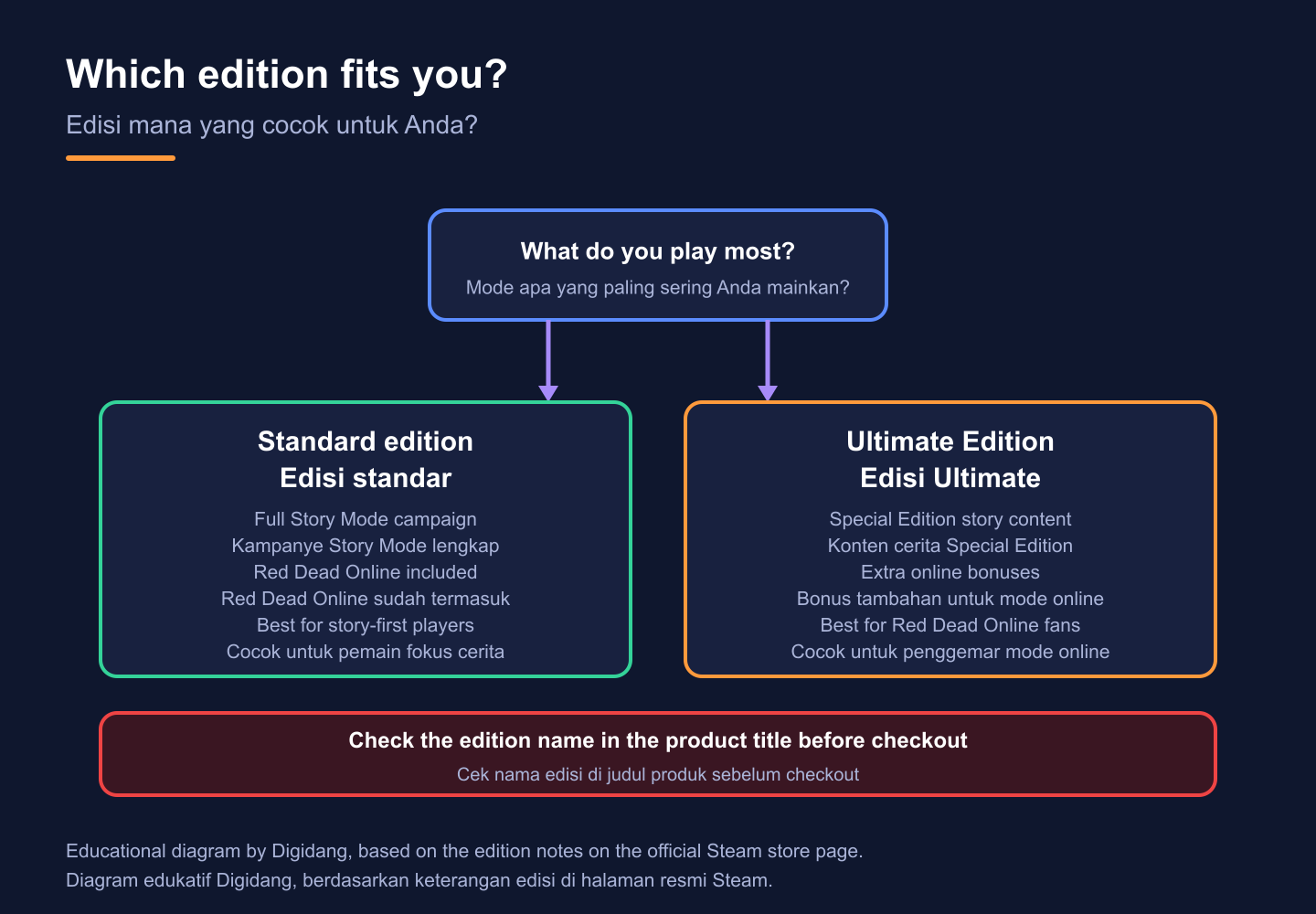
The Steam store page currently sells two packages for this game: the standard Red Dead Redemption 2 and Red Dead Redemption 2: Ultimate Edition. Both include the full Story Mode and Red Dead Online, because Steam states that the game "also includes Red Dead Online", the multiplayer mode set in the same world.
The difference sits in the extras. According to the same Steam page, the Ultimate Edition delivers all of the Story Mode content from the Special Edition plus bonuses for online play, such as bonus outfits for your online character, rank bonuses, a Black Chestnut Thoroughbred horse, free access to the Survivor Camp Theme, and access to additional weapons in online. None of these extras change the main campaign, so a player who only cares about the story of Arthur Morgan loses nothing important by choosing the standard version.
Red Dead Online also exists as a separate, lower-cost product. Its own Steam listing shows a release date of December 1, 2020, but that product does not include the single-player story. If you want both modes, buy the full game rather than the standalone online version.
A simple rule works for most people. Choose standard if you are mainly here for the story, and consider Ultimate only if you plan to spend many evenings in Red Dead Online and want the head start. Whatever you pick, read the edition name in the product title before checkout, because sellers list editions separately and a key unlocks only the package it was issued for.
Key regions explained: Global, SEA, EU, and AU
Region is the detail that causes the most failed activations. Steam Support explains on its region restrictions page that restrictions on CD keys vary by publisher, that there is no universal rule for retail keys, and that registering a regionally restricted key outside its region shows the error "Game not available in your territory". Steam Support also states that it cannot modify or remove any region restriction.
In practice, that means the label on the listing is your contract. A Global listing is intended for activation across regions. A SEA, EU, or AU listing is meant for an account whose store country sits inside that region. Your account's store country, not your current location or the language of your PC, is what Steam uses, and you can see it on your account details page.
The table below summarises the Steam variants currently listed on Digidang and who each one suits. Live prices are on each product page.
| Listing on Digidang | Region label | Best suited to | What to check first |
|---|---|---|---|
| Steam Key (Global) | Global | Buyers who are unsure of their store region or who move between countries | That your account is on Steam, not another launcher |
| Steam Key (SEA) | Southeast Asia | Accounts whose Steam store country is in Southeast Asia | Store country on your Steam account details page |
| Steam Key (EU) | Europe | Accounts whose Steam store country is in Europe | That the listing's region note covers your country |
| Steam Key (AU) | Australia | Accounts whose Steam store country is Australia | Store country and the region note on the product page |
If a listing's description and your account do not obviously match, ask before you buy. Steam itself recommends asking the retailer about region restrictions before purchase. For definitions of terms such as region lock, global key, and gray market, keep our game key and region glossary open in another tab.
System requirements from the official Steam page
RDR2 is a large, demanding game, so check your hardware before you spend money. The figures below are copied from the official Steam store page, which lists Windows as the only supported operating system and requires a 64-bit processor and operating system for both tiers.
| Component | Minimum | Recommended |
|---|---|---|
| Operating system | Windows 10, 64-bit | Windows 10, 64-bit |
| Processor | Intel Core i5-2500K or AMD FX-6300 | Intel Core i7-4770K or AMD Ryzen 5 1500X |
| Memory | 8 GB RAM | 12 GB RAM |
| Graphics | Nvidia GeForce GTX 770 2GB or AMD Radeon R9 280 3GB | Nvidia GeForce GTX 1060 6GB or AMD Radeon RX 480 4GB |
| Storage | 150 GB available space | 150 GB available space |
| Network | Broadband internet connection | Broadband internet connection |
Two rows deserve extra attention. Storage is listed at 150 GB for both tiers on the Steam page, so clear space before you start, and remember that updates also need room. The network row matters because the game connects to Rockstar's servers to verify ownership, which we cover in the activation section below.
Meeting the minimum tier means the developer expects the game to run, not that it will run at the settings you want. If you are not sure what is inside your computer, our guide to optimizing a PC for gaming explains which parts matter most and which settings give back the most performance on older hardware.
How to activate the key on Steam
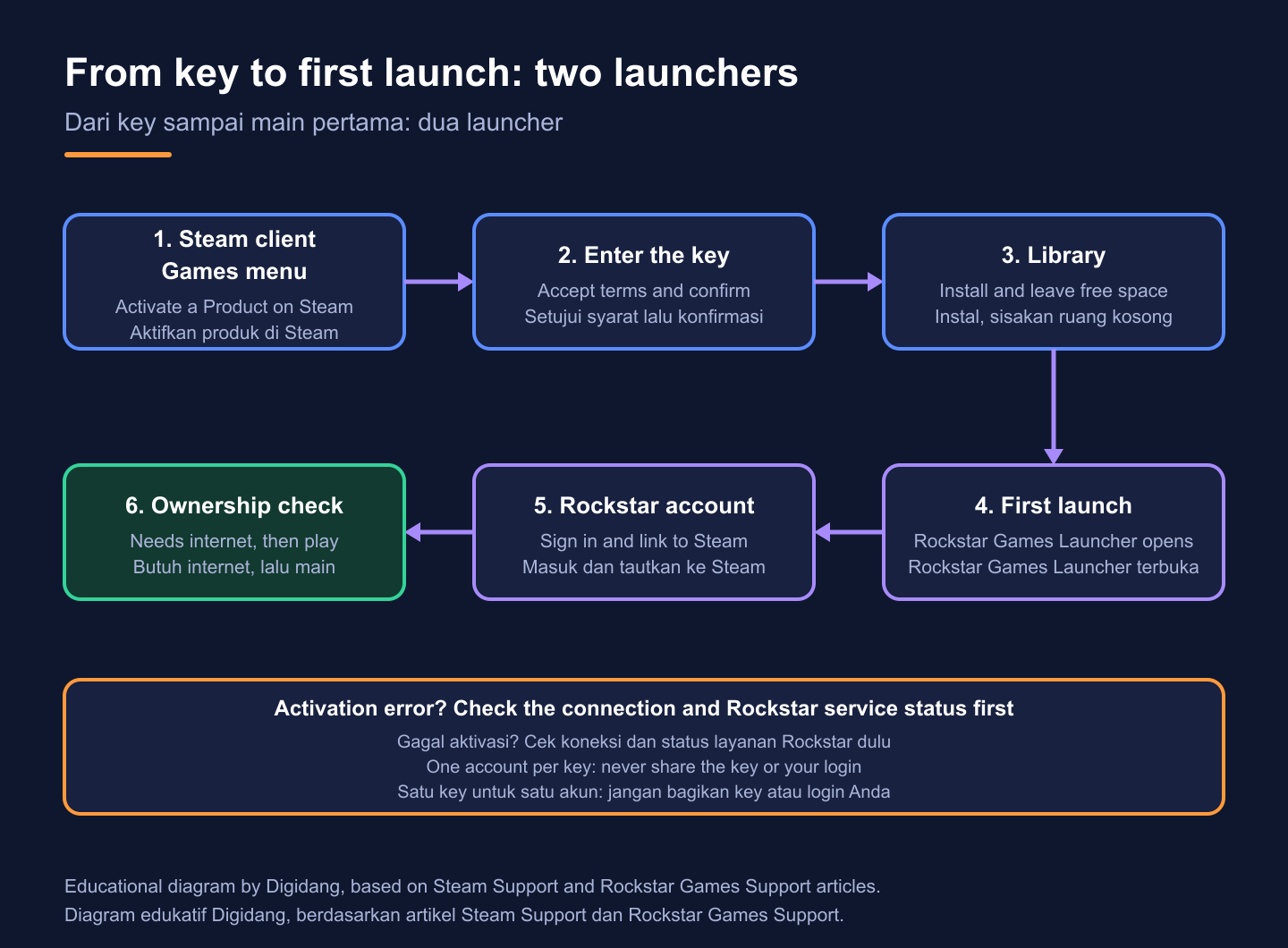
Activation follows the standard Steam process described in the Steam Support article on activating a product. Do it on the account you actually play on, because once a key is redeemed it is tied to that account and cannot be moved to another one.
- Open the Steam client on your PC and sign in to your own account.
- Click the Games menu at the top of the client.
- Choose Activate a Product on Steam.
- Accept the subscriber agreement, then paste the key exactly as delivered.
- Confirm, and the game appears in your Library, ready to install.
Steam also lets you register a key through a web browser, which is handy if you are away from your gaming PC; the same Steam Support page links to that option. The install will start the next time you open the client at home.
If you have never redeemed a code before, our walkthrough on how to redeem a game code on Steam shows each screen, and Digidang's activation guide covers every major platform. New to Steam entirely? Create your account first with the guide on how to create a Steam account, then come back to redeem.
The Rockstar Games Launcher step
This is the part that surprises first-time buyers. The Steam store page lists a required third-party account, Rockstar Games, which supports linking to a Steam account, and it also asks you to accept a third-party EULA. In other words, owning the game on Steam is only half of the setup.
When you start the game for the first time, the Rockstar Games Launcher installs or opens and asks you to sign in with a Rockstar account. If you do not have one, you can create it there. Once linked, your Steam purchase and your Rockstar account work together, and later launches are much faster.
The game then checks with Rockstar's servers that your account owns it. Rockstar's own support article on the "not entitled" activation error explains that this message appears when the game cannot reach Rockstar's servers to verify ownership. That is why a working internet connection matters at first launch even if you only plan to play Story Mode.
Keep your Rockstar login private and turn on the security options Rockstar offers. Since your purchase is linked to that account, losing it is almost as bad as losing your Steam account. Never give your Rockstar password to a seller, a "booster", or anyone offering to install the game for you.
A five-point checklist before you pay
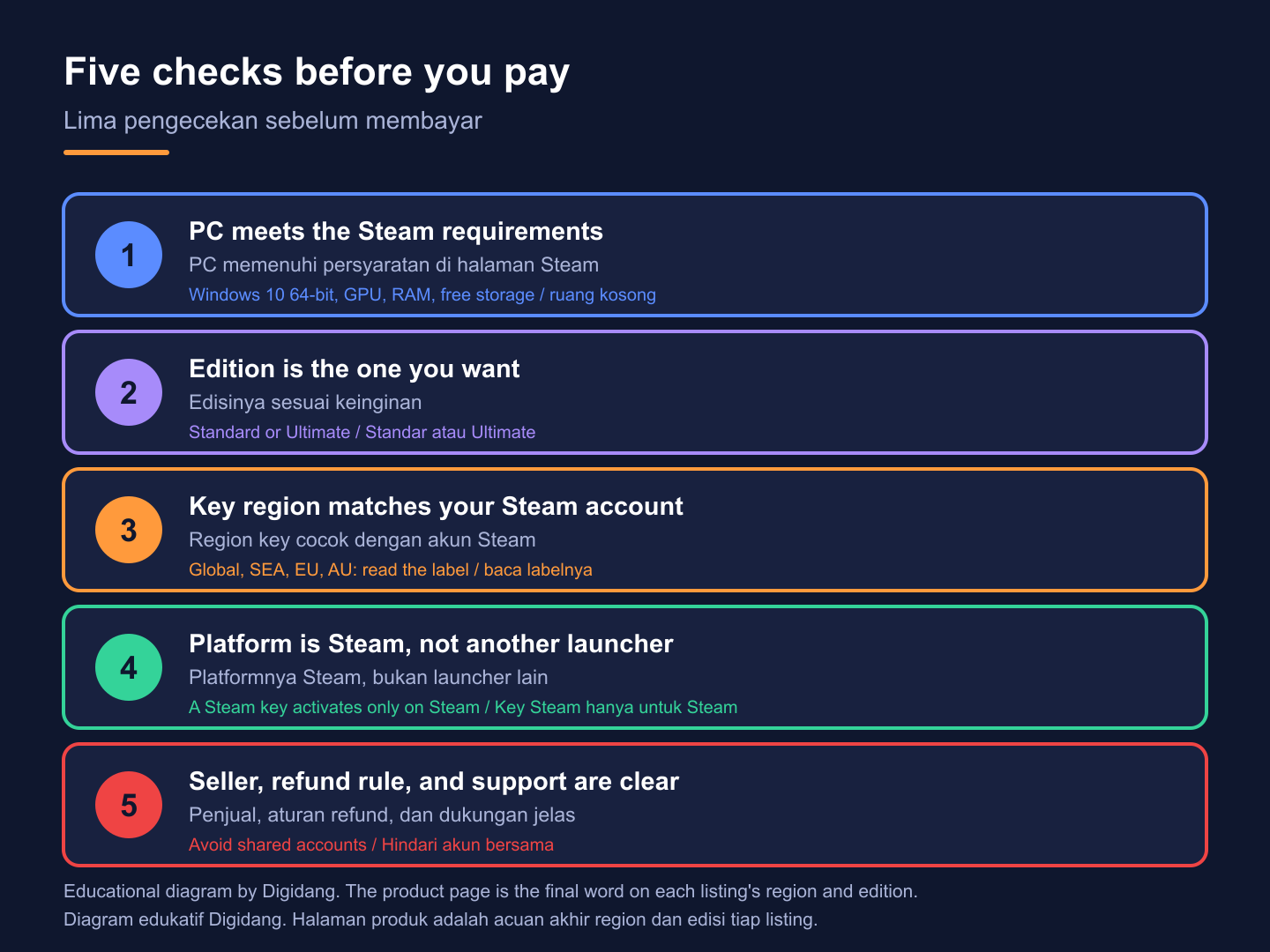
Most failed purchases come from skipping one quick check. Run through these five points before you click Buy Now, and you remove nearly every common problem in under five minutes.
- Hardware: compare your PC with the requirement table above, especially graphics, memory, and free storage.
- Edition: confirm whether the title says standard or Ultimate, and that it matches what you want.
- Region: match the region label to your Steam store country, or choose the Global listing if you are unsure.
- Platform: make sure the listing is a Steam key. A Steam key will not activate in the Rockstar Games Launcher store or on a console.
- Seller and refund rule: read the refund policy, the seller name, and the support contact before paying.
It also helps to know how to spot a genuine code. Digidang's guide on how to check a game code is genuine lists the warning signs before and after purchase, and the payment security page explains how checkout protects your card or e-wallet details.
Common activation problems and how to fix them
Most problems fall into a small set of patterns, and each has a clear first step.
"Game not available in your territory". This is the region error described on the Steam region restrictions page. Steam's advice is to contact the seller, since Steam Support cannot change the restriction or refund a key bought from a third-party store. Do not keep retrying the code on other accounts.
"Product code already activated". Check whether you or someone in your household already redeemed it on another account. If not, contact the seller with your order details and a screenshot of the message.
"Not entitled" error in the Rockstar launcher. Rockstar's support article suggests checking your connection and the Rockstar service status first, then verifying the game files from the launcher settings. Make sure you signed in to the same Rockstar account you linked to Steam.
Download is slow or stuck. That is usually a Steam download issue rather than a key problem. Our guide to Steam downloads covers download region settings, cache clearing, and other fixes.
Whatever the error, keep a copy of your order confirmation and a screenshot of the message. A seller can resolve a ticket far faster when it can see the exact error text and the time it appeared.
Refunds and buyer protection
Refund rules depend on where you bought the key, and many buyers assume Steam will help when it will not. The Steam refund policy covers purchases made on the Steam store, within two weeks of purchase and with less than two hours of playtime. Steam's region page adds that Steam Support cannot offer refunds on keys bought from third-party retailers.
So for a key bought on Digidang or any other store, the store's own policy is the one that counts. Read the Digidang refund policy before you pay, note what it says about keys that fail to activate, and contact support through the order page rather than through social media messages, where it is harder to prove the purchase.
Once you redeem a working key, it becomes part of your Steam library, and changing your mind later is rarely possible with a third-party store. That is why the checklist above matters: a minute spent confirming edition, region, and hardware saves a refund conversation later. For a wider look at what counts as a valid refund case and what does not, read our guide on how to refund a digital game.
One more habit protects you: buy for your own account. Keys bought to resell, or bought on behalf of strangers, are the transactions most likely to end in disputes that no policy covers cleanly.
Is Red Dead Redemption 2 still a good buy?
For players who enjoy slow, detailed open worlds, it remains one of the strongest choices. Wikipedia describes it as an action-adventure game developed and published by Rockstar Games, set in a fictionalized United States in 1899, following outlaw Arthur Morgan of the Van der Linde gang. It was released for Windows on November 5, 2019, and the Steam version followed in December of that year.
The game rewards patience. Hunting, fishing, camp life, and long rides between towns are part of the experience, not filler, and the story leans on character moments as much as on shootouts. Players who want constant action may find the opening chapters slow, while players who like to wander will find plenty to discover in a world that reacts to their choices through the honor system.
If you are comparing it with other large worlds, our list of the best open world games puts it next to other popular titles. Fans of Rockstar's other big sandbox can also look at the Grand Theft Auto V Steam key, which uses the same Rockstar Games Launcher setup. You can browse every other Steam title in the game keys category.
Because the game is often discounted by stores and by Steam itself, it is worth checking the product page shortly before you buy instead of relying on a price you saw weeks ago. The current Digidang price is always shown on the listing.
Frequently Asked Questions
Is a Red Dead Redemption 2 Steam key the full game?
Yes. A Steam key for the standard edition unlocks the full Story Mode and Red Dead Online, as described on the official Steam store page. Always check the product title to confirm which edition you are buying.
Do I need a Rockstar account to play the Steam version?
Yes. The Steam store page lists a required third-party Rockstar Games account that can be linked to Steam. The Rockstar Games Launcher asks you to sign in the first time you start the game.
Can I activate a Steam key in the Rockstar Games Launcher store?
No. A Steam key is redeemed only in the Steam client or through Steam in a browser. After activation, Steam starts the game, and the Rockstar launcher handles sign-in and ownership checks.
Which region should I buy?
Match the region label to your Steam store country. If you are not sure what your store country is, or you move between countries, the Global listing is the safer choice. Ask the seller before buying if the listing note is unclear.
What does the Ultimate Edition add?
According to Steam, it adds the Story Mode content from the Special Edition plus online bonuses such as outfits, rank bonuses, a horse, a camp theme, and access to extra weapons in online. The main story is the same in both editions.
Can I play offline after activation?
Story Mode is single-player, but the first launch needs internet so the game can verify ownership with Rockstar's servers. Rockstar's support article notes that offline mode settings must be disabled until that verification completes.
What if the key does not work?
Take a screenshot of the exact error, keep your order details, and contact the store where you bought the key. Steam Support cannot refund keys bought from third-party retailers, so the seller's refund policy is the one that applies.
How long does delivery take on Digidang?
Each product page shows its delivery type, and the Red Dead Redemption Steam listings are marked as instant delivery. If a key has not arrived after payment, contact Digidang support with your order number instead of placing a second order.
Digidang Team
Gaming enthusiast and marketplace expert sharing tips, guides, and the best gaming deals.