How to Redeem a Roblox Gift Card Safely: Complete Guide
To redeem a Roblox gift card safely, sign in to the correct Roblox account, type roblox.com/redeem into the address bar yourself, enter the code there and nowhere else, then confirm the Roblox Credit before buying Robux. Most lost balances come from a wrong account or a leaked code, not from the card.
This article is part of our Roblox guide hub. For the plain step list on every device, see the Roblox redeem code tutorial.
Where is the only safe place to redeem a Roblox gift card?
The only safe place to redeem a Roblox gift card is the official page roblox.com/redeem, opened in a web browser, or the Redeem tile in the Samsung Galaxy version of the Roblox app. Roblox Support lists no other redemption route, so any other site asking for your code is a red flag (Roblox Support).
Three checks before you type the code
- Right account. If the card is for a child, sibling or friend, sign in to their account. Redeemed value stays on the account that was signed in and cannot be moved later.
- Right address. The address bar must read roblox.com. A page with the Roblox logo on another domain is not Roblox.
- Code kept private. Do not post the code or a photo of it in Discord, chat or comments before it is redeemed. Anyone who sees it can redeem it first.
Safe redemption, step by step
- Type roblox.com/redeem yourself rather than following an ad, a message or a shortened link.
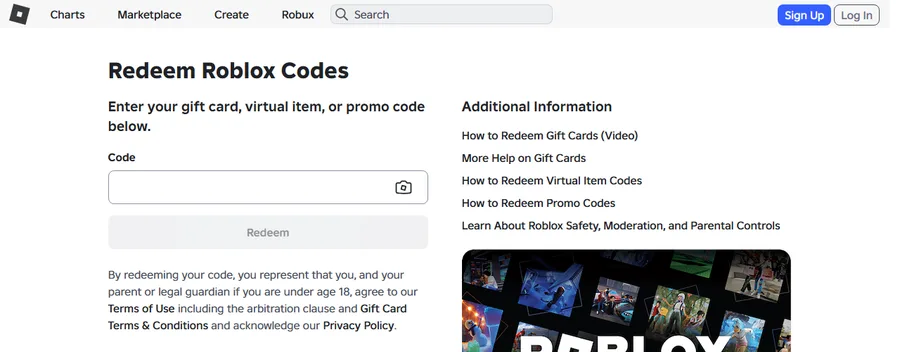
Step 1: the genuine page is titled "Redeem Roblox Codes" and sits on roblox.com. Screenshot: roblox.com/redeem, captured by the Digidang team on 7 October 2026 (logged out). - Log in on the official login form and check the username before going on.
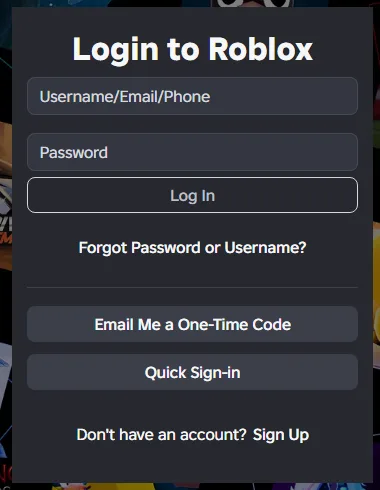
Step 2: the official Roblox login form. Screenshot: Roblox login page, captured by the Digidang team on 7 October 2026. - Enter the code in the Code box and press Redeem once. Wait for the confirmation instead of refreshing.
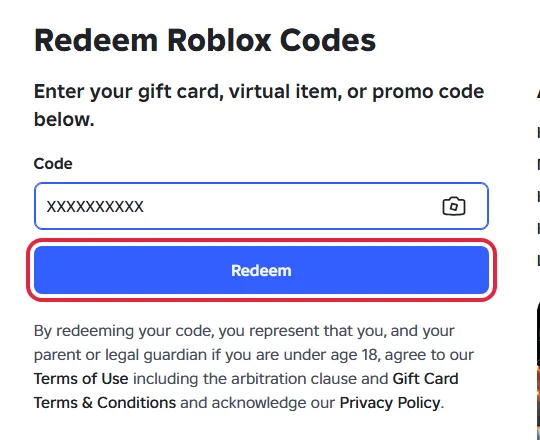
Step 3: code entered, Redeem ready. "XXXXXXXXXX" is a placeholder. Screenshot: roblox.com/redeem, captured by the Digidang team on 7 October 2026 (logged out). The red box is our highlight. - Confirm the balance. Available Credit appears under the Redeem button, and Billing Settings shows it next to the Roblox Credit line (Roblox Support).
- Keep the receipt until the Credit has been spent. Roblox does not refund gift cards (Roblox gift card terms).
Scam signs to walk away from
- A site or person promising free Robux in exchange for your gift card code or password.
- A "redeem" page that is not on roblox.com, or that asks for your password on a page other than the Roblox login form.
- Someone in chat offering to redeem the card for you.
- A seller with no clear product details, region note or order record.
Two-step verification and a unique password protect the account the Credit lands on. For a child's account, an adult can sit in on the redemption and check spending settings first.
Redeemed on the wrong account?
First check every other account you may have been signed in to. If the value is not on any of them, contact Roblox Support and include the card PIN, serial number, store and city of purchase, purchase date and card amount. Roblox then asks for a photo of the receipt and both sides of the card in JPG or PNG format (Roblox Support).
Common problems and fixes
| Problem | Cause | Fix |
|---|---|---|
| "Invalid code" error | Letters and numbers that look alike were mixed up | Retype using the substitutions in the next table (0 to O, 1 to I, 2 to Z, 5 to S, 6 to G or Q, 8 to B). Still failing: contact Roblox Support. |
| No Redeem button in the app or on a console | The standard Roblox app and consoles have no redeem screen | Open roblox.com/redeem in a browser. Exception: the Roblox app on Samsung Galaxy phones, More page, then Redeem. |
| Balance shows Roblox Credit, not Robux | Gift card value is stored as Credit | Convert it with Get Robux on roblox.com/redeem in a browser. Credit cannot be spent inside the apps. |
| Card bought for another country | Not a problem | Roblox codes work worldwide and the value converts to your account currency automatically. |
| Several cards to add | The form takes one code at a time | Enter them one by one at roblox.com/redeem. |
| Amazon or Party Packs card did not become Credit | These two card types are Robux only | Expected. The value is added as Robux instead of Credit. |
| Bonus code from a store promotion never arrived | Roblox does not issue codes for outside promotions | Contact the retailer that ran the promotion. |
Every fix above follows the official Roblox Support article on redeeming gift cards and the Roblox Credit guide, rechecked on 7 October 2026. Roblox does not refund gift cards, so keep your receipt until the balance is spent (Roblox gift card terms).
Characters that are easy to mix up, per Roblox Support:
| If you typed | Try instead |
|---|---|
| 0 (zero) | O |
| 1 (one) | I (capital i) |
| 2 (two) | Z |
| 5 (five) | S |
| 6 (six) | G or Q |
| 8 (eight) | B |
Need a code first?
Digidang is a price comparison site. The Buy button opens the offer on G2A through an affiliate link, and G2A handles the order. Full details: Is Digidang safe?
FAQ
Can I redeem a Roblox gift card in the mobile app?
Only in the Samsung Galaxy version. On other phones, use a mobile browser and go to roblox.com/redeem.
Why did I get Roblox Credit instead of Robux?
Gift card value is stored as Credit. Convert it with Get Robux on the redeem page, in a browser.
Are Roblox gift cards region locked?
No. Roblox says all its codes can be redeemed worldwide, and the value converts to your account currency.
Can I redeem several cards?
Yes, one at a time on roblox.com/redeem.
Official sources (checked 7 October 2026)
Marcus Chen
Gaming enthusiast and marketplace expert sharing tips, guides, and the best gaming deals.