How to Redeem a Roblox Gift Card on PS5, Xbox & PC

You cannot redeem a Roblox gift card on PS5 or Xbox directly. Roblox Support says redemption is not available on consoles, so you redeem the card at roblox.com/redeem on a phone or computer browser, convert the Roblox Credit into Robux there, and then open Roblox on the console.
This article is part of our Roblox guide hub. For every other device, see the Roblox redeem code tutorial.
Can you redeem a Roblox gift card on PS5?
No, a Roblox gift card cannot be redeemed on PS5 or PS4 at this time. The Roblox PlayStation FAQ tells players to use a computer browser for redemption instead. Robux you already hold on your Roblox account can then be spent in the PlayStation app (Roblox PlayStation FAQ).
How to use a Roblox gift card for PS5, step by step
- On a phone or computer, open roblox.com/redeem.
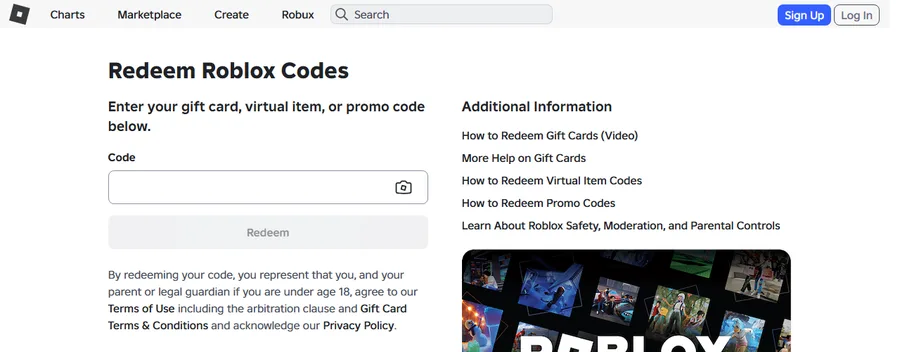
Step 1: the redeem page in a computer browser. Screenshot: roblox.com/redeem, captured by the Digidang team on 7 October 2026 (logged out). - Log in with the Roblox account your PS5 uses. Check the username matches the one shown in Roblox on the console.
- Enter the gift card PIN and press Redeem.
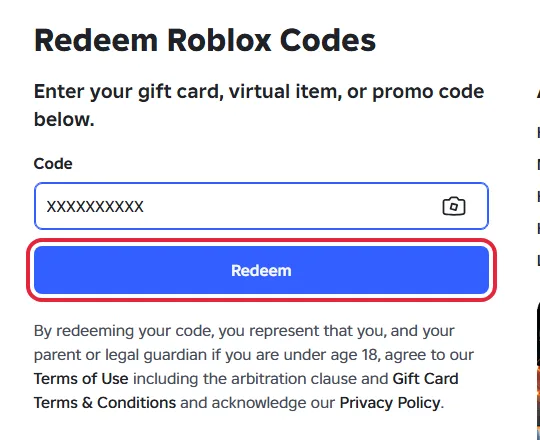
Step 3: PIN entered, Redeem button ready. "XXXXXXXXXX" is a placeholder. Screenshot: roblox.com/redeem, captured by the Digidang team on 7 October 2026 (logged out). The red box is our highlight. - Convert the Credit to Robux. Select Get Robux, then Buy. This has to happen in the browser, because Roblox Credit cannot be used inside Roblox apps (Roblox Support).
- Open Roblox on the PS5. The Robux are on your account, so they appear in the PlayStation app without any extra linking.
Do not skip the Credit conversion. Redeemed Credit sitting on the account does not show up on the console until it has been converted into Robux.
Buying Robux on PlayStation without a Roblox gift card
There is a second route. In the Roblox PlayStation app, select the gold Robux icon at the top right and pick a package. Payment goes through the PlayStation Store, so a PlayStation Store gift card in your PSN wallet works here. Refunds for Robux bought this way follow PlayStation's refund policy, not Roblox's (Roblox PlayStation FAQ).
A PlayStation Store gift card is a different product from a Roblox gift card. To add one to your wallet, follow our guide on how to redeem a PlayStation Store code.
How to use a Roblox gift card for Xbox
The same rule applies on Xbox: the console has no Roblox redeem screen (Roblox Support).
- On a phone or computer, open roblox.com/redeem and log in with the account you use on Xbox.
- Enter the PIN and press Redeem.
- Select Get Robux and Buy to convert the Credit.
- Start Roblox on the Xbox. Your Robux follow your Roblox account.
How to redeem a Roblox gift card on PC
A PC is the easiest device because the browser is already there.
- Open roblox.com/redeem in Chrome, Edge, Firefox or Safari.
- Log in, check the username, type the PIN and click Redeem.
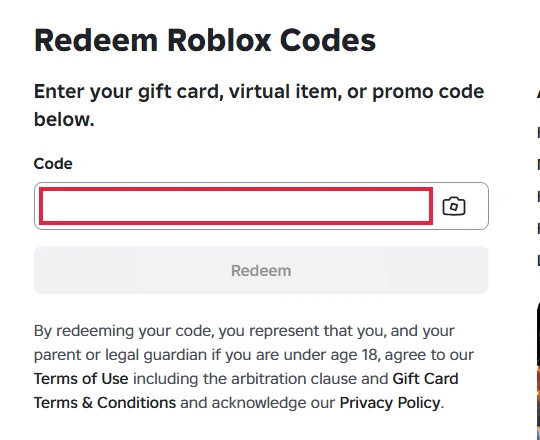
The Code field on the redeem page. Screenshot: roblox.com/redeem, captured by the Digidang team on 7 October 2026 (logged out). The red box is our highlight. - Select Get Robux, then Buy, to turn the Credit into Robux.
PS5, Xbox and PC side by side
| Device | Redeem on the device? | Where to redeem | Spend Robux on the device? |
|---|---|---|---|
| PlayStation 5 or 4 | No | Phone or computer browser | Yes, after converting Credit |
| Xbox | No | Phone or computer browser | Yes, after converting Credit |
| Windows PC or Mac | Yes, in the browser | roblox.com/redeem | Yes |
Console redeem problems and fixes
| Problem | Cause | Fix |
|---|---|---|
| "Invalid code" error | Letters and numbers that look alike were mixed up | Retype using the substitutions in the next table (0 to O, 1 to I, 2 to Z, 5 to S, 6 to G or Q, 8 to B). Still failing: contact Roblox Support. |
| No Redeem button in the app or on a console | The standard Roblox app and consoles have no redeem screen | Open roblox.com/redeem in a browser. Exception: the Roblox app on Samsung Galaxy phones, More page, then Redeem. |
| Balance shows Roblox Credit, not Robux | Gift card value is stored as Credit | Convert it with Get Robux on roblox.com/redeem in a browser. Credit cannot be spent inside the apps. |
| Card bought for another country | Not a problem | Roblox codes work worldwide and the value converts to your account currency automatically. |
| Several cards to add | The form takes one code at a time | Enter them one by one at roblox.com/redeem. |
| Amazon or Party Packs card did not become Credit | These two card types are Robux only | Expected. The value is added as Robux instead of Credit. |
| Bonus code from a store promotion never arrived | Roblox does not issue codes for outside promotions | Contact the retailer that ran the promotion. |
| Robux missing on the console after redeeming | The value is still Roblox Credit | Go back to roblox.com/redeem in a browser, select Get Robux, then Buy. |
| Robux show on the phone but not on the console | The console is signed in to a different Roblox account | Check the username in Roblox on the console and on the redeem page. |
Every fix above follows the official Roblox Support article on redeeming gift cards and the Roblox Credit guide, rechecked on 7 October 2026. Roblox does not refund gift cards, so keep your receipt until the balance is spent (Roblox gift card terms).
Characters that are easy to mix up, per Roblox Support:
| If you typed | Try instead |
|---|---|
| 0 (zero) | O |
| 1 (one) | I (capital i) |
| 2 (two) | Z |
| 5 (five) | S |
| 6 (six) | G or Q |
| 8 (eight) | B |
Need a code first?
- Roblox Gift Card $10
- Roblox Gift Card $25
- Roblox Gift Card $50
- PlayStation Store Gift Card $25 (check the card region matches your PSN account)
Digidang is a price comparison site. The Buy button opens the offer on G2A through an affiliate link, and G2A handles the order. Full details: Is Digidang safe?
Official sources (checked 7 October 2026)
Digidang Team
Gaming enthusiast and marketplace expert sharing tips, guides, and the best gaming deals.