How to Redeem a Roblox Gift Card: Complete 2026 Guide

To redeem a Roblox gift card, go to roblox.com/redeem in a web browser, log in to the account that should get the money, type the PIN from the card and press Redeem. The value lands as Roblox Credit, which you then convert into Robux on the same page in a few clicks.
This article is part of our Roblox guide hub. If you hold a promo code rather than a gift card, the Roblox redeem code tutorial covers it.
What happens when you redeem a Roblox gift card?
When you redeem a Roblox gift card, its value is stored on your account as Roblox Credit, not as Robux. Credit can only be viewed and spent in a web browser, where you exchange it for Robux. Amazon and Party Packs gift cards are the exception and add Robux directly (Roblox Support).
Every Roblox gift card also includes a free virtual item, granted to the account at the moment of redemption, with a limit of one unique item per month (Roblox Support: Virtual Items). Cards bought in another country still work, and the value converts to your account currency automatically (Roblox Support).
Before you start
- Find the PIN. On a physical card, scratch the silver panel on the back gently. For a digital card, copy the code from the order email or order page.
- Pick the right account. If the card is a present for a child or friend, sign in to their account, not yours. Redeemed value stays on the account that was signed in.
- Use a browser. The standard Roblox app and consoles have no redeem screen. Only the Samsung Galaxy version of the app does.
How to redeem a Roblox gift card, step by step
- Open roblox.com/redeem by typing the address yourself.
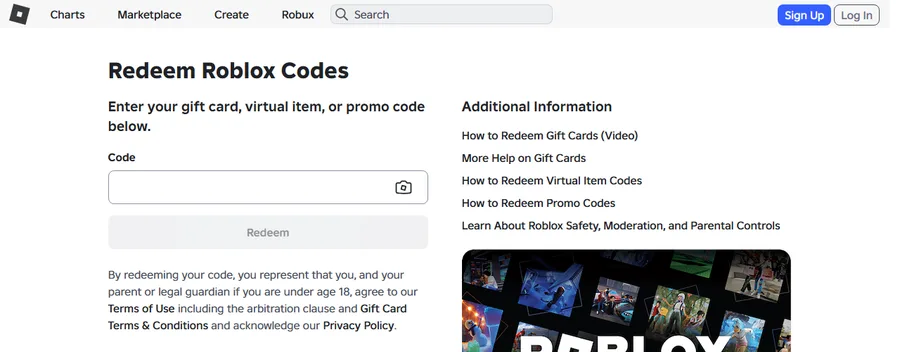
Step 1: the official redeem page. Screenshot: roblox.com/redeem, captured by the Digidang team on 7 October 2026 (logged out). - Log in with the Log In button at the top right and check the username.
- Type the gift card PIN into the Code box, or tap the camera icon to scan the card.
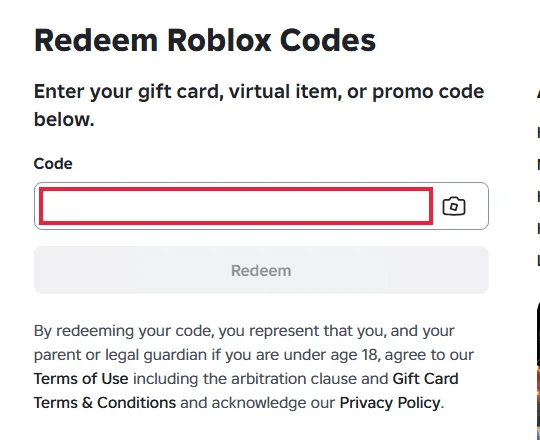
Step 3: enter the PIN in the Code field. Screenshot: roblox.com/redeem, captured by the Digidang team on 7 October 2026 (logged out). The red box is our highlight. - Press Redeem.
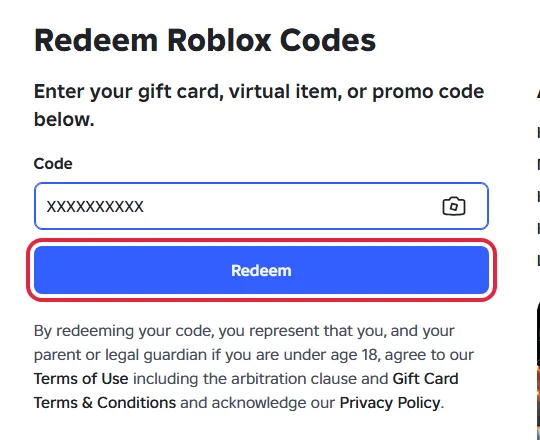
Step 4: the Redeem button. "XXXXXXXXXX" is a placeholder, not a real PIN. Screenshot: roblox.com/redeem, captured by the Digidang team on 7 October 2026 (logged out). The red box is our highlight. - Wait for the confirmation message. Your Available Credit now shows under the Redeem button.
Redeeming on a phone works the same way in Safari or Chrome. Screenshots of the phone layout are in the phone section of our tutorial. On PlayStation or Xbox, follow the console guide.
How to check your Roblox Credit balance
Credit is not shown on every account page. Roblox Support lists two places to see it, both in a browser (source):
- The gift card redemption page: Available Credit appears directly under the Redeem button.
- Billing Settings: the Balance sits next to the Roblox Credit line.
If neither page shows a balance, the account has no gift card Credit on it. Check whether you redeemed while signed in to a different account.
How to turn Roblox Credit into Robux
- Stay signed in on roblox.com/redeem.
- Select Get Robux. Roblox pre-selects the largest package your Credit covers. To pick a different package, open the Robux page after redeeming.
- Click Buy and confirm in the window that appears.
- With Credit left over, Roblox asks whether to buy more. Buy converts the rest, Cancel keeps it for later.
- Small leftovers that do not cover a full package can be turned into Robux with Convert Credit to Robux on the redemption page.
Once converted, Robux work everywhere you play, including the mobile app and consoles.
Roblox gift card not working? Problems and fixes
| Problem | Cause | Fix |
|---|---|---|
| "Invalid code" error | Letters and numbers that look alike were mixed up | Retype using the substitutions in the next table (0 to O, 1 to I, 2 to Z, 5 to S, 6 to G or Q, 8 to B). Still failing: contact Roblox Support. |
| No Redeem button in the app or on a console | The standard Roblox app and consoles have no redeem screen | Open roblox.com/redeem in a browser. Exception: the Roblox app on Samsung Galaxy phones, More page, then Redeem. |
| Balance shows Roblox Credit, not Robux | Gift card value is stored as Credit | Convert it with Get Robux on roblox.com/redeem in a browser. Credit cannot be spent inside the apps. |
| Card bought for another country | Not a problem | Roblox codes work worldwide and the value converts to your account currency automatically. |
| Several cards to add | The form takes one code at a time | Enter them one by one at roblox.com/redeem. |
| Amazon or Party Packs card did not become Credit | These two card types are Robux only | Expected. The value is added as Robux instead of Credit. |
| Bonus code from a store promotion never arrived | Roblox does not issue codes for outside promotions | Contact the retailer that ran the promotion. |
| Two cards redeemed, only one bonus item | Roblox limits bonus virtual items to one unique item per month | Expected. Open the Gift Card page on roblox.com to see which item your account owns. |
Every fix above follows the official Roblox Support article on redeeming gift cards and the Roblox Credit guide, rechecked on 7 October 2026. Roblox does not refund gift cards, so keep your receipt until the balance is spent (Roblox gift card terms).
Characters that are easy to mix up, per Roblox Support:
| If you typed | Try instead |
|---|---|
| 0 (zero) | O |
| 1 (one) | I (capital i) |
| 2 (two) | Z |
| 5 (five) | S |
| 6 (six) | G or Q |
| 8 (eight) | B |
Need a code first?
Digidang is a price comparison site. The Buy button opens the offer on G2A through an affiliate link, and G2A handles the order. Full details: Is Digidang safe?
Frequently asked questions
Can I redeem a Roblox gift card in the Roblox app?
Only in the Samsung Galaxy version of the app (More page, Redeem tile). Everywhere else, use roblox.com/redeem in a browser.
Can I redeem a gift card for someone else?
Yes. Sign in to their account first, then redeem. The value cannot be moved to another account afterwards.
Can I redeem more than one card?
Yes, as many as you like, entered one at a time.
Can I get a refund for a Roblox gift card?
Roblox does not refund gift cards (Roblox gift card terms). If you bought through a marketplace, the seller's own policy applies to the order.
Official sources (checked 7 October 2026)
Digidang Team
Gaming enthusiast and marketplace expert sharing tips, guides, and the best gaming deals.