Canva Pro Guide: Price, Features, and Tips for Creators
Canva Pro is Canva's paid plan for one person that unlocks premium templates, premium stock photos and videos, AI tools, and Brand Kits. This guide covers the official price in Indonesia, the features that actually matter, tips for gaming thumbnails, the content license rules, and how to subscribe without billing surprises.
What Is Canva Pro?
Canva Pro is a Canva subscription for individual creators who want premium templates, premium stock content, and AI powered design tools. Canva states that a Pro account can only be used by one person, so the plan is built for solo creators, not for a whole team sharing a single login.
Canva itself is a web based design app founded in Perth, Australia, in 2013, according to Wikipedia's Canva article. The Free plan is enough for many people. Pro only starts to feel different when you create content regularly, such as weekly YouTube thumbnails, community tournament posters, or social media assets for an online shop.
What you pay for in Pro is not just templates. You also buy a license to use premium content in the designs you export, much larger cloud storage, and a looser AI allowance. So before subscribing, get clear on three things: how often you design, what content you use, and what the finished designs are for.
Official Canva Pro Price in Indonesia
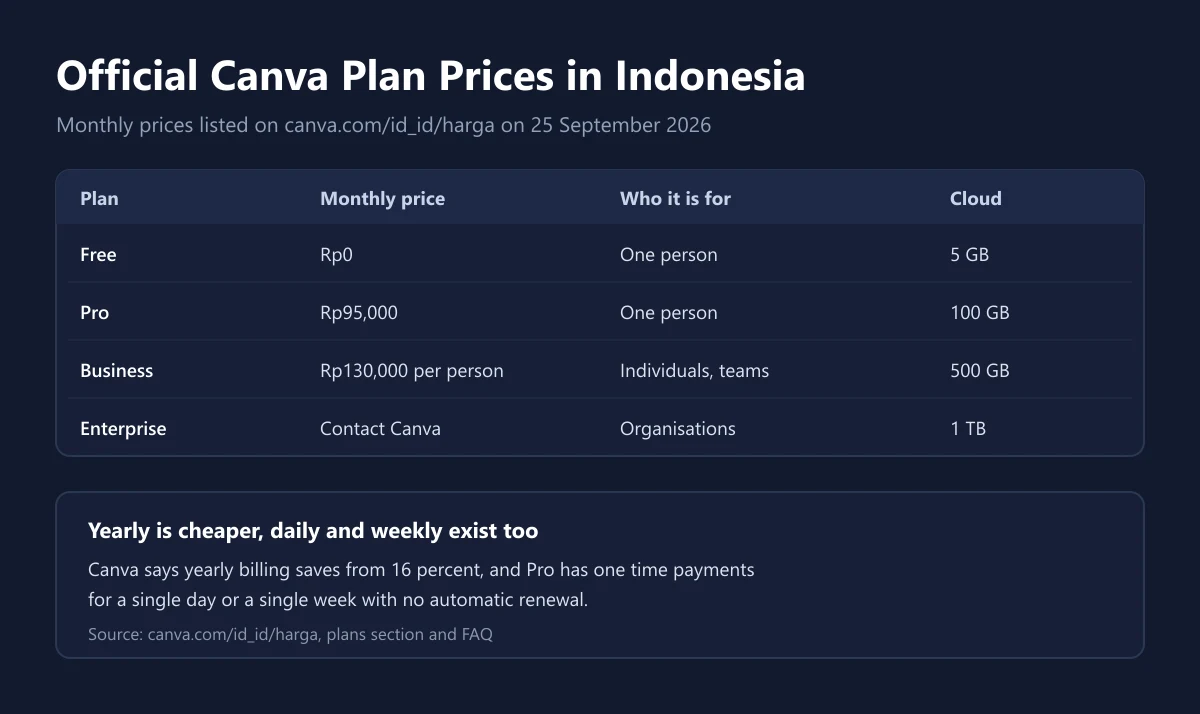
The prices below come from Canva's Indonesian pricing page as we checked it on 25 September 2026. Canva notes that prices can vary by location and billing information, so treat these figures as a reference for purchases from Indonesia.
| Plan | Monthly price | Who it is for | Cloud storage | Brand Kits |
|---|---|---|---|---|
| Free | Rp0 | One person | 5 GB | 1 (3 colours only) |
| Pro | Rp95,000 | One person | 100 GB | 5 |
| Business | Rp130,000 per person | Individuals and teams | 500 GB | 100 |
| Enterprise | Contact Canva | Organisations | 1 TB | 1,000 |
For yearly billing, Canva says you save from 16 percent compared with paying monthly. The exact figure appears at checkout for your account, so we do not quote a yearly amount here. If you are sure you will use Pro all year, yearly billing is usually the cheapest choice.
Canva also offers one time payments for Pro. According to the FAQ on the pricing page, these are prepaid one day and one week plans in selected countries, with no automatic renewal, and they are available for Pro only, not Business. They suit a single project, such as preparing materials for a weekend tournament.
The Canva Pro Features That Matter Most
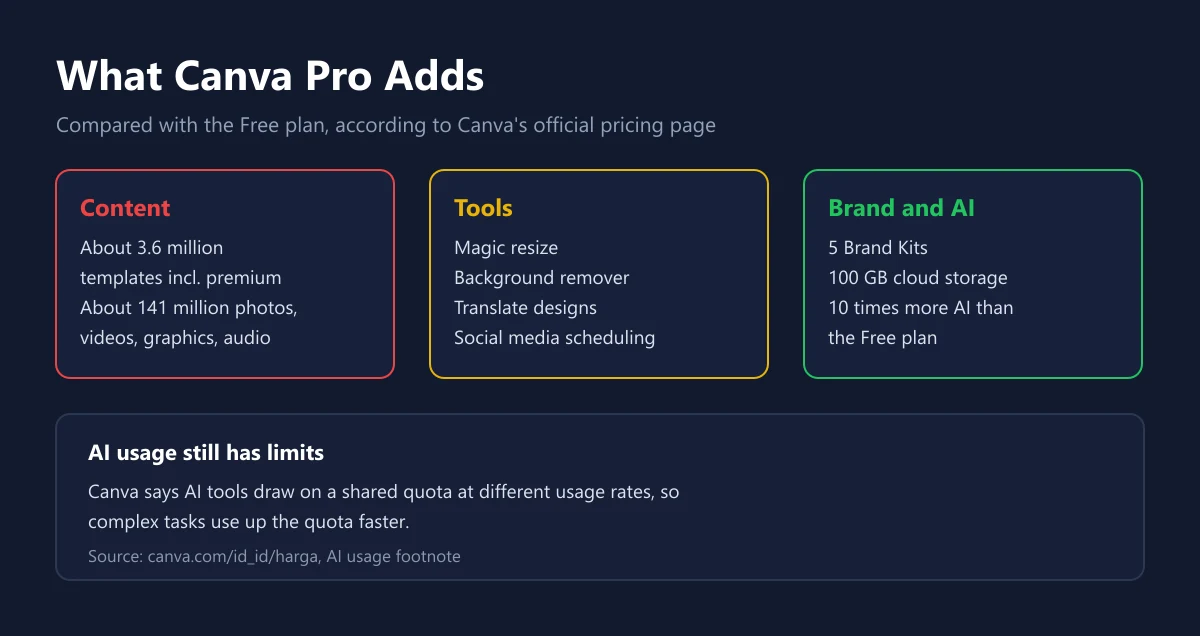
The biggest difference is the content library. Canva's pricing page lists the Free plan with about 1.6 million templates and 4.7 million photos, videos, graphics, and audio files, while Pro unlocks about 3.6 million templates including premium ones and about 141 million premium assets. For creators who often run out of visual ideas, this is the gap you notice first.
Next come the tools. Pro adds AI tools to resize designs, translate them, and remove backgrounds, plus social media content scheduling. Resizing helps a lot when one design has to work as a YouTube thumbnail, a square post, and a vertical story. The background remover is handy for cutting yourself out of a webcam shot or a character out of a screenshot.
Finally, the AI allowance. Canva says Pro gets 10 times more AI than the Free plan, but AI tools draw on a shared quota at different usage rates. Complex tasks use up the quota faster, so real usage can be lower than expected. If you run out, Canva offers a separately paid add on.
Canva Pro for Game Creators and Streamers
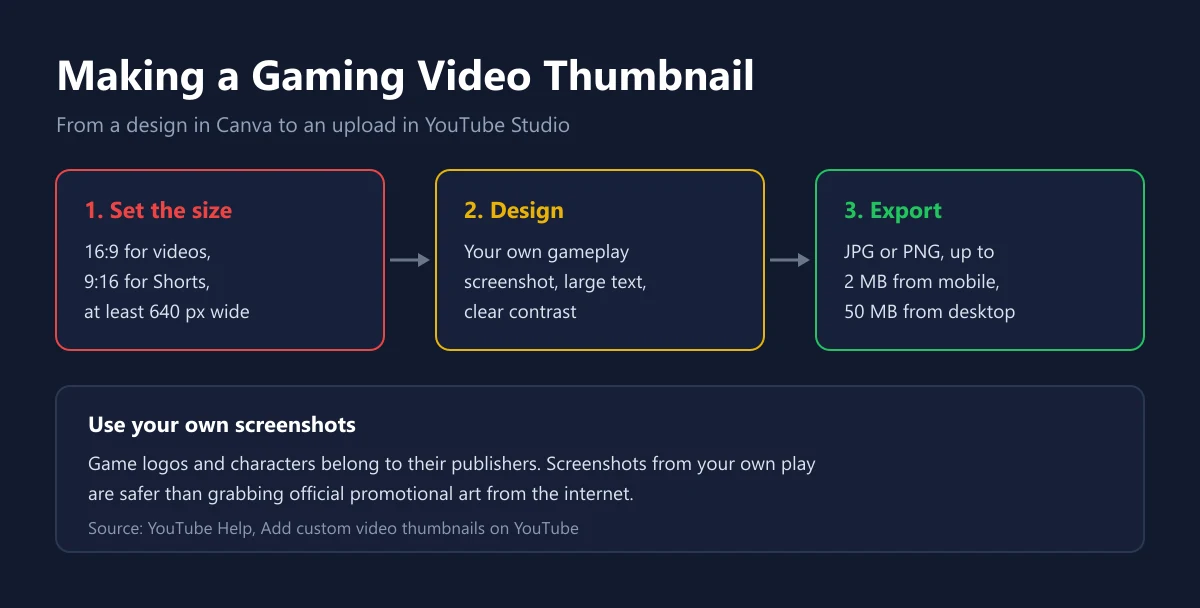
Thumbnails are the most frequent job for gaming creators. YouTube Help recommends a 16:9 ratio for videos and 9:16 for Shorts, a minimum width of 640 pixels for videos, JPG or PNG format, and a limit of 2 MB when uploading from a phone or 50 MB from a desktop. Canva can create canvases with custom dimensions, so set the size first to keep text from being cut off.
| Gaming creator need | Free is enough | Easier with Pro |
|---|---|---|
| Weekly video thumbnails | Yes, with free templates | Premium templates and quick resize |
| Cut out yourself from a photo | Not listed in the Free plan | Background remover |
| Community tournament posters | Yes | More premium stock graphics |
| Channel colour identity | 1 Brand Kit, 3 colours | 5 Brand Kits |
| Scheduling social posts | Not listed in the Free plan | Social media content scheduling |
For the thumbnail itself, use screenshots from your own play. Game logos, characters, and official promotional art belong to their publishers. Grabbing promo art from the internet and pasting it into a thumbnail opens the door to copyright claims, which a Pro subscription does not solve. If you also run a community server, Discord announcements can use the same templates, and how to gift subscriptions to members is covered in our Discord Nitro Gift guide.
Pro Content License: What Is Allowed and What Is Not
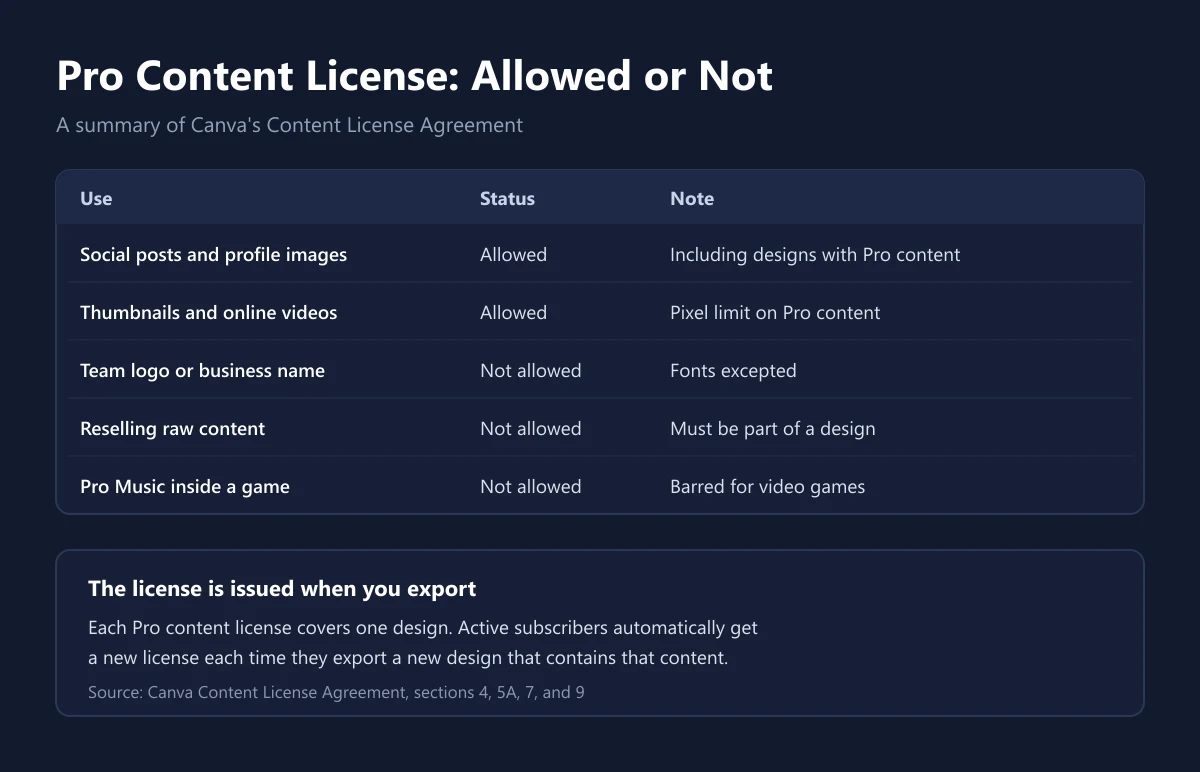
Many people assume a Pro subscription means any content can be used for anything. It does not. According to Canva's Content License Agreement, a license is issued when you export a design, and each Pro content license covers one design. Active subscribers automatically get a new license each time they export a new design that contains that content.
The permitted uses are broad: social media posts and profile images, promotional material, online publications including video, and prints. For Pro content in online publications there is a pixel limit per unedited file, unless the design is published through Canva's website feature or embedded from Canva. Your YouTube thumbnails and videos usually fall into this category.
Three bans matter most for gamers. First, the same agreement forbids using Canva content as part of a trademark, business name, or logo, fonts excepted. So do not build an esports team logo from Canva stock icons. Second, content cannot be resold or distributed on a standalone basis outside a design. Third, Pro Music cannot be used inside video games or software applications.
| Use | Status | Note from the license agreement |
|---|---|---|
| Social media posts and profile images | Allowed | Including designs that contain Pro content |
| Thumbnails and online videos | Allowed | Pixel limit for unedited Pro content |
| Team logo or business name | Not allowed | Fonts are excepted |
| Reselling raw content | Not allowed | Content must be part of a design |
| Pro Music inside a video game | Not allowed | Barred for video games and apps |
Pro, Business, or Education
If you work alone, Pro is the right fit. Canva explains that Business builds on Pro for individuals and teams that need more AI access, brand management, ad analytics, and a shared workspace. Business is billed per person who accepts an invitation, with 500 GB of cloud storage and 100 Brand Kits.
Esports teams or channels with more than one editor should not share a single Pro account. Besides breaking the one person per Pro account rule, sharing exposes your design history and payment method to everyone. Canva's older Teams plan also no longer accepts new sign ups, according to the same pricing page.
For students and teachers there is Canva for Education, free for eligible educators and students from kindergarten to high school and for eligible schools. However, the license agreement limits Pro content in Canva for Education to educational, non commercial use. If you are a student who also runs a monetised gaming channel, designs for that channel need a separate account.
Trials, Renewals, and Cancellation
Canva offers a free trial of Pro. According to Canva's Terms of Use, at the end of the trial Canva charges the next billing cycle to your chosen payment method unless you cancel before the trial ends. Set a calendar reminder on the day you sign up.
Paid subscriptions, other than one time payments, renew automatically each billing cycle, and Canva notifies you before renewal. You can cancel any time from your account settings. Cancellation takes effect at the end of the current billing cycle, and the same terms say you are not entitled to a refund of fees already paid, unless the law requires it.
If Canva raises prices, the increase applies at the next renewal or 30 days after notice, whichever is later, according to the Terms of Use. You can always see what your plan costs under Settings, then Billing. We cover general refund rules for digital products in our guide on refunding digital purchases.
Tips for Buying Canva Pro Safely
Very cheap Canva Pro offers on social media are usually invitations into someone else's team. Avoid them. The team owner can remove you at any time, your designs sit in a stranger's workspace, and a Pro account is meant for one person anyway. Choose a purchase that activates Pro on your own account, either directly with Canva or through an official code redeemed to your account.
For payment, Canva's pricing page mentions credit cards and PayPal plus other online payment systems in some countries, and the list for one time payments includes GoPay for Indonesia. If you usually pay with a digital wallet, our e-wallet guide explains how to choose safely. Tax on digital subscriptions is covered in our guide to VAT on digital products.
If you buy a code from a shop, check the duration, the code region, and the activation method, then keep your receipt. How to judge a shop before paying is covered in our guide on choosing a top up platform. Our catalog lists Canva Pro 1 month and Canva Pro 1 year, and you can compare those prices with Canva's official price. Guidance on checking a code before redeeming it is in our guides on checking whether a digital code is genuine and safe digital shopping. Protect your Canva account with two step verification as in our 2FA guide, and if you are also sorting out office apps, compare with our Microsoft 365 guide and YouTube Premium guide.
Frequently Asked Questions
What is the official price of Canva Pro in Indonesia?
Rp95,000 per month for one person, according to Canva's pricing page when we checked on 25 September 2026. Yearly billing saves from 16 percent.
Can two people share one Canva Pro account?
No. Canva states that a Pro account can only be used by one person. For teams, Canva offers the Business plan, billed per person.
Can I pay for Canva Pro once without a subscription?
Yes. Canva offers prepaid one day and one week plans in selected countries, with no automatic renewal, for Pro only.
Does the Canva Pro trial charge automatically?
Yes, unless you cancel before the trial ends. Canva charges the next billing cycle to the payment method you chose.
Can I get a refund on a Canva subscription?
Usually not. Canva's Terms of Use say cancellation takes effect at the end of the cycle and fees already paid are not refunded, unless the law requires it.
Can I make an esports team logo from Canva elements?
Not from stock content. Canva's Content License Agreement forbids using its content as a trademark, business name, or logo, with fonts as the exception.
What thumbnail size does YouTube recommend?
A 16:9 ratio for videos with a minimum width of 640 pixels, JPG or PNG, up to 2 MB from a phone, according to YouTube Help.
Is Canva free for students?
Canva for Education is free for eligible educators and students from kindergarten to high school, but Pro content there is for educational, non commercial use only.
Do I lose my designs if I stop paying for Pro?
Files you have already exported stay on your device. Under the license agreement, a subscriber's Pro content license is issued when a design is exported, so export important designs while your subscription is still active.
Digidang Team
Gaming enthusiast and marketplace expert sharing tips, guides, and the best gaming deals.