JetBrains All Products Pack Guide: Prices and Licensing

The JetBrains All Products Pack is a subscription that unlocks every paid JetBrains IDE under one license, including Rider for Unity and Unreal game developers. This guide covers official prices for the first three years, the pack's contents, Rider and dotUltimate alternatives, free licenses, the fallback license, and safe buying.
What Is the JetBrains All Products Pack?
JetBrains is a developer tools company founded in February 2000 in Prague and now headquartered in Amsterdam, according to Wikipedia. It is known for IDEs such as IntelliJ IDEA, PyCharm, and Rider, and for the Kotlin programming language it created in 2011.
The All Products Pack bundles almost all of those tools into one subscription. According to the All Products Pack page, it includes 10 IDEs, three extensions, two profilers, JetBrains AI credits, and early access to Air, an agentic development environment that is still in EAP. The ten IDEs are IntelliJ IDEA, WebStorm, Rider, PyCharm, CLion, PhpStorm, DataGrip, RubyMine, RustRover, and GoLand.
The three extensions are ReSharper, ReSharper C++, and dotCover, and the two profilers are dotMemory and dotTrace. For individual use, the pack includes 10 JetBrains AI credits every 30 days, while organization licenses get 20, with top-ups available at any time. You can switch between all the IDEs on one machine or across your own devices.
Official JetBrains All Products Pack Prices
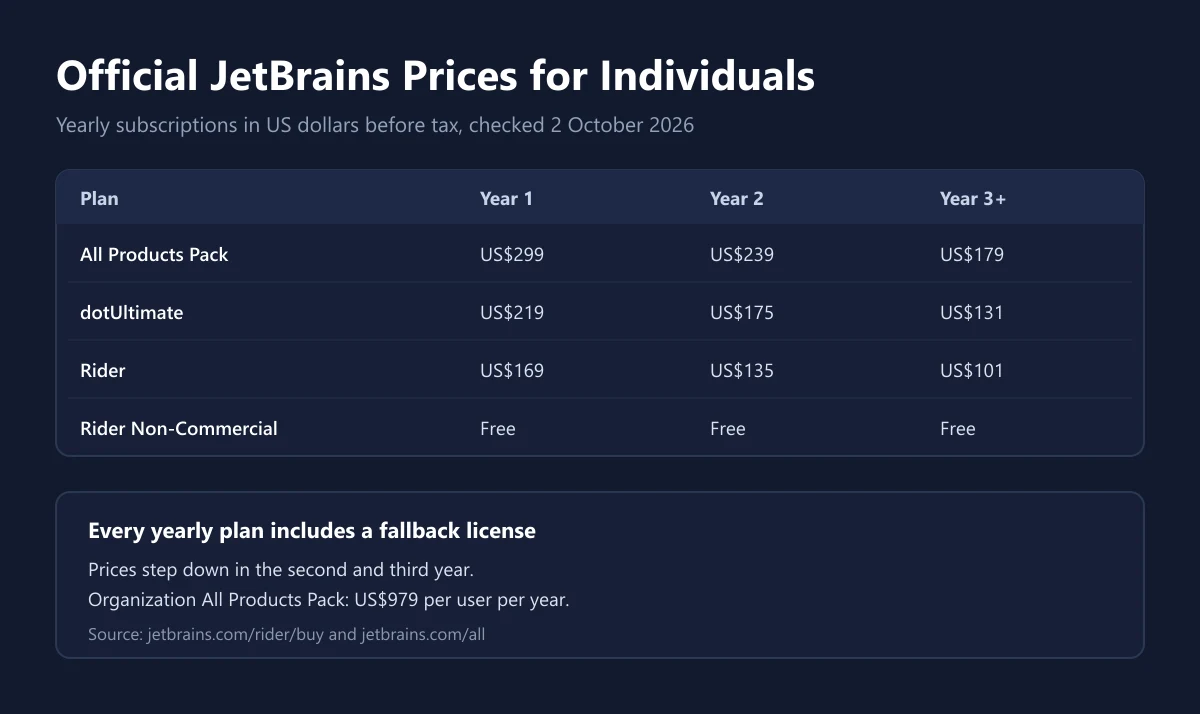
The prices below come from the JetBrains pricing page for individuals on yearly billing as of 2 October 2026. JetBrains uses a stepped pricing model: the second year costs less than the first, and the third year onwards costs less again.
| Individual plan | First year | Second year | Third year onwards |
|---|---|---|---|
| All Products Pack | US$299 | US$239 | US$179 |
| dotUltimate | US$219 | US$175 | US$131 |
| Rider | US$169 | US$135 | US$101 |
| Rider Non-Commercial | Free | Free | Free |
These figures exclude tax. When we opened the page from Indonesia, the All Products Pack showed US$331.89 including tax for the first year. The same page says the tax rate depends on your country's rules, any tax ID you enter, and the purchase method, so read our guide to VAT on digital products before setting a budget.
Organization pricing is much higher. The All Products Pack page lists US$979 per user per year for organization licenses. There is also an option to freeze your price for 2 to 3 years and a monthly billing option, both selectable on the purchase page.
All Products Pack, dotUltimate, or Just Rider?
Not everyone needs 10 IDEs. If you only work in one language, buying a single IDE is often cheaper. The comparison below uses first-year individual prices from the Rider pricing page.
| Aspect | Rider | dotUltimate | All Products Pack |
|---|---|---|---|
| First-year price | US$169 | US$219 | US$299 |
| Main contents | .NET and game IDE | Rider plus other .NET tools, 7 tools in total | 10 IDEs, 3 extensions, 2 profilers, 16 tools in total |
| Best for | One language, C# or C++ games | .NET and game developers who need profilers | Developers who use many languages |
| Trial | 30 days | See purchase page | See purchase page |
| Perpetual fallback license | Yes, on yearly plans | Yes, on yearly plans | Yes, on yearly plans |
According to the same page, dotUltimate is a complete toolkit for .NET and game development with 7 tools, while the All Products Pack has 16 tools. The US$80 first-year gap between dotUltimate and the All Products Pack only pays off if you also write Python, JavaScript, Go, or Java on a regular basis.
The reasoning is similar to choosing other software bundles we have covered, such as our Microsoft 365 guide and Canva Pro guide: count the tools you actually use every week, not the number of tools listed in the bundle.
Rider for Game Developers
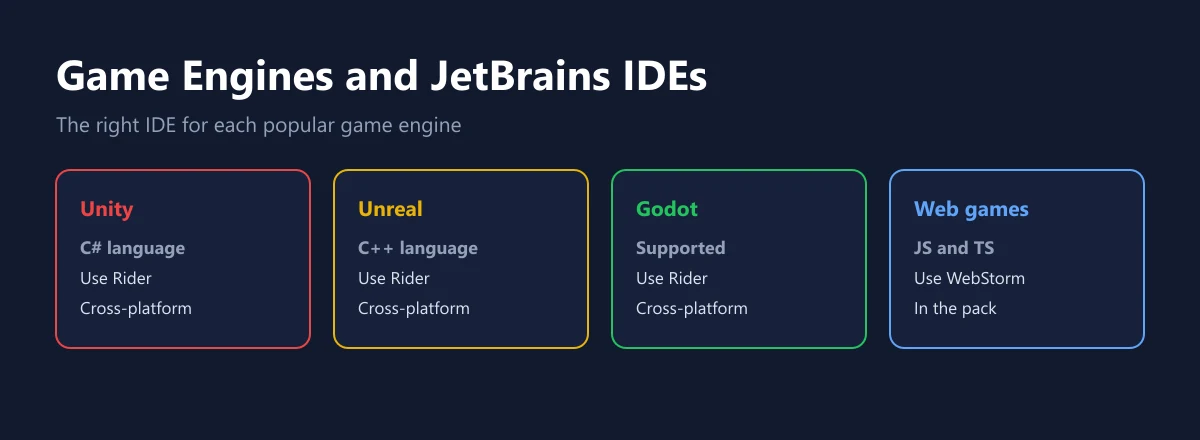
For Digidang readers who want to make games, Rider is the most relevant IDE. The official Rider page calls it a cross-platform IDE for .NET and game development, with support for Unity, Unreal Engine, and Godot. Rider runs on Windows, macOS, and Linux.
Wikipedia describes Rider as an IDE for .NET development, mainly C# and F#, and for game development with Unity in C# and Unreal Engine in C++. If you build web games in JavaScript or TypeScript, the right IDE is WebStorm, which is also included in the All Products Pack.
Game development also demands a capable PC, because the engine editor, compilation, and testing all run at once. Tips for keeping your PC fast are in our PC gaming optimization guide, and make sure your operating system is genuine as covered in our Windows license guide. Rider itself runs on Windows, macOS, and Linux according to the Rider page.
Free Options: Non-Commercial and the Student Pack
Before paying, check whether you qualify for a free license. According to the Rider pricing page, Rider Non-Commercial is free for learning and self-education, open-source contributions without commercial benefit, any form of content creation, and hobby development. It already includes AI Free.
The line is drawn by the definition of commercial use. The JetBrains non-commercial license agreement defines commercial use as using the product to develop commercial products, meaning products distributed for a fee or used as part of a business activity, or to provide paid services. So if your game will be sold in a game store, you need a paid license. The same agreement says this edition collects usage data by default, including code-related data, and the pricing page notes that detailed code-related data collection can be disabled in the settings.
Students have their own route. The JetBrains education page offers a free Student Pack with access to all JetBrains IDEs, with student status verified through a university email address, an ISIC or ITIC card, or the GitHub Student Developer Pack.
Personal vs Organization Licenses
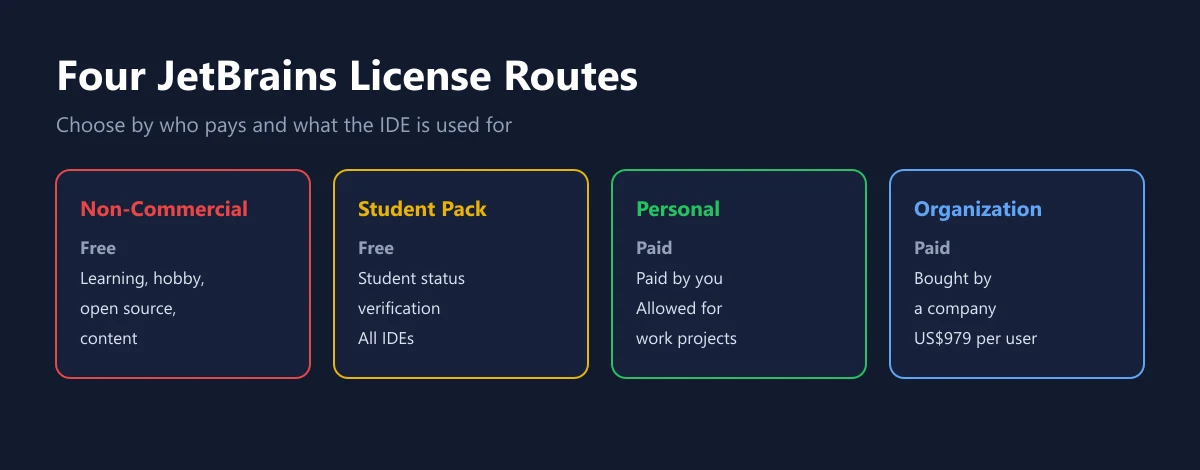
A personal license is bought and paid for by an individual. According to the JetBrains licensing FAQ, you can use a personal license wherever you work and for any kind of development, personal or company projects. That makes personal licenses attractive for freelancers and indie game developers.
| License type | Cost | Allowed for paid projects | Main condition |
|---|---|---|---|
| Non-Commercial | Free | No | Learning, hobby, open source, content |
| Student Pack | Free | No, for learning | Student status verification |
| Personal | From US$169 per year for Rider | Yes | Bought and paid for by an individual |
| Organization | US$979 per user per year for the All Products Pack | Yes | Bought by a company |
Organization licenses are bought by companies and managed centrally. The price gap is large, so make sure you choose the right type based on who is paying. If in doubt, read the terms on the purchase page or contact the JetBrains sales team before paying.
The Perpetual Fallback License
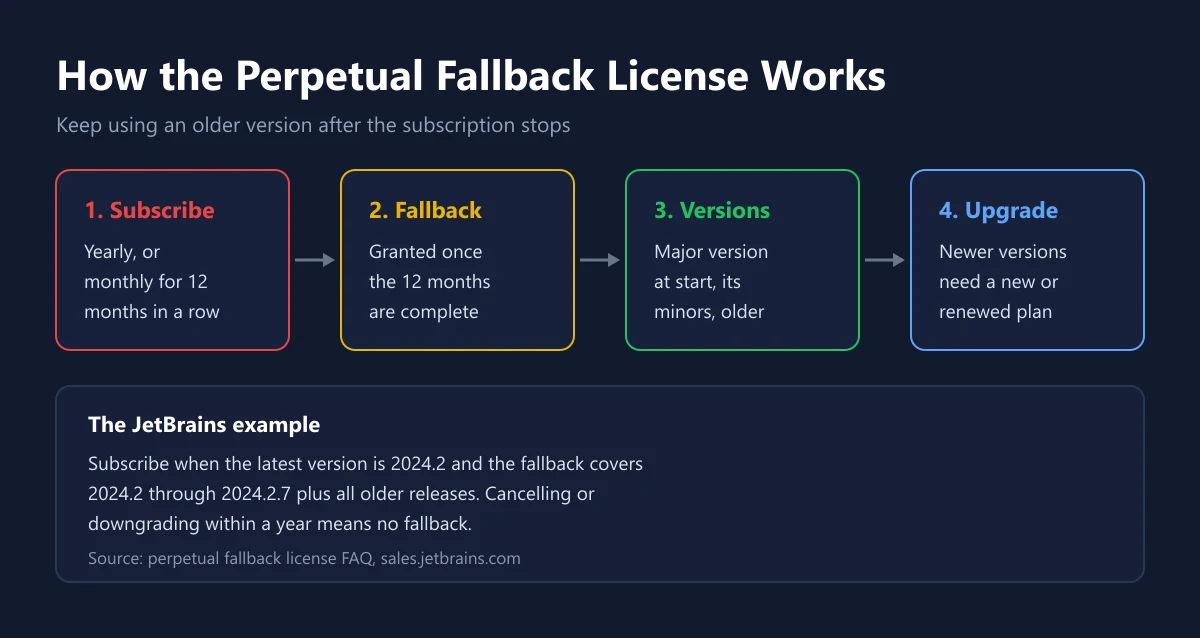
One strength of JetBrains subscriptions is the perpetual fallback license. The pricing page states that all yearly subscriptions include it. According to the JetBrains FAQ, a fallback license lets you use a software version indefinitely, even after your subscription ends.
The conditions are clear. You get a fallback license if you buy a yearly subscription, or keep renewing a monthly subscription for 12 consecutive months. The license covers the last major version available when your subscription started, every minor release of that version, and all older versions. JetBrains gives this example: if you subscribe when the latest version is 2024.2, your fallback covers 2024.2 through 2024.2.7 and all earlier releases.
There is an important exception. The same FAQ says you do not get a fallback license if you cancel or downgrade within a year, for example by downgrading the All Products Pack to a single-product license. To use newer versions, you still need to buy or renew a subscription.
How to Buy JetBrains Safely
Buying directly on the JetBrains site is the simplest route because the license is tied straight to your JetBrains account. Payment is by debit or credit card through third-party payment providers such as Adyen and PayPal, according to the JetBrains store terms. For recurring subscriptions, you authorize JetBrains to charge your card automatically at the interval you chose.
On refunds, the same terms say any refund request after the purchase date is subject to prior authorization by JetBrains and accepted at its sole discretion, unless applicable law provides otherwise. That is why it pays to use Rider's 30-day trial before paying. If you buy a license code from another store, that store's return policy applies, as explained in our guide on refunding digital games.
Our catalog lists the JetBrains All Products Pack 1 year, alongside other productivity software such as Notion Plus and Adobe Creative Cloud. Make sure the license type, personal or organization, matches your needs, and avoid codes sold far below the official price. How to judge a seller is covered in our tips for buying digital products safely and how to verify a digital code. Once activated, protect your JetBrains account the same way as in our two-step verification guide and store the password in a manager as covered in our 1Password guide.
Frequently Asked Questions
How much does the JetBrains All Products Pack cost?
For individuals, it costs US$299 in the first year, US$239 in the second year, and US$179 per year from the third year, before tax, according to the JetBrains pricing page on 2 October 2026.
What is included in the All Products Pack?
It includes 10 IDEs (IntelliJ IDEA, WebStorm, Rider, PyCharm, CLion, PhpStorm, DataGrip, RubyMine, RustRover, GoLand), three extensions (ReSharper, ReSharper C++, dotCover), two profilers (dotMemory, dotTrace), JetBrains AI credits, and early access to Air.
Is Rider free?
Rider is free for non-commercial use such as learning, hobby projects, open source without commercial benefit, and content creation. For commercial projects, Rider for individuals costs US$169 in the first year.
Does Rider support Unity, Unreal, and Godot?
Yes. The Rider page lists support for Unity, Unreal Engine, and Godot, and Rider runs on Windows, macOS, and Linux.
What is the JetBrains perpetual fallback license?
It is a license that lets you keep using a specific version after your subscription ends. It is granted for yearly subscriptions or monthly subscriptions renewed for 12 consecutive months.
Can I use a personal license for work?
Yes. The JetBrains licensing FAQ says a personal license can be used wherever you work and for both personal and company projects.
Can students use JetBrains for free?
Yes, through the Student Pack, with student status verified by a university email, an ISIC or ITIC card, or the GitHub Student Developer Pack, according to the JetBrains education page.
Does JetBrains give refunds?
Refund requests after purchase require JetBrains' prior authorization and are at its sole discretion unless local law provides otherwise, according to the JetBrains store terms. Use the free trial first.
How much is the All Products Pack for companies?
The organization license for the All Products Pack is listed at US$979 per user per year on the All Products Pack page, before tax.
Digidang Team
Gaming enthusiast and marketplace expert sharing tips, guides, and the best gaming deals.