PlayStation Plus Guide: Essential, Extra, Deluxe, and How to Subscribe

PlayStation Plus is Sony official paid subscription that unlocks online play, a rotating set of monthly games, member discounts, cloud saves for your game data, and a game catalogue that depends on the tier you pick. This guide breaks down what each plan actually contains according to the official PlayStation page for Indonesia, how upgrades and downgrades are billed, the voucher rules that cause most failed redemptions, and one change that takes effect in January 2026.
Everything below is taken from official PlayStation sources: the PlayStation Plus page for Indonesia, the Subscriptions and Services support hub, and the official guide to redeeming PlayStation Store voucher codes. Membership prices are not published as fixed figures on those pages, so this article invents none. What it does instead is explain how the price is determined and where you read the number that applies to your own account.
What PlayStation Plus Is and What You Are Actually Paying For
PlayStation describes PlayStation Plus as a paid subscription service that gives players access to games, online multiplayer, and exclusive content. The important word is access. You are paying for the right to use something while your membership is active, not for permanent ownership of everything in the catalogue.
In its official question and answer section, Sony answers whether PlayStation Plus games are yours to keep with a clear line: yes, for as long as you remain an active member. Some games in the Game Catalogue and Classics Catalogue have end dates when they leave the service, and those dates are publicised ahead of time. So one subscription contains two very different categories, and mixing them up is the most common source of disappointment we hear about.
The second thing worth correcting: not every online game needs a membership. Sony states that for the majority of games you buy on disc or download from PlayStation Store, you do need PlayStation Plus to play online. However, most free to play games such as Fortnite, Apex Legends, and Call of Duty Warzone do not require a membership. If those three are your whole rotation, a subscription is a choice, not a requirement.
Three Plans for Indonesia: Essential, Extra, and Deluxe
This is the part Indonesian buyers most often get wrong. The official PlayStation Plus page for Indonesia shows three plans named Essential, Extra, and Deluxe. The Premium name that circulates in foreign coverage refers to how plans are arranged in other markets. If you are about to buy a code sold under a Premium label, confirm first which plan will actually land on your account.
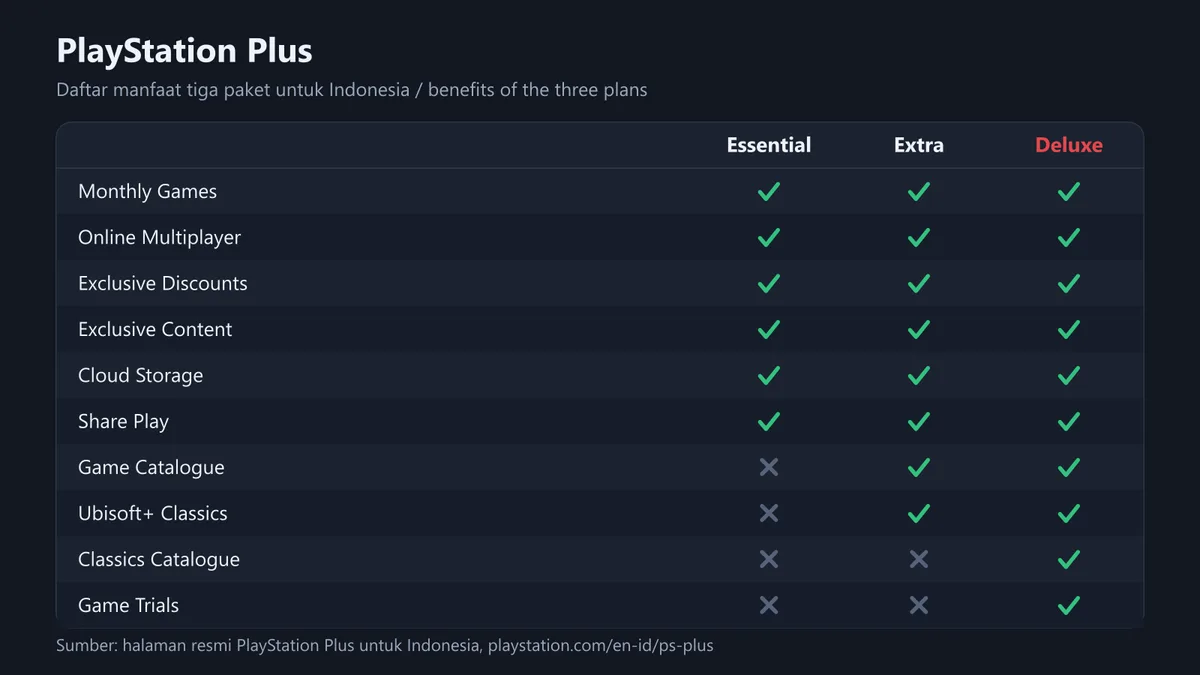
Here is what each plan contains according to the benefit list on that official page.
| Benefit | Essential | Extra | Deluxe |
|---|---|---|---|
| Monthly Games | Yes | Yes | Yes |
| Online Multiplayer | Yes | Yes | Yes |
| Exclusive Discounts | Yes | Yes | Yes |
| Exclusive Content | Yes | Yes | Yes |
| Cloud Storage | Yes | Yes | Yes |
| Share Play | Yes | Yes | Yes |
| Game Catalogue | No | Yes | Yes |
| Ubisoft+ Classics | No | Yes | Yes |
| Classics Catalogue | No | No | Yes |
| Game Trials | No | No | Yes |
An official footnote on the same page states that Classics and Game Trials are available only to Deluxe subscribers, and that the game library varies over time, by country or region, and by plan. That last clause matters: two people on Deluxe in two different countries do not automatically see the same list of titles.
One Extra and Deluxe benefit does carry an official rupiah figure, namely Ubisoft+ Classics. The PlayStation Plus page for Indonesia describes that curated selection of Ubisoft+ Classics as worth Rp79,000.00 per month. That number is a useful reference point when you weigh the gap between Essential and Extra, especially if the Ubisoft catalogue genuinely interests you.
One benefit is often assumed to be included when it is not: game streaming. Sony describes instant streaming to your console as a benefit of Premium memberships. In the benefit list for the three plans shown for Indonesia, streaming is not listed under Deluxe. Do not assume you get it simply because you paid for the highest tier. Open the benefit list for your own plan on the official page before you pay.
What It Costs and Why Numbers Online Are Often Wrong
In its official question and answer section, Sony addresses cost by stating that the price of PlayStation Plus varies by membership tier and by whether you are enrolled in a one month, three month, or twelve month plan, then points readers to explore the membership options available to them. No fixed price table is published on that page, and the price you see follows the country on your account.
The consequence is simple. Numbers you find in English articles are almost always United States pricing, and numbers from Indonesian YouTube channels may already be stale. The safest method is to open PlayStation Store while signed in to your own account and read the price there. Sony itself keeps the plan selector behind a sign in step with the line sign in to see your membership plan options.
If you are comparing total cost of ownership, do not stop at the subscription price. Tax is often the differentiator between stores, and we cover that separately in understanding VAT on digital products. For a view of how PS Plus sits against a comparable service, our older comparison is in Xbox Game Pass vs PS Plus.
How to Subscribe, Upgrade, and Downgrade
The official subscribe flow is short: select a PlayStation Plus membership plan, then follow the on screen instructions to set up your subscription. What deserves a slow read is the plan change rules, because that is where money quietly disappears.
To change a plan, Sony gives this path: sign in to Account Management, select Subscription from the menu on the left of the screen, select your PlayStation Plus subscription, then select Change Plan and pick a new plan and payment frequency. To stop, the path is the same up to Subscription, then select Cancel Subscription next to PlayStation Plus.
The three rules below come straight from the official PlayStation Plus page and are worth memorising.
- Stacking time. You can purchase a new membership that starts when your existing plan ends. So if a good offer appears, you can take it to extend your membership without wasting the time you already paid for.
- Upgrades are pro rated. To move up to Extra or Deluxe you simply purchase a membership at that level. You will pay a pro rated fee to bring your payments to the level of your new plan for the remainder of the paid membership period.
- Downgrades apply later. A downgrade takes effect at the end of your existing pre paid subscription period, stacked time included, and that is when you lose the benefits exclusive to your previous level.
That third rule has a side people rarely notice. If you stack two years of Deluxe and change your mind next month, downgrading does not refund anything, because the downgrade only lands after the whole pre paid period runs out. Stacking time at an expensive tier is a long term decision, not an experiment.
PSN Gift Cards and Voucher Codes: the Rules That Break Redemptions
Many buyers in Indonesia pay through codes rather than cards. That makes the official PlayStation voucher rules worth reading in full rather than in fragments. The official redemption page states the following.
| Official rule | What it means for you |
|---|---|
| PlayStation Store voucher codes contain 12 digits | If your code has 10 digits it is a discount code, not a voucher, and it is redeemed through a different path |
| The code must be for the same region as your account | A card for another country will not go in, even when the denomination matches |
| Physical vouchers carry a printed country flag | Check the flag on the card before paying, not after |
| Codes can only be used once | Redemption history is visible in Account Management under transaction details |
| Funds and content cannot be transferred between accounts | Redeeming on the wrong account is a permanent loss, not an inconvenience |
| Some subscription vouchers need a valid payment method on the account | Add a payment method first so the redemption is not blocked |
| Discount codes do not work on subscription services | Do not expect a 10 digit discount code to cut the price of PlayStation Plus |
The redemption path itself differs by device. On the web, go to PlayStation Store, select your profile at the top of the screen, select Redeem Code from the menu, then enter the 12 digit code and select Continue. On a PS5 console, go to PlayStation Store, press the triangle button to open the menu, then select More and Redeem Code. On PS4, go to PlayStation Store, scroll to the bottom of the sidebar, and select Redeem Codes. The PlayStation App also offers a Redeem Code menu.
Child accounts carry extra rules. Sony states that wallet top up voucher codes need to be redeemed on the family manager account, after which the family manager can set a monthly spending limit for the child. PlayStation Plus benefits such as monthly games and online multiplayer are also limited by age ratings and the parental controls set on child accounts.
If you buy codes from a marketplace, make checking authenticity a habit before you redeem. The practical steps are in how to check that a digital game code is genuine, and safer buying habits are in safe shopping tips for digital products. To understand why region is such a hard wall, read understanding digital gift card regions. Our own seller verification process is explained on the how we verify page.
PS Plus and PS Now Vouchers: the Confusing Conversion
One official rule rarely gets read even though it has a large effect on the value of your money. Sony explains what happens when you redeem a one month, three month, or twelve month PlayStation Plus or PlayStation Now membership voucher.
- If you do not have an active membership, a redeemed PlayStation Plus voucher gives access to PlayStation Plus Essential for the length of time printed on the voucher. Sony official example: a one month voucher gives one month of Essential.
- If you do not have an active membership and redeem a PlayStation Now voucher, you receive PlayStation Plus Deluxe for a length of time equivalent to the monetary value of that voucher. Sony official example: a one month PlayStation Now voucher gives roughly three weeks of Deluxe.
- If you are an existing customer, the voucher is converted into time on your current plan equivalent to the monetary value of the voucher. Sony official example: a one month PlayStation Plus voucher gives roughly three weeks of Extra or roughly two and a half weeks of Deluxe.
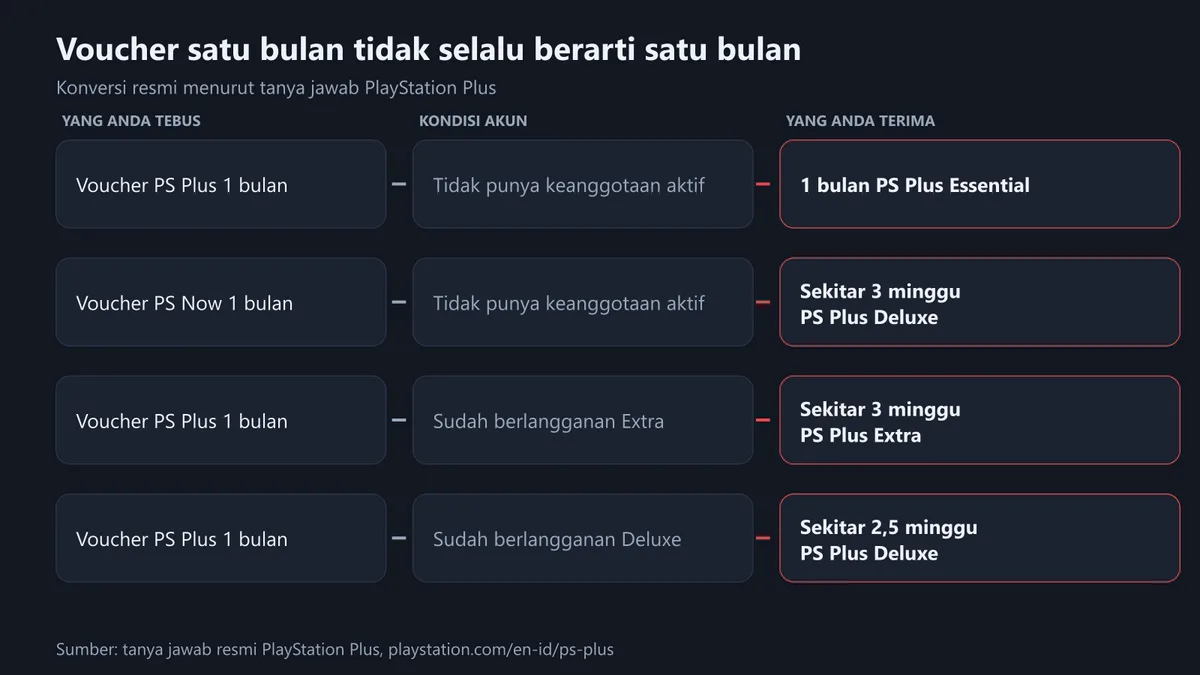
Read that third point again. A one month voucher does not always mean one month. If your account is running on Deluxe, a one month Essential voucher becomes roughly two and a half weeks. This is not seller trickery, it is the official conversion rule. If you want the full duration printed on the voucher, redeem it while your account is not sitting on a more expensive tier.
Cloud Storage, Share Play, and the Benefits Nobody Uses
The benefit whose value only appears during a disaster is cloud storage for saved data. PlayStation support gives concrete steps. On PS5, automatic syncing can run when you close a game or put the console into rest mode, provided automatic updates are enabled, the console is set to stay connected to the internet through Settings, System, Power Saving, Features Available in Rest Mode, Stay Connected to the Internet, and Saved Data and Game App Settings is set to Sync Saved Data and Auto Sync Saved Data.
For PS4 games, automatic uploads take data from your primary PS4 console through Settings, Application Data Management, Auto Upload. Sony adds a note that is easy to miss: for PS5 games both console and cloud sync to the most recent data, while PS4 game data is uploaded automatically but must be downloaded manually to PS5 console storage.
Share Play is another paid for benefit that mostly goes unused. It lets you invite friends to join your game or take control from their own console even when you are not in the same room. On sharing, PS5 has a Console Sharing and Offline Play setting that is automatically enabled on the first PS5 console you use to sign in to PlayStation Network, and it can be changed through Settings, Users and Accounts, Other. On PS4, each player can activate one console as their primary console through Settings, Account Management, Activate as Your Primary PlayStation 4.
Browsing the catalogue has an official path too. On PS5, from the Games home screen scroll right, select PlayStation Plus, open the Benefits tab, then select Game Catalog. On PS4, from the function screen scroll right, select PlayStation Plus, then scroll down and select Game Catalog.
What Changes for PS4 Games from January 2026
There is a footnote on the official PlayStation Plus page that deserves a place in your buying decision, especially if you still play on PS4. It states that from January 2026, PS4 games will be added only intermittently. The note appears against both Monthly Games and the Game Catalogue across all three plans.

In plain terms, if your main reason to subscribe is a steady stream of new PS4 titles every month, expect that rhythm to slow. It does not mean PS4 support stops, but it is enough to change the maths for anyone weighing a twelve month plan. If you are considering moving platforms anyway, per title pricing and seasonal sales usually matter more than a subscription, and we cover that in how to buy digital games cheaply and how to claim free games legally.
Checklist Before You Pay
The order below runs from the mistakes that cause the most real losses.
- Confirm the country on your PlayStation account, then match the region of any card or code to that country. Your physical location is not what decides this.
- Pick the tier you will genuinely use. Deluxe only makes sense if you will actually open the Classics Catalogue and Game Trials.
- If you are tempted to stack time at an expensive tier, remember that a downgrade only lands after the entire pre paid period expires.
- If you already subscribe at a higher tier, do not redeem a long Essential voucher before you understand the value conversion.
- Keep a valid payment method on the account, because some subscription vouchers require one.
- Count the digits before typing. Twelve digits is a voucher, ten digits is a discount code and does not apply to subscriptions.
- Turn on two factor authentication for your account. The walkthrough is in securing your gaming account with 2FA.
- Keep purchase proof and transaction history. If a payment fails, the recovery steps are in our failed top up guide, and general refund rules are in how to refund a digital game.
If you want to compare product formats first, two reads help: digital game vouchers, types and how to buy and how to redeem a PlayStation Store gift card. To choose the right denomination, see our PlayStation gift card guide. If you also own a Nintendo console, the subscription rules there are different and we walk through them in the Nintendo Switch Online guide.
Frequently Asked Questions
What is the top PlayStation Plus tier in Indonesia called?
The official PlayStation Plus page for Indonesia shows three plans: Essential, Extra, and Deluxe. The Premium name you see in foreign coverage refers to how plans are arranged elsewhere, so check which plan will actually land on your account before buying a code labelled Premium.
Do I need PlayStation Plus for every online game?
No. Sony states that for the majority of games bought on disc or downloaded from PlayStation Store you need a membership to play online. However, most free to play games such as Fortnite, Apex Legends, and Call of Duty Warzone do not require one.
Do PlayStation Plus games stay mine if the subscription ends?
According to Sony official question and answer section, they are yours for as long as you remain an active member. Some titles in the Game Catalogue and Classics Catalogue also have end dates when they leave the service, and those dates are announced ahead of time.
How do I move up from Essential to Extra or Deluxe?
Simply purchase a membership at the level you want. Sony states you will pay a pro rated fee to bring your payments to the level of the new plan for the remainder of the paid membership period. Plan changes can also be made through Account Management, Subscription, then Change Plan.
If I downgrade, when does the change take effect?
A downgrade takes effect at the end of your existing pre paid subscription period, stacked time included. That is when you lose the benefits exclusive to your previous level, so downgrading is not a way to stop charges mid period.
Why did my one month PlayStation Plus voucher turn into less than a month?
Because of the official conversion rule. If you are already a subscriber, a voucher is converted into time on your current plan equivalent to its monetary value. Sony official example: a one month PlayStation Plus voucher gives roughly three weeks of Extra or roughly two and a half weeks of Deluxe.
How many digits should a PlayStation Store voucher code have?
Twelve. If your code has ten digits it is a discount code redeemed through the shopping cart, and Sony states discount codes cannot be used with subscription services, pre orders, other discount codes in the same purchase, or on more than one purchase.
Can a PSN card from another country work on an Indonesian account?
No. The official rule is that a voucher code needs to be for the same region as your account, and physical vouchers carry a printed country flag. Funds and content cannot be transferred between accounts either, so a region mistake cannot be undone.
What happens to my game saves when the membership ends?
Cloud storage is a membership benefit, so plan your backup before the term expires. For PS5 games the console and cloud sync to the most recent data, while PS4 game data is uploaded automatically but has to be downloaded manually to PS5 console storage.
Can my child redeem a voucher code on their own account?
For wallet top up codes, Sony states the code needs to be redeemed on the family manager account, after which the family manager can set a monthly spending limit for the child. PlayStation Plus benefits on a child account are also limited by age ratings and the parental controls in place.
Digidang Team
Gaming enthusiast and marketplace expert sharing tips, guides, and the best gaming deals.