Rocket League Credits Guide: Buy and Use

Credits are Rocket League's premium currency, bought with real money. They are used to craft Blueprints, buy whatever is currently on display in the Item Shop, and take the premium Rocket Pass. This guide covers those three routes, the history behind them, and the effect of trading being closed.
What Credits Are and What They Are Not
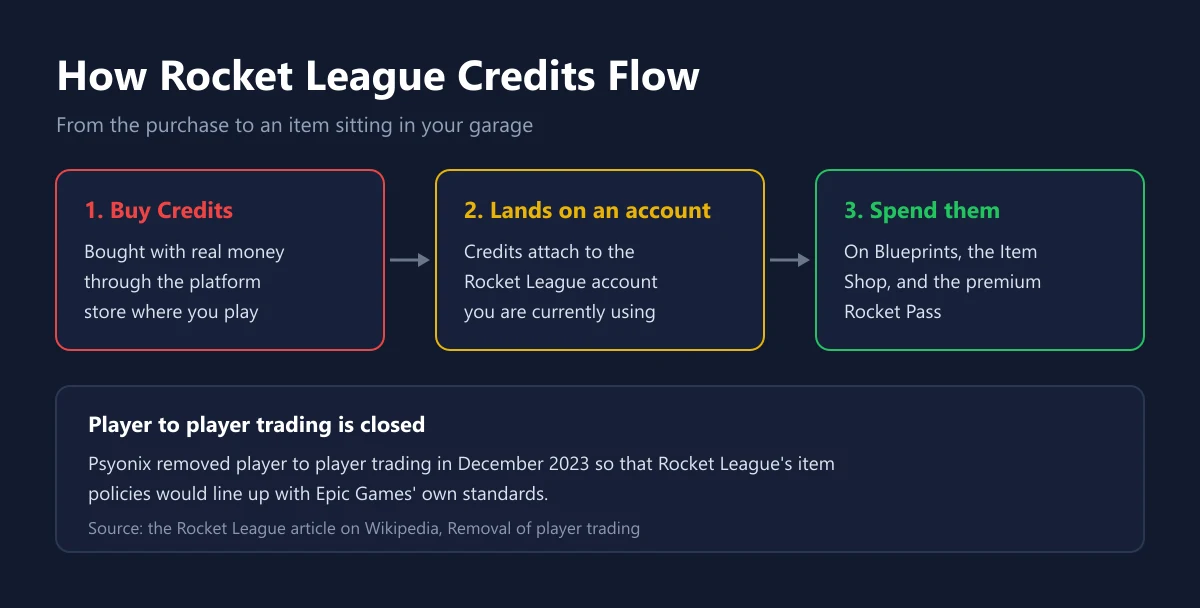
Credits are not points you accumulate by playing. They are bought with real money through the platform store where you play Rocket League, then spent inside the game. Everything they buy is cosmetic, so no purchase makes your car any better on the pitch.
Rocket League itself is now free to play. Nintendo's official page for the title carries an invitation to play for free and lists Epic Games as publisher with Psyonix as developer. What you spend therefore buys appearance, not access to the game. The same pattern runs through many other titles, and we discuss how to handle it in how to choose a game top up platform.
One thing worth settling early: Credits are not store balance. Store balance such as a gift card can buy many things across a platform, while Credits only work inside Rocket League. The distinction mirrors the one between wallet balance and in-game currency we set out in digital game vouchers: types and how to buy.
Can Credits Be Turned Back Into Money?
No. Credits are account content bought to be used inside the game, not savings you can cash out. With player to player trading removed, no official route exists to move items or value out of your account, so a Credits purchase is best treated as entertainment spending that concludes at once.
This is not an isolated policy. Many publishers apply the same principle to in-game currency, including Riot, which states its currency carries no cash value. We cover those terms in detail in our Riot Points guide, and the comparison is useful before spending heavily in any game.
| Common question | Short answer |
|---|---|
| Can be cashed out | No |
| Can be moved to another player | No, player trading has been removed |
| Improves how you play | No, the content is cosmetic |
| Earned by playing | No, bought with real money |
| Works outside Rocket League | No |
| Required to play | No, the game is free |
Three Ways to Spend Credits
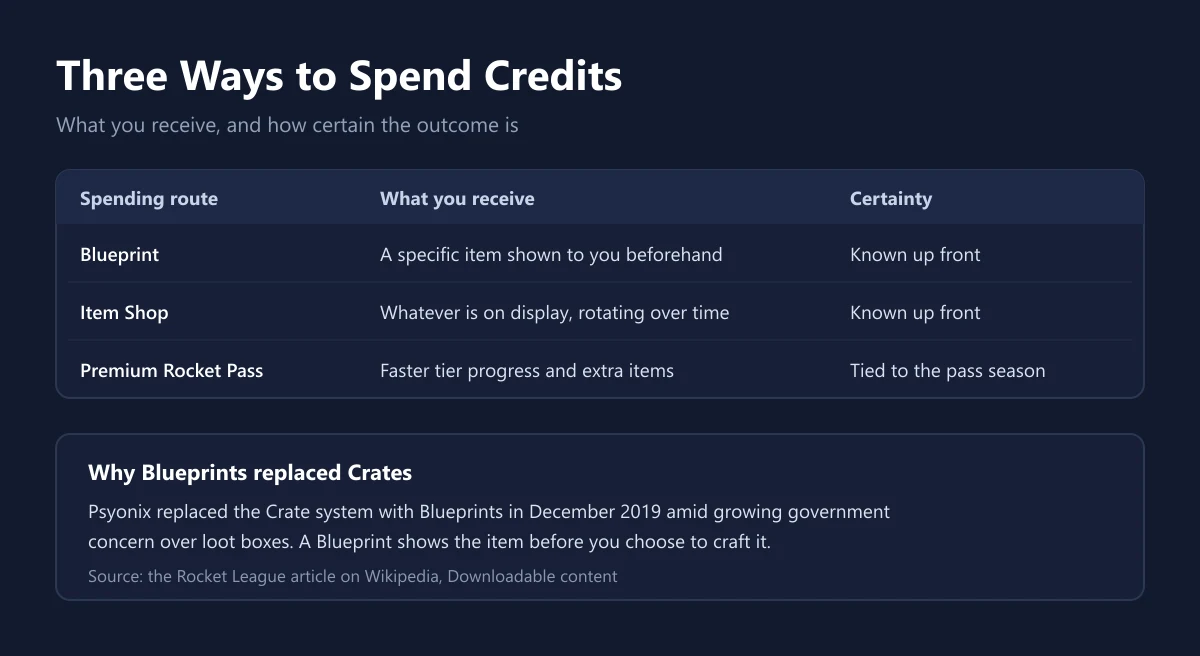
The first route is a Blueprint. A Blueprint is an item plan you receive after a match, and you can see exactly what it would produce before deciding to craft it with Credits. Because the contents are visible first, there is none of the surprise element the old crate system carried.
The second route is the Item Shop, where items are offered directly and the list rotates over time. Because it rotates, what you see today may not be there tomorrow, so waiting carries its own risk. The third route is the premium Rocket Pass, which according to the Rocket League article on Wikipedia is a flat-cost paid option that accelerates the level up rate and unlocks additional items at certain tiers.
| Route | How it works | Suits |
|---|---|---|
| Blueprint | Crafting a specific item you have already seen | Players chasing one particular item |
| Item Shop | Buying whatever is currently on display | Players who want an item without waiting |
| Premium Rocket Pass | Flat cost, faster tiers, additional items | Players who log in through the season |
If you play most days through a season, the third route usually delivers the most items for the money because its cost is fixed. If you play occasionally and want one item, the first or second route makes more sense. This is the same arithmetic we apply in how to save money on game keys.
Three Changes That Reshaped Buying
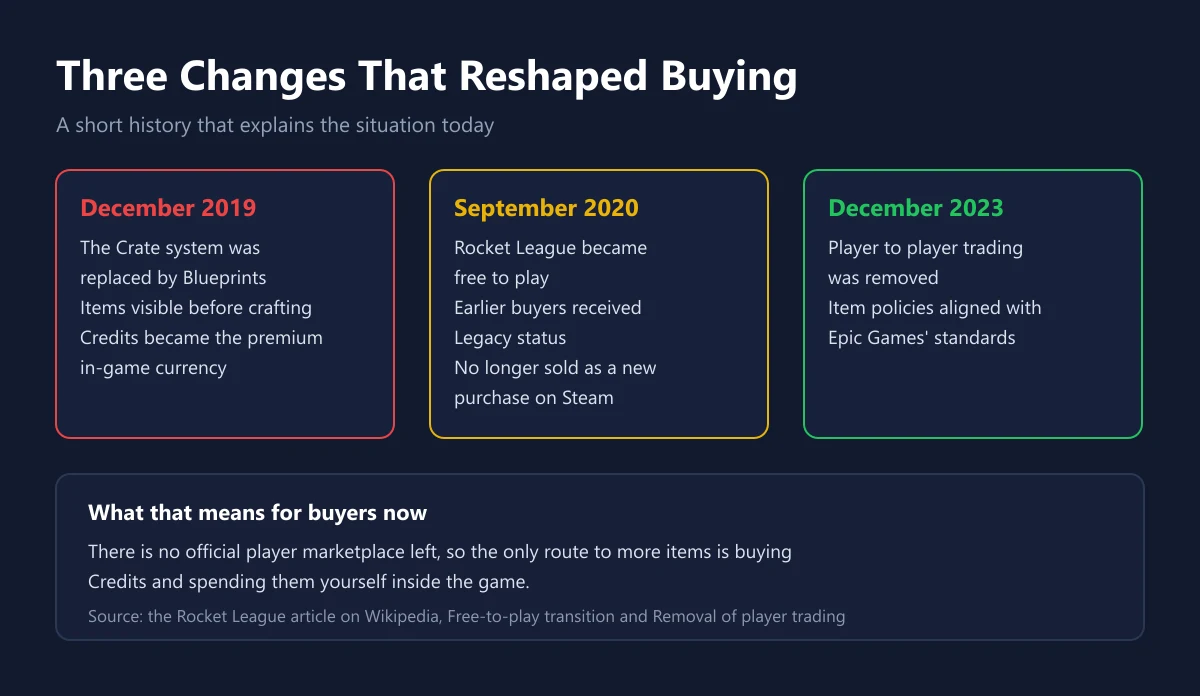
The first change came in December 2019. According to the Rocket League history record, Psyonix replaced the Crate system with Blueprints amid rising government concern over loot boxes. A Blueprint offers a known specific item with potential modifiers, and it is that Blueprint which is then crafted using Credits as the new premium currency.
The second recorded change came in September 2020, when Psyonix moved Rocket League to a free to play model on all platforms. Alongside it came cross-platform progression covering the cosmetic items players had earned. Players who had bought the game before the transition received Legacy status with some related cosmetic items, and from that point the game was no longer sold as a new purchase on Steam.
The third change came in December 2023, when Psyonix removed player to player trading. The reason, per the same record, was to align Rocket League's cosmetic and item shop policies with Epic's standards and to enable the possibility of cross-game ownership of Rocket League vehicles in other Epic titles. The practical effect on buyers is large, and we take it up next.
What the End of Trading Means
Before December 2023, players could swap items with one another, and an unofficial market grew around that practice. With trading closed, the only official way to add items is buying Credits and spending them yourself inside the game. No official method remains for moving an item from one account to another.
Offers to buy or sell Rocket League items outside the game therefore deserve suspicion. Such offers usually end in an account sale, which risks losing access and breaches platform terms. We list the signs of a bad offer in safe digital product shopping tips, and how to verify a digital code in how to check a genuine digital game code.
There is a subtler effect too. Because items can no longer be moved, the long term value of an item can never be realised in any form. What you buy really is only for your own use. That is a strong reason to buy Credits for what you want now rather than stockpiling in the hope of appreciation.
Choosing a Sensible Credits Amount
The simple rule: decide which item you want first, then buy just enough Credits. The reverse order, buying a large amount and then hunting for something worth spending it on, almost always ends in spending more than you planned.
| Amount | Usually suits | Product page |
|---|---|---|
| 500 Credits | One small item or topping up a shortfall | 500 Credits |
| 1100 Credits | A premium Rocket Pass or one mid tier item | 1100 Credits |
| 3000 Credits | A combined run of items across one season | 3000 Credits |
Note that Psyonix sets in-game prices and can change them, so the table describes typical use rather than a guarantee. How we check where stock comes from is described on how we verify, and our purchase terms sit on the refund policy page.
The Mistakes That Happen Most Often
The first mistake is buying on a platform other than the one you play on. Because Credits attach to the account you use, the wrong platform leaves the money somewhere you never open. The second is waiting too long on an Item Shop listing and losing the chance when the rotation moves on.
The third mistake is trusting an item swap offer from a stranger. Since the official route closed, such offers have no basis and frequently end in an account takeover. Switch on two step verification first, as we set out in our two step verification guide for game accounts, and never hand credentials to anyone.
Checklist Before Buying Credits
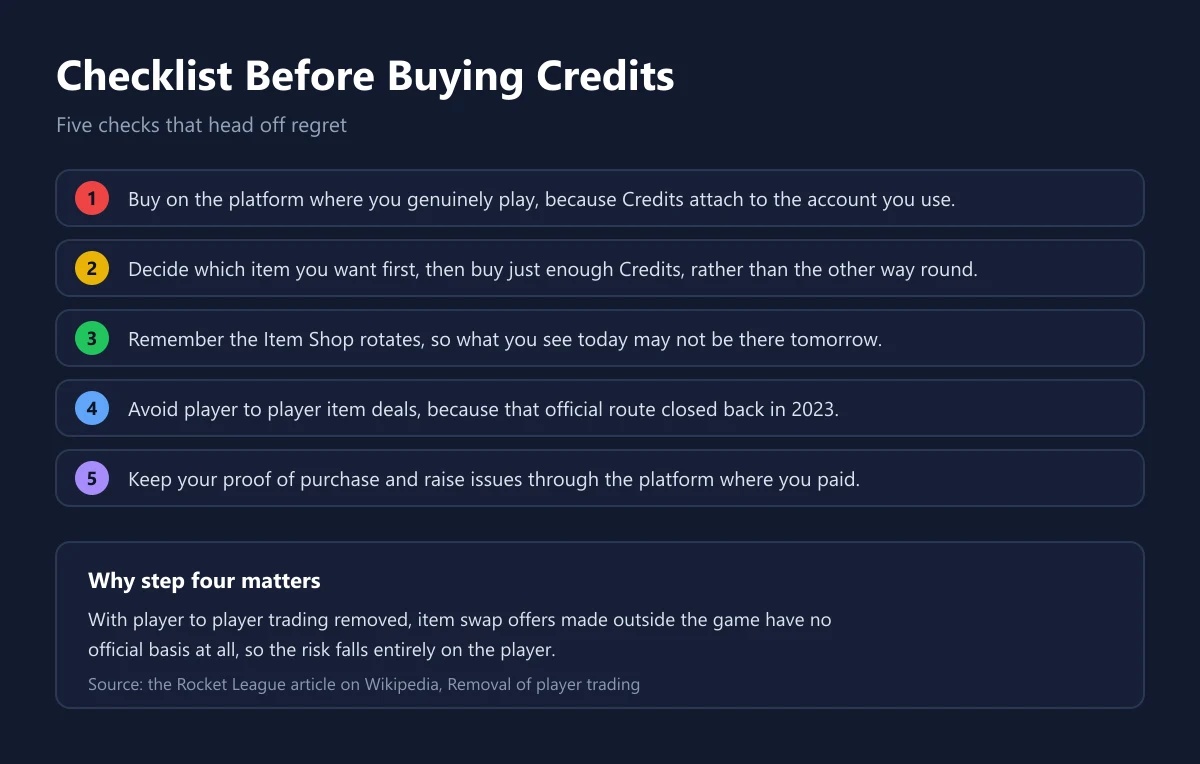
Before paying, confirm five things. You are buying on the platform where you actually play. The item you want is decided in advance. You understand that the Item Shop rotates. You are not tempted by item swap offers outside the game. And your proof of purchase is saved, so any problem can be raised with the platform where you paid.
With those five settled, a Credits purchase becomes easy to evaluate: you know what you bought, what it cost, and what it is for. We apply the same principle in our other buying guides, such as the EA Play guide and the Xbox Game Pass guide. If a payment fails midway, the diagnostic steps are in failed game top up and how to fix it and our guide to e-wallets for game top ups.
Frequently Asked Questions
Is Rocket League still a paid game?
No. Psyonix moved it to a free to play model on all platforms in September 2020, and since then in-game purchases have been cosmetic.
What do Credits actually do?
Credits are used to craft Blueprints, to buy items currently on display in the Item Shop, and to take the premium Rocket Pass.
Can Credits be earned by playing?
No. Credits are a premium currency bought with real money. What you earn by playing arrives as rewards and items through other routes, not as Credits.
Can items be traded with other players?
Not any more. Psyonix removed player to player trading in December 2023 to align its item policies with Epic Games' standards.
How do Blueprints differ from the old Crate system?
A Blueprint shows the item it will produce before you craft it, while the old Crate system revealed contents at random. The replacement happened in December 2019.
Can Rocket League still be bought on Steam?
Not as a new purchase. After the free to play transition the game stopped being sold on Steam, though earlier owners can still download, update and play with cross-play.
What is Legacy status?
A status granted to players who bought Rocket League before the free to play transition, along with some related cosmetic items.
Is the premium Rocket Pass worth it?
It depends on how often you play. Because its cost is flat and rewards rise with tiers, players who log in through the season usually get the most items per unit of money compared with buying individually.
Do Credits work in other Epic titles?
No. Credits are a currency inside Rocket League. Aligning item policy with Epic concerns possible cross-game ownership of vehicles, not moving currency between games.
Why did an Item Shop item disappear?
Because the Item Shop rotates. What you see today may not be available tomorrow, so delaying a purchase carries a real risk of missing it.
Where do I go if a purchase goes wrong?
To the official support of the platform where you paid, with your proof of purchase in hand. For purchases from our shop, the terms sit on the refund policy page.
Digidang Team
Gaming enthusiast and marketplace expert sharing tips, guides, and the best gaming deals.