Dota Plus Guide: Price, Features, and How to Subscribe

Dota Plus is Valve's official monthly subscription for Dota 2 players. It adds a hero levelling system, hero-specific challenges, an assistant that suggests items and abilities, and free entry to the weekly Battle Cup. This guide covers the price, the term options, the features, how to pay, the refund rules, and who genuinely benefits.
What Is Dota Plus?
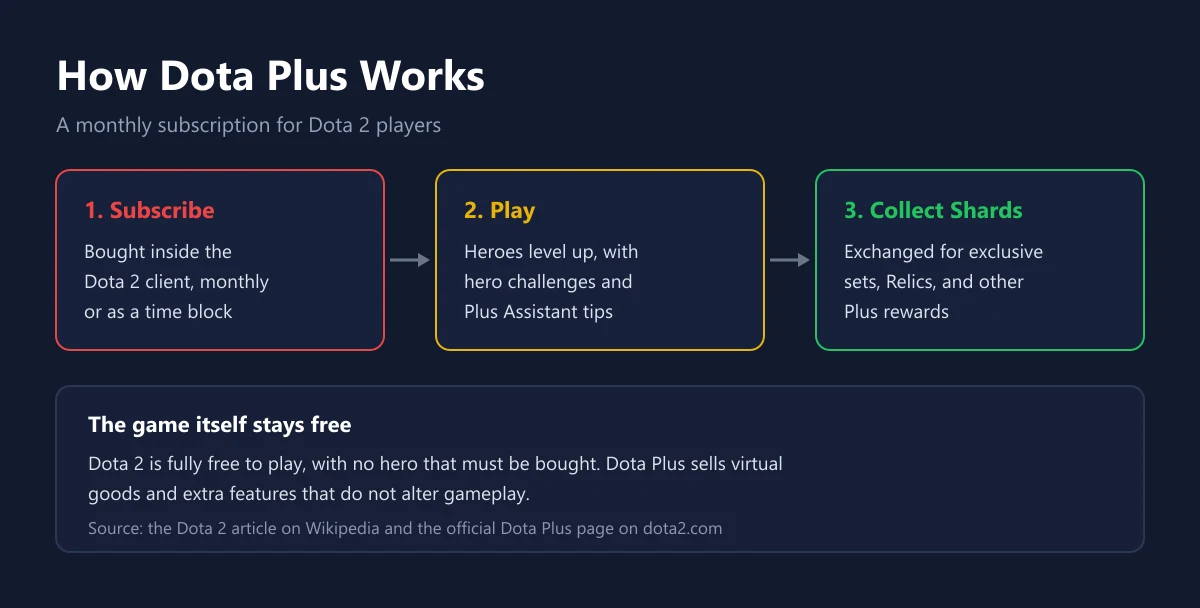
Dota Plus is an in-game subscription for Dota 2 that adds hero progression, match analytics, and member-only rewards. Dota Plus is not required to play, because Dota 2 itself is free. What you pay for is learning tools, achievement tracking, and cosmetic goods that do not change how strong any hero is in a match.
The background helps explain what the subscription is worth. According to the Dota 2 article on Wikipedia, Dota 2 was released in July 2013 and is fully free to play, with no heroes or gameplay elements that must be bought. Valve funds the game by selling virtual goods that do not alter gameplay, and around 2018 it introduced Dota Plus as a monthly subscription that replaced the seasonal battle passes. The official Dota Plus page itself calls it an evolution of the Majors Battle Pass.
| Feature | Without Dota Plus | With Dota Plus |
|---|---|---|
| Playing Dota 2 | Free | Free |
| Weekly Battle Cup | Buy a ticket | Free entry |
| Hero levels and hero challenges | Not available | Available |
| Plus Assistant | Not available | Item, ability, and hero suggestions |
| Seasonal Terrain | Not available | The current season's terrain |
| Watching a friend's match with no broadcast delay | Not available | Available |
How Much Dota Plus Costs
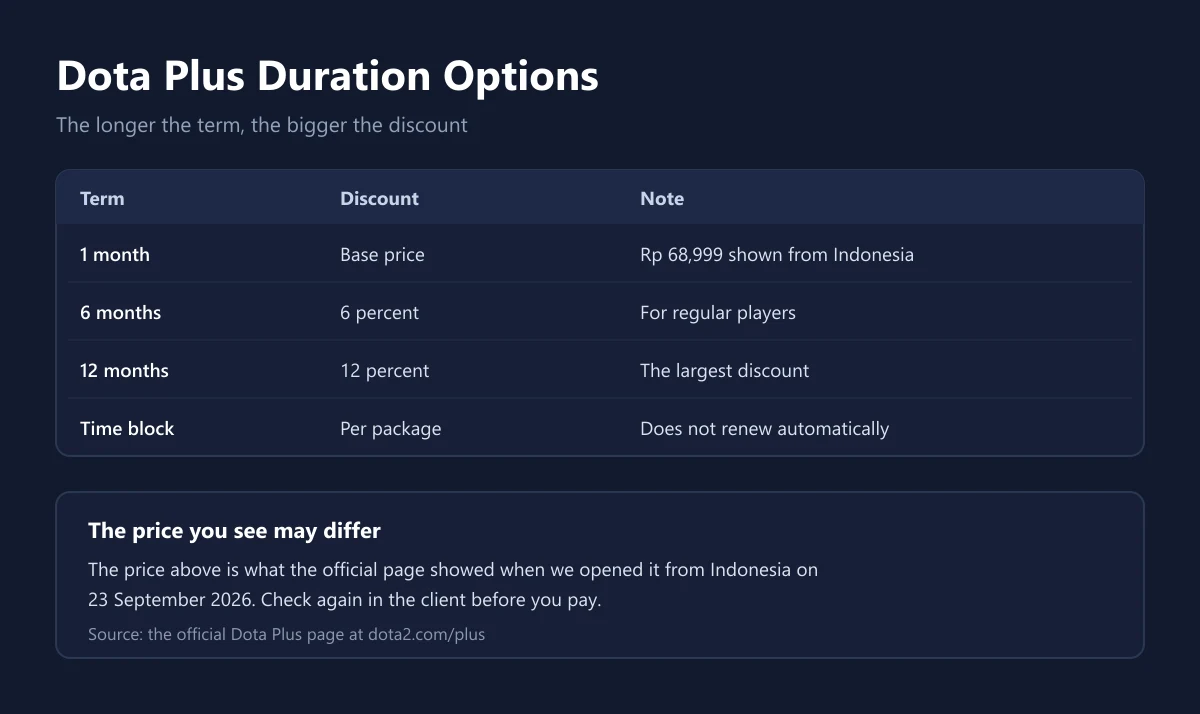
When we opened the official Dota Plus page from Indonesia on 23 September 2026, one month was listed at Rp 68,999. The same page says longer terms are discounted, at 6 percent off for 6 months and 12 percent off for 12 months. The price you see can differ by region, so confirm it in the client before paying.
| Term | Discount per the official page | Suits |
|---|---|---|
| 1 month | Base price | Trying the features first |
| 6 months | 6 percent | Players who log in every week |
| 12 months | 12 percent | Players sure they will play all year |
| Time block | Not stated | Anyone who wants no recurring charge |
The last option is easy to miss. Valve writes that Dota Plus is also available in non-renewing time blocks. If you only want to subscribe for a particular season, a time block avoids a charge you forget to stop. We use the same reasoning for comparing subscription costs in Game Pass versus PS Plus.
Three Groups of Dota Plus Features
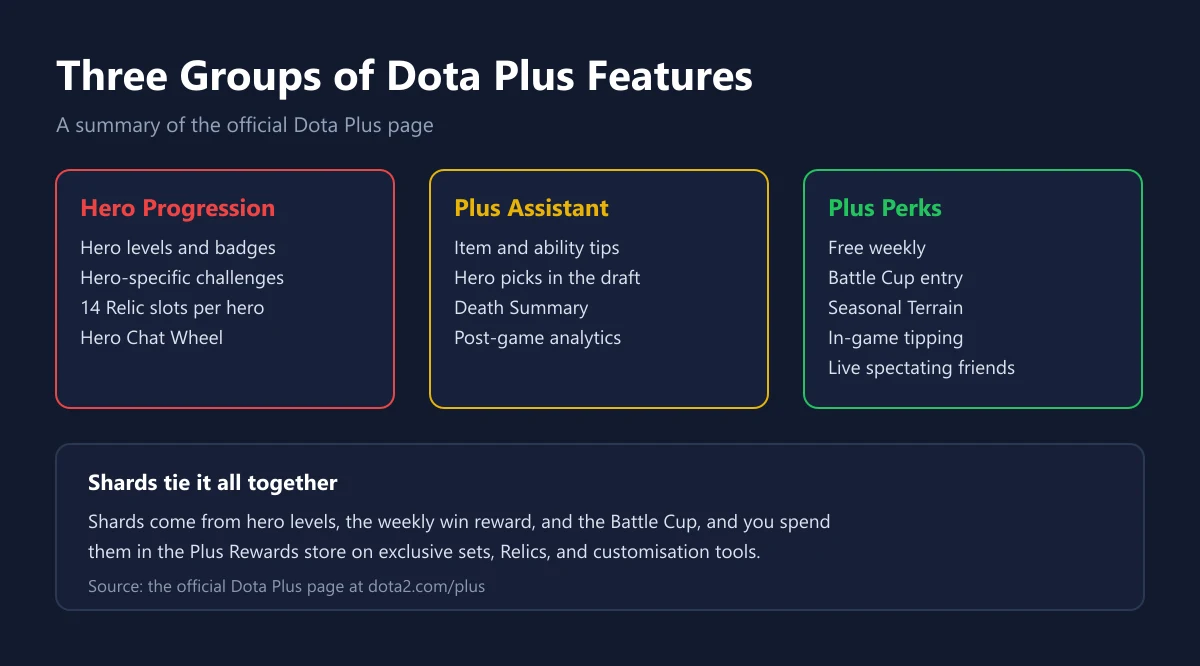
The first group is Hero Progression. Every match with a hero earns XP toward that hero's level, and each level grants Reward Shards. According to Valve, every hero has tailored challenges with three difficulty levels that can be refreshed every two weeks, and challenge XP only counts when you win. Each hero also has 14 Relic slots, 10 Common and 4 Rare, which track your statistical milestones.
The second group is Plus Assistant. It gives real-time item and ability suggestions drawn from data across millions of recent games at each skill bracket, hero suggestions during the draft, a death summary, and post-game analytics. For players who are still learning, this is the part that pays off most, because the suggestions adjust to your lane and the items you have already bought.
The third group is Plus Perks. Members enter the weekly Battle Cup for free, while non-members buy tickets for $0.99 according to the official page. Members also get the Seasonal Terrain, can set a lane preference in Ranked Roles, can tip other players during a match, and can spectate a friend's game from the team perspective with no broadcast delay.
Shards: The Rewards Members Collect
Shards are the reward currency inside Dota Plus, and the ways to earn them are spelled out on the official page. You earn 1,000 extra Shards each week by winning three games before the weekly timer resets. The Battle Cup winner receives 20,000 Shards, and first-time subscribers can earn more than 20,000 Shards through welcome quests.
Tipping uses Shards too, but Valve explains that tips do not come out of your own stash. You can give up to three 50-Shard tips in a single game, up to ten tips a week. Shards are then spent in the Plus Rewards store on exclusive hero sets, selected legacy sets, Relics, Chat Wheel sounds, and customisation tools such as the Name Tag.
One important note: Chat Wheel sounds unlocked with Shards can only be used while your Dota Plus membership is active. So part of what you collect is tied to your subscription status rather than owned for good. Weigh this before committing to a long term, just as you would with other subscriptions in our EA Play guide.
How to Subscribe and Pay
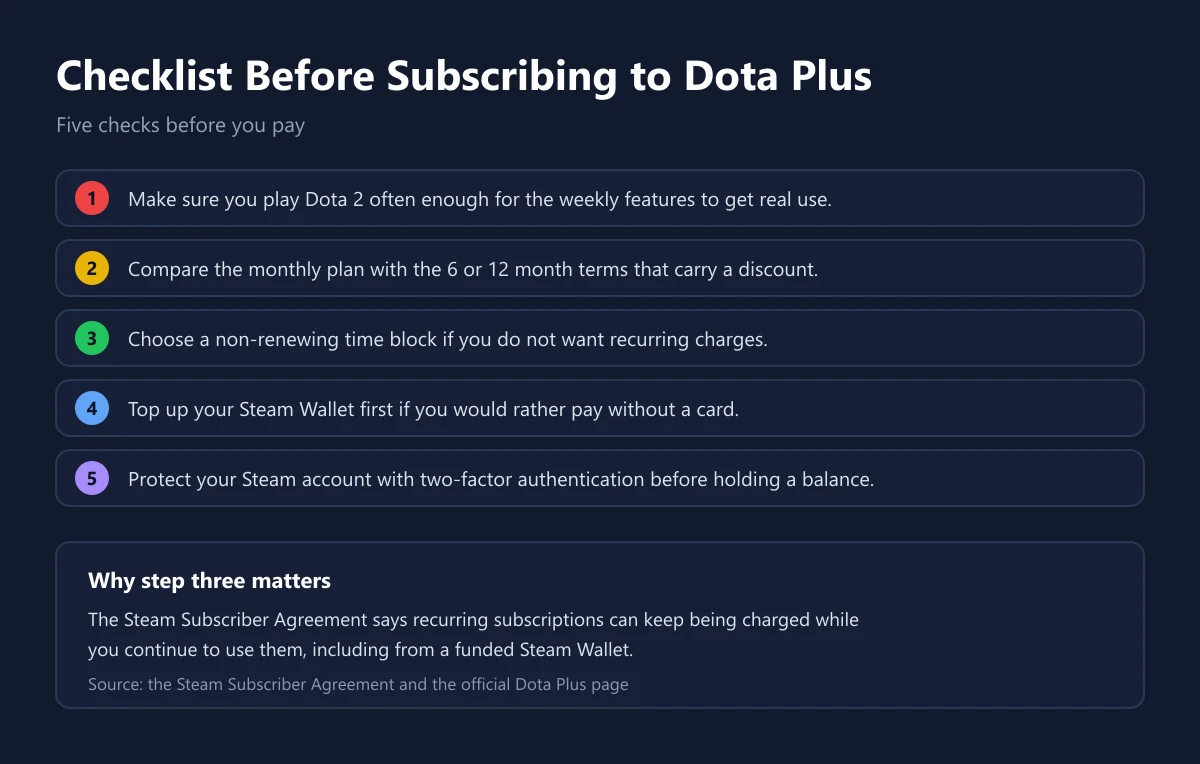
Dota Plus is bought from inside the Dota 2 client, as the subscribe button on the official page states. Because Dota 2 runs on Steam, payment follows Steam's rules. The Steam Subscriber Agreement says Steam Wallet funds can be used for in-game orders where Steam Wallet transactions are enabled, and that recurring subscriptions can keep being charged to your card or to a funded Steam Wallet while you continue to use them.
If you do not use a card, the most practical route is to top up your Steam Wallet first. We cover the limits and how to add funds in our Steam Wallet Code guide, voucher price comparisons in Steam Wallet voucher prices, and the codes are on our Steam Wallet Code 10 USD and Steam Wallet Code 25 USD pages. We also stock Dota 2 Plus for one month.
Before keeping a balance on your Steam account, turn on two-factor authentication. A stored balance makes an account a more attractive target, and the protection steps are in our guide to two-factor authentication for game accounts. If a payment fails partway, work through the checks in fixing a failed game top-up and our e-wallet guide for game top-ups.
Refunds and Cancelling
Steam's refund rules for in-game purchases are specific. The Steam Refunds page says Steam offers refunds for in-game purchases in any Valve-developed game within 48 hours of purchase, as long as the item has not been consumed, modified, or transferred. Dota 2 is developed by Valve, but whether a subscription that has already started counts as consumed is for Steam Support to decide, so do not treat a refund as guaranteed.
The safest way to avoid an unwanted charge is to pick a non-renewing time block from the start. On top of that, Steam Wallet funds themselves are non-refundable, non-transferable, and have no cash value under the Steam Subscriber Agreement. We summarise general refund rules for digital products in how to refund a digital game.
Who Benefits Most
| Player profile | Recommendation | Why |
|---|---|---|
| A beginner still learning | Worth a one month try | Plus Assistant suggests items and abilities as you play |
| A weekly regular | The 6 or 12 month term | A bigger discount, and the weekly Shards reward gets used |
| A Battle Cup player | Worth it | Free entry to the weekly Battle Cup |
| An occasional player | Not needed | The weekly reward needs three wins a week |
In short, the value of Dota Plus depends on how often you play. Someone who plays daily gets something from almost every feature, while a weekend-only player may never touch the weekly reward. We cover how to judge game spending like this in how to save money on game keys and how to choose a game top-up platform.
Checklist Before Subscribing
Before you pay, confirm five things. You play often enough for the weekly features to get real use. You have compared the monthly plan with the discounted terms. You picked a time block if you do not want recurring charges. Your Steam Wallet is funded if you are not using a card. And your Steam account is protected with two-factor authentication.
Once all five are in place, subscribing to Dota Plus becomes an easy decision to judge. We list the signs of a problem seller in safe shopping tips for digital products, how to check a code is genuine in how to check a digital game code is genuine, and guides to other game currencies in our Apex Coins guide and Riot Points guide. How we check where our stock comes from is explained on the how we verify page.
Frequently Asked Questions
Do I need Dota Plus to play Dota 2?
No. Dota 2 is fully free to play with no heroes that must be bought. Dota Plus is an optional extra.
How much does Dota Plus cost in Indonesia?
When we opened the official Dota Plus page from Indonesia on 23 September 2026, one month was listed at Rp 68,999. Check again in the client, because prices can change.
Is there a discount for longer terms?
Yes. According to Valve, a 6 month term is 6 percent off and a 12 month term is 12 percent off.
Can I subscribe without automatic renewal?
Yes. Valve says Dota Plus is also available in non-renewing time blocks.
What is Plus Assistant?
A feature that gives real-time item, ability, and hero suggestions based on recent match data at each skill bracket, plus a death summary and post-game analytics.
Does Dota Plus make heroes stronger?
No. According to Wikipedia, the virtual goods Valve sells for Dota 2 do not alter gameplay. Plus Assistant only makes suggestions, and the decisions stay yours.
How do I earn Shards?
From hero levels, the 1,000 Shards weekly reward for three wins, Battle Cup prizes, and welcome quests for new subscribers, according to the official page.
Can non-members join the Battle Cup?
Yes, by buying a ticket for $0.99 according to Valve. Dota Plus members enter for free.
Can I pay for Dota Plus with Steam Wallet?
The Steam Subscriber Agreement says Steam Wallet funds can be used for in-game orders where Steam Wallet transactions are enabled. Check the payment options shown in the client when you subscribe.
Is Dota Plus refundable?
Steam offers refunds on in-game purchases in Valve games within 48 hours if the item has not been consumed, according to Steam Refunds. For a subscription already running, the decision rests with Steam Support.
Where do I go if a purchase goes wrong?
To Steam Support for purchases made in the client, or to the store where you bought a code. For purchases from our store, the terms are on our refund policy page.
Digidang Team
Gaming enthusiast and marketplace expert sharing tips, guides, and the best gaming deals.