Apex Coins Guide: Buying, Spending, and the Limits

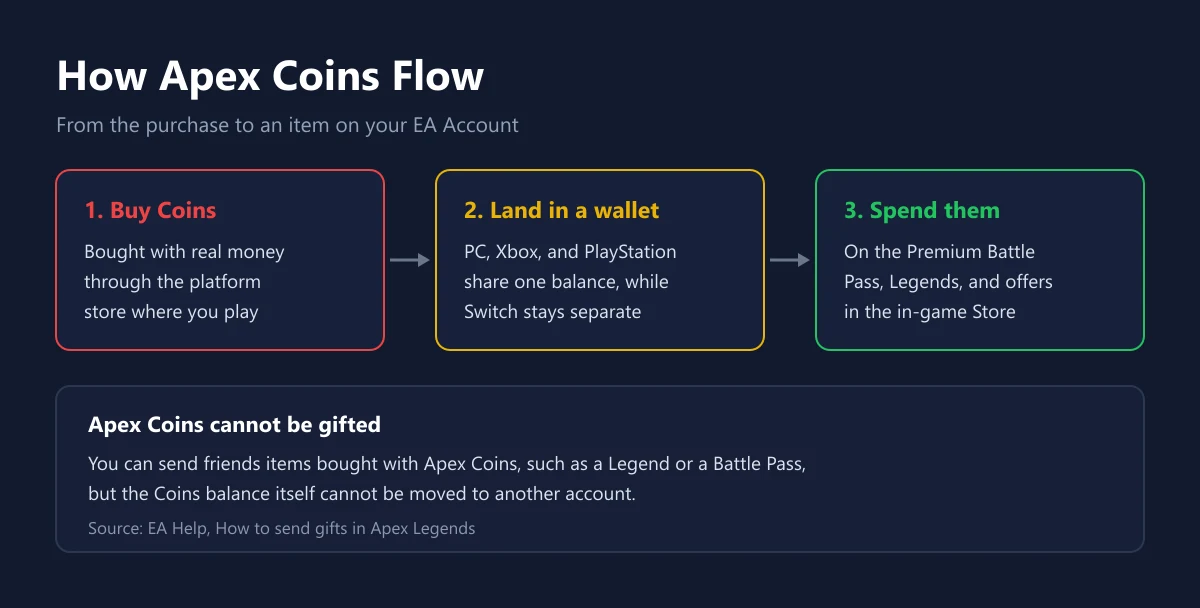
Apex Coins are the premium currency in Apex Legends. You buy them with real money and spend them on the Premium Battle Pass, Legends, and offers in the in-game Store. This guide covers how to buy them, how to spend them, how balances behave on each platform, the gifting rules, and the limits worth knowing before you pay.
What Are Apex Coins?
Apex Coins are the paid virtual currency in Apex Legends. You buy them with real money, then exchange them for in-game content such as the paid Battle Pass, Legends, and cosmetic bundles. Apex Coins give no competitive advantage, cannot be cashed out, and only work inside EA's Apex Legends ecosystem, nowhere else.
Apex Legends itself is free to play. According to the Apex Legends article on Wikipedia, the battle royale was developed by Respawn Entertainment, published by Electronic Arts, released in 2019, and is funded through in-game purchases. So the money you spend is not the price of entry but the price of extra content. Many other free titles work the same way, and we cover how to approach them in how to choose a game top-up platform.
The legal status of Apex Coins is set out in the EA User Agreement. EA states there that its virtual currency has no monetary value, has no value outside EA products, and cannot be sold, traded, transferred, or exchanged for cash. An unused balance is not refundable either. We explain how in-game currency differs from store wallet credit in digital game vouchers: types and how to buy.
| Common question | Short answer |
|---|---|
| Can they be cashed out | No |
| Can they be sent as a gift | No, only items bought with Coins can be gifted |
| Is an unused balance refundable | No, according to the EA User Agreement |
| Do they add competitive power | No |
| Are they needed to play | No, the game is free |
| Same balance on PC, Xbox, and PlayStation | Yes, since Cross Progression |
What You Can Buy With Apex Coins
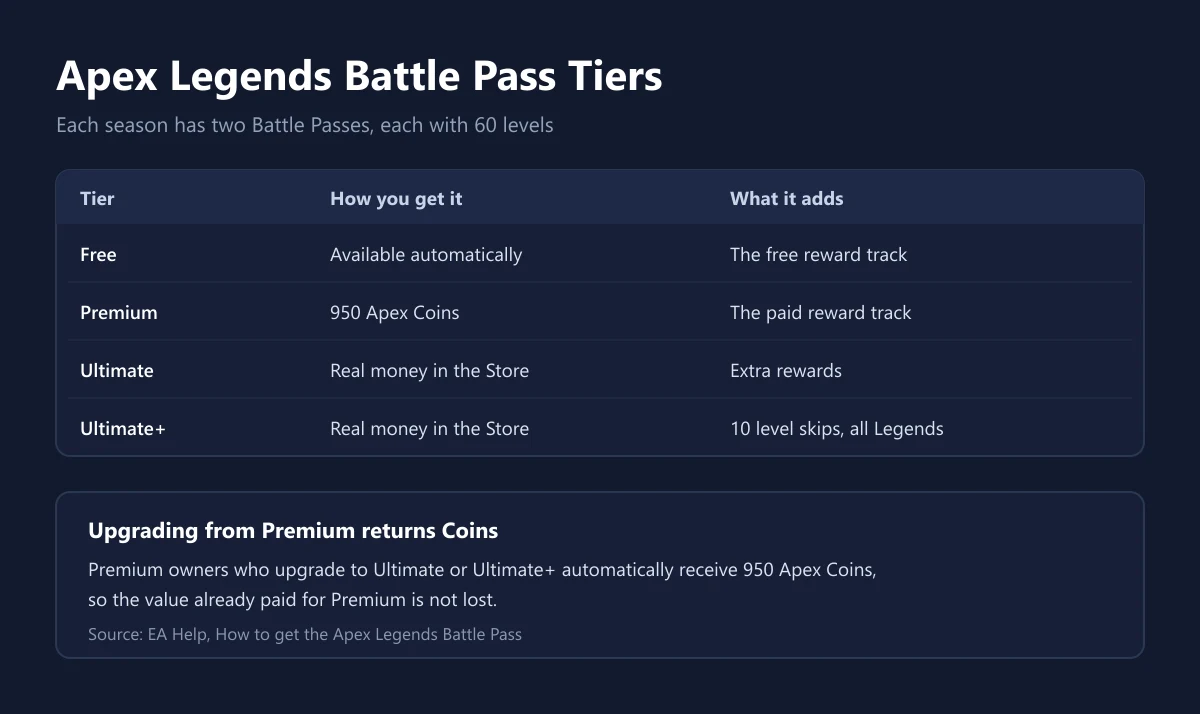
The use spelled out most clearly on official pages is the Premium Battle Pass. According to EA's help page on the Battle Pass, the Premium Battle Pass costs 950 Apex Coins, while the Ultimate and Ultimate+ tiers are bought with real-world currency in the in-game Store or the official Apex Legends store.
Beyond that, Apex Coins are spent in the in-game Store. EA's gifting guide says Legends, Legend Passes, Battle Passes, and select Store offers can be bought as gifts, and that gifts can only be paid for with Apex Coins, not with Crafting Metals or Legend Tokens. That makes Coins the one paid currency that reaches every one of those content types.
Battle Pass: When Premium, When Ultimate
The Battle Pass is a seasonal reward track. EA explains that each season has two Battle Passes, one for the first split and one for the second. There is a free track and a paid track, each with 60 levels, and you level up by completing daily and weekly challenges.
| Tier | How you get it | What it adds |
|---|---|---|
| Free | Available automatically to every player | The free reward track |
| Premium | 950 Apex Coins | The paid reward track |
| Ultimate | Real money in the Store | Extra rewards |
| Ultimate+ | Real money in the Store | 10 level skips, all Legends playable for the split, extra rewards |
One detail is easy to miss. According to the same page, Premium owners who later upgrade to Ultimate or Ultimate+ automatically receive 950 Apex Coins. So buying Premium first does not cost you anything if you decide to move up later. The Ultimate and Ultimate+ prices for your region are shown in the in-game Store, so we do not quote a figure here.
If you play most days, Premium is usually enough, because daily and weekly challenges are the main way to climb levels. If your playtime is limited but you want the top-level rewards, the level skips in Ultimate+ can make more sense. The value-per-dollar reasoning is the same one we use in how to save money on game keys.
Apex Coins Balances on Each Platform
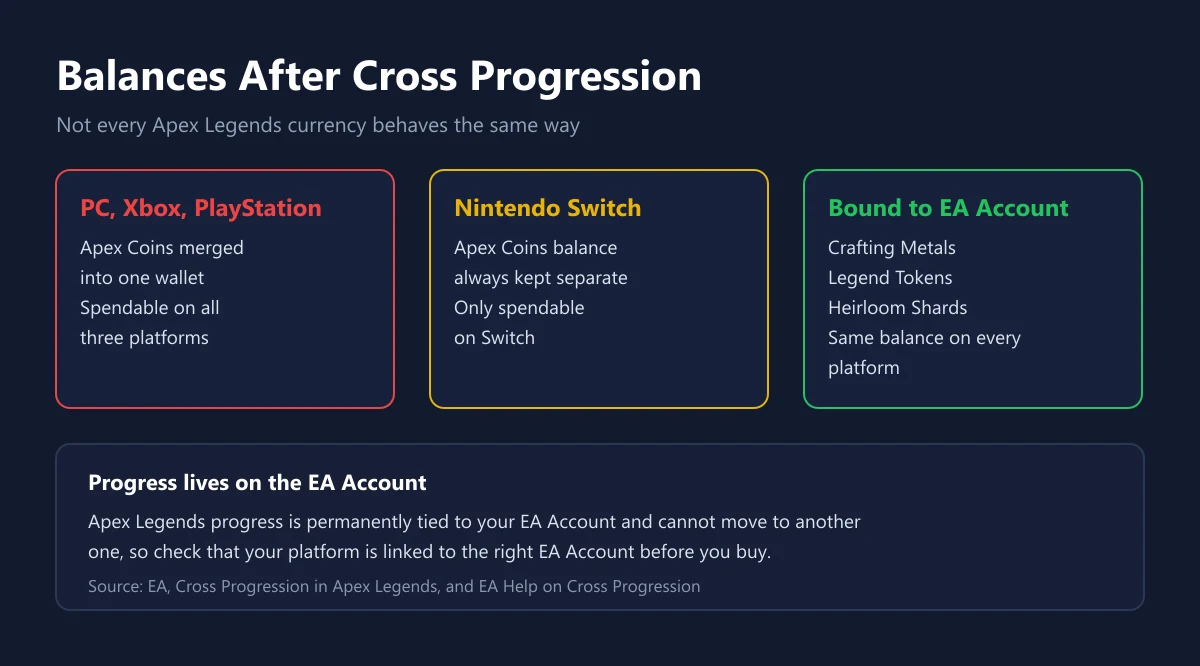
Plenty of players assume Apex Coins are locked to a single platform. That is not quite right. In the Cross Progression announcement dated 26 October 2023, EA said Apex Coins acquired on PC, Xbox, and PlayStation are merged into one wallet that can be spent on any of those three platforms. The exception is Nintendo Switch: Coins there always stay separate and can only be spent on Switch.
Other currencies behave differently. Crafting Metals, Legend Tokens, and Heirloom Shards are bound to the EA Account, so the balance is the same on every platform. Things that stay locked per platform include console trophies and achievements, ranked leaderboards, and exclusive items such as PS Plus or Xbox Gold rewards. If you also subscribe to a console service, we compare the benefits in our PlayStation Plus guide and Xbox Game Pass guide.
The most important point is on the Cross Progression help page: Apex Legends progress is permanently tied to your EA Account and cannot be moved to another EA Account. If you unlink a platform account, you lose access to your progress and purchases until you relink it, and EA says it cannot merge Apex Legends progress from two EA Accounts. Switch players should also note that the announcement was updated on 3 February 2026 to say the game will be removed from Nintendo Switch platforms beginning 4 August 2026, so check your platform's status before buying Coins there.
Gifting Items With Apex Coins
Apex Coins themselves cannot be gifted, but you can use Coins to buy a friend an item. The rules are strict. According to EA's gifting guide, the sender needs two-factor authentication turned on, must be level 50 or higher, must have enough Coins, must have been in-game friends for at least two weeks, and must not have sent more than five gifts in the past 24 hours.
Platform friendships do not count, so you have to be friends through the Apex Legends Friends menu. You also cannot gift an item your friend already owns unless it is part of a bundle, in which case the bundle price is discounted. Gifts are final and cannot be cancelled. If two-factor authentication is not on yet, follow the steps in our guide to two-factor authentication for game accounts before you try to send a gift.
Choosing a Sensible Apex Coins Amount
The simple rule is to decide what you want to buy first, then buy just enough Coins. The easiest example is the Premium Battle Pass at 950 Apex Coins according to EA, which means a 1000 Coins pack covers one Premium Battle Pass. Buying a large amount without a plan almost always ends with spending more than you meant to.
| Amount | Usually suits | Product page |
|---|---|---|
| 1000 Apex Coins | One Premium Battle Pass at 950 Coins | 1000 Apex Coins |
| 2150 Apex Coins | One Premium Battle Pass with Coins left over for the Store | 2150 Apex Coins |
| 6000 Apex Coins | Several bundles bought across one season | 6000 Apex Coins |
Store prices are set by EA and can change, so the middle column describes typical use, not a guarantee. How we check where our stock comes from is explained on the how we verify page, and purchase terms are on our refund policy. For a comparison with other game currencies, see how to top up Valorant Points and how to top up Fortnite V-Bucks.
The Most Common Mistakes
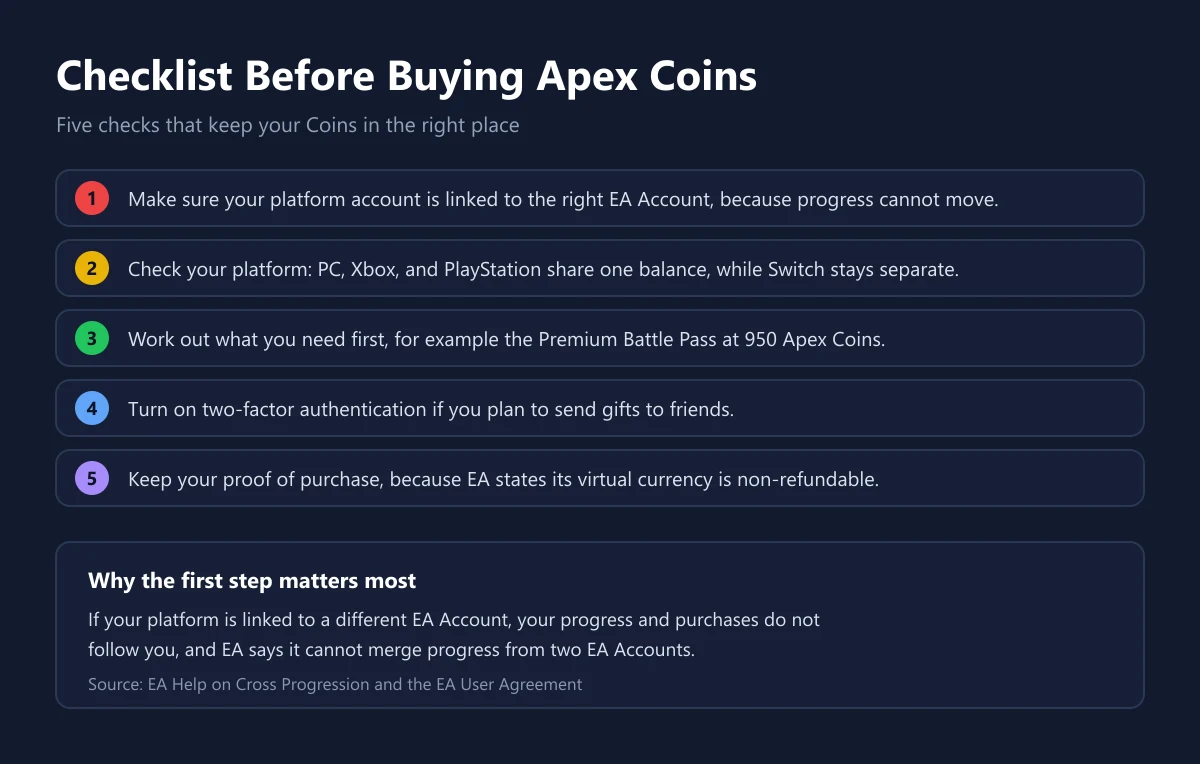
The first mistake is buying while your platform account is linked to the wrong EA Account. Because progress and purchases attach to the EA Account, your Coins can end up on an account you do not use. The second mistake is assuming a Switch balance merges with PC or the other consoles, when the Switch balance stands on its own.
The third mistake is trusting offers from other people who claim they can move Coins or sell an account full of items. Because Coins cannot be transferred, such offers nearly always come down to selling an account, which breaks the rules and risks a takeover. We list the warning signs in safe shopping tips for digital products, and how to check a code is genuine in how to check a digital game code is genuine.
Checklist Before Buying Apex Coins
Before you pay, confirm five things. Your platform account is linked to the right EA Account. You know which platform you are buying for, because the Switch balance is separate from the rest. You have worked out what you need. Two-factor authentication is on if you plan to send gifts. And your proof of purchase is saved, so any problem can be raised with the official support of wherever you paid.
Once all five are in place, buying Apex Coins becomes an easy decision to judge. We apply the same principle in our EA Play guide, Riot Points guide, and Rocket League Credits guide. If a payment fails, the checks are in fixing a failed game top-up and our e-wallet guide for game top-ups, and general refund rules are in how to refund a digital game.
Frequently Asked Questions
Does Apex Legends cost money?
No. Apex Legends is free to play and funded through in-game purchases. You only need Apex Coins if you want to buy extra content.
What can Apex Coins be used for?
The Premium Battle Pass, Legends, Legend Passes, and offers in the in-game Store, including items bought as gifts for friends.
How much is the Premium Battle Pass?
According to EA, the Premium Battle Pass costs 950 Apex Coins. Ultimate and Ultimate+ are bought with real money, with regional prices shown in the Store.
Is my Apex Coins balance the same on PC and PlayStation?
Yes. Since Cross Progression, EA merges PC, Xbox, and PlayStation balances into one wallet. Only the Nintendo Switch balance stays separate.
Can I send Apex Coins to a friend?
No. EA states that Apex Coins cannot be gifted. You can only buy a friend certain items using your own Coins.
What do I need to send a gift in Apex Legends?
According to EA, the sender needs two-factor authentication on, must be at least level 50, must have been in-game friends for two weeks, and can send at most five gifts per 24 hours.
Are Apex Coins refundable?
Generally, no. The EA User Agreement says EA virtual currency is non-refundable and that an unused balance does not entitle you to a refund, subject to EA's terms of sale.
Can Apex Coins be exchanged for money?
No. EA virtual currency has no monetary value and cannot be sold, traded, transferred, or exchanged for cash.
What happens if I upgrade from Premium to Ultimate?
You automatically receive 950 Apex Coins, according to EA's Battle Pass page, so the value of the Premium pass you already bought is not lost.
Can my progress move to another EA Account?
No. Apex Legends progress is permanently tied to your EA Account, and EA says it cannot merge progress from two different EA Accounts.
Where do I go if a purchase goes wrong?
To the official support of wherever you paid, with your proof of purchase. For purchases from our store, the terms are on our refund policy page.
Digidang Team
Gaming enthusiast and marketplace expert sharing tips, guides, and the best gaming deals.