Malwarebytes Guide: Prices, Free Version, and Licensing

Malwarebytes is security software with a free version and paid Premium plans, best known for cleaning up malware. This guide covers the official price of each plan, the difference between the free and Premium versions, the Browser Guard extension, license and renewal rules, and how to use it to protect a gaming PC.
What Is Malwarebytes?
Malwarebytes is security software for Windows, macOS, ChromeOS, Android, and iOS that finds and removes malware. According to Wikipedia, Malwarebytes comes as a free version that scans when you start it manually and a paid version that adds real-time protection against new threats.
Malwarebytes has long been known in the PC community as the "second opinion" scanner, the tool people reach for when their main antivirus misses something. According to Wikipedia's record, its predecessor was released in January 2006 as RogueRemover. Today the product has grown into a full protection suite with antivirus, a VPN, and identity protection.
The current Windows version requires Windows 10 or later, and the Mac version requires macOS 11 or later, according to the Wikipedia infobox. If your older gaming PC still runs Windows 7 or 8, the current version no longer supports it, which is one more reason to upgrade using our Windows 11 license guide.
Official Malwarebytes Prices Right Now
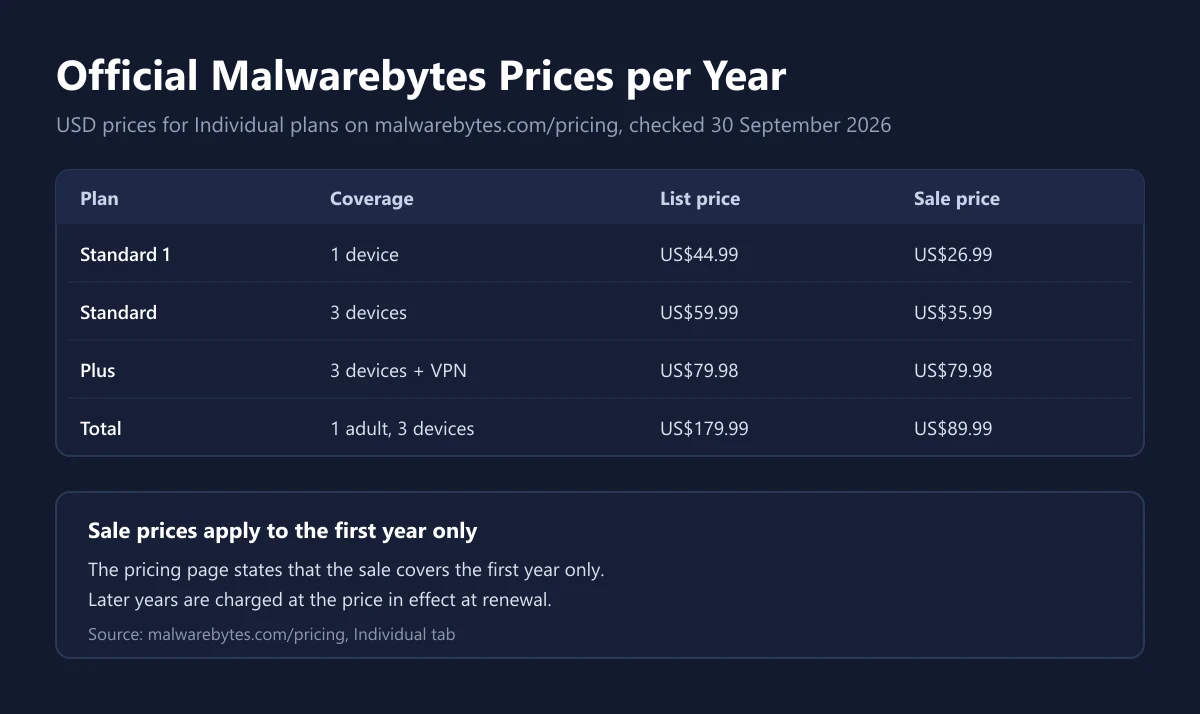
The prices below come from the Malwarebytes pricing page, Individual tab, checked on 30 September 2026. The page was running a Cybersecurity Awareness Month sale through 11 October and states that sale prices apply to the first year only.
| Plan | Coverage | List price per year | First-year sale price |
|---|---|---|---|
| Standard for 1 device | Antivirus, 1 device | US$44.99 | US$26.99 |
| Standard | Antivirus, 3 devices | US$59.99 | US$35.99 |
| Plus | Antivirus and VPN, 3 devices | US$79.98 | US$79.98 |
| Total | Antivirus, VPN, and identity protection, 1 adult and 3 devices | US$179.99 | US$89.99 |
One note on the Plus plan. When we checked, the Plus card showed a 40 percent savings label, yet both the struck-through price and the purchase price read US$79.98 per year on the pricing page. Because the figures do not line up, treat US$79.98 as the listed amount and confirm the total at checkout before paying.
Every paid plan includes antivirus for PCs, tablets, and phones plus safe browsing with a scam and ad blocker. Plus adds a VPN, and Total adds identity protection with insurance. Tax and currency at checkout can vary by country, so read our guide to VAT on digital products before comparing prices.
Malwarebytes Free vs Premium
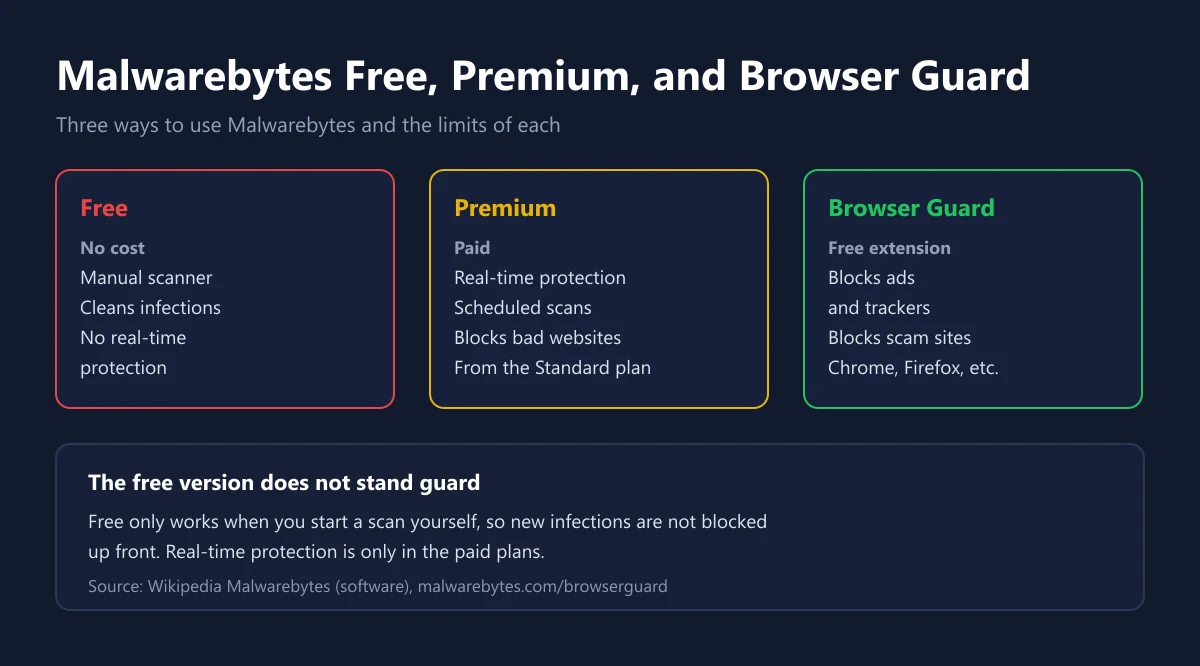
The key difference is how each version works. According to Wikipedia, the free edition works purely as an on-demand scanner. It can remove malware that is already there, but it lacks real-time protection, so you have to run scans yourself. Premium plans add real-time protection, scheduled scans, and blocking of malicious websites.
| Aspect | Malwarebytes Free | Malwarebytes Premium |
|---|---|---|
| Cost | Free | Yearly subscription |
| Manual scan and cleanup | Yes | Yes |
| Real-time protection | No | Yes |
| Scheduled scans | No | Yes |
| Blocks malicious websites | No | Yes |
| Best for | A second scan when something feels off | Everyday protection |
The free version is still a useful tool. The Malwarebytes Free Antivirus page says the free version is available for Windows, Mac, Android, and iOS and can clean viruses and malware from an infected PC. Many people install it alongside the built-in Windows antivirus and only run it when something seems wrong.
If you want protection that stays on around the clock without buying extra software, Windows already includes Microsoft Defender Antivirus with real-time protection, according to Microsoft Support. Premium is worth considering if you want an extra layer focused on scams, fake sites, and dangerous downloads.
Browser Guard, the Free Extension People Overlook
Malwarebytes Browser Guard is a free browser extension that blocks ads, trackers, malicious websites, and phishing attempts. It is available for Chrome, Firefox, Edge, and Safari, and works without a Premium subscription.
For gamers, Browser Guard matters because many traps start in the browser. Think of fake pages copying a game store login, download ads with fake "Download" buttons, or free reward links that ask you to sign in. The official page also says the extension helps stop card skimmers from capturing payment details at online checkouts.
The extension does not replace safe habits. Still check the site address before entering a password, and be wary of reward messages that look too good, like the scams covered in our Discord Nitro Gift guide. If you often look for browser games, our guide to free games with no download also explains how to choose safe sites.
License, Renewal, and Guarantee Rules
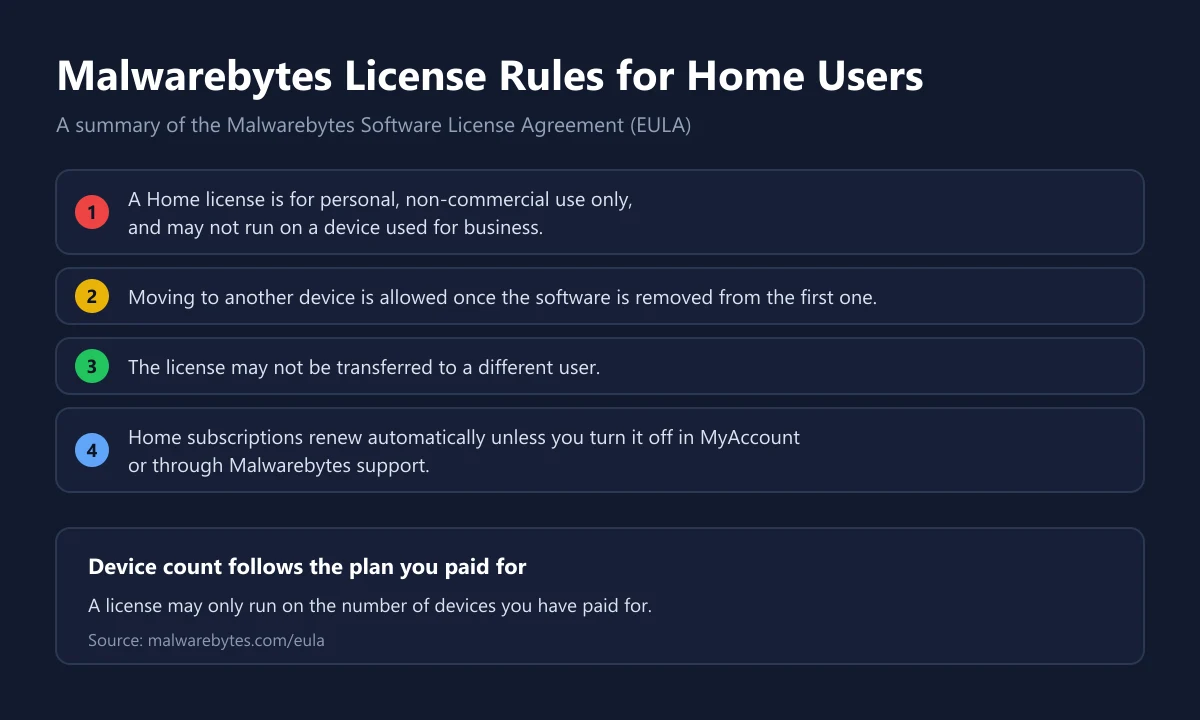
According to the Malwarebytes Software License Agreement, a Malwarebytes for Home license, free or paid, may only be used for personal, non-commercial purposes and may not run on a device used for business. If you need it for an office or a company, there are separate business products.
Moving devices is allowed. The same EULA says Home software may move to another device once it is removed from the first one, but it may not be transferred to a different user. In other words, reselling a license or sharing it with friends outside your household does not follow the rules.
Home subscriptions renew automatically unless you turn off auto-renewal in the MyAccount portal or through Malwarebytes support, according to the license terms. Since sale prices only cover the first year, check the renewal price before the next billing date and decide whether you want to continue.
On refunds, the Malwarebytes pricing page lists a 60-day money-back guarantee and free customer support. This guarantee applies to direct purchases. If you buy a code from another store, refunds follow that store's policy, as we explain in our digital game refund guide.
Malwarebytes for Gamers: Mods, Cheats, and Fake Downloads
The biggest risk for PC gamers rarely comes from official games. Common sources of trouble are mod files from unknown sites, cheat programs, "cracks", and fake installers that copy popular launchers. Files like these often ask you to disable your antivirus first, and that request alone is a warning sign.
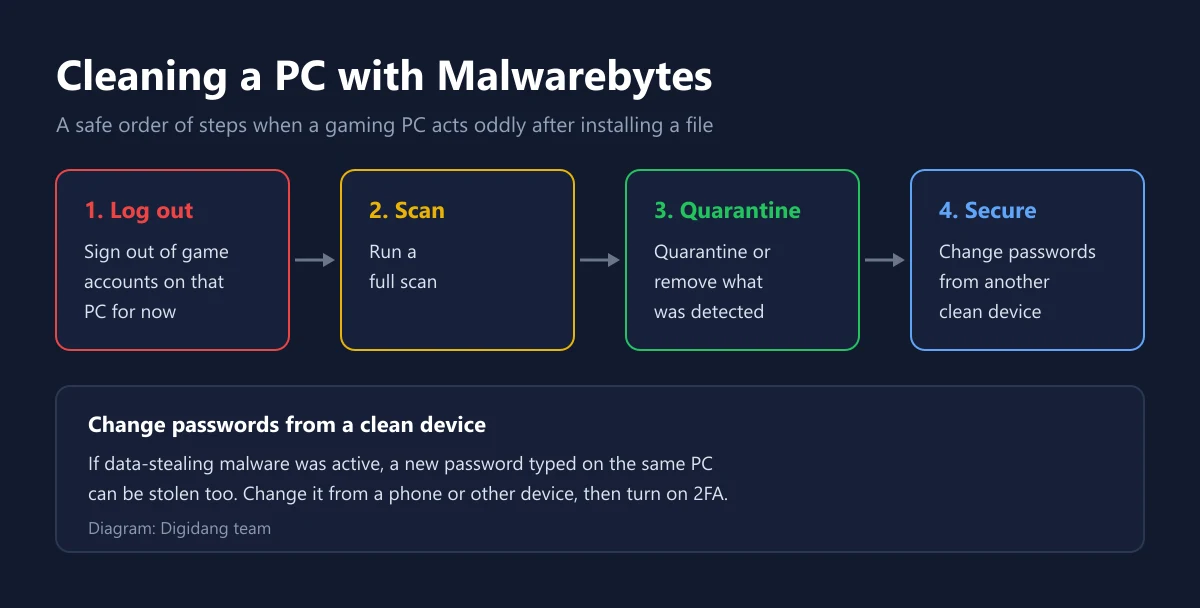
If your PC starts acting strangely after installing such a file, follow the order in the diagram. Sign out of game accounts on that PC first, run a full scan, then quarantine or remove the detections. The last step is the one people forget: change passwords from another clean device, because data-stealing malware can also record a new password typed on the same PC. After that, turn on two-step verification for your game accounts.
Prevention is still cheaper than cleanup. Download games from official stores as described in our Steam Download guide, keep passwords in a password manager as covered in our 1Password guide, and never enter account credentials on unofficial item trading sites.
Malwarebytes or Norton?
Both can serve as your main protection, but the products lean in different directions. Norton sells a full bundle with many extras, while Malwarebytes is known for being leaner and focused on malware and scams. The comparison below uses figures from the Malwarebytes pricing page and the Norton Deluxe page on 30 September 2026.
| Aspect | Malwarebytes Standard | Norton Standard |
|---|---|---|
| Devices | 3 | 3 |
| First-year price | US$35.99 | US$39.99 |
| List or renewal price | US$59.99 | US$94.99 |
| VPN included | No, starts with Plus | Yes |
| Password manager | Not listed | Yes |
| Money-back guarantee | 60 days | 60 days on annual plans |
| Free version | Yes, manual scanner | Free trial (for Gamers) |
Choose Malwarebytes if you want simple malware protection and already have your own VPN or password manager. Choose Norton if you want antivirus, a VPN, and a password manager on one bill. Details on the Norton plans, including the gamer edition, are in our Norton guide.
When Is Malwarebytes Premium Worth Buying?
Not every player needs another subscription. If you only buy games from official stores, keep Windows updated, and never install files from unclear sources, the built-in Windows protection plus the free Malwarebytes version as a second scanner is often enough. You can run a manual scan once a month or whenever something feels off.
Premium starts to make sense in a few situations. First, the PC is shared with siblings or children who download mods, skins, or apps from anywhere. Second, you often trade game items or accounts and deal with links from strangers. Third, you want protection on your phone as well, since Malwarebytes plans cover PC, Mac, Android, and iOS in one subscription.
Whichever you choose, put the purchase date and renewal date in your calendar. That way you still have time to use the money-back guarantee if it is not a fit, and the second-year price will not catch you off guard.
How to Buy Malwarebytes Safely
Buying on the official site gives you the 60-day guarantee directly from the vendor. If you buy a license code from a store, check the device count, the term, and whether the code is for the Home version. Our catalog carries Malwarebytes Premium for 1 year on 3 devices, the same device count as the Standard plan on the official pricing page. For comparison there is also Norton 360 Deluxe and Kaspersky Total Security.
Avoid codes sold far below a reasonable price without a clear origin, because such codes may come from business licenses or licenses someone else already used. We explain how to judge a seller before paying in our safe digital shopping tips and how to check a genuine digital code.
Frequently Asked Questions
Is Malwarebytes free?
There is a free version that scans and cleans malware when you run it yourself, but without real-time protection. Real-time protection is only in the paid plans, according to Wikipedia.
How much does Malwarebytes Premium cost?
When we checked on 30 September 2026, the Standard plan for 3 devices listed at US$59.99 per year with a first-year sale price of US$35.99, according to the Malwarebytes pricing page.
What is the difference between Malwarebytes Standard, Plus, and Total?
Standard includes antivirus and safe browsing, Plus adds a VPN, and Total adds identity protection with insurance, per the plan cards on the pricing page.
Does Malwarebytes have a money-back guarantee?
Yes. The pricing page and the Premium page list a 60-day money-back guarantee for direct purchases, according to Malwarebytes.
Can a Malwarebytes license move to another PC?
Yes for Home licenses, as long as the software is removed from the first device. The license may not be transferred to another user, according to the Malwarebytes EULA.
Does a Malwarebytes subscription renew automatically?
Yes. Home subscriptions renew automatically unless you turn it off in MyAccount or through Malwarebytes support, and sale prices only apply to the first year.
What is Malwarebytes Browser Guard?
Browser Guard is a free extension for Chrome, Firefox, Edge, and Safari that blocks ads, trackers, scam sites, and phishing attempts, with no Premium subscription needed.
Can Malwarebytes run alongside another antivirus?
The free version is often used as a second scanner next to a main antivirus because it does not run in real time. For real-time protection, it is best to keep only one product active so they do not scan each other and slow the system.
Does Malwarebytes still support Windows 7?
Not in the current version. The current Windows version requires Windows 10 or later, according to the Malwarebytes infobox on Wikipedia.
Digidang Team
Gaming enthusiast and marketplace expert sharing tips, guides, and the best gaming deals.