What Is WPS Office? Uses, Official Prices, and How It Compares with Microsoft Office

WPS Office is an office suite made by the Chinese software company Kingsoft that bundles a word processor, a spreadsheet app, a presentation app, and PDF tools. WPS stands for Writer, Presentation, and Spreadsheets. The basic version is free and opens Microsoft Office files such as DOCX, XLSX, and PPTX, so many people use it in place of Microsoft Office.
This article explains what WPS Office is, its short history, the apps inside it, the difference between the free and paid versions, how it compares with Microsoft Office, what to keep in mind about security and privacy, and how to choose between the two for the way you work.
What Is WPS Office?
According to Wikipedia, WPS Office (previously known as Kingsoft Office) is an office suite for Windows, macOS, Linux, iOS, Android, Fire OS, and HarmonyOS developed by Kingsoft. It is made up of WPS Writer, WPS Slides, and WPS Sheets, plus PDF tools.
The same source notes that in 2022 WPS Office had more than 494 million monthly active users and more than 1.2 billion installations. Those numbers show that WPS is not a niche app, especially in Asian markets and on Android phones.
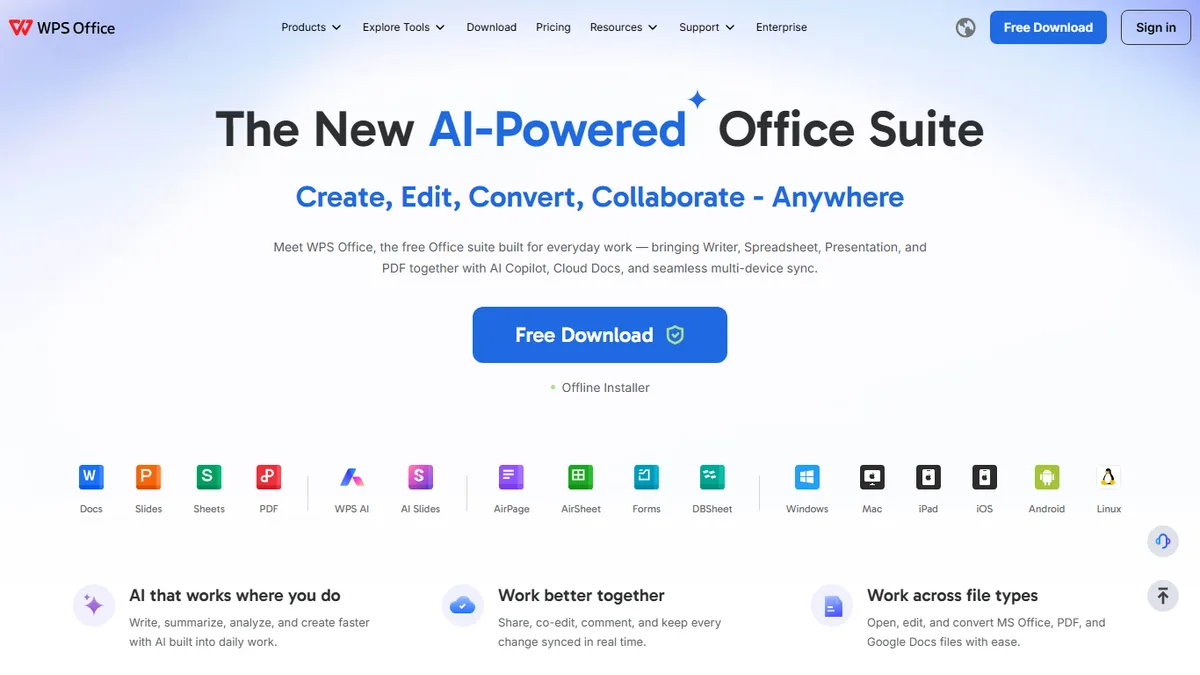
The official WPS Office website presents it as a free office suite for creating, editing, and managing documents, spreadsheets, presentations, and PDFs, with AI, Cloud Docs, and sync across devices. The site offers downloads for Windows, Mac, Linux, Android, iOS, and iPad.
In Indonesia, WPS is best known on phones. Many students open Word or PowerPoint assignments through the WPS app on Android because it is free and one app opens every type of file.
A Short History of WPS Office
WPS has a longer history than many people expect. According to Wikipedia, it started in 1988 as a DOS word processor called Super-WPS. At that time it competed in the Chinese market long before Microsoft Office became popular there.
In May 2001, according to the same source, Kingsoft launched a full suite called WPS Office 2001 with a word processor, a spreadsheet, and a presentation app. Since WPS Office 2005 the interface has resembled Microsoft Office, and Microsoft document formats are used by default alongside WPS's own formats.
Wikipedia also notes that for international markets Kingsoft used the names KSOffice and Kingsoft Office for a while before returning to WPS Office. The Android version arrived in 2012, and since 2019 the Linux version has been developed by a volunteer community rather than by Kingsoft itself.
The Apps Inside WPS Office and What They Do
Unlike Microsoft Office, which splits Word, Excel, and PowerPoint into separate apps, WPS on a computer combines them in one window with tabs. Here is what it includes.
| WPS app | What it does | Microsoft Office equivalent |
|---|---|---|
| WPS Writer (Docs) | Writing and formatting documents | Microsoft Word |
| WPS Spreadsheet (Sheets) | Numbers, formulas, and charts | Microsoft Excel |
| WPS Presentation (Slides) | Building and presenting slides | Microsoft PowerPoint |
| WPS PDF | Reading, marking up, and converting PDFs | No dedicated app, partly through Word |
| WPS AI | Writing, summarising, and making slides from a text prompt | Copilot |
If you are not yet familiar with the Microsoft apps they replace, read what Microsoft Word is, what Microsoft Excel is, and what Microsoft PowerPoint is used for. Those guides help you see which features you actually use.
File Formats WPS Can Open
One reason people choose WPS is how many formats it opens. Wikipedia cites a review of WPS Office 2016 Free saying the program opens and saves all Microsoft Office document formats, plus HTML, RTF, XML, and PDF.
- Documents: DOC, DOCX, DOT, DOTX, DOCM, and WPS's own WPS and WPT formats.
- Spreadsheets: XLS, XLSX, XLSM, XLSB, CSV, and the WPS formats ET and ETT.
- Presentations: PPT, PPTX, PPSX, POTX, PPTM, and the WPS formats DPS and DPT.
The official pricing page says WPS Standard supports 47 file formats and 46 languages. Still, "opens" does not always mean "looks identical". Documents with complex layouts, custom fonts, or complicated spreadsheet formulas should be checked after opening them in WPS, especially before you send them to an office or campus that runs Microsoft Office.
Free WPS vs WPS Pro+: What Is the Difference?
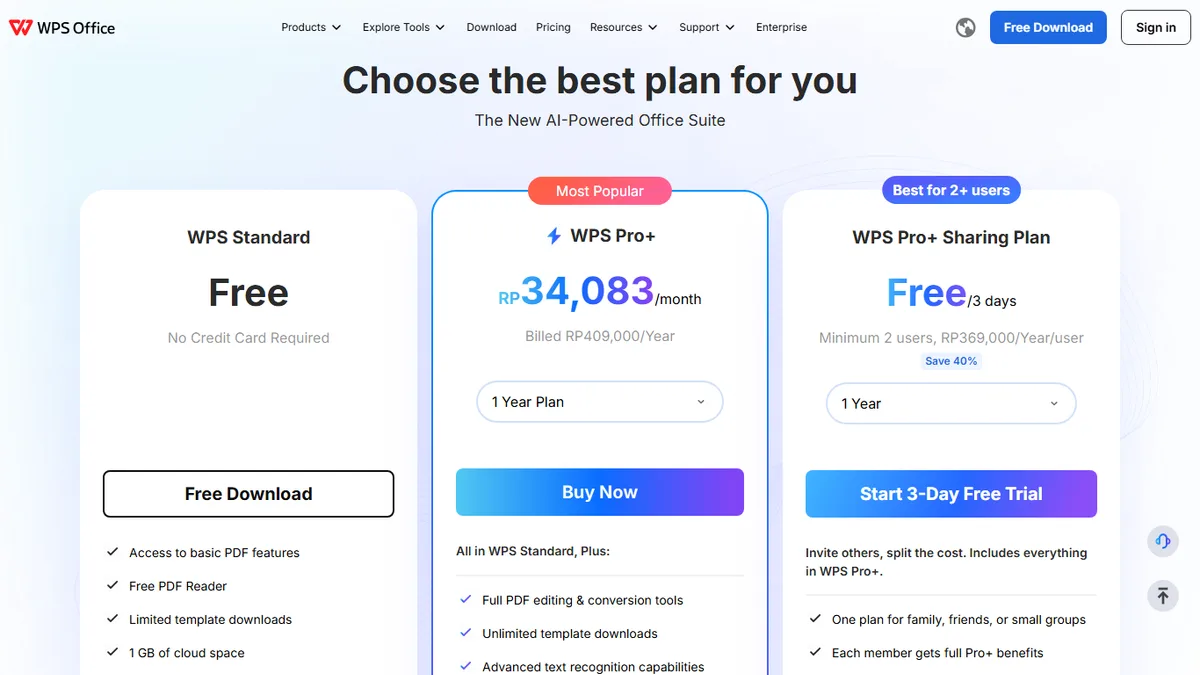
WPS uses a freemium model. The basic version is free, while the full feature set needs a subscription. As of October 2026, the official WPS Office pricing page lists three options for individuals, shown here in Indonesian rupiah as the page displays them for Indonesian visitors.
| Plan | Official price (October 2026, Indonesia) | Main contents |
|---|---|---|
| WPS Standard | Free, no credit card | Basic PDF features, PDF reader, limited template downloads, 1 GB cloud |
| WPS Pro+ | Rp409,000 per year (about Rp34,083 per month) | Full PDF editing and conversion, unlimited templates, advanced text recognition, electronic signatures, 20 GB cloud, no ads, AI tools with limits |
| WPS Pro+ Sharing Plan | Rp369,000 per year per person, at least 2 people | Every Pro+ benefit for each member, 20 GB cloud per member, 3-day free trial |
The same page says these prices apply to PC and Android and that there is a 30-day money-back guarantee. Because WPS Pro+ is described as "no advertising", the free version shows ads. That is fine for many people, but ads can get in the way if you present directly from the app.
Think about what you actually need. If you only type assignments and open slides, WPS Standard is enough. If you often edit PDFs, need electronic signatures, or want an ad-free app, Pro+ starts to make sense.
WPS Office vs Microsoft Office
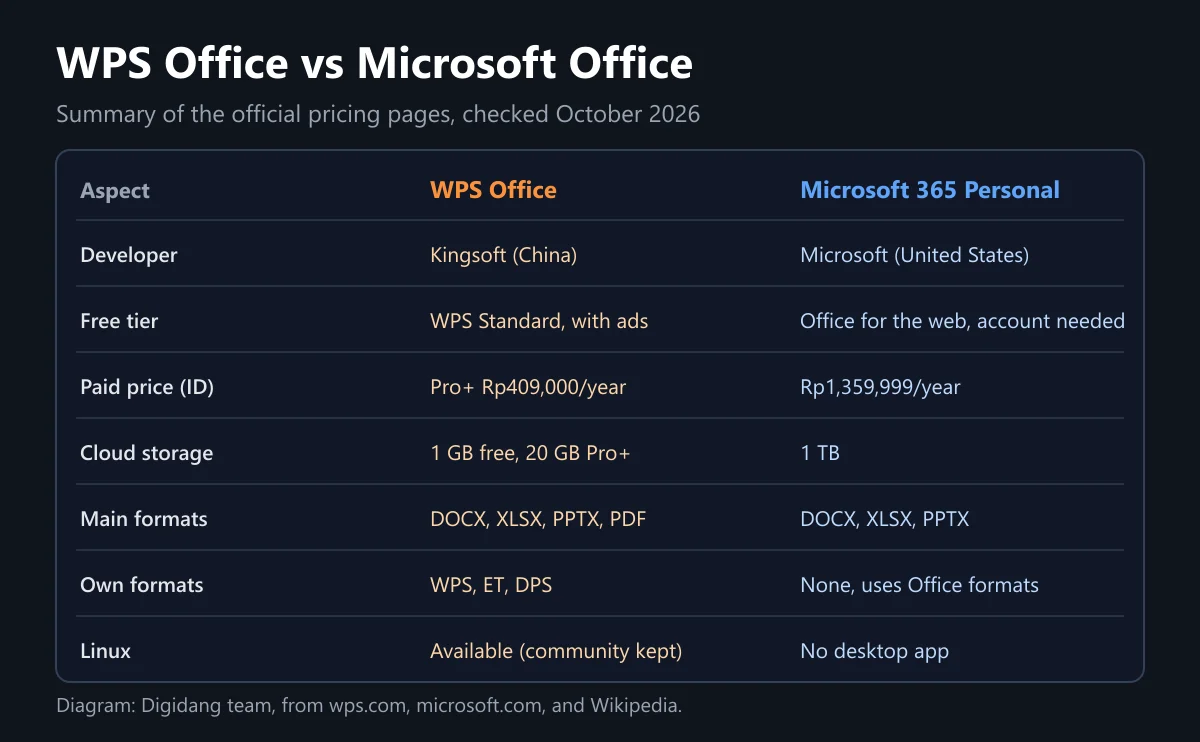
The question that usually follows "what is WPS Office" is whether it is better than Microsoft Office. The answer depends on how you work. The table below sums up the differences you will notice most.
| Aspect | WPS Office | Microsoft Office |
|---|---|---|
| Cheapest option | Free (Standard, with ads) | Free web version, desktop from Rp1,359,999 per year |
| Paid plan for one person | Pro+ Rp409,000 per year | Microsoft 365 Personal Rp1,359,999 per year |
| Cloud storage | 1 GB free, 20 GB with Pro+ | 1 TB with Personal, 2 TB shared with Family |
| Format compatibility | Opens Office formats, check complex files | Native DOCX, XLSX, PPTX |
| Linux | Available, community maintained since 2019 | No desktop app, web version only |
| AI assistant | WPS AI with usage limits | Copilot in Microsoft 365 plans |
The Microsoft prices above come from the Indonesian Microsoft 365 plan comparison page as of October 2026. We cover Microsoft's plans, including the Family plan for six people, in our Microsoft 365 guide, and the app list in Microsoft Office apps.
On price, WPS is clearly cheaper. On compatibility, Microsoft Office remains the reference because DOCX, XLSX, and PPTX are Microsoft's own formats. If your lecturer, manager, or client uses Microsoft Office, small differences in spacing, page numbers, or picture positions can cause trouble at the worst moment.
There is also a third option people forget: Office for the web. Microsoft offers browser versions of Word, Excel, and PowerPoint for free through Microsoft 365 for the web. It has fewer features and needs an internet connection, but the file formats are native, so it is safe for work that will be opened in Microsoft Office.
Security and Privacy When Using WPS
Every office app stores documents that may hold personal data, so security deserves some thought before you choose. The official WPS site mentions privacy practices aligned with standards such as GDPR and ISO, encrypted transfer, and a promise that documents and prompts are not used to train AI without permission.
On the other hand, Wikipedia records a report by the security company ESET that found a hacker group called Blackwood injecting NSPX30 malware through the WPS Office update mechanism. The activity was said to date back to at least 2018 and was first noticed in 2023. The lesson applies to any app: download only from the official website or official app stores, and always install the latest updates.
A few simple habits help keep your documents safe.
- Download WPS only from wps.com, Google Play, or the App Store, never from "free WPS Premium" sites.
- Do not install modified versions that claim to unlock Pro+ features. They often carry malware.
- Keep sensitive documents, such as ID cards, payslips, or contracts, in storage you control.
- Turn on two-step verification for any cloud account you use, as we explain in how to secure accounts with 2FA.
- Read the privacy policy before uploading work documents to any cloud service.
How to Install WPS Office Safely
Installing WPS is quick, but there are a few points where people end up on copycat sites. Follow this order on a Windows or Mac computer.
- Open the official site by typing the address yourself, not through an ad in search results.
- Choose Free Download, then run the installer you downloaded.
- Read every installer screen and untick any extra app offers if they appear.
- After installing, open the settings and pick the interface language you want.
- Set the default save format to DOCX, XLSX, and PPTX so your files open easily in Microsoft Office.
- Sign in only if you need cloud sync. Without an account, WPS still works for local documents.
The fifth step matters most. Many "this file won't open" complaints come from documents saved in a WPS format rather than an Office format. Changing the default format at the start means you never have to remember it when you save.
On a phone, install WPS from Google Play or the App Store and check the developer name on the app page before tapping install. Copycat apps usually use a similar name and icon but a different developer.
Strengths and Weaknesses of WPS Office
To keep things fair, here are the strengths and weaknesses of WPS Office based on the official information and the notes above.
| Strengths | Weaknesses |
|---|---|
| Free basic version with no credit card | The free version shows ads |
| One app for documents, spreadsheets, slides, and PDFs | Complex Office files can shift in layout |
| Available on Linux, Android, iOS, Windows, and Mac | The Linux version is no longer developed directly by Kingsoft |
| Pro+ costs far less than Microsoft 365 | Free cloud storage is only 1 GB |
| Includes AI tools and a PDF editor | Full AI and PDF features need a subscription |
When to Choose WPS and When to Choose Microsoft Office
There is no single answer. Use these five questions to decide quickly.
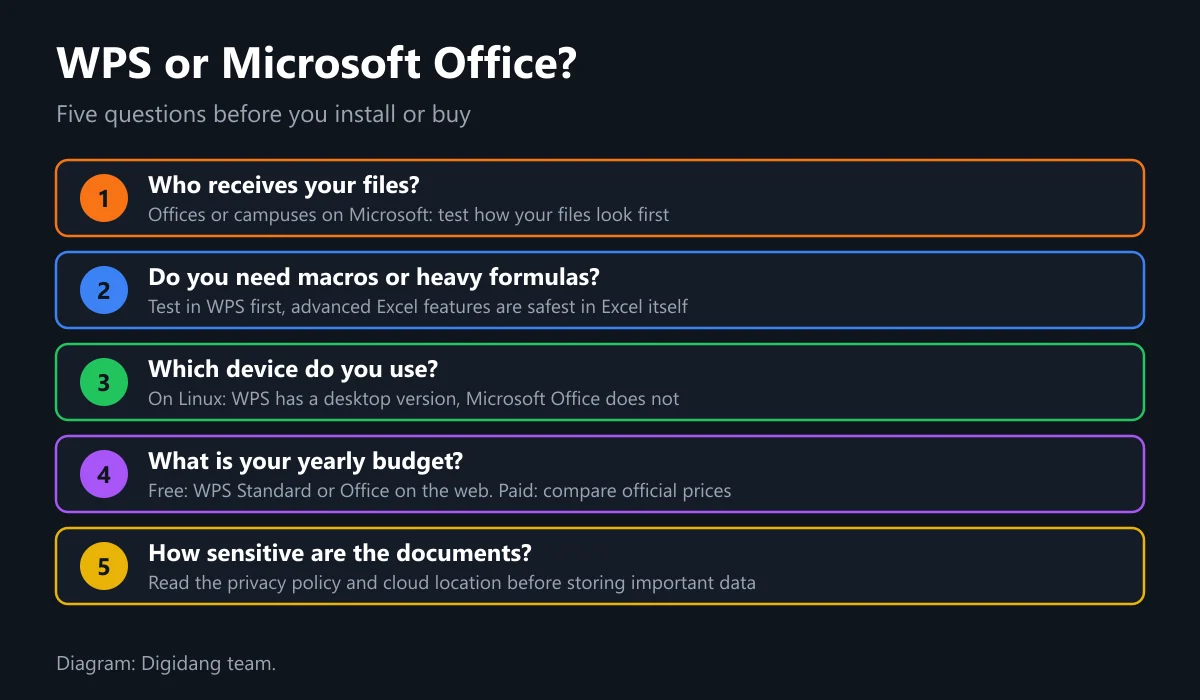
Choose WPS if your budget is zero, you use Linux, or you only need to type, open slides, and read PDFs on your phone. WPS also works well as a backup app for opening attachments on a phone.
Choose Microsoft Office if your files often go to offices, campuses, or clients that use Microsoft, if you rely on advanced Excel features, or if you need a lot of cloud storage. The Microsoft 365 Personal 12 months and Microsoft 365 Family 12 months plans at Digidang are options, as long as you compare their prices with the official ones and make sure the region and activation method match your account.
Whatever you choose, avoid pirated copies. Office license keys that are far too cheap are often stolen or volume keys that can be blocked at any time. Our safe digital shopping tips explain how to pick a trustworthy seller, and for a new computer check the Windows license guide too. If you are creating a new account for Office, read our Microsoft account guide first.
Frequently Asked Questions
What is WPS Office?
WPS Office is an office suite from Kingsoft with a word processor, a spreadsheet app, a presentation app, and PDF tools. The basic version is free and opens Microsoft Office files such as DOCX, XLSX, and PPTX.
What does WPS stand for?
WPS stands for Writer, Presentation, and Spreadsheets, the three main apps in the suite. WPS Office was previously also known as Kingsoft Office.
Is WPS Office really free?
WPS Standard is free and needs no credit card, but it shows ads and has limited PDF features and templates. The full feature set comes with WPS Pro+, listed at Rp409,000 per year on the official pricing page as of October 2026.
What is WPS Office used for?
WPS Office is used to write documents, work with spreadsheet data, build presentations, and read and convert PDFs. It also has AI features for writing, summarising, and creating slides.
Can WPS files be opened in Microsoft Office?
Yes, as long as you save them in Microsoft formats such as DOCX, XLSX, or PPTX. WPS's own formats such as WPS, ET, and DPS are best avoided when the file is going to a Microsoft Office user.
Which is better, WPS or Microsoft Office?
WPS is cheaper and available on Linux, while Microsoft Office is safer for format compatibility and advanced features. Choose based on who receives your files, the features you need, and your budget.
Is WPS Office safe to use?
WPS is safe to use as long as you download it from the official website or official app stores and keep it updated. Avoid modded or "free Premium" versions from unofficial sites because they often carry malware.
Is WPS Office available on Linux?
Yes. WPS offers a Linux version, and according to Wikipedia it has been developed by a volunteer community rather than directly by Kingsoft since 2019.
Digidang Team
Gaming enthusiast and marketplace expert sharing tips, guides, and the best gaming deals.