Grammarly Pro Guide: Price, Features, and Language Limits

Grammarly Pro is the paid Grammarly plan for cleaner English writing, and it now replaces the Premium name. This guide covers the price listed on the plans page, Free versus Pro, the supported languages, the trial, renewal, and refund rules, and how gamers and creators can put it to work.
What Is Grammarly Pro?
Grammarly Pro is a paid plan for individuals and teams that adds full-sentence rewrites, tone adjustment, plagiarism and AI text detection, and a much larger AI prompt quota on top of the Free plan. According to the Grammarly FAQ, Pro includes all of the advanced writing features that used to be in Premium.
Grammarly itself is an English writing assistant. According to Wikipedia, Grammarly was developed in Ukraine and launched in 2009. After buying Superhuman in 2025, it renamed its parent company Superhuman, and Grammarly is now developed by Superhuman Platform Inc., headquartered in San Francisco. That is why the Grammarly Terms of Service now name Superhuman as the provider.
The switch from Premium to Pro also matters to buyers. Some stores, our own catalogue included, still use the old name, so a product labelled Grammarly Premium usually refers to the paid plan for individuals. According to the FAQ on the plans page, a Premium subscriber who switches to Pro has the Premium subscription cancelled with a refund prorated to the rest of the term, and Pro then runs with the same features plus team features that used to be exclusive to the Business plan.
Grammarly Pro Price and the Other Plans
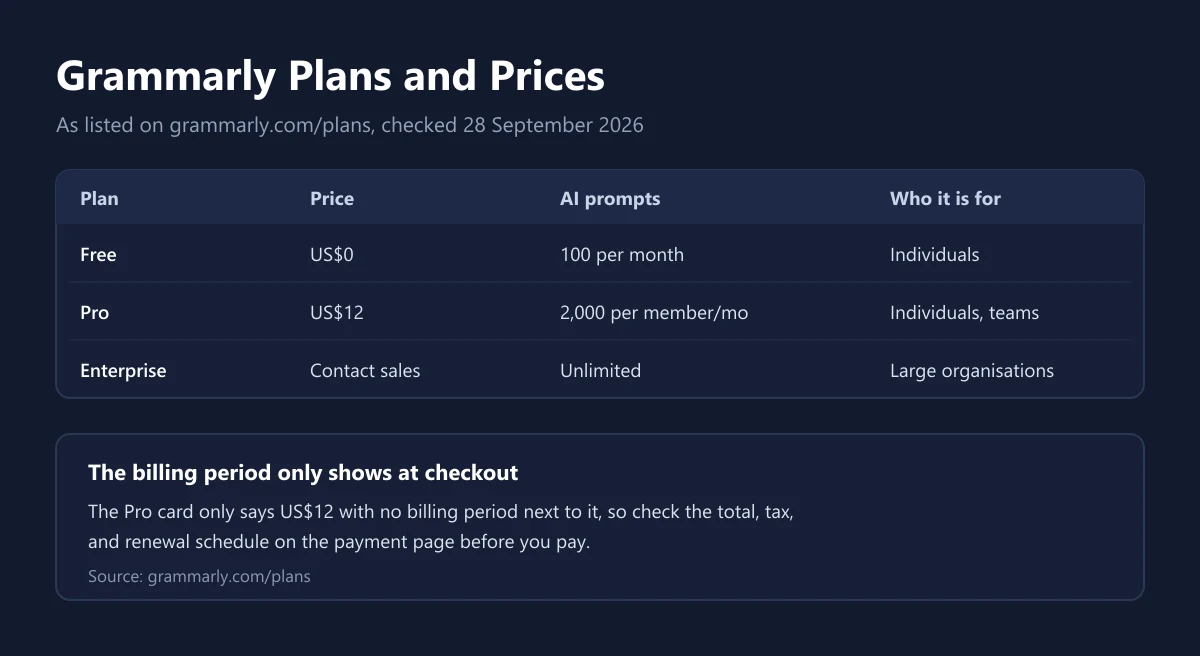
The details below come from the Grammarly plans page as checked on 28 September 2026. From our connection the page showed prices in US dollars.
| Plan | Price on the plans page | AI prompts | Main contents |
|---|---|---|---|
| Free | US$0 per month | 100 per month | Spelling and grammar fixes, see your writing tone |
| Pro | US$12 | 2,000 per member per month | Everything in Free, full-sentence rewrites, tone adjustment, plagiarism and AI text detection |
| Enterprise | Contact sales | Unlimited per member | Everything in Pro, security and admin controls for large organisations |
One thing deserves a close look. The Pro card on the plans page only shows US$12 with no billing period next to it. So we do not assume whether that figure is a monthly rate or a per-month rate on annual billing. Check the total, tax, and renewal schedule on the payment page before you click pay.
For payment, the Grammarly FAQ lists major credit cards (Visa, American Express, Mastercard, Discover) and PayPal. Grammarly Business purchases for 10 or more members on an annual plan can request an invoice. Tax on digital subscriptions bought from abroad can add to the total, as we explain in our guide to VAT on digital products.
Grammarly Free vs Pro
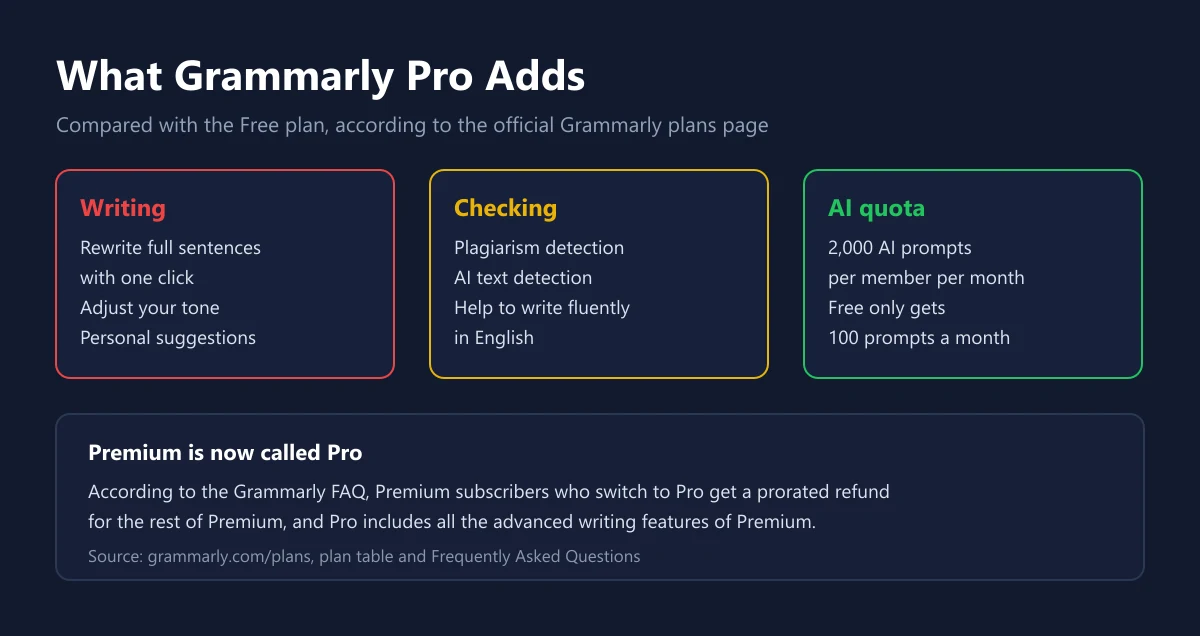
The Free plan is already enough to catch typos and basic grammar mistakes. According to the official plan cards, Free covers writing without spelling and grammar mistakes, seeing your writing tone, and 100 AI prompts a month. Pro adds features that change how you write, not just how you fix typos.
| Capability | Free | Pro |
|---|---|---|
| Spelling and grammar fixes | Yes | Yes |
| See your writing tone | Yes | Yes |
| Adjust your writing tone | No | Yes |
| Rewrite full sentences with one click | No | Yes |
| Help writing fluently in English | No | Yes |
| Unlimited personalised suggestions | No | Yes |
| Plagiarism and AI text detection | No | Yes |
| AI prompt quota | 100 per month | 2,000 per member per month |
For non-native English writers, the feature that stands out most is the full-sentence rewrite. A sentence that is grammatically correct but sounds stiff can become more natural with one click. The tone adjuster helps too, for example when you want to turn a message that is too casual into something more polite before it goes to a potential sponsor.
On the AI quota, the Grammarly Terms of Service say generative AI use can be limited by plan, and if you go past the limit you may need to buy extra capacity. That extra capacity is tied to your current subscription, cannot be moved to another account, and is not refunded when the subscription ends.
Languages Grammarly Supports
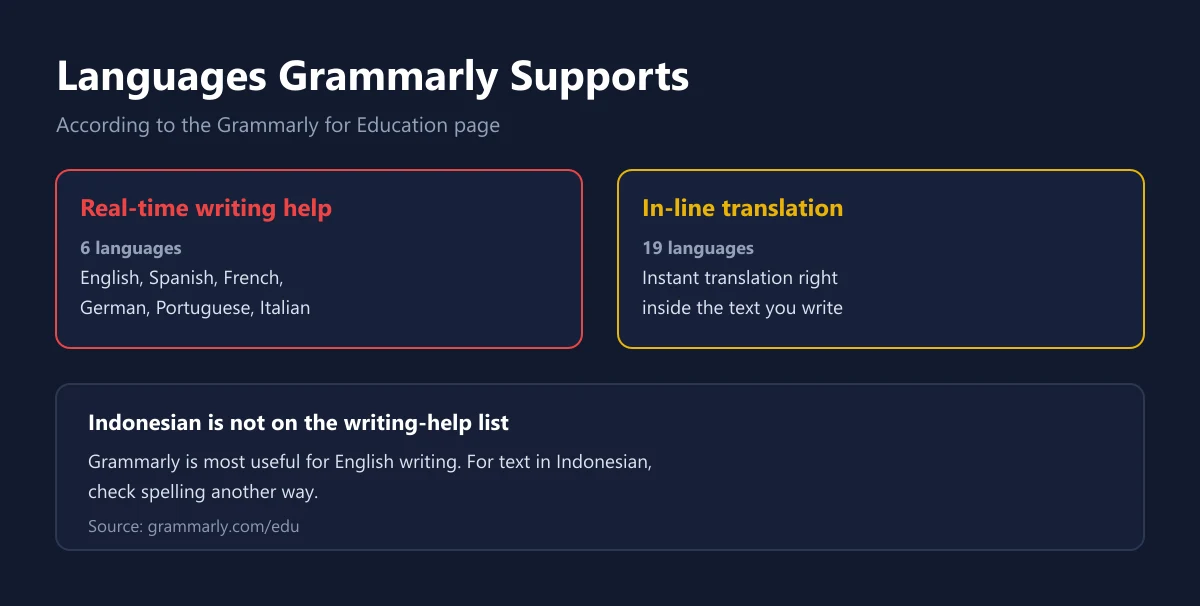
This part is important for Indonesian readers before paying. According to the Grammarly for Education page, real-time writing help is available in English, Spanish, French, German, Portuguese, and Italian, plus instant in-line translation in 19 languages. Indonesian is not on that list of languages for writing help.
In other words, Grammarly is not built to check writing in Indonesian. If you write captions, articles, or assignments in Indonesian, Grammarly Pro will not help much. Pro only earns its price when most of your writing really is in English, for example for university, work with overseas clients, or international communities.
So start with the Free plan. Install the browser extension or desktop app, use it for a week or two on your English writing, then see how often you actually need full-sentence rewrites or tone adjustment. If the answer is rarely, Free is enough and the subscription money can go elsewhere.
Grammarly for Gamers, Streamers, and Creators
In gaming, English is often the working language. International Discord communities, Steam reviews, emails to tournament organisers, and store page descriptions for indie games are almost always written in English. The table below maps those situations to the Grammarly features that fit.
| Situation | Feature that helps | Plan |
|---|---|---|
| Writing a game review in English | Spelling and grammar fixes | Free |
| Announcements for an international Discord community | Seeing and adjusting tone | Free to see, Pro to adjust |
| Emails to potential sponsors or tournament organisers | Tone adjustment, sentence rewrites | Pro |
| Stream channel bios and video descriptions | Sentence rewrites, AI prompts | Pro |
| Store page copy for an indie game | Sentence rewrites, help writing fluent English | Pro |
| Writing in Indonesian | No Indonesian grammar checking | Not recommended |
For streamers and creators, Grammarly works best alongside other tools. Thumbnails and graphics are still made in a design app, as covered in our Canva Pro guide, while Grammarly helps with titles, descriptions, and partnership emails. If you write long documents in Word, see our guide to the Microsoft office subscription to pick a plan.
In communities, tone often matters more than grammar. An announcement that sounds curt can cause misunderstandings on a Discord server whose members come from many countries. How to build a Discord community, including using Nitro gifts for active members, is in our Discord Nitro Gift guide. If you want to reach the regional esports scene, our look at esports in Southeast Asia describes the communities you will be talking to.
Trial, Renewal, and Refunds
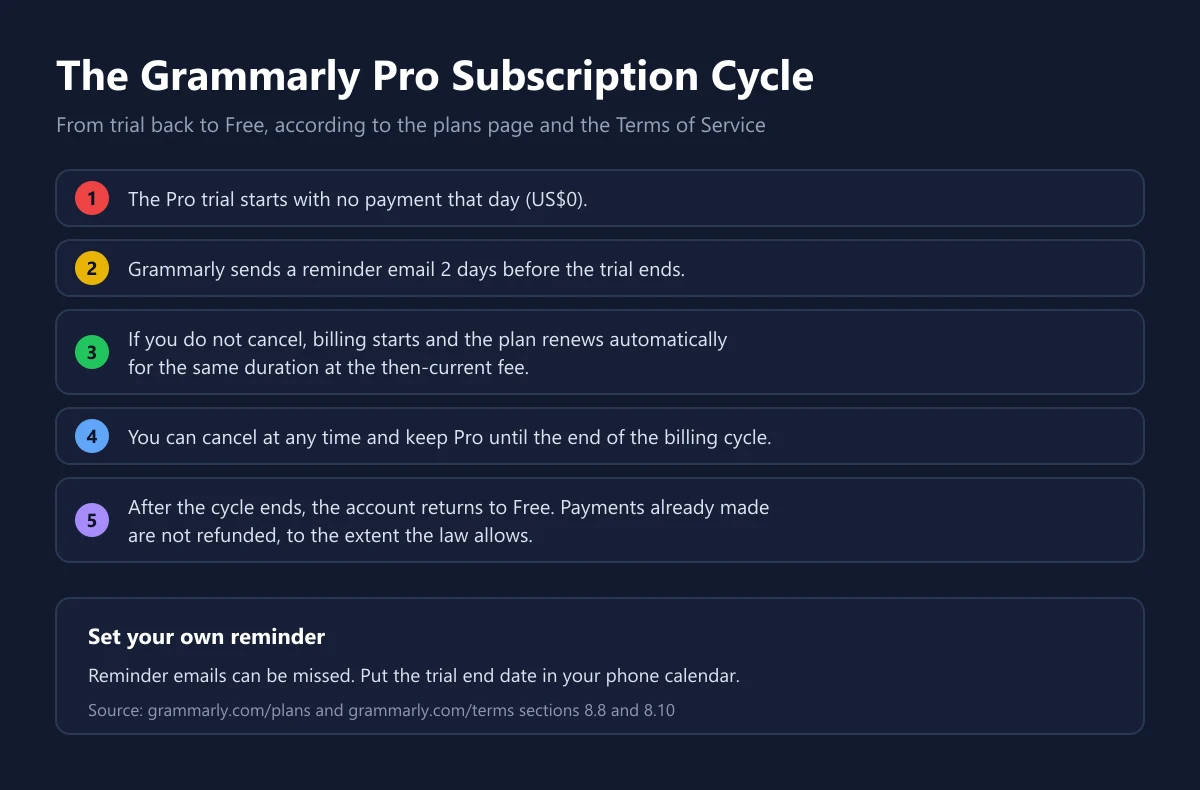
The Grammarly plans page offers a Pro trial with no payment that day, plus a reminder email 2 days before the trial ends. If you do not cancel, billing starts. The Terms of Service effective from 29 October 2025 say paid subscriptions renew automatically for the same duration at the then-current fee unless you cancel.
You can cancel at any time. According to section 8.8 of the Terms of Service, after cancelling you keep Pro until the end of the current billing cycle, and then the account becomes a Free plan. Section 8.10 states that, to the fullest extent permitted by law, all payments are non-refundable and there are no refunds for partially used subscription periods.
The takeaway: do not count on a refund if you forget to cancel. Put the trial end date in your phone calendar, because reminder emails can land in a promotions folder or get missed. The only exception clearly written down is the prorated refund when an old Premium subscriber moves to Pro. We explain the usual pattern for digital product refunds and the common mistakes in how to refund digital games.
How to Buy Grammarly Pro Safely
Subscribing directly on the official site is the clearest route, since billing, renewal, and cancellation all sit in your own account. If you buy a code or voucher from a store, make sure it is activated on your own account and that the duration is clear. Our catalogue has Grammarly Premium for 1 month, and you should compare its price with the official Grammarly price before buying.
Avoid shared Grammarly accounts. Section 3.4 of the Grammarly Terms of Service forbids users from selling, reselling, transferring, lending, or renting the service, or otherwise allowing others to access it. Beyond breaking the rules, a shared account means other people can read the text you check, including work emails and personal documents. The same terms also set a minimum age, for example 13 under most US law or 16 under EU law.
We explain how to judge a seller before paying in how to choose a top-up platform, safe shopping tips for digital products, and how to check that a digital code is genuine. Once you subscribe, protect your Grammarly account with a unique password, for example one generated and stored with a password manager as in our 1Password guide.
Frequently Asked Questions
How much does Grammarly Pro cost?
When we checked on 28 September 2026, the Grammarly plans page showed Pro at US$12 with no billing period on the plan card. The final total, tax, and billing period appear on the payment page.
What is the difference between Grammarly Premium and Grammarly Pro?
Pro is the current name of the paid plan. According to the Grammarly FAQ, Pro includes all of the advanced writing features of Premium, plus team features that used to be exclusive to the Business plan.
Can Grammarly check Indonesian?
Not for writing help. According to Grammarly for Education, real-time writing help covers 6 languages, namely English, Spanish, French, German, Portuguese, and Italian, plus in-line translation in 19 languages.
Can I try Grammarly Pro for free?
Yes. The plans page offers a Pro trial with no payment that day and a reminder email 2 days before the trial ends. If you do not cancel, billing starts.
Can I get a refund on a Grammarly subscription?
Usually not. The Grammarly Terms of Service state that all payments are non-refundable to the extent permitted by law, with no refunds for partially used subscription periods.
What happens after I cancel Grammarly Pro?
You keep Pro until the end of the current billing cycle, and then the account automatically becomes a Free plan. Your account stays and can keep using the Free features.
Can one Grammarly Pro account be shared?
No. The Terms of Service forbid allowing others to access the service, including reselling or lending an account. For teams, Grammarly offers plans with separate members.
How many AI prompts do Grammarly Free and Pro include?
Free gets 100 AI prompts a month, while Pro gets 2,000 prompts per member per month, according to the Grammarly plan table.
Which payment methods does Grammarly accept?
Major credit cards such as Visa, American Express, Mastercard, and Discover, plus PayPal. Large team purchases on annual billing can also use an invoice.
Digidang Team
Gaming enthusiast and marketplace expert sharing tips, guides, and the best gaming deals.