Kaspersky Guide: Prices, Premium Plans, and Total Security

Kaspersky is paid security software sold in three main plans, Standard, Plus, and Premium, which replaced older products such as Kaspersky Total Security. This guide covers official prices in Indonesian Rupiah, what each plan includes, what happens to old Total Security licenses, the auto-renewal and refund rules, and what to weigh before using it on a gaming PC.
What Is Kaspersky?
Kaspersky is a cybersecurity company founded in 1997 in Moscow by Eugene Kaspersky, Natalya Kaspersky, and Alexey De-Monderik, according to Wikipedia. Its first product was called AVP and was later renamed Kaspersky Anti-Virus. For years, the names home buyers knew best were Kaspersky Anti-Virus, Internet Security, and Total Security.
That lineup has since been replaced. Kaspersky's official home pages now sell only Kaspersky Standard, Kaspersky Plus, and Kaspersky Premium, plus companion apps such as Safe Kids, VPN, and Password Manager. When we opened the old address kaspersky.com/total-security, it redirected straight to the Kaspersky Premium page.
Every plan runs on Windows, macOS, Android, iOS, and Linux, and everything is managed through a My Kaspersky account. According to the Kaspersky Premium page, protection is activated simply by signing in to your account, with no activation code to type, and you can share your protection with family members from the same account.
Current Official Kaspersky Prices
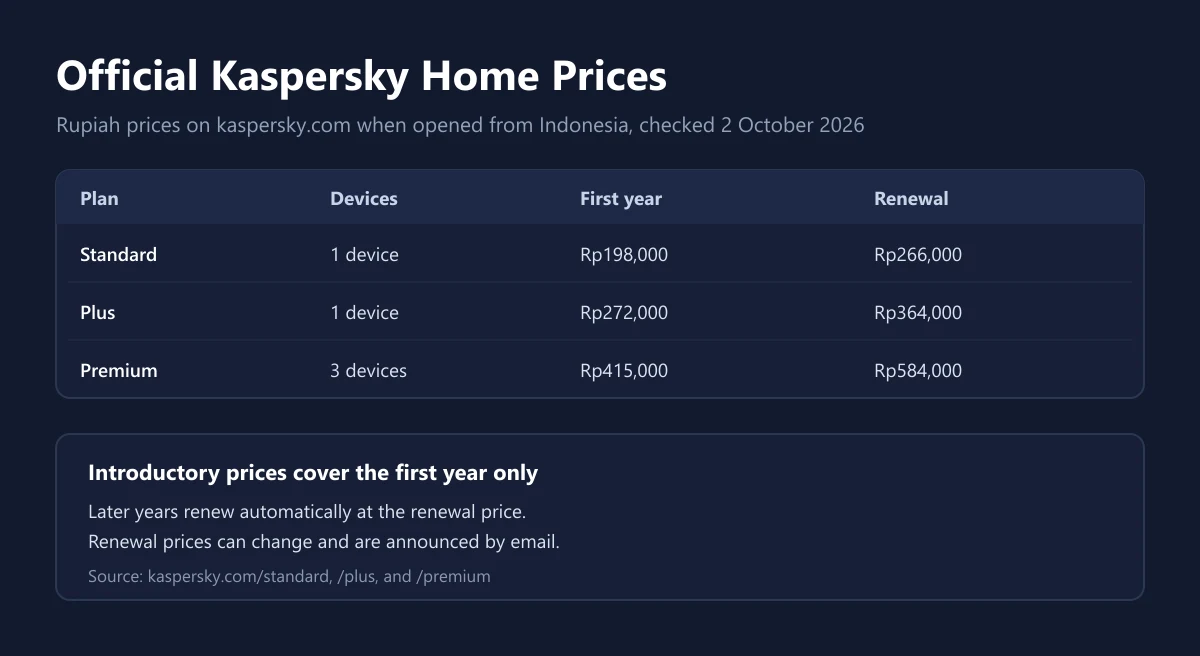
The prices below come from the official kaspersky.com product pages, which showed Rupiah prices when opened from Indonesia on 2 October 2026. Each plan uses an introductory price for the first year and then renews at a higher regular price. The same pages say the current promotion ends on 31 October 2026.
| Plan | Devices | First-year price | Renewal price per year |
|---|---|---|---|
| Kaspersky Standard | 1 device | Rp198,000 | Rp266,000 |
| Kaspersky Plus | 1 device | Rp272,000 | Rp364,000 |
| Kaspersky Premium | 3 devices | Rp415,000 | Rp584,000 |
Watch the device count on each card. When we checked, the Standard and Plus cards showed the 1-device option, while the Premium card showed the 3-device option. So part of Premium's higher price pays for two extra devices. If you need more devices, pick that option on the purchase page and compare the final totals.
Renewal prices can change. The subscription notes on the Premium page state that the renewal price may differ from the introductory price and that Kaspersky will email you the renewal price before the renewal date. Taxes at checkout can also change the final figure, so read our guide to VAT on digital products before comparing prices across stores.
Kaspersky Standard vs Plus vs Premium
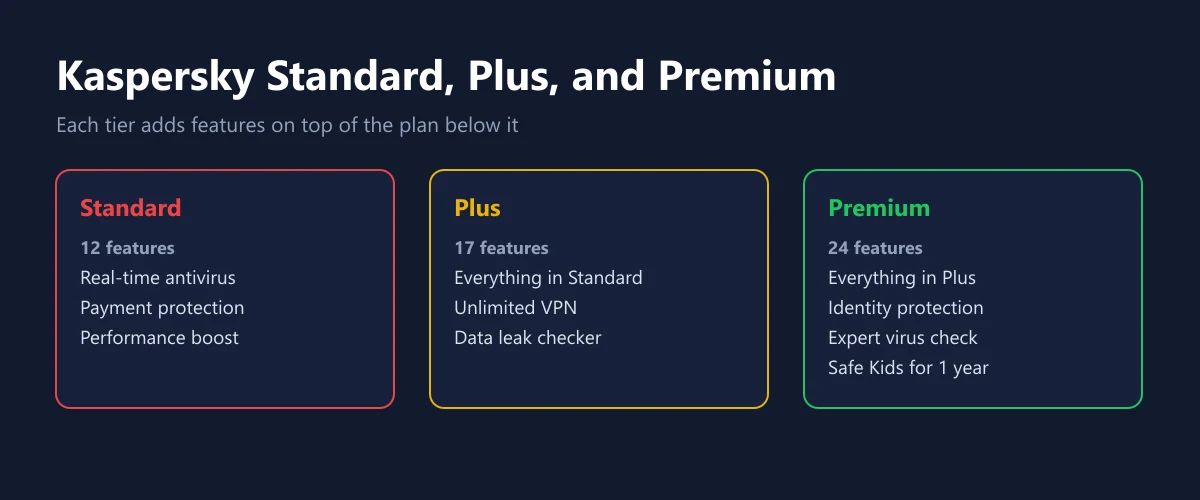
All three plans share the same foundation. The comparison cards on the Premium page list real-time antivirus, online payment protection, and performance optimization as the base features. The difference is the number of features: Standard has 12 protection features, Plus has 17, and Premium has 24.
| Feature | Standard | Plus | Premium |
|---|---|---|---|
| Real-time antivirus | Yes | Yes | Yes |
| Online payment protection | Yes | Yes | Yes |
| Performance optimization | Yes | Yes | Yes |
| Unlimited VPN | No | Yes | Yes |
| Data leak checker | No | Yes | Yes |
| Identity protection | No | No | Yes |
| Expert virus check and removal | No | No | Yes |
| Kaspersky Safe Kids | No | No | Free for 1 year |
| Number of protection features | 12 | 17 | 24 |
Premium also adds services the other two plans do not have. According to Kaspersky, Premium includes a fast unlimited VPN, a password manager and document vault, and 24/7 remote IT support. The same page values the VPN and the password manager at Rp209,000 per year each if bought separately.
If you already have a VPN or a password manager, Plus or even Standard is often enough. If you are weighing a standalone VPN, compare it with our NordVPN guide first, and for a dedicated password manager there is our 1Password guide.
What Happened to Kaspersky Total Security?
Many stores, including our own catalog, still use the name Kaspersky Total Security because that is what buyers search for. On the vendor side, the name is no longer sold as a new product. The Kaspersky Total Security download page states that this older solution still provides security with your activation code but will not get new feature updates.
| Aspect | Total Security (old) | Kaspersky Premium (current) |
|---|---|---|
| Sale status on the official site | Old address redirects to the Premium page | Actively sold |
| Protection | Still active with an activation code | Active |
| New feature updates | None | Yes |
| Activation method | Activation code | Sign in to My Kaspersky |
| Windows support | Windows 11, 10, 8.1, 8, 7 SP1+ | Windows 11, 10, 8.1, 8, 7 SP1+ |
In other words, a Total Security code that is still valid does not suddenly become useless. Threat protection keeps working for the life of the license, but you will not get new features like the ones arriving in Premium. When the license expires, the sensible move is to switch to one of the three new plans, based on the features you actually use.
If you buy a code named Total Security from any store, ask first whether it is an old Total Security license or a new-plan license sold under the old trade name. How to check a code before using it is covered in our guide on how to verify a digital code is genuine.
Auto-Renewal, Cancellation, and Refunds
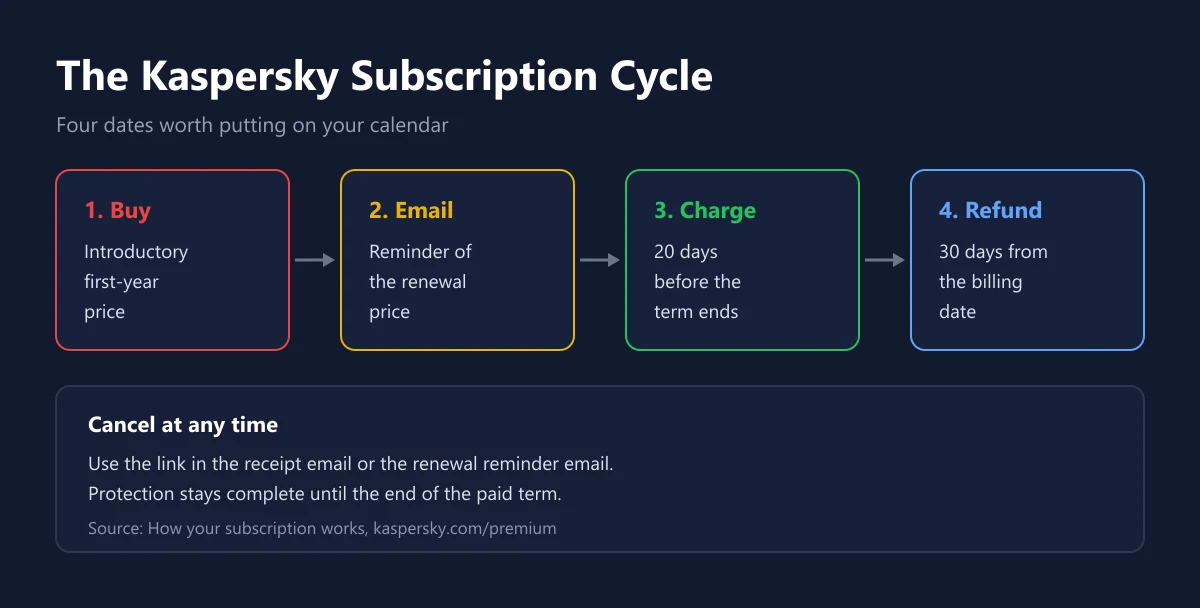
Kaspersky subscriptions renew automatically each term until you cancel. According to the notes on how the subscription works, Kaspersky attempts to charge your payment method 20 days before the subscription ends and emails you about the upcoming renewal beforehand. So the renewal charge arrives earlier than the printed expiry date.
You can cancel at any time. Open the purchase receipt email or the renewal reminder email, follow the link to the renewal conditions page, and choose to cancel auto-renewal. You can also cancel through Kaspersky Customer Support. After cancelling, you keep full protection until the end of the term you already paid for.
There are two money-back rules to tell apart. For new purchases, every plan card on kaspersky.com shows a 30-day money-back guarantee. For renewals, the Premium page says you have 30 days from the billing date to request a full refund of the renewal payment through customer support. These guarantees apply to direct purchases from Kaspersky. If you buy a code from another store, that store's policy applies, as explained in our guide on refunding digital games.
Kaspersky on a Gaming PC
Gamers often worry that an antivirus will get in the way while they play. Kaspersky has a feature called Uninterrupted Entertainment which, according to the Premium page, lets you watch movies, play games, or use full-screen apps without interference. If a game ever feels choppy after installing an antivirus, check whether this feature is on before blaming your hardware.
The security features most relevant to gamers sit in the anti-hacking category. Kaspersky says these block malicious sites, phishing emails, infected ads, and credit card skimmers, along with ransomware protection and a firewall. That matters because many game account thefts start with a fake login page or a "cheat" download that turns out to be a data stealer.
An antivirus is still not the only layer. Turn on two-step verification on your game accounts, download games only from official stores as explained in our Steam download guide, and trim background apps with our PC gaming optimization tips. For real-time protection, keep only one antivirus active so two programs do not scan each other and slow your games down.
The United States Ban
Before buying, it helps to know the regulatory context. According to Wikipedia, on 20 June 2024 the US Department of Commerce announced a ban on sales of Kaspersky products in the US from 20 July 2024 and on software updates from 29 September 2024. Kaspersky then said it would leave the US market, and in September 2024 it replaced its software on US users' computers with UltraAV.
That ban applies in the United States. Wikipedia also records bans on use in government agencies in some countries, such as Australia in 2025. When we opened kaspersky.com from Indonesia on 2 October 2026, the product pages still showed Rupiah prices and buy buttons, and Indonesian was listed among the supported languages.
Whether to use Kaspersky is ultimately your own call. If you work for an agency or company with a specific security policy, check its internal rules first. For personal use at home, compare the alternatives in our Norton guide and Malwarebytes guide.
System Requirements
Kaspersky Premium's requirements are generous for older PCs. According to the System Requirements section on the Premium page, supported Windows versions are Windows 11, 10, 8.1, 8, and 7 SP1 or later. Macs need macOS 14 to 26, Android needs version 11 to 16, and iPhones need iOS 26. Several Linux distributions are also supported, including Ubuntu 24.04 or later.
Besides the operating system, Kaspersky requires an internet connection and a My Kaspersky account. Windows 7 support is a plus compared with some rivals, but Windows 7 itself stopped receiving security updates from Microsoft long ago. If your gaming PC still runs an old Windows version, consider upgrading with our Windows 11 license guide.
Windows users should also know that Windows already includes Microsoft Defender Antivirus with real-time protection, according to Microsoft Support. Kaspersky is worth considering if you want extras such as payment protection, a VPN, and a password manager in a single subscription.
How to Buy Kaspersky Safely
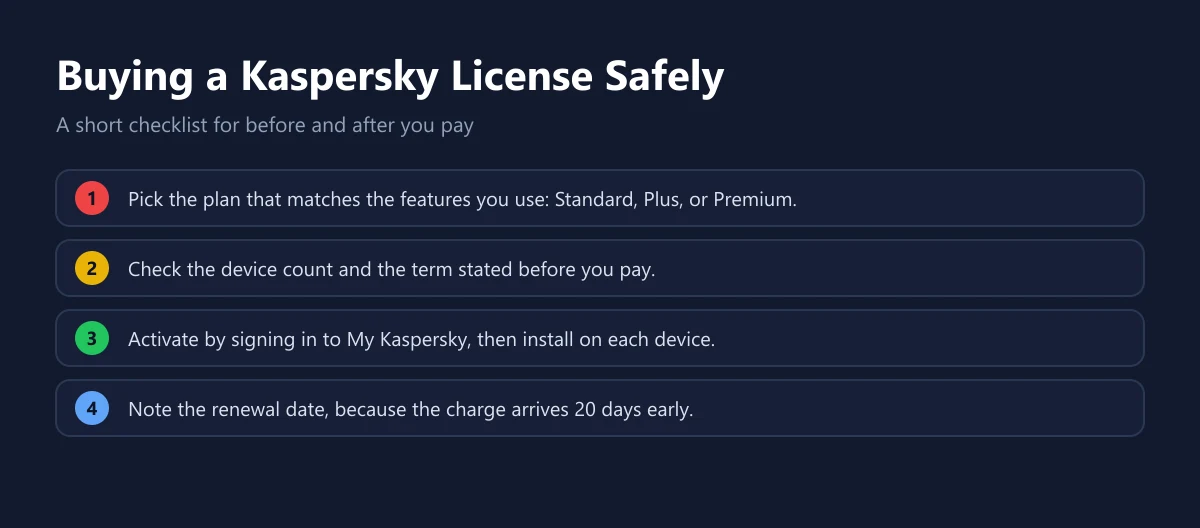
Start from your needs, not from the discount. Count the devices you want to protect, including phones, then decide whether you need a built-in VPN and password manager. Then pick the matching plan and make sure the term is clearly stated before you pay.
Our catalog lists Kaspersky Total Security 1 year. For comparison, there are also Norton 360 Deluxe and Malwarebytes Premium. Whatever you choose, keep the proof of purchase and note the renewal date so the second-year bill does not surprise you.
Avoid codes sold far below a fair price with no explanation of where they came from, because such codes may be business licenses, region-locked licenses, or licenses already used by someone else. How to judge a seller before paying is covered in our tips for buying digital products safely.
Frequently Asked Questions
How much does Kaspersky Premium cost?
When we checked on 2 October 2026, Kaspersky Premium for 3 devices for 1 year cost Rp415,000 for the first year and renews at Rp584,000 per year, according to the Kaspersky Premium page.
Is Kaspersky Total Security still sold?
Not as a new product on the official site. The old kaspersky.com/total-security address redirects to the Premium page, and existing Total Security licenses keep protecting you but get no new feature updates, according to the Kaspersky download page.
What is the difference between Kaspersky Standard, Plus, and Premium?
Standard includes real-time antivirus, payment protection, and performance optimization. Plus adds an unlimited VPN and a data leak checker. Premium adds identity protection, expert virus checks, and Safe Kids free for 1 year.
Does Kaspersky offer a money-back guarantee?
Yes. Plan cards on the official site show a 30-day money-back guarantee, and a renewal payment can be fully refunded within 30 days of the billing date through Kaspersky Customer Support.
When does Kaspersky charge for renewal?
Kaspersky attempts to charge your payment method 20 days before the subscription ends and emails you a notice first, according to the subscription notes on the Premium page.
Does Kaspersky still support Windows 7?
Yes. Kaspersky Premium's system requirements list Windows 11, 10, 8.1, 8, and 7 SP1 or later, although Windows 7 itself no longer receives security updates from Microsoft.
Is Kaspersky banned?
Sales and updates of Kaspersky have been banned in the United States since 2024, according to Wikipedia. When we checked from Indonesia, the official site still sold its plans in Rupiah.
Does Kaspersky slow down games?
Kaspersky offers an Uninterrupted Entertainment feature for playing games and using full-screen apps without interference. Make sure only one real-time antivirus is active so your system is not running two scanners at once.
Can Kaspersky be used on phones?
Yes. All plans support Android and iOS in addition to Windows, macOS, and Linux, and the number of devices you can protect depends on the plan option you buy.
Digidang Team
Gaming enthusiast and marketplace expert sharing tips, guides, and the best gaming deals.