Can You Use a PlayStation Gift Card for PlayStation Plus? Rules, Prices, and Renewal

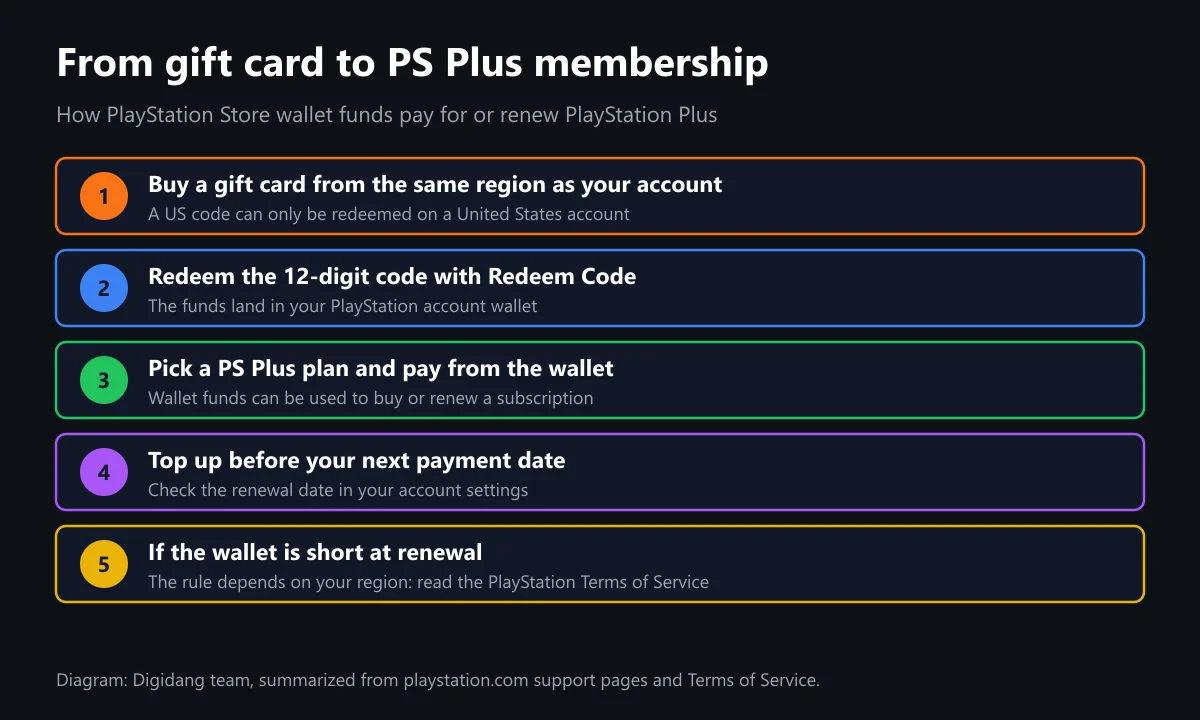
Yes, you can use a PlayStation gift card for PlayStation Plus. The card adds funds to your account wallet, and wallet funds can pay for a new membership or a renewal. The one hard rule is region: the card must match your account. The PlayStation Terms of Service confirm wallet funds can renew a subscription.
This guide walks through how to buy PlayStation Plus with a gift card step by step, the difference between a wallet gift card and a PS Plus membership voucher, official Essential, Extra, and Premium prices, what happens when your wallet runs short at renewal, and the mistakes that most often get a code rejected. Every rule below comes from official playstation.com pages we opened ourselves on October 28, 2026.
Can You Use a PlayStation Gift Card for PlayStation Plus?
You can use a PlayStation gift card for PlayStation Plus through your wallet. Redeem the card first, the funds land in your account wallet, and then you spend that balance on a PS Plus plan in PlayStation Store. The US PlayStation Terms of Service say wallet funds may be used to complete a purchase or renew a subscription.
In other words, a gift card is never "converted" straight into membership time. It only adds money. The plan you pick and the balance you hold decide how long PS Plus stays active. That is different from a PS Plus membership voucher, which contains a fixed amount of membership time. We break that difference down in the next sections.
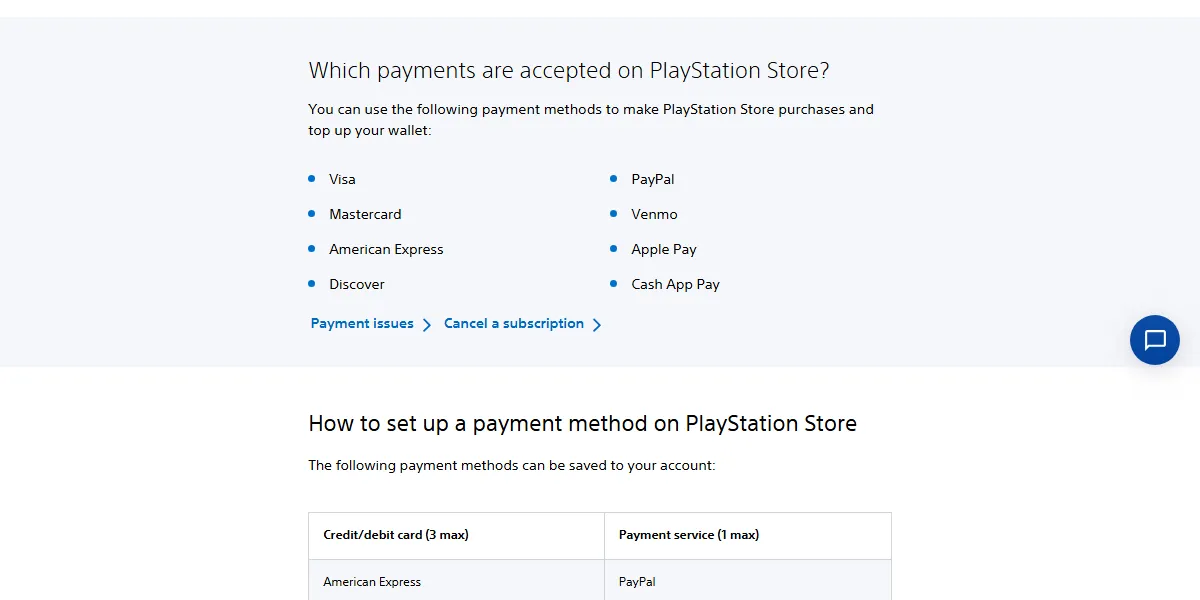
The US accepted payment methods page lists Visa, Mastercard, American Express, Discover, PayPal, Venmo, Apple Pay, and Cash App Pay for store purchases and wallet top-ups. The same page explains that every adult account has an online wallet that can be topped up with a registered payment method or PlayStation gift cards.
How to Buy PlayStation Plus With a Gift Card
These steps follow the official voucher redemption guide and the PlayStation Plus support page. The order is the same on a web browser, PS5, and PS4; only the menu location changes.
- Match the card region to your account. Physical cards carry a printed flag for the country or region; digital codes state the region on the listing.
- Sign in to the right account. Funds cannot move between accounts, so check which profile is active.
- Redeem the code. On the web, open PlayStation Store, select your profile, then Redeem Code. On PS5, open PlayStation Store, press the triangle button, select More, then Redeem Code.
- Enter the code carefully and confirm. The credit is applied to your wallet immediately.
- Open PlayStation Plus. On PS5, select the PlayStation Plus icon on the Games home screen. On the web, choose a membership plan on the PS Plus page.
- Pick a tier and duration, then pay with your wallet balance.
- Check your transaction history to confirm the payment and the active membership.
According to the official PlayStation guide, PlayStation Store voucher codes contain 12 digits and can only be used once. You can also redeem a code at checkout by selecting Redeem Codes and Gift Cards from the payment method menu, so redeeming in advance is optional.
One note for families: the same page says wallet top-up voucher codes need to be redeemed on the family manager's account. Child accounts can only spend from the family manager's wallet within a monthly spending limit. If the membership is for a child, manage the funds and the subscription from the parent account.
Wallet Gift Card vs PS Plus Membership Voucher
Many buyers assume every PlayStation card works the same way. There are actually two kinds, and the difference changes how you use them. The table below is based on the redeem voucher guide and the change PS Plus plan guide.
| Aspect | Wallet gift card | PS Plus membership voucher |
|---|---|---|
| What it holds | A cash value added to your wallet | A fixed amount of PS Plus membership time |
| What it buys | Games, add-ons, in-game currency, and subscriptions | PS Plus time only |
| Plan choice | You choose tier and duration at checkout | Converted based on your current plan |
| Auto-renewal | Wallet funds can cover the renewal | Adds time, not wallet funds |
| Saved payment method | Not needed to redeem | Some subscription vouchers may need one |
| Region | Must match your account | Must match your account |
The change PS Plus plan page explains that when you enter a membership voucher code, the pre-paid period is converted to an amount of time of equivalent value based on your current PlayStation Plus plan. So a 12-month Essential voucher redeemed on an account that is currently on Premium can turn into a shorter period.
The redeem guide also notes that you may need a valid payment method on the account to redeem some subscription vouchers. A wallet gift card is the more flexible option because you choose the plan yourself. For more on PlayStation gift cards in general, see our PlayStation Store gift card guide and where to buy PlayStation gift cards.
Official PlayStation Plus Prices
How much wallet balance you need depends on your account region. We copied the prices below from the official PS Plus US page and PS Plus Indonesia page on October 28, 2026. Prices can change at any time, so check again before you buy.
| Plan | United States (1 / 3 / 12 months) | Indonesia (1 / 3 / 12 months) |
|---|---|---|
| Essential | $10.99 / $27.99 / $79.99 | Rp139,000 / Rp364,000 / Rp1,010,000 |
| Extra | $16.99 / $43.99 / $134.99 | Rp208,000 / Rp590,000 / Rp1,710,000 |
| Premium (Deluxe in Indonesia) | $19.99 / $54.99 / $159.99 | Rp243,000 / Rp695,000 / Rp1,990,000 |
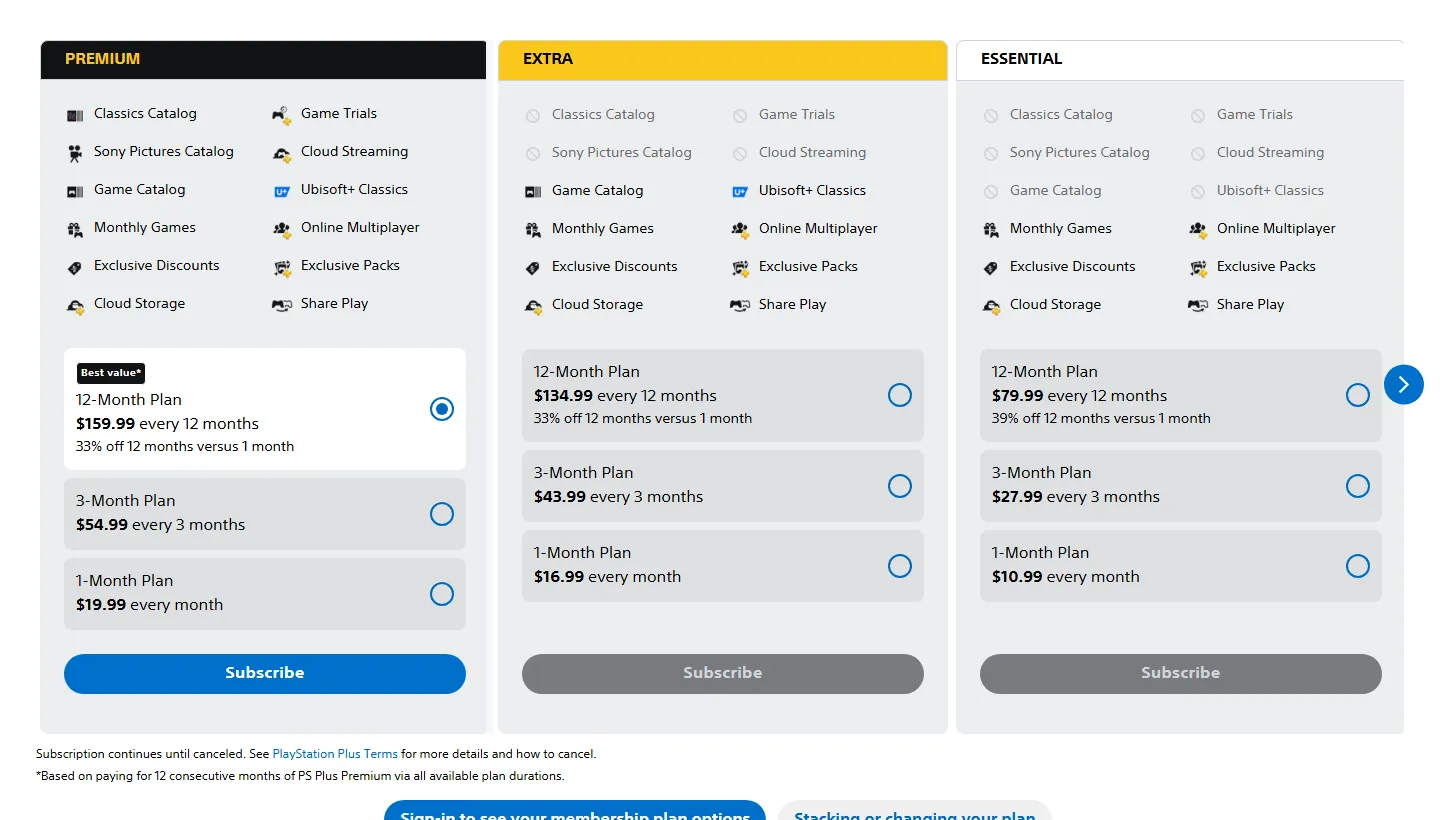
Per the PlayStation Plus support page, all three tiers include online multiplayer, monthly games, exclusive discounts, exclusive game content, 100GB cloud storage, and Share Play. Extra adds the Game Catalog, while Premium adds the Classics Catalog, cloud streaming, and game trials. Our PlayStation Plus guide compares the tiers in detail.
A quick example for a US account: Essential for one month at $10.99 on the US PS Plus page is not covered by a single $10 card, but one $25 card covers it and leaves about $14 for your next purchase, before any applicable tax. For 12 months of Essential at $79.99, you can stack several cards until the wallet balance is high enough.
What Happens if Your Wallet Is Short at Renewal?
The answer depends on your region, because PlayStation writes its Terms of Service per market. This matters if you rely on gift cards for auto-renewal, since a failed payment can cut off multiplayer and catalog access.
United States. The US Terms of Service say that if your wallet does not have enough funds when an automatic recurring subscription payment is due, the balance is automatically funded from your default Approved Payment Method on file. If you keep no card on file, top up the wallet before the renewal date.
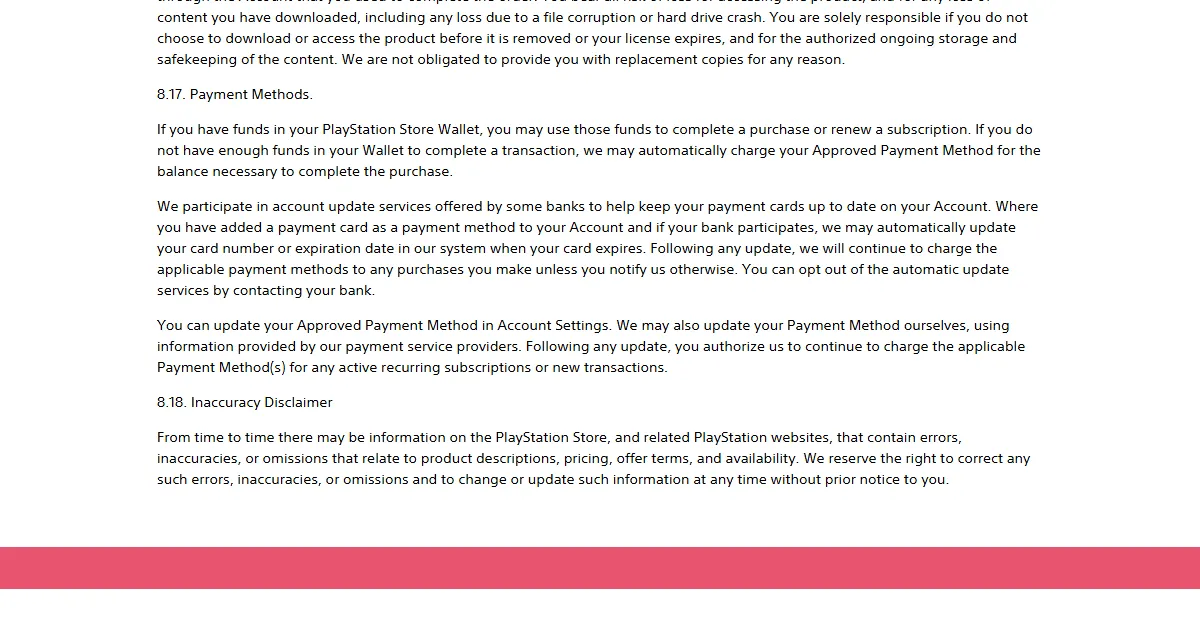
Indonesia. Section 11.5 of the Indonesian Terms of Service is stricter: if the wallet cannot cover the renewal, the subscription is cancelled unless the automatic funding feature on the account is set to ON. Buying a new subscription switches that feature back to ON automatically.
The Indonesian terms add one more detail gift card buyers should know: wallet funds not used within 2 years of purchase or redemption are deemed abandoned and are not returned unless required by law, according to the PlayStation Terms of Service for Indonesia. Do not let a balance sit for years.
Upgrading, Downgrading, and Cancelling PS Plus
Gift card funds can also pay for a tier upgrade. The change PS Plus plan guide sets out the rules:
- Upgrades carry a pro-rated fee for the time left until your next payment date. On that date you are charged the standard price of the new tier.
- Downgrades take effect on your next payment date, after which the higher-tier benefits end.
- Stacked subscriptions must be upgraded all at once, so the fee can look larger.
- Cancellation is possible up until the next payment date.
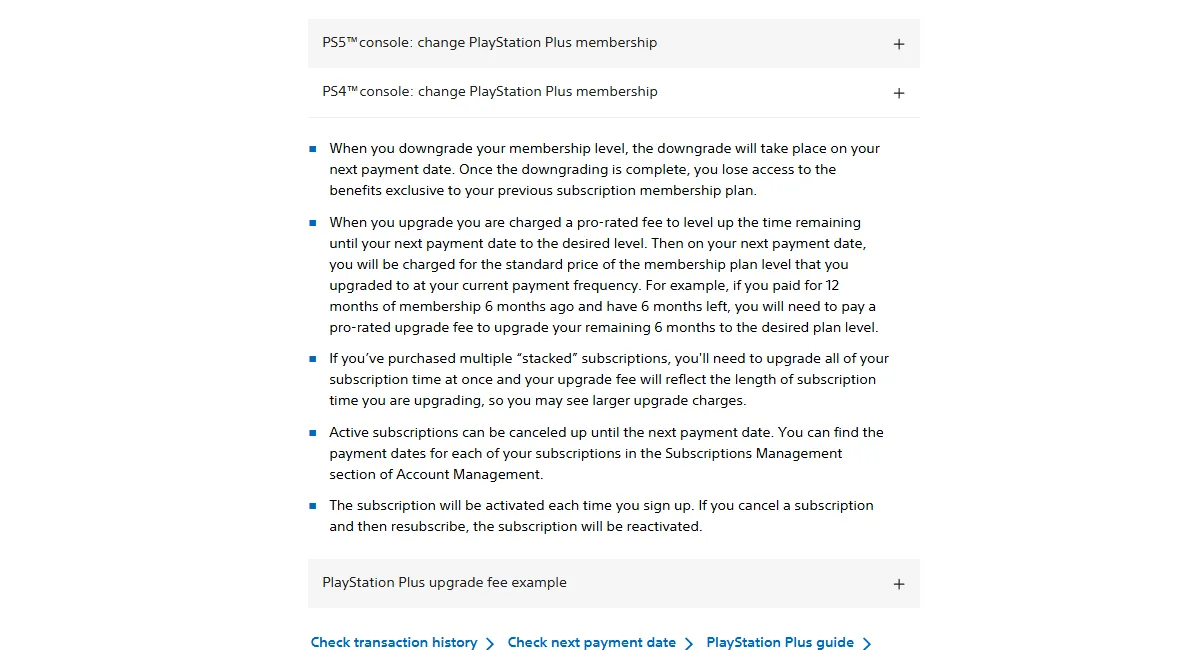
PlayStation's own example on the US support page: a 12-month Essential member who paid $79.99 with half a year left wants Premium at $159.99 per year. The $80 difference is halved because half a year remains, so the upgrade costs $40. PlayStation notes those figures are for illustration only.
If you decide to cancel, follow the official cancellation guide in your account. Before you do, check your next payment date in subscription management so you know exactly how long your PS Plus benefits will last.
The Region Rule That Trips Up Most Buyers
The most common mistake when paying for PS Plus with a gift card is a region mismatch. The PlayStation Store voucher restrictions state that the voucher code needs to be for the same region as your account. For physical vouchers, look for a printed flag showing the country or region.
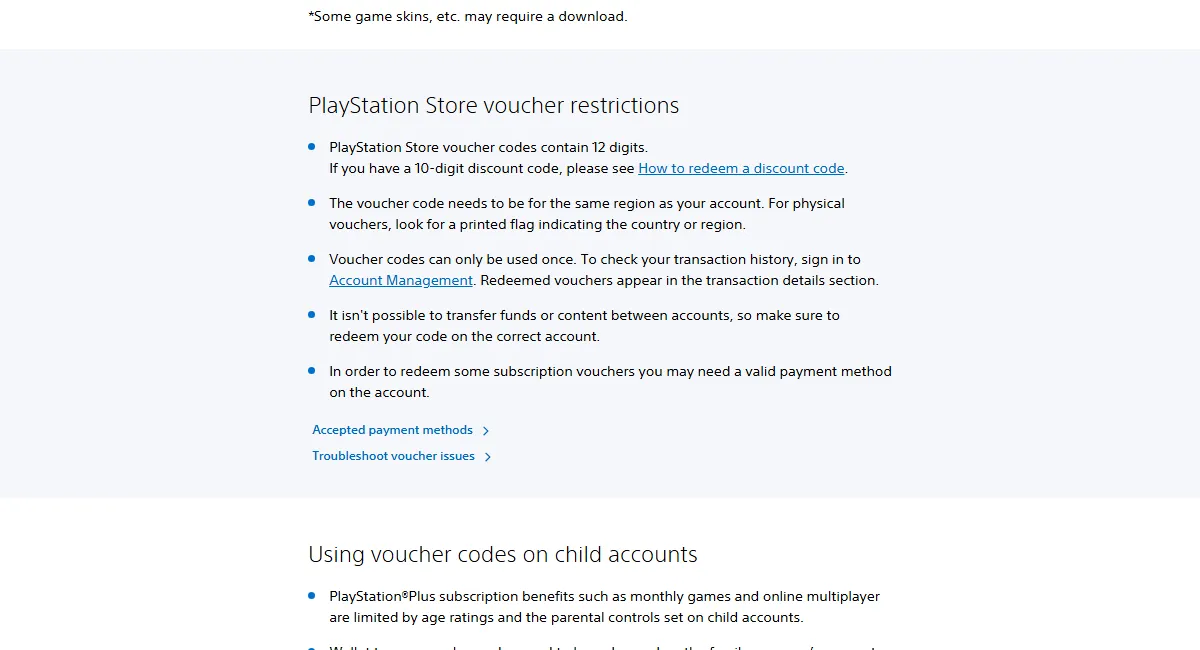
That means a US PSN gift card only works on a US account, and an account from another country needs a card from its own store region. Pick the card that matches the account, not the other way around. Our explainer on digital gift card regions covers this in more depth.
Other reasons a code gets rejected include typos, a code that was already used, or entering a discount code instead of a wallet voucher. If your physical card is damaged, follow our guide for a scratched-off PlayStation gift card code. Device-by-device redemption steps are in how to redeem a PlayStation Store code.
PSN Gift Cards and PS Plus at Digidang
Digidang is an affiliate marketplace for digital products. For PS Plus, our catalog lists PSN gift cards and PS Plus membership vouchers. Every product below is for the United States region, so it only suits US PlayStation accounts. Check the current price and availability on each product page.
- PSN Gift Card $10 USD and PSN Gift Card $25 USD to top up a US wallet.
- PSN Gift Card $50 USD, handy when paying for a 3-month or 12-month plan from your wallet.
- PS Plus Essential 1 Month, PS Plus Extra 3 Months, and PS Plus Premium 12 Months, membership vouchers that convert based on your active plan.
If your account belongs to another region, these US cards and vouchers will not redeem. Use the payment methods your own region accepts, listed on the PlayStation Store payment methods page for that country. For a comparison with other console subscriptions, read Game Pass vs PS Plus.
Safe Habits for Paying Subscriptions With Gift Cards
A few small habits keep your balance safe and your membership running.
- Buy from trusted sellers. Suspiciously cheap codes may already be used or come from fraud. See safe shopping tips for digital products.
- Keep the receipt and a photo of the card. It makes a claim far easier if the code fails.
- Redeem on the right account. Funds cannot be moved between accounts.
- Watch your renewal date. Top up a few days early so the renewal does not fail.
- Set automatic funding deliberately. Turn it off if you never want your card charged, but then keep the wallet funded.
- Turn on two-step verification. A funded account is a bigger target. See how to secure a game account with 2FA.
The same principles apply to gift cards on other platforms. See our Xbox gift card guide, Steam Wallet code guide, and Nintendo eShop gift card guide.
Frequently Asked Questions
Can you use a PlayStation gift card for PS Plus?
Yes. Redeem the code so the funds land in your wallet, then choose a PS Plus plan and pay from that balance. The PlayStation Terms of Service say wallet funds can complete a purchase or renew a subscription.
Can I use a US PSN gift card on an account from another country?
No. According to PlayStation, the voucher code must be for the same region as your account. A US card only redeems on a United States account.
What is the difference between a gift card and a PS Plus voucher?
A gift card adds money to your wallet that you can spend on any plan. A membership voucher holds a set amount of time that is converted based on your current PS Plus plan, so the resulting time can differ.
What happens if my wallet does not have enough funds at renewal?
In the US, the Terms of Service say the shortfall is charged to your default payment method on file. In Indonesia, the subscription is cancelled unless automatic funding is turned on.
Can I combine several gift cards to pay for PS Plus?
Yes. Each redeemed card adds to the same wallet balance. Once the balance covers the plan you want, pay for it from the wallet. Make sure every card matches your account region.
Do PlayStation wallet funds expire?
The Indonesian Terms of Service say funds not used within 2 years of purchase or redemption are deemed abandoned and are not returned unless required by law. Check the terms for your own region.
Can I pay for a PS Plus upgrade with gift card funds?
Yes, an upgrade is a PlayStation Store purchase. You pay a pro-rated fee for the time left until your next payment date, and on that date you are charged the standard price of the new tier.
How do I check that my PS Plus payment went through?
Open your transaction history in Account Management on the web, or in the account settings on PS5 and PS4. Subscription payments and redeemed vouchers appear in the transaction details.
Digidang Team
Gaming enthusiast and marketplace expert sharing tips, guides, and the best gaming deals.