Microsoft 365 vs Office 2021: Key Differences and Which to Choose

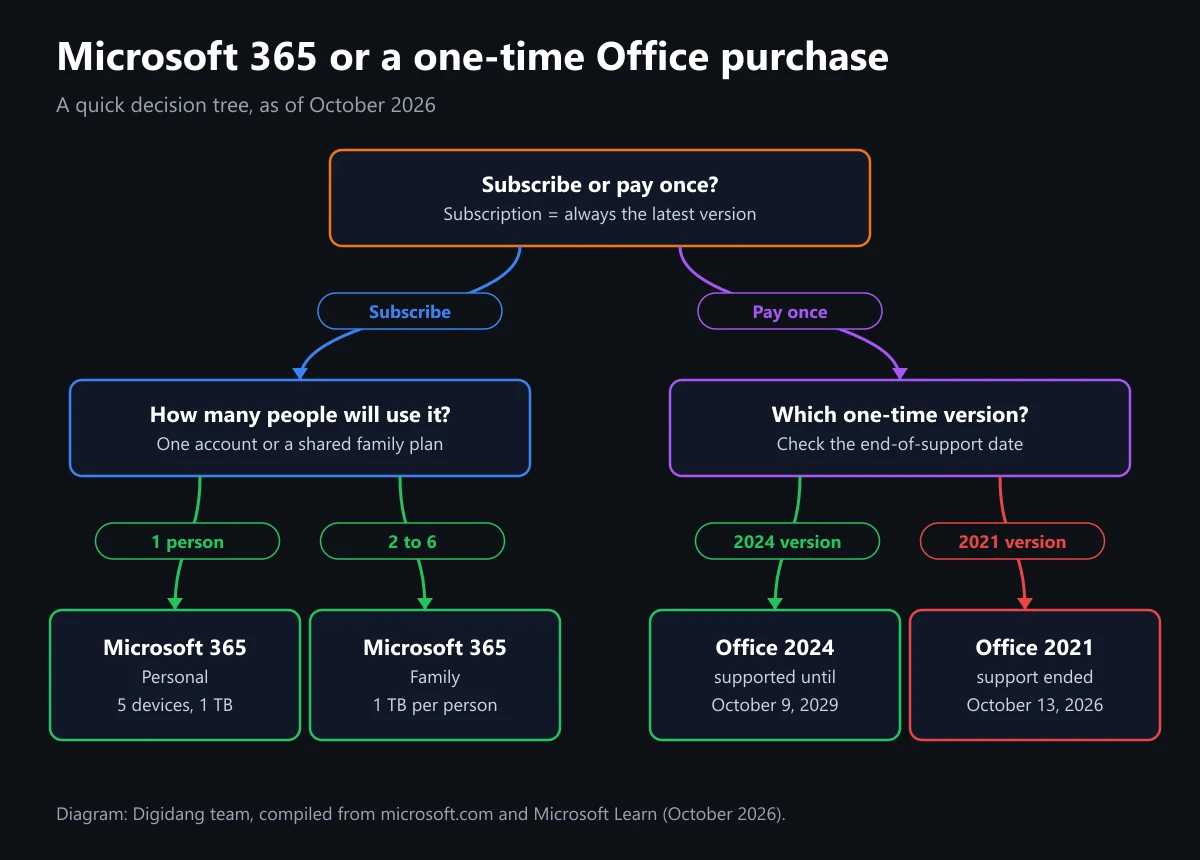
Microsoft 365 vs Office 2021 comes down to payment and updates. Microsoft 365, formerly Office 365, is a subscription with ongoing feature updates, 1 TB of cloud storage, and multi-device use. Office 2021 is a one-time purchase for one PC or Mac, and Microsoft Lifecycle lists its support as ended on October 13, 2026.
This guide compares the two side by side: included apps, device limits, OneDrive storage, feature updates, Copilot, official prices, and end-of-support dates. We also cover Office 2024 as the one-time successor and give recommendations for different kinds of users. Every price and date below comes from official Microsoft Store and Microsoft Learn pages we opened in October 2026.
What Is the Difference Between Microsoft 365 and Office 2021?
The core difference between Microsoft 365 and Office 2021 is the license model. Microsoft 365 is paid monthly or yearly and keeps updating while the subscription is active. Office 2021 is paid once, installs on one computer, never gains new features, and according to Microsoft retired on October 13, 2026, so it no longer gets security fixes.
A simple way to picture it: Microsoft 365 is like renting an apartment from a landlord who keeps renovating. As long as you pay rent, things keep getting fixed and new amenities appear. Office 2021 is like buying a house as it stands. You never pay again, but no new rooms get added, and once the warranty period is over nobody comes to repair anything.
That difference ripples into everything else. The subscription brings cloud storage, sign-ins on many devices, and Copilot AI features. The one-time purchase brings desktop apps for one device and nothing more. Microsoft's official page on the difference between Microsoft 365 and Office also notes that one-time purchases do not include upgrades to the next major release, so moving to a newer version later means paying full price again.
So "which one is better" is not really the right question. A more useful one is "which one fits the way I work". Someone who types letters on a single laptop has very different needs from a family that wants to keep photos and school assignments in the cloud. The sections below help you weigh each factor in turn.
Office 365 Is Now Called Microsoft 365
Plenty of people still search for "Office 365", but for home users that name has been retired. The official Microsoft Store page is literally titled Compare Microsoft 365 Plans & Pricing (Formerly Office 365). According to Wikipedia, the rename happened because the bundle grew beyond Office apps to include cloud storage, security, and other services.
So when people compare Office 365 vs Office 2021, they mean the consumer Microsoft 365 plans listed on the official plans page: Personal, Family, and Premium. The apps are familiar: Word, Excel, PowerPoint, Outlook, and OneNote. If you want to learn what each app does first, read our overview of Microsoft Office apps, then the deep dives on Microsoft Word, Microsoft Excel, and Microsoft PowerPoint.
Office 2021, meanwhile, is the one-time-purchase generation of Office released in October 2021, according to Wikipedia. It came in several editions. Home & Student includes Word, Excel, PowerPoint, and OneNote. Home & Business adds Outlook. Professional adds Publisher and Access, and Professional Plus adds Teams. The last two editions are Windows-only.
Microsoft 365 vs Office 2021 Comparison Table
The table below summarizes the key differences. Subscription details come from the Compare Microsoft 365 plans page and Microsoft's support article on Microsoft 365 vs one-time Office, while Office 2021 details come from Microsoft Lifecycle and Wikipedia.
| Factor | Microsoft 365 (Office 365) | Office 2021 |
|---|---|---|
| How you pay | Monthly or yearly subscription | One-time purchase |
| Desktop apps | Word, Excel, PowerPoint, Outlook, OneNote (PC users also get Access and Publisher) | Depends on edition; Home & Student has only Word, Excel, PowerPoint, OneNote |
| Devices | Install on all your devices, sign in on 5 at once | One PC or Mac |
| Phones and tablets | Extra features in the mobile apps | Basic editing only |
| OneDrive | 1 TB per person | No extra online storage |
| Feature updates | Always gets new features | No new features |
| Copilot in the apps | Included, with usage limits | Not included |
| End of support | Updated while the subscription is active | Ended October 13, 2026 |
The row people underestimate most is feature updates. Microsoft's support page says one-time purchases get security updates but no new features. For Office 2021, even those security updates have now stopped because its support window closed. In other words, the Office 2021 you run today will stay exactly the same forever.
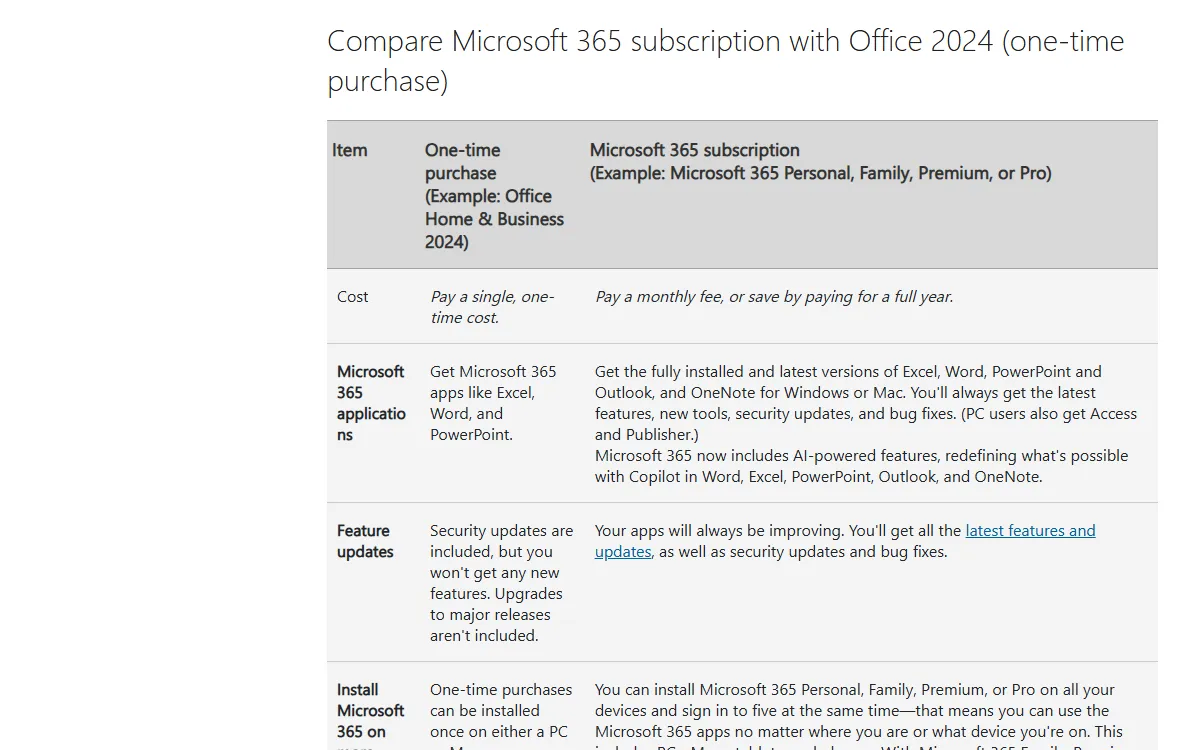
On Copilot, the official plans page lists Microsoft 365 Personal as including desktop Word, Excel, PowerPoint, Outlook, and OneNote with Microsoft Copilot. No such feature is listed for one-time versions. One important caveat from Microsoft: AI benefits belong to the subscription owner only and cannot be shared with Family members.
Official Prices: Microsoft 365 vs One-Time Office
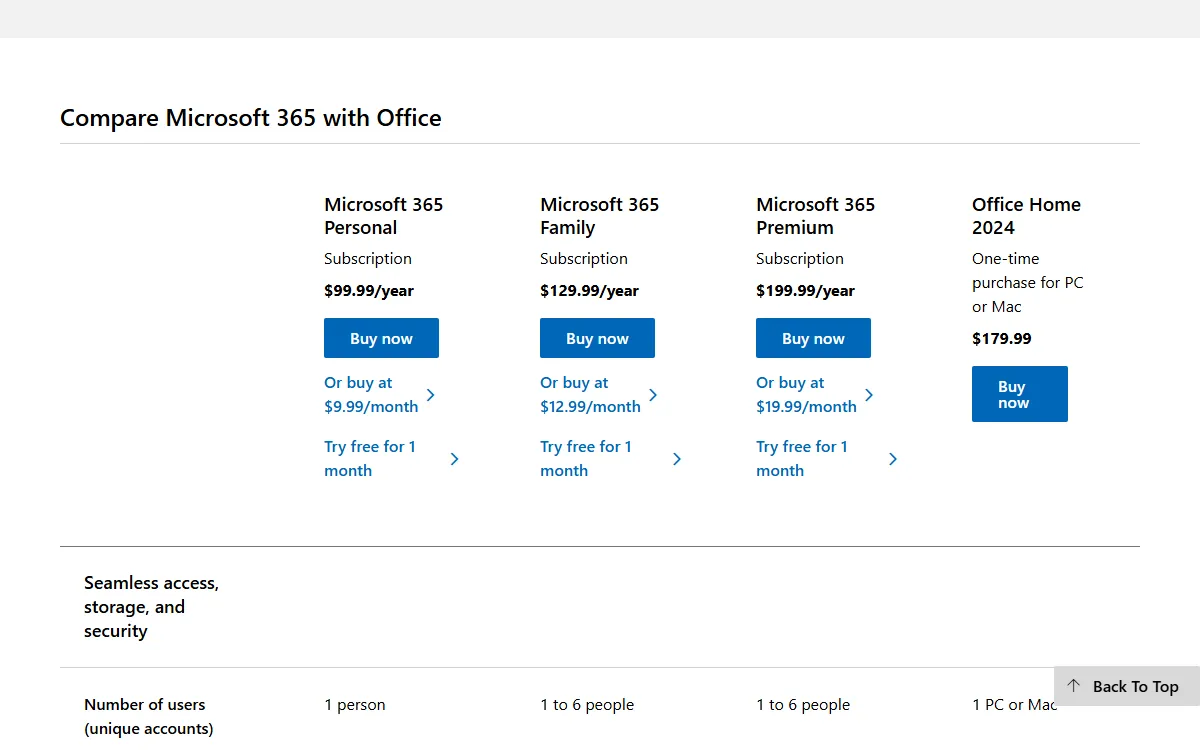
These are the prices shown on the US Compare Microsoft 365 plans page when we checked on October 26, 2026, alongside the prices the Indonesian Microsoft Store shows on the same date. Office 2021 is no longer listed; the one-time option Microsoft now offers is Office Home 2024. Prices vary by region and can change, so always recheck before paying.
| Product | Model | US price | Indonesia price | Users |
|---|---|---|---|---|
| Microsoft 365 Personal | Subscription | $99.99/year or $9.99/month | Rp1,359,999/year | 1 person |
| Microsoft 365 Family | Subscription | $129.99/year or $12.99/month | Rp1,699,999/year | 1 to 6 people |
| Microsoft 365 Premium | Subscription | $199.99/year or $19.99/month | Rp3,299,999/year | 1 to 6 people |
| Office Home 2024 | One-time | $179.99 | Rp2,279,999 | 1 PC or Mac |
The math is simple. Using the official US prices, Office Home 2024 costs roughly the same as 21 or 22 months of Microsoft 365 Personal billed yearly. If you will use the same Office on one laptop for more than two years, the one-time purchase starts to pay off. On the other hand, a Family plan shared by six people works out to about $21.67 per person per year.
Those are Microsoft Store prices. If you buy a code from another store, taxes and exchange rates also affect the final amount; we explain that in our article on VAT on digital purchases. A full breakdown of Personal, Family, and Premium, including how family sharing works, is in our Microsoft 365 guide, so here we focus on the comparison with one-time Office.
Office 2021 Support Has Ended: What That Means
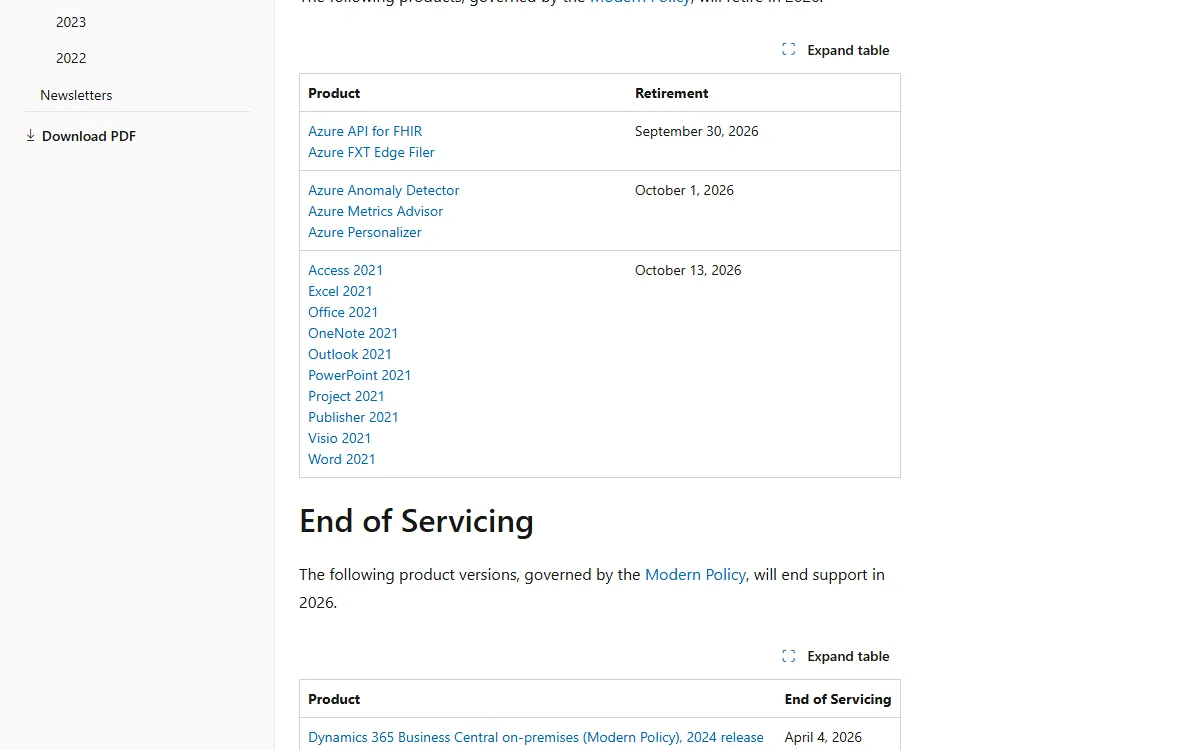
The Ending Support in 2026 page on Microsoft Learn lists Office 2021 together with Word 2021, Excel 2021, PowerPoint 2021, Outlook 2021, Access 2021, Publisher 2021, and the other 2021 apps, all retiring on October 13, 2026. The same page explains that after retirement there are no new security updates, non-security updates, or free or paid assisted support options.
The lifecycle page does not say the apps stop working. What disappears is the maintenance. Security holes discovered after that date will not be patched, and Office documents are a common attack route through email attachments. The risk is similar to running an antivirus that never updates, as we explain in our article on antivirus examples.
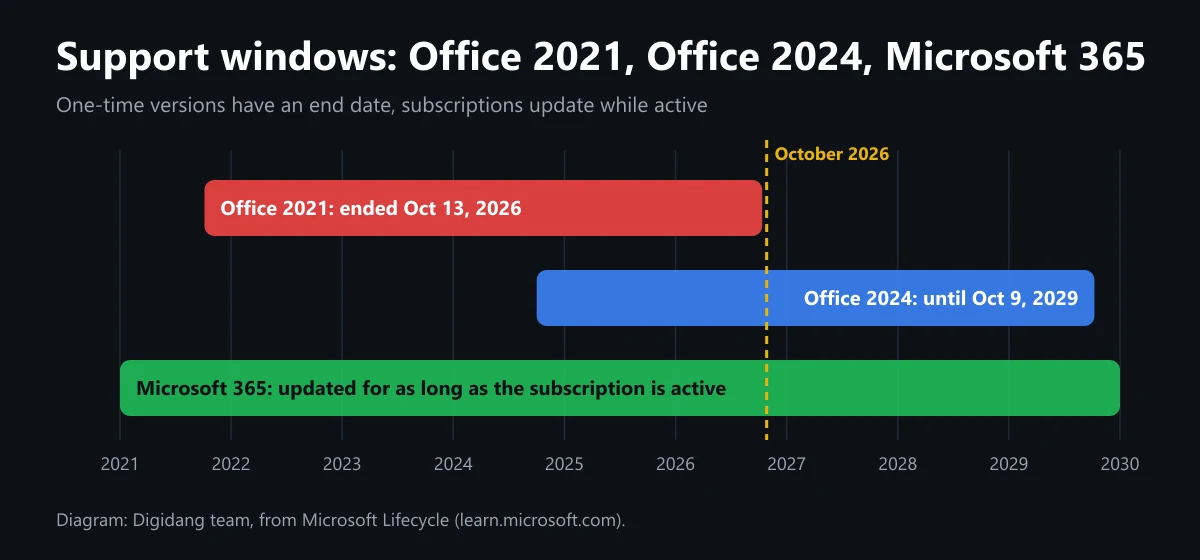
For home users who only open their own files, that risk may feel small. For anyone who regularly receives files from others, such as office admins, teachers, or freelancers, Office without security updates should not stay in use for long. Compare that with Office 2024, which Microsoft Lifecycle lists as supported until October 9, 2029.
Office 2024, the One-Time Successor
If you dislike subscriptions, the successor to Office 2021 is Office 2024. The Office Home 2024 product page describes it as a one-time purchase for 1 PC or Mac, with classic 2024 desktop versions of Word, Excel, PowerPoint, and OneNote, compatible with Windows 11, Windows 10, or macOS, and intended for non-commercial use.
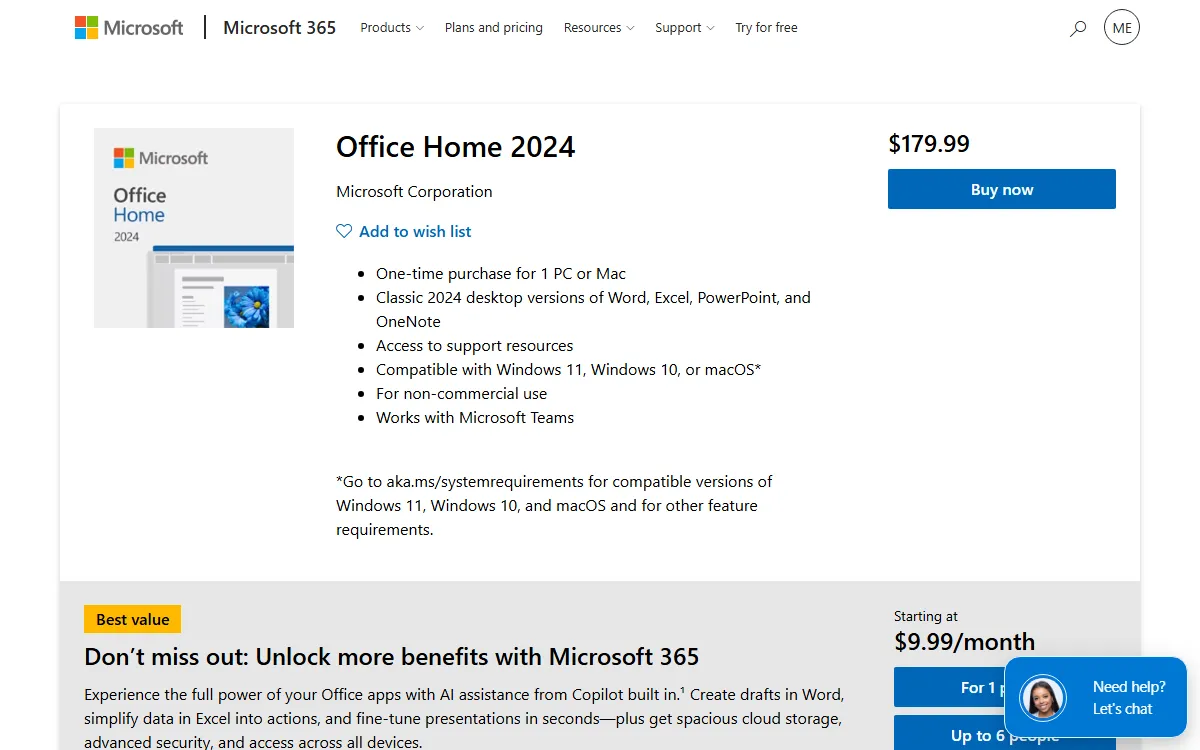
Note the words non-commercial use. For business use, the FAQ on Microsoft's support page also lists Office Home & Business 2024 as a one-time option. Outlook is not part of Office Home 2024, so anyone who depends on desktop Outlook should pick Home & Business or subscribe to Microsoft 365 instead.
Compared with Office 2021, the biggest advantage of Office 2024 is the support time left on the clock. With a retirement date of October 9, 2029 according to Microsoft Lifecycle, you still get security updates for several more years. The model is otherwise the same as Office 2021: no new features, no 1 TB of cloud storage, and no Copilot. If those matter to you, the subscription is still the better fit.
Be Careful With Cheap Office Professional Plus Keys
Digital key marketplaces often list Office 2021 Professional Plus and Office 2024 Professional Plus far below official prices. According to Microsoft Learn, Office LTSC Professional Plus 2021 is an edition offered to organizations through volume licensing agreements, designed for environments that cannot take feature updates. The same applies to the LTSC 2024 edition.
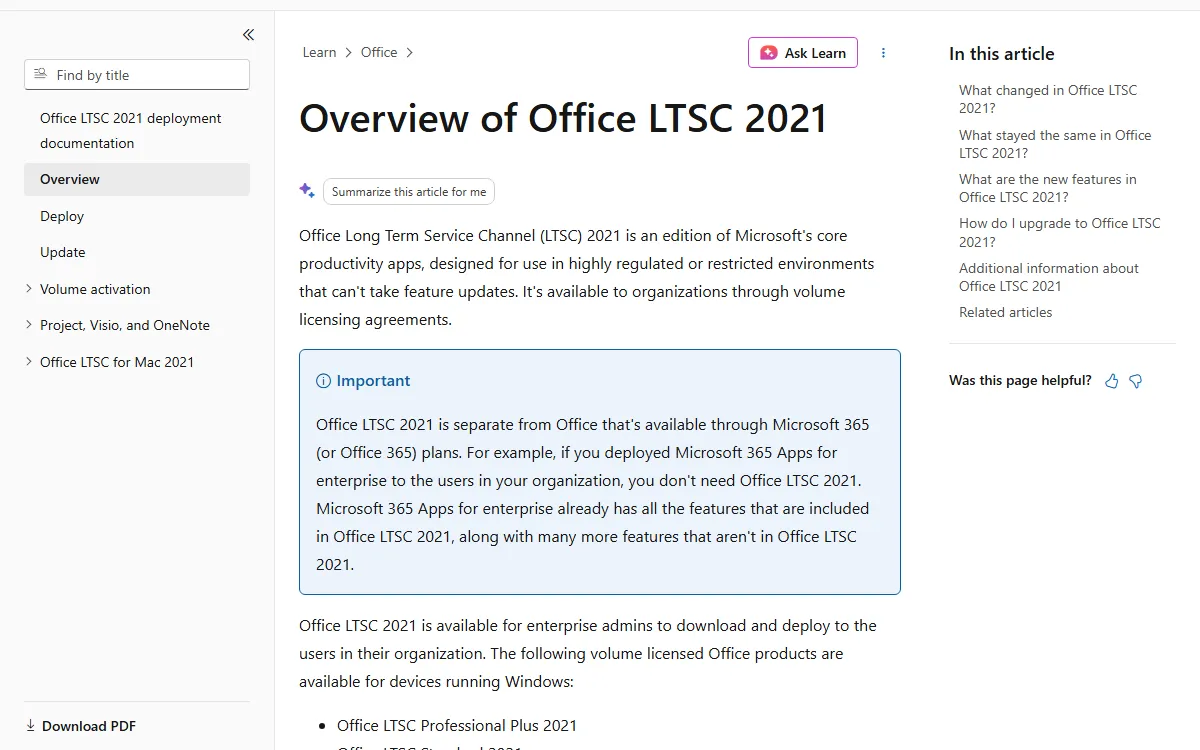
So before buying a Professional Plus key, ask where the key comes from, how activation works, and what happens if activation fails. Avoid sellers who ask you to run unofficial activation tools or download an installer from a private link, because a modified installer can carry malware. Our guide on checking whether a digital code is genuine walks through the warning signs.
Also remember that, per the Microsoft Learn retirement list, every Office 2021 edition, Professional Plus included, is past its end-of-support date. Buying Office 2021 today means buying software that no longer receives security patches. If your budget only stretches to a one-time purchase, Office 2024 is the more sensible choice.
Which Should You Choose?
The right pick depends on who uses it and for what. We built the table below from the plan contents on the Microsoft Store and common usage patterns.
| User type | Suggested choice | Why |
|---|---|---|
| Students | Microsoft 365 Personal, or check your school's access first | Laptop, phone, and tablet stay in sync; assignments are safe in the cloud |
| Families | Microsoft 365 Family | One subscription for up to six people, each with 1 TB |
| Freelancers and creators | Microsoft 365 Personal or Premium | Latest features, Outlook, and Copilot |
| One home computer, rarely replaced | Office Home 2024 | Pay once, supported until 2029 |
| Small business with a point-of-sale PC | Office Home & Business 2024 or Microsoft 365 | The Home edition is not for commercial use |
| Still running Office 2021 | Plan a move to Office 2024 or Microsoft 365 | Security updates have stopped |
For students, the Office Home 2024 product page suggests first checking whether you qualify for Office 365 Education, because many schools and universities provide it. If not, Personal is enough for one person.
If all you need is to open and lightly edit documents other people send you, remember there is a free option. Microsoft offers Word, Excel, and PowerPoint for the web, usable in a browser with a Microsoft account. Another popular free alternative is WPS Office, which we compare in our article on what WPS Office is.
How to Choose and Buy an Office License Safely
Once you know the difference, follow these steps so your money does not go to the wrong license.
- List the apps you actually use. If you need desktop Outlook, cross Office Home 2024 off the list.
- Count the people and devices. More than one person at home usually means Family is cheaper.
- Pick a payment model: subscription for the latest features and cloud, or one-time for a single computer.
- Check the end-of-support date of any one-time version on Microsoft Lifecycle. Avoid Office 2021 for new purchases.
- Compare the seller's price with Microsoft's official price and ask about the license channel.
- Make sure the license is linked to your own Microsoft account, then keep your proof of purchase.
Step six matters because both subscriptions and modern one-time versions are managed through a Microsoft account, as the installation FAQ on the Office Home 2024 page explains. If you do not have one or forgot the password, read our Microsoft account guide first. Office also needs a legitimate copy of Windows, and we cover the edition choices in our Windows 11 license guide. For safe shopping habits in general, see our safe digital shopping tips.
At Digidang you can compare Microsoft 365 Personal 12 months and Microsoft 365 Family 12 months on the subscription side, plus Office 2024 Professional Plus and Office 2021 Professional Plus on the one-time side. Before paying, read the product description, activation region, and activation method, and keep the volume licensing note above in mind. Other software licenses are in our software category.
One last piece of advice: do not choose based only on today's lowest price. Add up the total cost over the time you plan to use Office, plus the value of cloud storage, security updates, and moving between devices. For many people that math points to a subscription. For someone with a single computer and simple needs, a one-time version that is still supported remains a reasonable choice.
Frequently Asked Questions
What is the difference between Microsoft 365 and Office 2021?
Microsoft 365, formerly Office 365, is a subscription that keeps updating and includes 1 TB of cloud storage, Copilot, and use on many devices. Office 2021 is a one-time purchase for one PC or Mac with no new features, and Microsoft Lifecycle lists its support as ended on October 13, 2026.
Is Office 365 the same as Microsoft 365?
For home users, yes. Microsoft renamed the Office 365 consumer subscription to Microsoft 365, and its official page still reads Microsoft 365 (formerly Office 365). It still includes Word, Excel, PowerPoint, Outlook, and OneNote, plus cloud storage and other services.
Can I still use Office 2021 after October 13, 2026?
The Microsoft Learn page says what stops after that date is security updates, non-security updates, and technical support. It does not say the apps shut off, but running Office without security patches is risky, especially when opening attachments from other people.
Which is cheaper, Microsoft 365 or one-time Office?
At official US prices, Office Home 2024 at $179.99 equals roughly 21 to 22 months of Microsoft 365 Personal billed yearly. One-time is cheaper if you use it for years on one computer. The subscription is cheaper if it is shared by a family or used across many devices.
Does Office 2021 include Copilot?
No. Copilot in Word, Excel, PowerPoint, Outlook, and OneNote is listed as part of the subscription on Microsoft's support page. One-time versions such as Office 2021 and Office 2024 do not receive new features, including those AI features.
What replaces Office 2021 if I do not want a subscription?
Office 2024 does. Office Home 2024 is a one-time purchase for one PC or Mac and is supported until October 9, 2029. For business use, or if you need Outlook, choose Office Home & Business 2024.
How many devices can use Microsoft 365 Personal?
According to the Compare Microsoft 365 plans page, Personal is for 1 person who can sign in on 5 devices at once, including PCs, Macs, phones, and tablets. One-time Office 2021 and Office 2024 install on a single PC or Mac only.
Is a cheap Office 2021 Professional Plus key legitimate?
Not necessarily. According to Microsoft Learn, Office LTSC Professional Plus 2021 is offered to organizations through volume licensing. Ask the seller about the license channel and activation method, avoid unofficial activation tools, and remember that Office 2021 support has already ended.
Digidang Team
Gaming enthusiast and marketplace expert sharing tips, guides, and the best gaming deals.