How to Activate Microsoft Office 2021 with a Product Key (Official Steps)

To activate Office 2021 the official way, redeem your 25-character product key at setup.office.com, link it to your Microsoft account, install Office from that account, and sign in with the same account inside Word or Excel. You can then confirm the license under File, Account. No third-party activator is needed.
This guide walks through every step of activating Microsoft Office 2021, from redeeming the key to checking that the license is genuine. It also covers the "Unlicensed Product" error, the difference between retail and volume licenses, and one fact many guides skip: according to the Microsoft Lifecycle page, Office 2021 reached its retirement date on October 13, 2026. Every step below is based on official Microsoft support pages we opened in October 2026.
What Do You Need Before You Activate Office?
Before you activate Office, have three things ready: a genuine Office product key that has never been redeemed, a Microsoft account (Outlook, Hotmail, or any email registered as a Microsoft account), and a stable internet connection. You redeem the key only once, and after that you can reinstall Office simply by signing in to the same account.
An Office product key is a string of letters and numbers split into five groups, for example XXXXX-XXXXX-XXXXX-XXXXX-XXXXX. It can arrive on a physical card, in an email from an online store, or on the order page of a marketplace. Keep it private. Whoever redeems a key first owns the license, so never post it in chats, forums, or screenshots.
If you do not have a Microsoft account yet, create one first. Our guide to creating and managing a Microsoft account covers the process. Turn on two-step verification as well, because your Office license will be permanently attached to that account. The same security habits apply as in our guide to securing accounts with 2FA.
- A new product key with 25 characters.
- A personal Microsoft account that will own the license.
- A Windows 10 or Windows 11 PC with enough free storage for the Office installation.
- An internet connection to redeem the key, download the installer, and activate online.
- Administrator rights on the PC so the installer is not blocked.
How to Activate Microsoft Office 2021 with a Product Key
Microsoft's own instructions say that a brand new product key is redeemed at Office.com/setup or Microsoft365.com/setup. It is a one-time process that adds the product to your Microsoft account. Once the key is redeemed, you install Office from your account page and activate it by signing in.
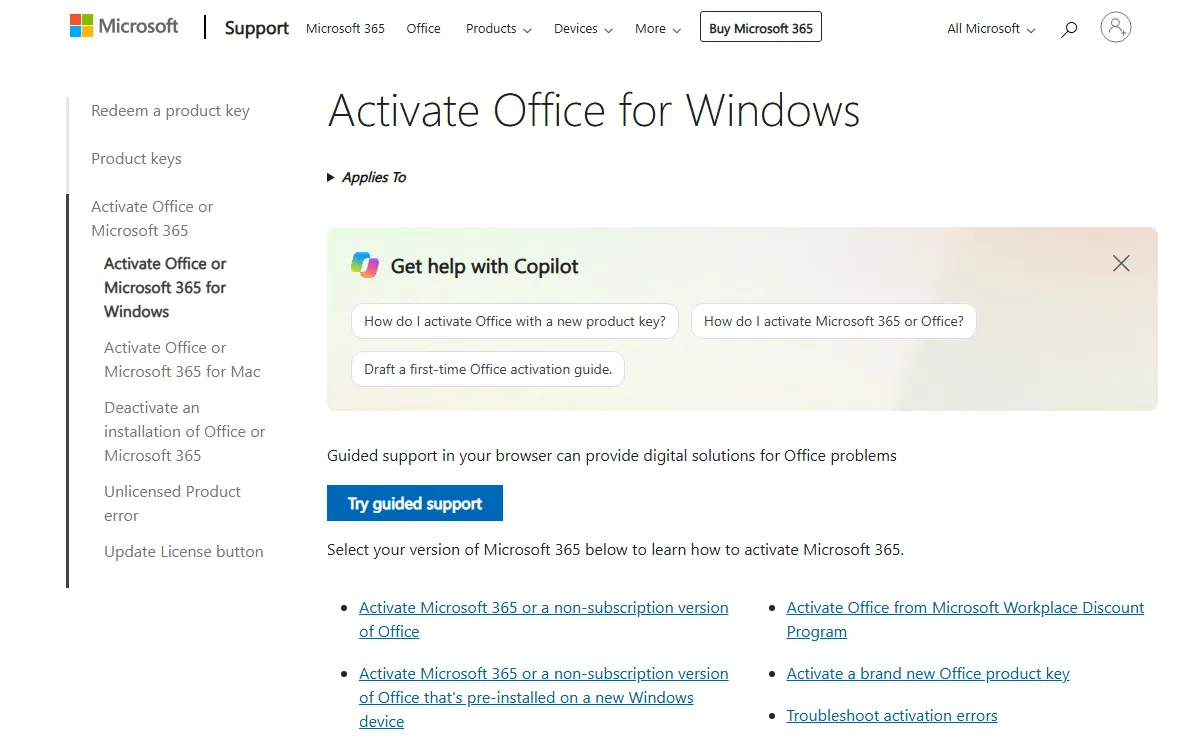
Follow the steps in this exact order. Installing Office before the key is redeemed is the most common reason people later see a "no Office products found" message.
- Open setup.office.com in your browser and select Get started or Sign in.
- Sign in with the Microsoft account that should own the license.
- Type the 25-character product key. The hyphens are usually added for you.
- Choose your country or region and language, then confirm. The product is now saved to your account.
- Open the services and subscriptions page of your Microsoft account, find the Office product you just added, and select Install.
- Run the installer and wait until it says Office is ready.
- Open Word or Excel, sign in with the same account, and accept the license agreement. Office is now activated.
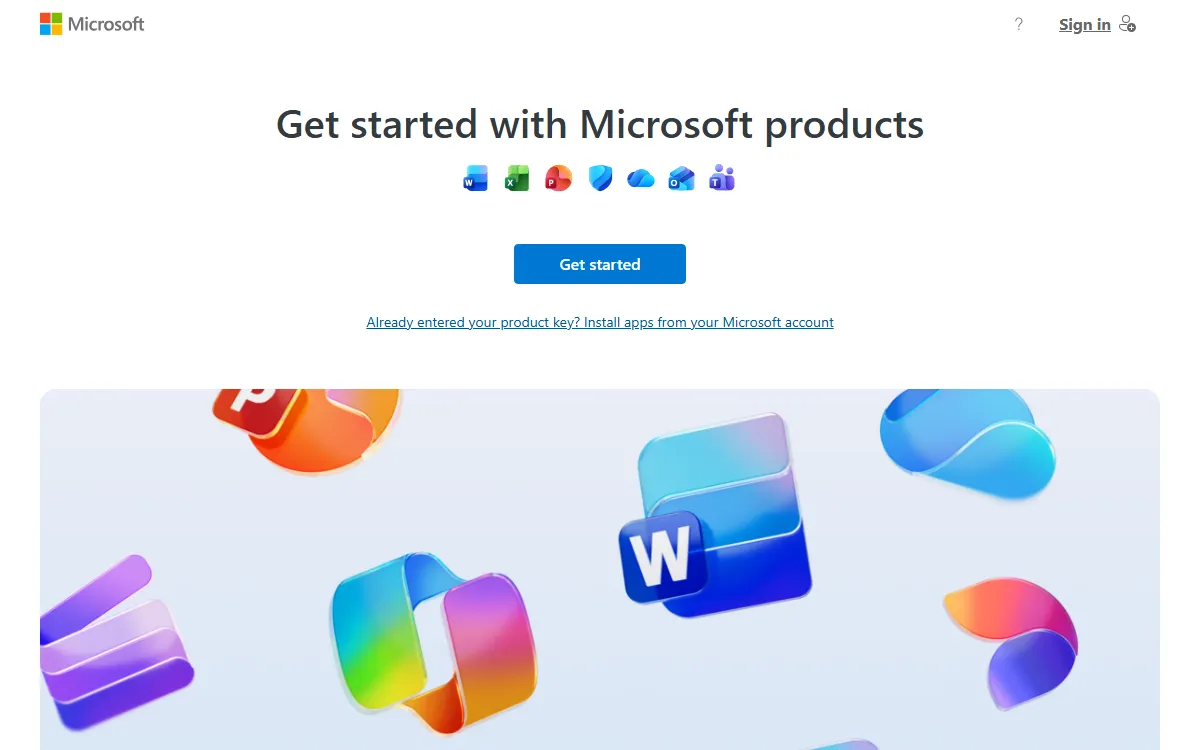
If Office was already installed before you owned a key, for example on a new laptop, you do not need to uninstall it. Microsoft's support page explains that the activation screen lets you sign in or enter a key from a new product key card. There is also an "I don't want to sign in or create an account" option at the bottom of the screen with a key field, but then the license is not stored in your account and future reinstalls become harder.
Retail vs Volume Licensing: What Is the Difference?
Office 2021 comes in two license families. The editions for home users and small businesses, namely Home and Student, Home and Business, and Professional, are listed on the Office 2021 lifecycle page. The organizational editions, called Office LTSC 2021 (Standard and Professional Plus), follow a separate policy on the Office LTSC 2021 lifecycle page.
The family matters because activation works differently. Retail keys are normally redeemed to a personal Microsoft account at setup.office.com, as described above. Organizational licenses are usually managed by an IT admin and may be activated by entering the key directly in the app or through company management tools. Always read the activation instructions that come with the key you buy, including Professional Plus keys.
| Aspect | Retail license (Home, Business, Professional) | Organizational license (LTSC Standard, Professional Plus) |
|---|---|---|
| Typical activation | Redeem at setup.office.com, then sign in | Key entered in the app or managed by IT |
| Saved to a personal account | Yes, reinstall from your account | Not always, depends on distribution |
| Lifecycle policy | Modern Lifecycle Policy | Fixed Lifecycle Policy |
| Best for | Students, families, freelancers, small businesses | Offices and institutions with IT staff |
The edition also decides which apps you get. For an overview of each app, read our list of Microsoft Office apps and what they do, plus the deeper explainers on Microsoft Word, Microsoft Excel, and Microsoft PowerPoint.
How to Check Your Office License Status
After activation, confirm that Office is properly licensed. It takes less than a minute and needs no commands.
- Open Word, Excel, or PowerPoint.
- Select File, then Account.
- Look at Product Information. An activated copy shows that the product is activated, along with the edition name.
- If you see an activation button or a red warning instead, activation is not finished.
The title bar is another quick signal. According to Microsoft Support, when activation fails you see "Unlicensed Product" or "Non-commercial use / Unlicensed Product" in the title bar, and most Office features are disabled. You can still open documents, but you cannot edit them normally.
Fixing "Unlicensed Product" and Other Activation Errors
Activation failures almost always come from the same handful of causes. Microsoft lists troubleshooting steps in a specific order, and that order is worth following before you contact the seller or Microsoft support.
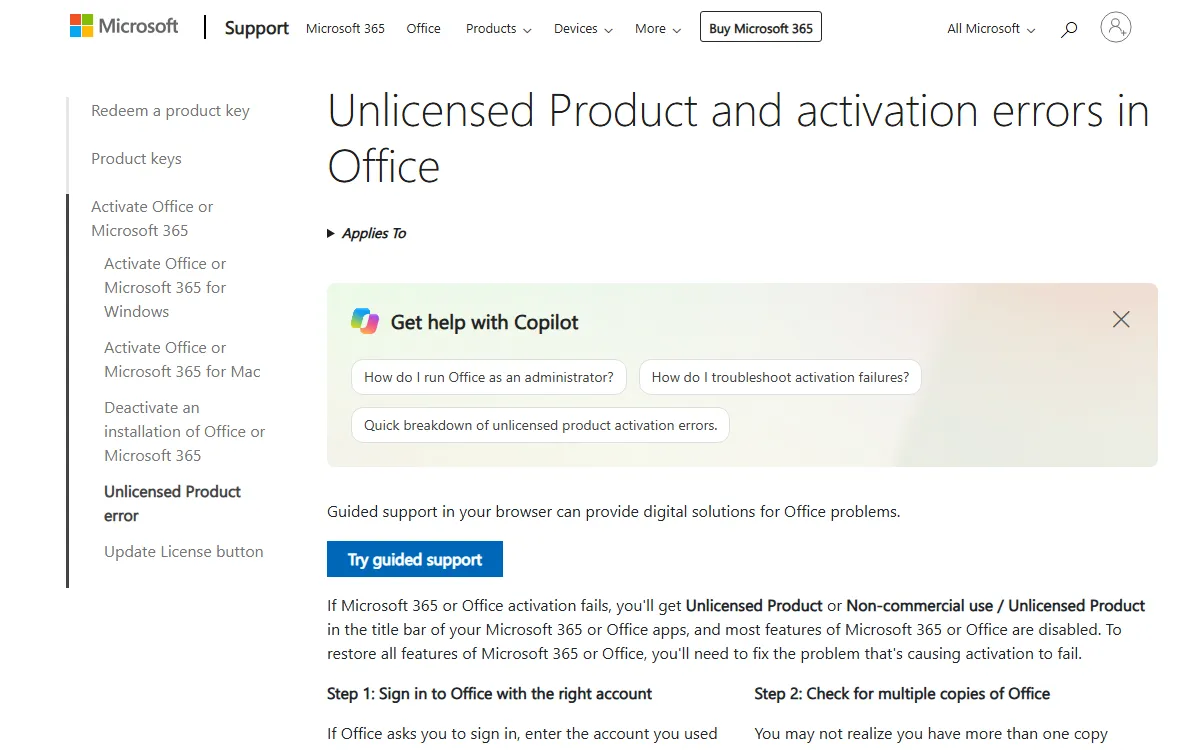
- Sign in with the right account. Use the Microsoft account you redeemed the key with. Any other account returns a message that no Office products were found.
- Check for multiple Office installs. Open Control Panel, Programs and Features. Two different Office versions can conflict, so uninstall the one you do not use and restart.
- Confirm the product is in your account. Open the services page of your Microsoft account. If Office 2021 is not listed, the key was not redeemed to that account.
- Run an Online Repair. In Windows Settings, Apps, select Microsoft Office, Modify, then Online Repair.
- Complete the Activation Wizard. If the wizard appears, follow its prompts to the end.
If none of this works, the problem is probably the key itself: it may have been redeemed by someone else, or it may not match the installed edition. Contact the seller with your proof of purchase and a screenshot of the error. Our guide to shopping safely for digital products explains how to pick a trustworthy seller.
| Symptom | Most common cause | First thing to try |
|---|---|---|
| "Unlicensed Product" in the title bar | Activation not finished or failed | Go to File, Account and sign in again with the owner account |
| "We couldn't find any Office products" | Signed in with the wrong account | Try each of your personal email addresses |
| Key rejected when redeeming | Typo, or key already used | Retype carefully, then contact the seller |
| Activation fails after moving to a new PC | Old installation still linked | Deactivate the old install in your account, then activate again |
| Editing locked although it worked before | Two Office versions conflicting | Uninstall the unused version and restart |
Office 2021 Support Has Ended: Is It Still Worth Using?
This is the part to know before you buy. The Microsoft Lifecycle page for Office 2021 lists a start date of October 4, 2021 and a retirement date of October 13, 2026. Since mid-October 2026, Office 2021 no longer receives security updates or technical support from Microsoft.
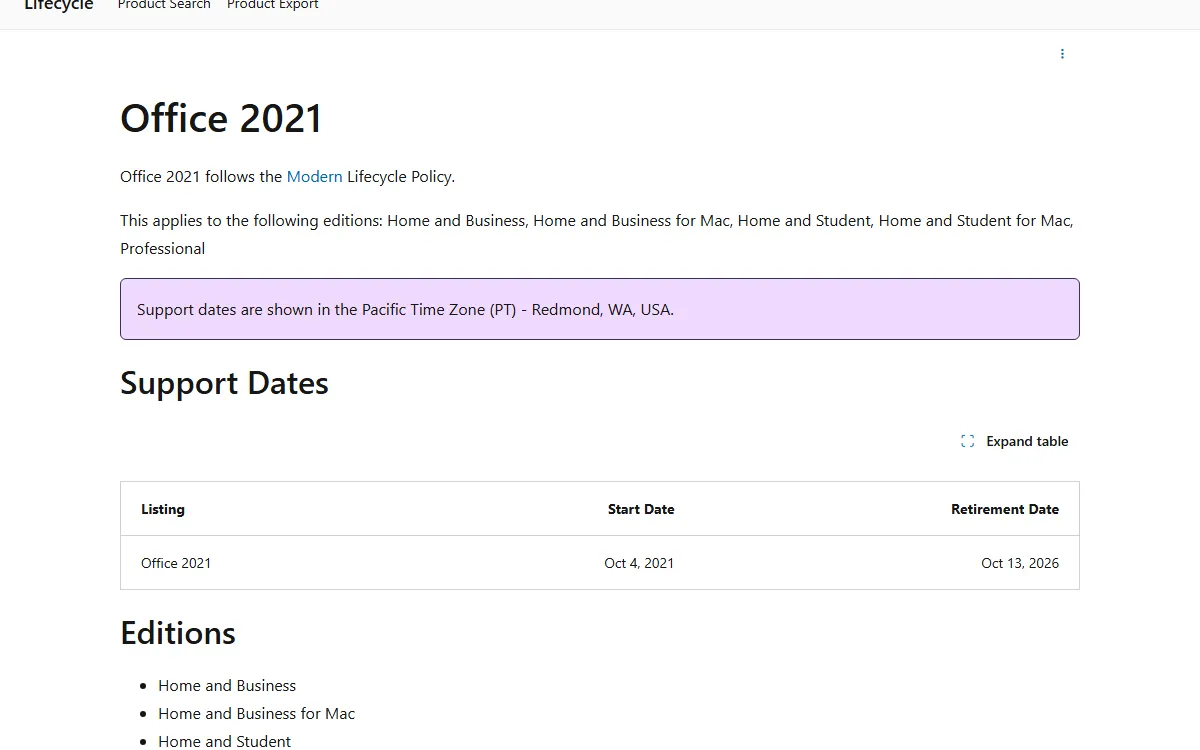
The lifecycle page does not say that Office 2021 stops working after that date; what ends is official support. The difference, given its retired status on Microsoft Lifecycle, is that newly discovered security holes will not be patched. That risk matters most if you often open attachments from email or unknown sources. If you keep using Office 2021, run a good antivirus and open suspicious files in Protected View. We compare options in popular antivirus examples and our Malwarebytes guide.
For long-term use there are two alternatives. The one-time purchase successor is Office 2024, which the Office 2024 lifecycle page says is supported from September 30, 2024 to October 9, 2029. The other is a Microsoft 365 subscription, which stays current as long as it is active, as explained in our Microsoft 365 guide.
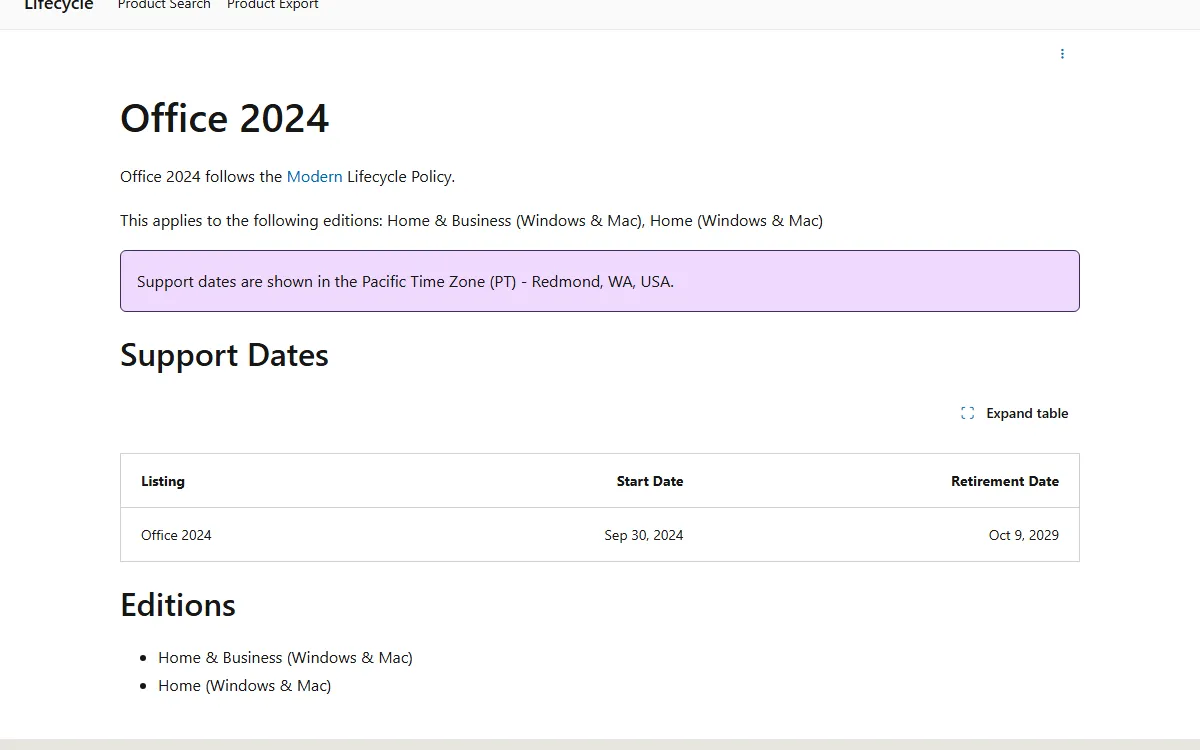
| Option | Model | End of support (Microsoft Lifecycle) | Best for |
|---|---|---|---|
| Office 2021 | One-time purchase | October 13, 2026 (already passed) | Basic needs, PCs that rarely receive outside files, tightest budget |
| Office 2024 | One-time purchase | October 9, 2029 | Pay once and still get security updates for several years |
| Microsoft 365 Personal/Family | Subscription | While the subscription is active | Latest features, cloud storage, and use across several devices |
Why You Should Avoid Unofficial KMS Activators
The internet is full of Office "activators", downloads or commands that claim to unlock Office without a license. We do not recommend them and will not give instructions for them. Besides violating Microsoft's license terms, these files come from anonymous sources and often ask you to turn off your antivirus first, which is exactly how malware gets onto a PC.
The fallout can cost far more than a license: stolen social media and e-wallet accounts, work files encrypted by ransomware, or a PC secretly used to mine cryptocurrency. Microsoft runs a How to Tell site that helps you recognize genuine software and report counterfeits. The simple rule: a genuine key is always activated through Microsoft's official channels, never through an extra program.
Buying an Office Product Key on Digidang
Digidang is an affiliate marketplace for digital products. The software category lists several Office options, including Microsoft Office 2021 Professional Plus, Microsoft Office 2024 Professional Plus, Microsoft 365 Personal 12 Months, and Microsoft 365 Family 12 Months. Current prices and stock are always shown on each product page, and you can compare the official plans on the Microsoft 365 site.
Before you buy, keep these points in mind so activation goes smoothly:
- Read the seller's activation instructions. Professional Plus keys belong to the organizational license family, so activation can differ from a retail card.
- Think about the support window. For several years of use, Office 2024 or Microsoft 365 is safer than Office 2021.
- Keep your proof of purchase. The confirmation email and order number are what you need if a key fails.
- Redeem the key right away. Do not wait for weeks, so any problem can be raised while the seller's guarantee still applies.
If you also need an operating system license, read our Windows 11 license guide. If you want a free option such as WPS Office for now, we review it in what WPS Office is. The basics of digital keys are covered in our beginner's guide to buying and activating digital keys, and saving tips are in how to save money on game keys.
Frequently Asked Questions
How do I activate Microsoft Office 2021 officially?
Redeem your product key at setup.office.com, sign in with your Microsoft account, install Office from your account page, then sign in with the same account inside an Office app. The official steps are on Microsoft Support.
Do I need a Microsoft account to activate Office?
For retail licenses it is strongly recommended, because the license is saved to your account and you can reinstall Office without typing the key again. The activation screen also offers a way to enter a key without an account, but reinstalling later is more difficult.
How can I check whether Office is activated?
Open Word or Excel, select File, then Account. Product Information will say the product is activated. If the title bar shows "Unlicensed Product", activation has not succeeded.
Can I still use Office 2021 after support ends?
The lifecycle page does not say the apps stop working; what ends is official support. This means that since the retirement date of October 13, 2026 listed on Microsoft Lifecycle, Office 2021 no longer receives security updates.
How many PCs can one Office 2021 key activate?
A one-time purchase Office license is generally meant for one PC. To move it, deactivate the old installation from your Microsoft account first, then activate on the new PC. For several devices at once, Microsoft 365 Family is more practical.
Why is my product key being rejected?
The usual causes are a typo, a key that has already been redeemed, or a key that does not match the installed Office edition. Check every character again, then contact the seller with your proof of purchase if the key is still refused.
Is it safe to use a free KMS activator?
No. Unofficial activators violate Microsoft's license terms and often require you to disable your antivirus, leaving your PC open to malware. Use a genuine key and verify it through Microsoft's How to Tell site.
Should I buy Office 2021, Office 2024, or Microsoft 365?
Office 2021 is the cheapest, but its support has ended. Office 2024 suits people who want to pay once with support until 2029, according to Microsoft Lifecycle. Microsoft 365 suits people who want the newest features and cloud storage.
Digidang Team
Gaming enthusiast and marketplace expert sharing tips, guides, and the best gaming deals.